Do you feel that you do not have anything good to wear lately? Maybe this problem will vanish if you reorganize your wardrobe. Resetting things always gives a good idea about what other things or options are available, but were not feasible to us due to a particular arrangement. Similarly, if you are not liking your Instagram feed recently but used to love Instagram before, then you can try resetting the Instagram algorithm. But how to reset Instagram algorithm?
And what effects can it bring? What if there were other ways to manage Instagram without resetting it? We will discuss all of it in this blog. Let us go one by one.
 Time killer · Pain
Spending 6 hours writing posts that get zero traction?
Paste your URL. ZuAI turns it into 30 brand-on captions in 10 minutes — no blank-page panic, no generic AI filler.
What is Instagram Algorithm?
If you are offered a sandwich and a burger, which one would you eat first? That is your choice, and your algorithm. It depends on your taste, your conceptions, or your comfort.
Similarly, on Instagram, its algorithm decides which content you will see and will appear on your feed, explore page, reels, or search.
There are many AI systems that look at different signals, like your activities and your behavior ( like, share, save, comment, DMs, etc.) to decide what content should be shown to you.
For regular Instagram users, the algorithm matters as it decides what they see on Instagram.
For creators, algorithms matter as they can make or break the performance of their content.
How to reset Instagram algorithm on Android?
It is very easy to reset the algorithm on Instagram on Android.
- Open your Instagram and click on your profile picture at the bottom right.
- Now, click on the three vertical bars in the rightmost upper corner (hamburger icon)
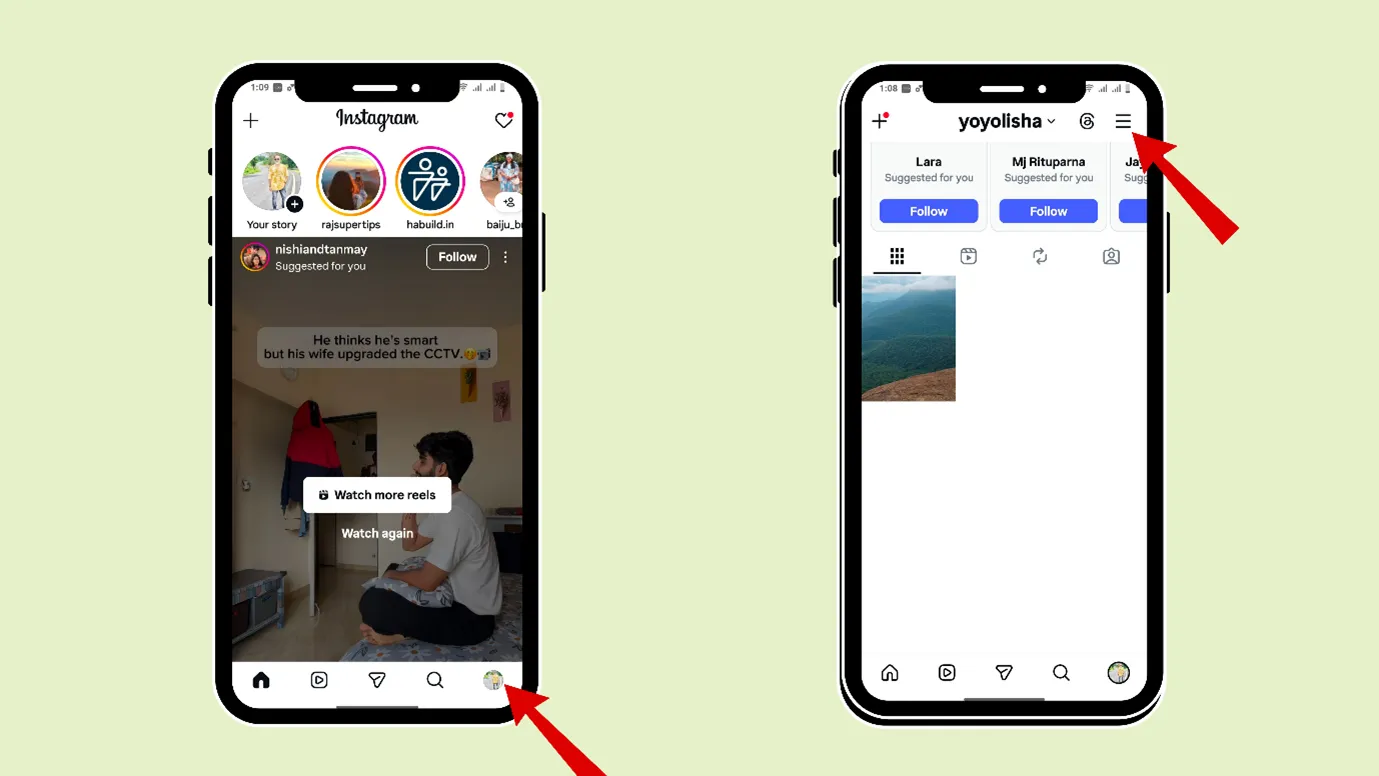
Scroll down and go to “Content Preferences.” Here we can also edit “Sensitive Content”, “Political Content”, “Interested”,“Not Interested”, etc.)
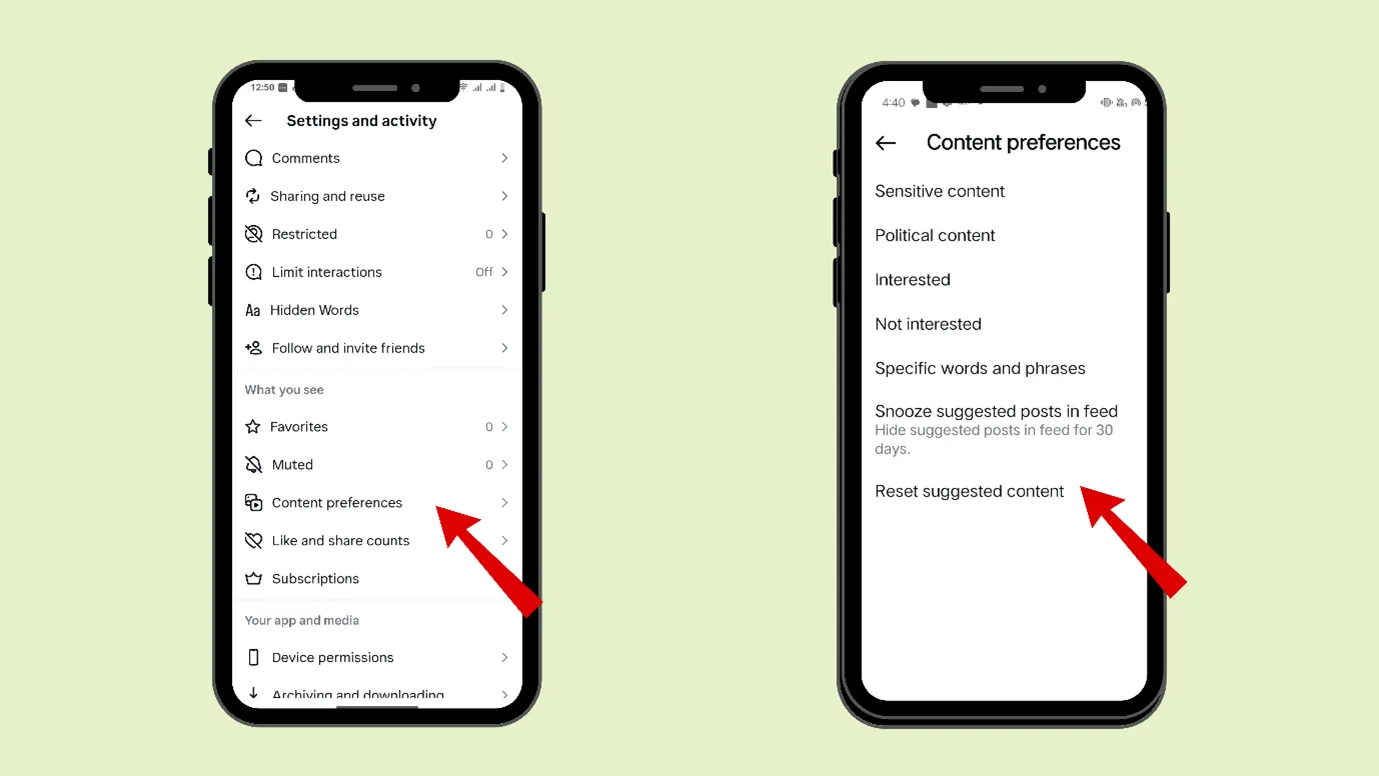
- Now go to “Reset Suggested Content” and click on “Next”.
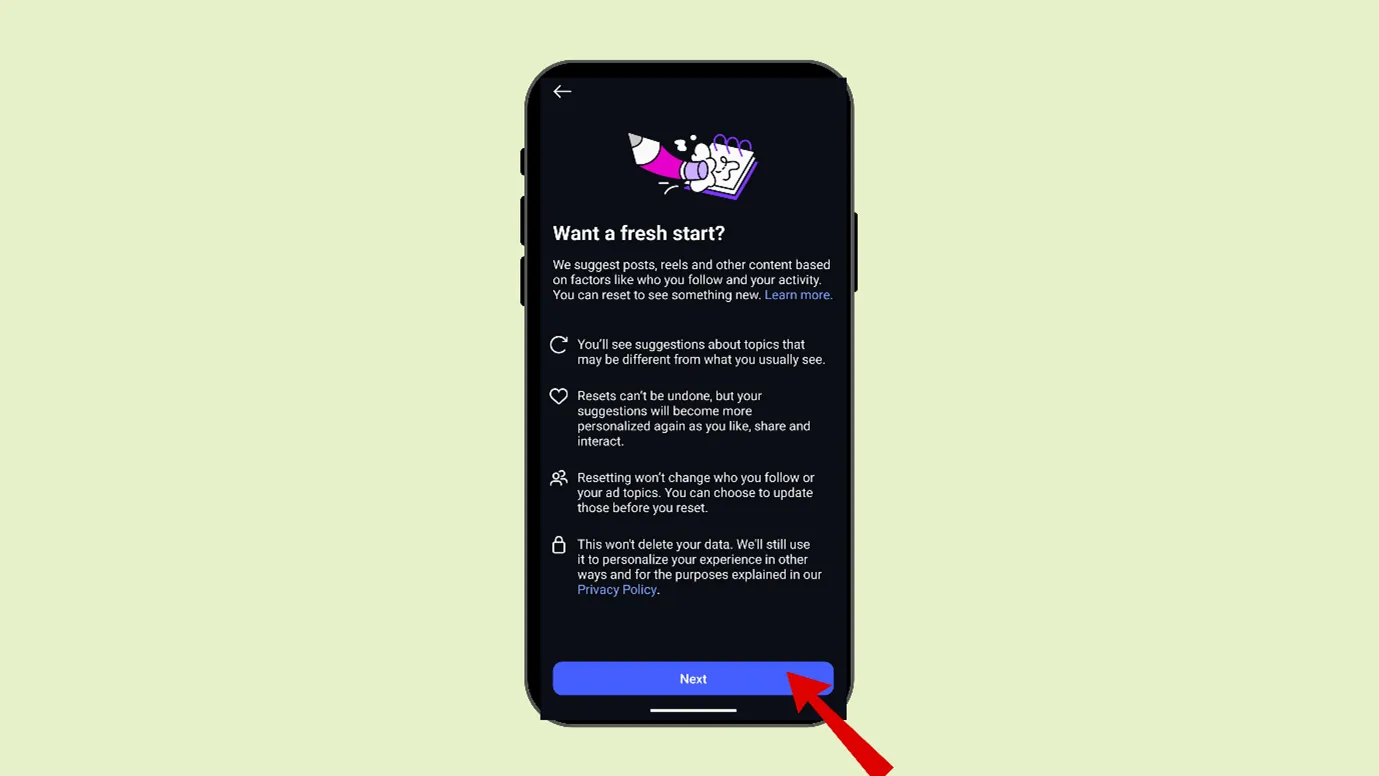
This will help you get a fresh start by setting everything to factory default.
Remember that you cannot undo an algorithm reset.
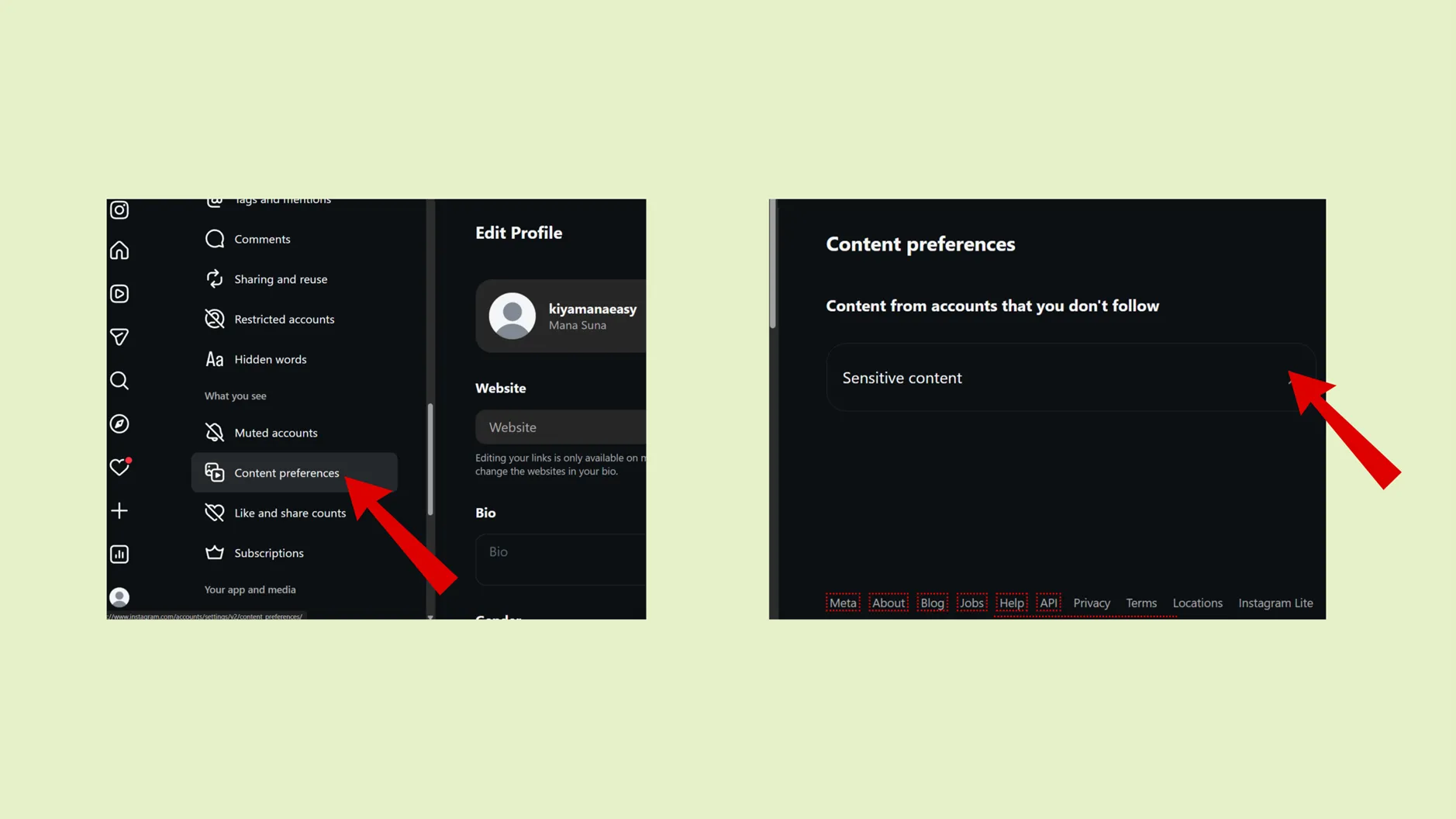
How to reset Instagram algorithm on Desktop?
You cannot reset the Instagram algorithm on Desktop. You can reset algorithm from your Android and iPhone. But you can control sensitive content from your desktop.
Outcome · RecommendedGet 30 days of social content from your website — in 10 minutes.
What happens after the Instagram algorithm reset?
Instagram feed, reels, Explore, Suggestions, etc., all will be reset. Now you will see various types of content in your feed.
And again, the ball will be in your court; you can like, save, or share your type of content, and based on that, Instagram will set up the algorithm for you.
But remember that
- The reset won’t change your followers or followings.
- Meta has collected some data based on your previous algorithm, so you will continue to see ads according to that data.
- It will not reset your DMs, stories, any content you posted, etc.
- If you are a creator, resetting the algorithm will give a fresh chance for content research, as now you can see content related to your niche, but as an outsider.
- For the first 3 or 4 days, you will see random content in your feed. After that, Instagram will start personalizing the feed according to your taste.
Proof · Verified
2k+ grew faster with one tool.
How to reset algorithm on Instagram without resetting it?
Doing an algorithm reset is a direct way to command algorithm to reset itself. But there are also other ways to achieve the same without giving a direct command.
While you are watching any content on Instagram, you can click on “Interested” or “Not Interested.”
- While you are watching any reel, click on the vertical three dots
- A window would open, where you can click on “Interested” or “Not Interested.”
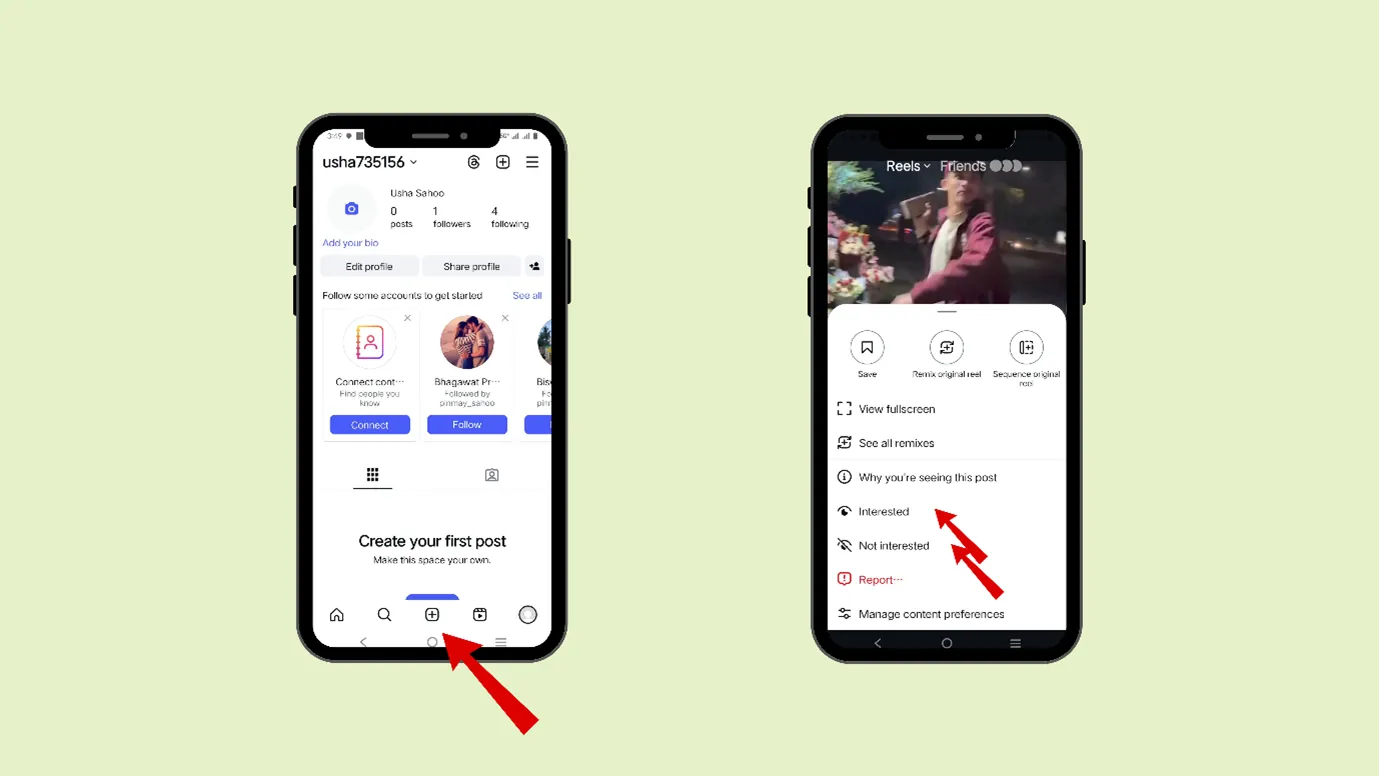
- This will give a signal to your Instagram algorithm and help you personalize your feed.
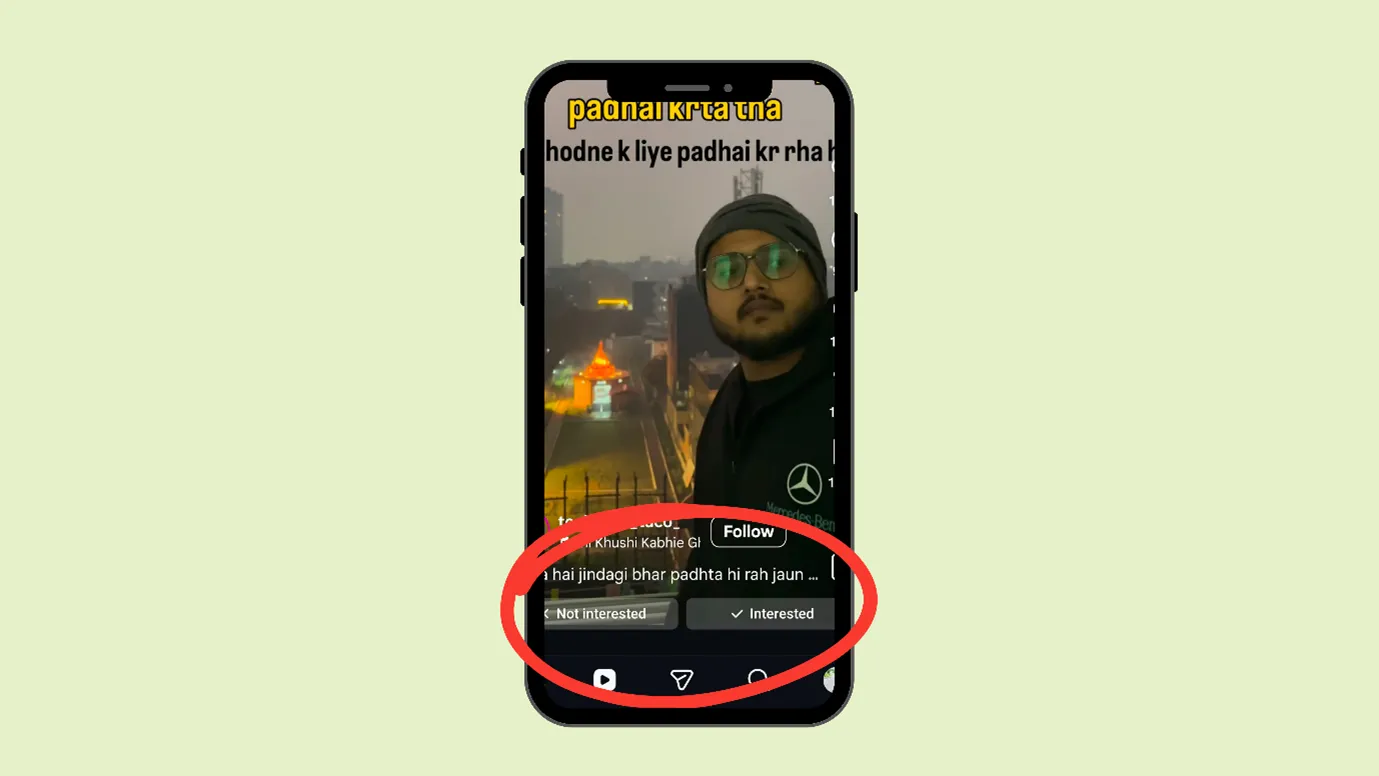
The more you personalize; the more eradication of unwanted reels will happen.
Clear your Following List”
Instagram learns who you like and dislike via many of your actions, and following someone is one of such actions. If you really want to restrict the enormous amount of reels in your suggested feed, then stop following unnecessary accounts.
To put it simply, you can only keep those accounts in your lists who are of utmost importance.
- Open your Instagram and click on your profile picture at the bottom right.
- Click on “Following”
- A list would appear
- Now, click on the 3 vertical dots present near the profile
- Then click on “Unfollow.”
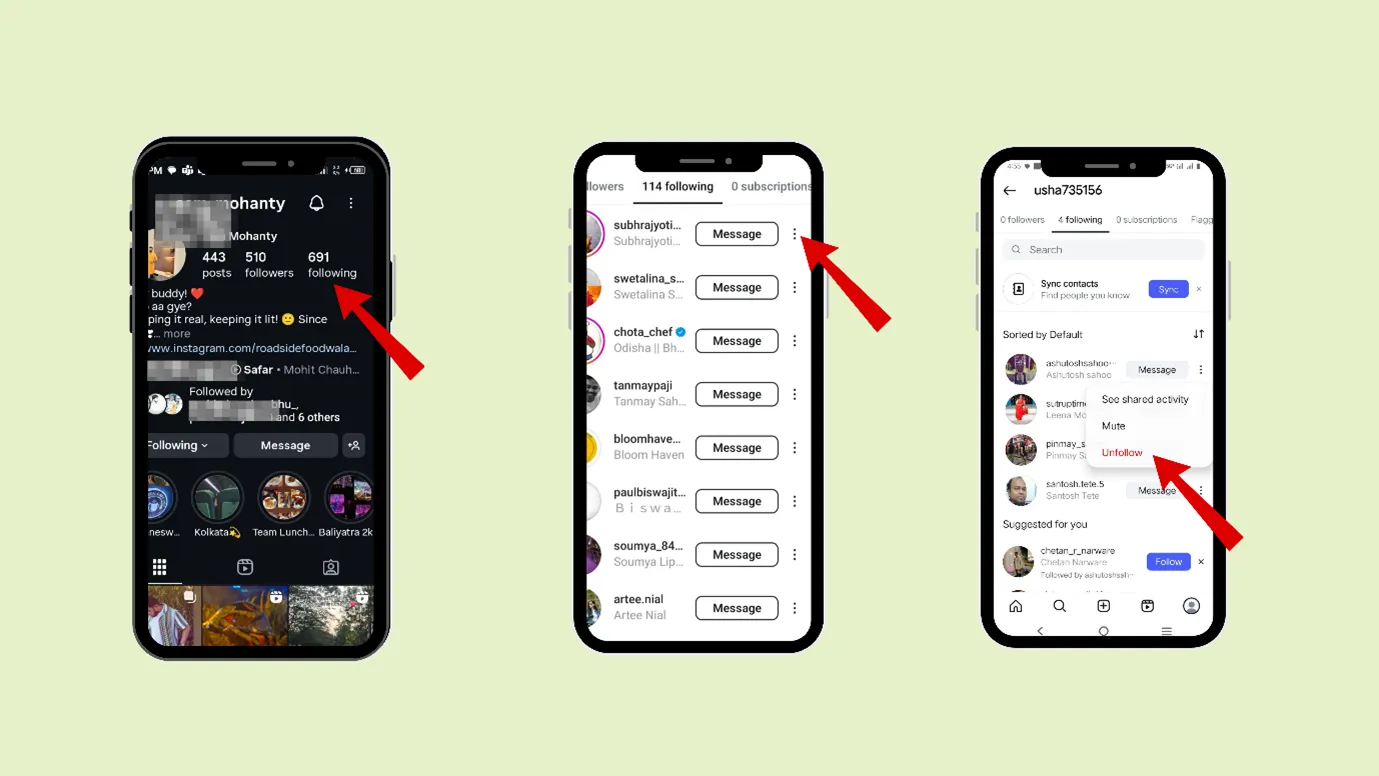
Also, if you see business or professional accounts of many people, you can see that they follow minimal accounts
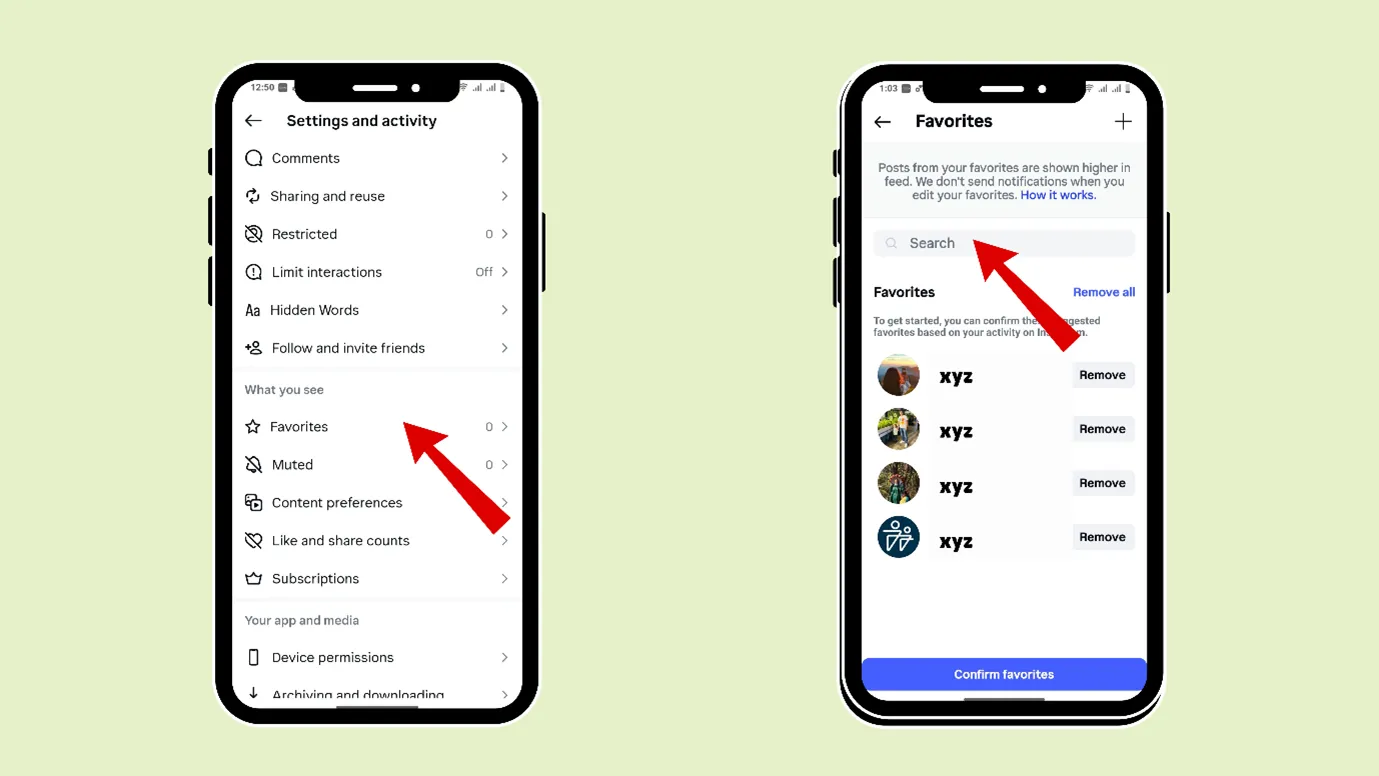
You can create your favorite list
You can manually add Instagram accounts to your Favorite list. Content from those accounts would appear in your feed at a higher or more frequency.
- Open your Instagram and click on your profile picture at the bottom right.
- Now, click on the three vertical bars in the rightmost upper corner (hamburger icon)
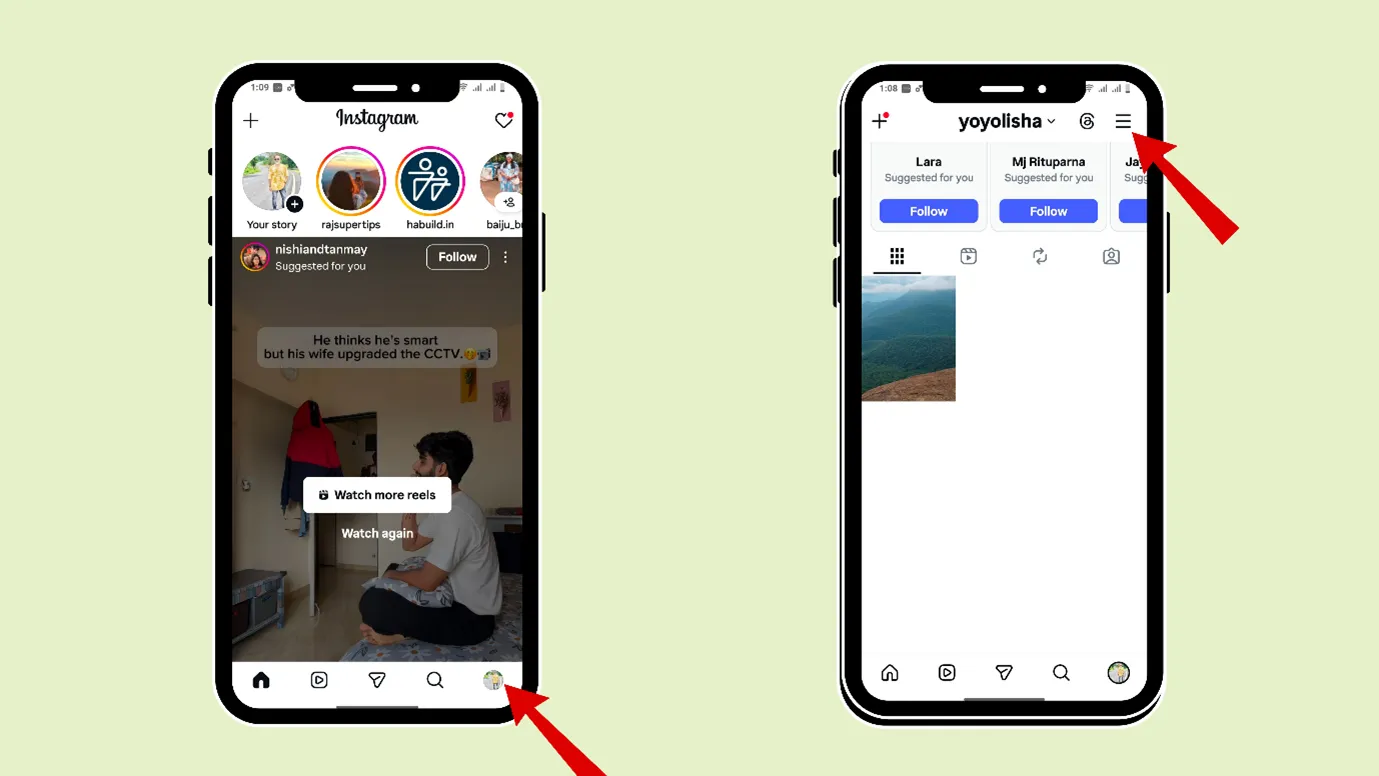
- Then scroll down and reach “Favorites”. Here you can add any of your favorite Instagram accounts.
You can edit “Your Algorithm’
It is 2026, and Instagram gives you the option to edit “ Your Algorithm”. This change was rolled out in December 2025. You can
- See what Instagram thinks is best for you
- You can select the type of topics you want to see more or less of
- You can also share your algorithm with others.
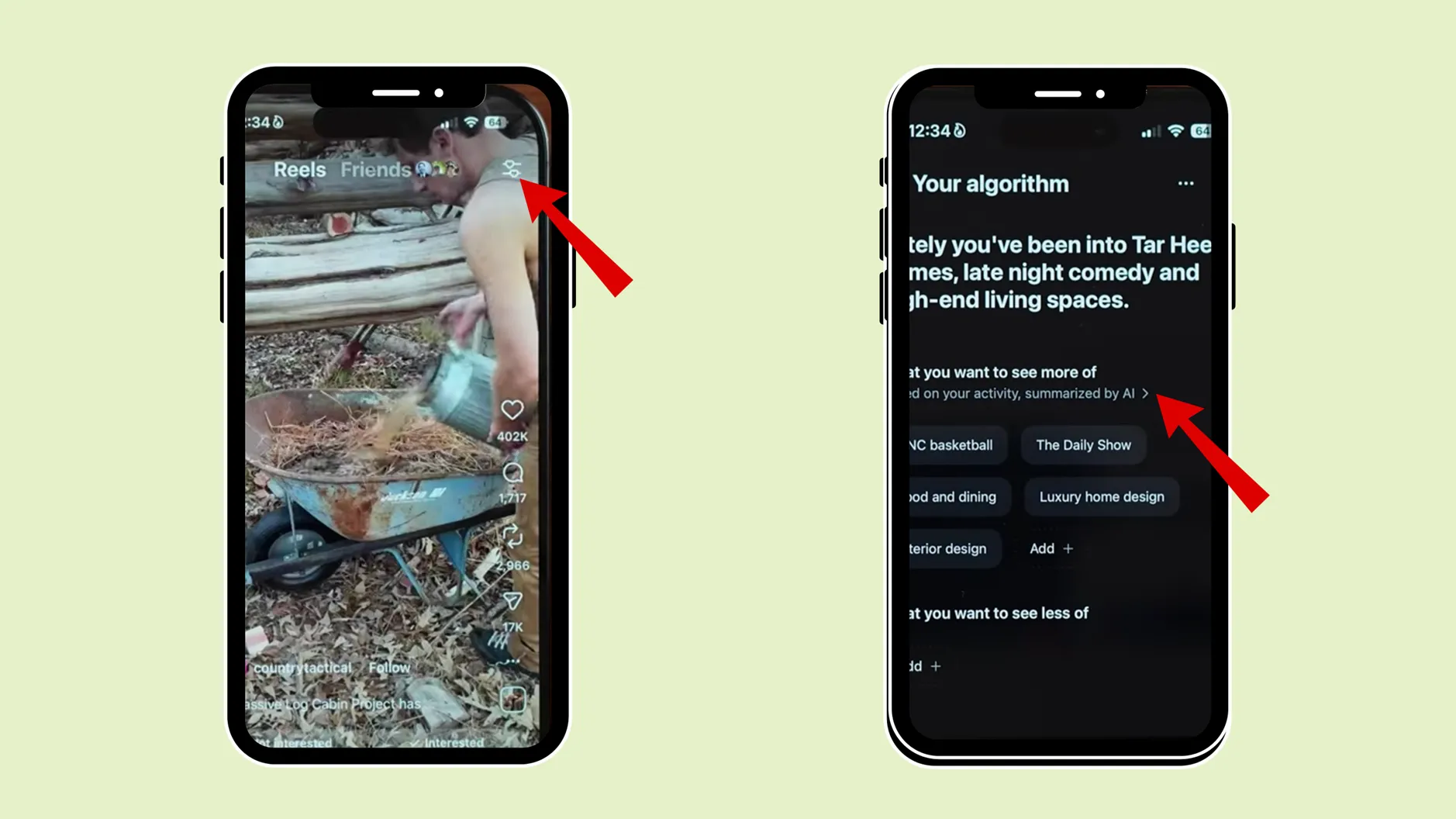
(This feature is newly launched; it might be/might not be available in your region.)
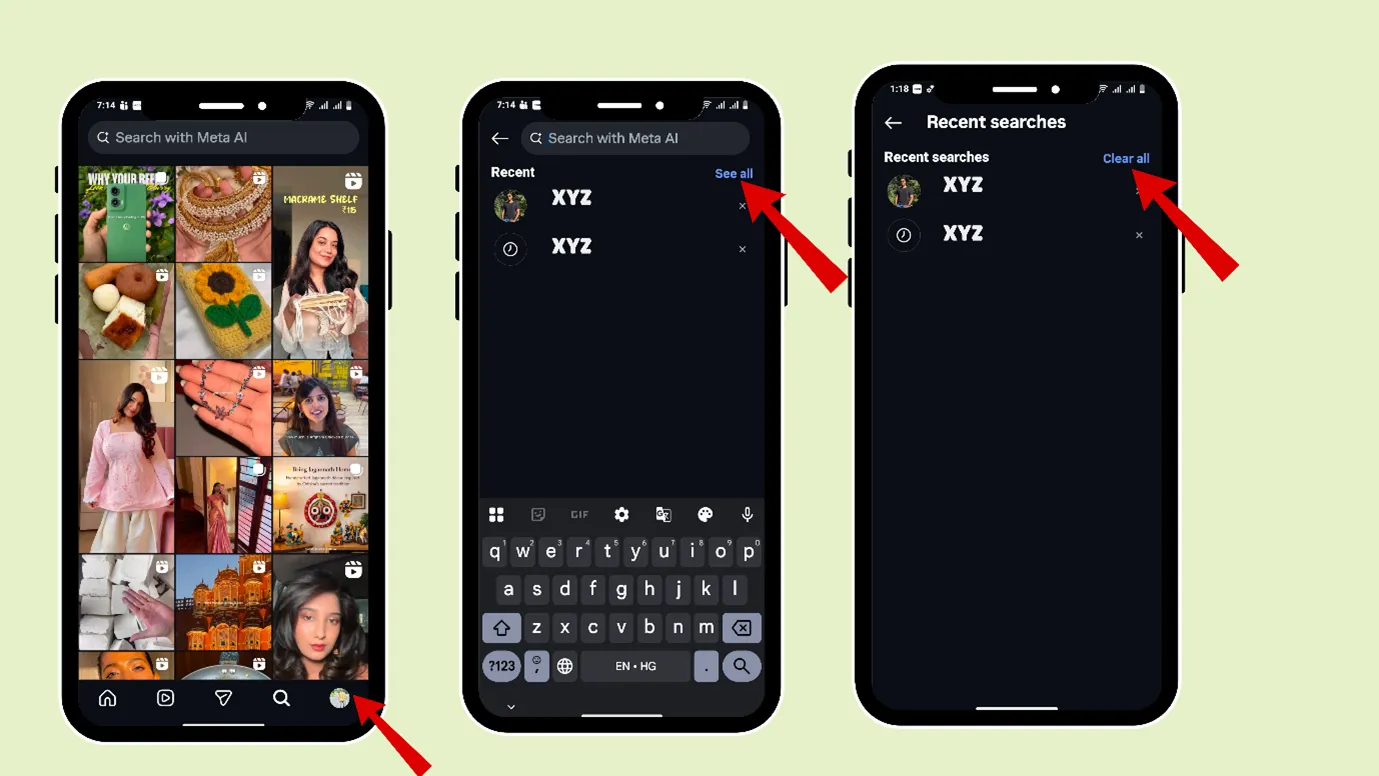
Clear your search result history
- Open your Instagram, go to the search button
- There, you can see what you had searched for before
- Next, click on “ See all” and then click on “Clear all.”
Free · Instant · No signupSee what ZuAI generates from your website — right now.
Paste your URL. Watch ZuAI write a month of brand-on captions in seconds. Preview before you create an account.
How to reset algorithm on Instagram for your favour (as a creator)
As a user, Instagram is fun to use, and resetting the algorithm is easy. But for a creator, an algorithm change has a completely different story.
Instagram’s algorithm changes from time to time. Sometimes the algorithm prefers to push more relatable content, sometimes it pushes trends more and more, sometimes reels with trending music get more views, etc
And this happens based on the user behaviour.
Creators get affected by the algorithm change, and their content gets low or high visibility because of it.
Although the creators themselves cannot change the algorithm, here are some tips on how they can reset algorithm on Instagram in their favour.
Use Trial Reels
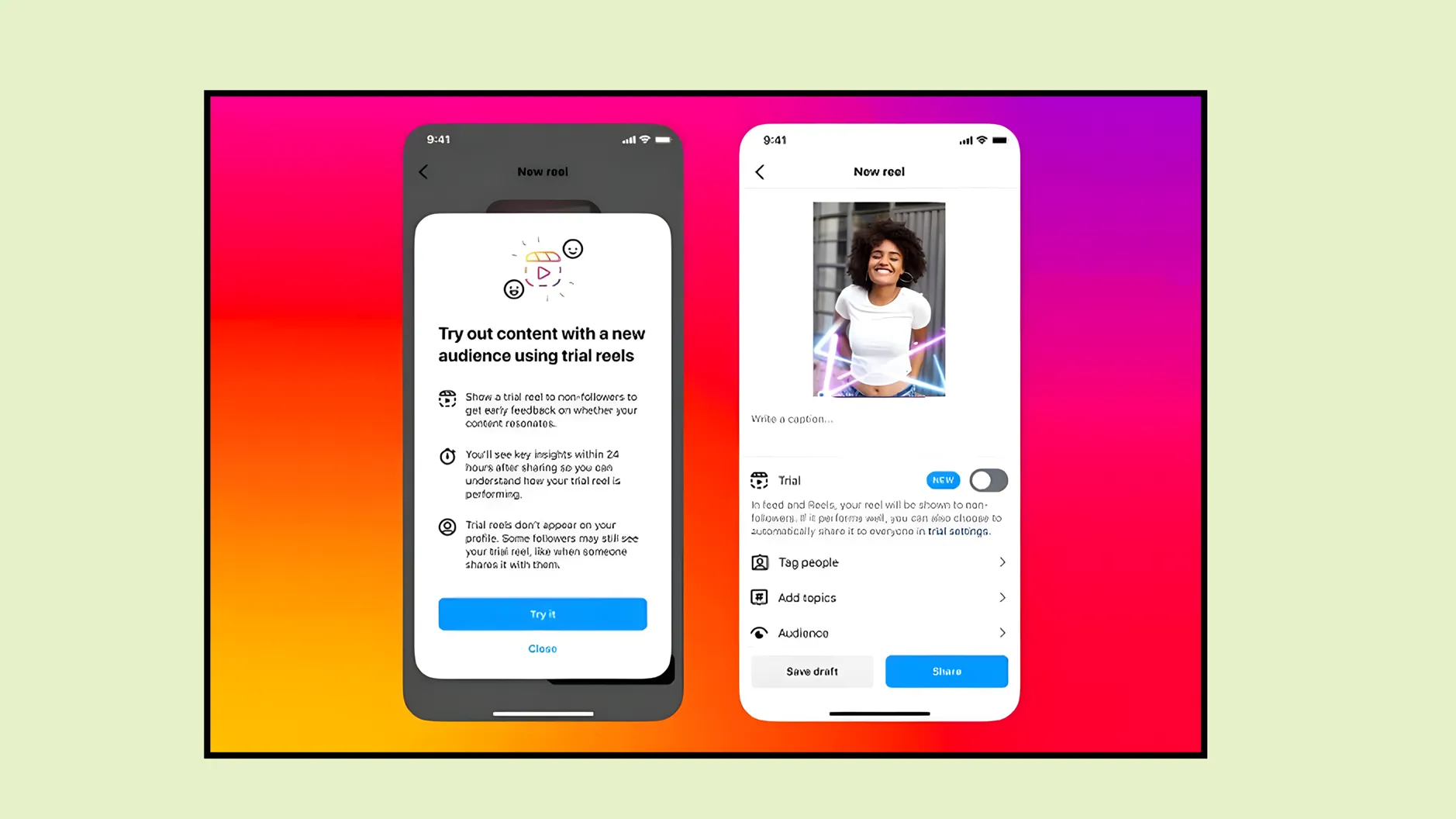
Trial reels will be circulated among your non-followers, and your followers won’t get any hint about it. So, you can try and see the results after 72 hours.
You can
- Post any of your same old reels with new captions
- Put a new thumbnail on an old reel
- Edit any old reel differently, like adding new music, etc., and post it as a trial reel
This will allow us to experiment and understand what works for the new algorithm.
Remember, the experiment results would be valid for nearly 6 or 8 months.
Always use simple captions.
There are many caption tools available online, but we recommend that you take the help of the caption-generating tools, but frame your own captions.
And keep them simple. For example, between “How to do 5 minutes meditation” and “ Take 5: A Quick Meditation to Reset Your Mind,” the first one is simpler and easily visible.
Instagram results also appear on Google search results. Therefore, using simpler words as captions can make your Instagram content appear in Google search results, too.
Put keywords in your caption
Putting hashtags is important, but putting keywords in captions is even more important today.
As we discussed earlier, Instagram results are also visible in Google searches, so putting keywords becomes important.
Prepare a minimum of 2 hooks while making content for IG
Everyone says hooks are so important; if you could hook your audience for at least 3 seconds, then congrats, you gained a view.
So, if you are posting a reel with a hook, and it does not work, then you can re-edit the reel and post it with a 2nd hook in the Trial reels.
This will help you understand what is working and what is not.
Understand your audience by visiting their Instagram accounts
Now go to your follower list, visit their Instagram profile.
- See their bio, their posts
- Look at who they are following.
Dig out every detail about them and understand what kind of content they post and follow.
You can also use Instagram analytics and find out factors like age, location, and active times.
These tips will help you survive any kind of algorithm changes and make your Instagram robust.
Speed · 10-minute setupOne coffee from URL to a full month of scheduled posts.
Drop your URL, brew your coffee, come back to 30 brand-on captions ready to publish.
Let us do an Instagram algorithm reset now
Now you have learnt all the way how to reset Instagram algorithm, the content you see is in your hands.
Your time is precious, so watching your favourite niche content on Instagram should be a priority.
Also, when you do not see random content on Instagram, spending time on Instagram won’t be counted as wasting time.
Do you want to know how to trun off reels on Instagram? Keep reading.
Blank tab. Six open browsers. No clue what to post.


 After · With Indzu
Paste one URL. Get 30 scheduled posts.
FAQ
How do I reset my Instagram Explore page?
Resetting your Instagram explore page is the same as reset algorithm on Instagram
- Open your Instagram and click on your profile picture at the bottom right.
- Now, click on the three vertical bars in the rightmost upper corner (hamburger icon)
- Scroll down and go to “Content Preferences.”
- Now go to “Reset Suggested Content” and click on “Next”.
Reset Instagram algorithm not showing. What to do?
Your confusion of how to reset algorithm on Instagram is gone.
But you are not getting the “Reset suggested content” button on your Instagram app, then
- You can update your Instagram app
- You can clear the cache of the Instagram app on your android/ Offload app on your iPhone.
- You can also uninstall and reinstall Instagram.
Does resetting affect the ads I see on Instagram?
No, it does not affect the ads of Instagram as Meta ads behave according to your previously collected data.
How to reset your Instagram algorithm?
It takes only 30 sec to reset your algorithm.
- Open your Instagram and click on your profile picture at the bottom right.
- Now, click on the three vertical bars in the rightmost upper corner (hamburger icon)
- Scroll down and go to “Content Preferences.”
- Now go to “Reset Suggested Content” and click on “Next”.
How to reset instagram reels algorithm?
You can easily reset the reel algorithm
- Open your Instagram and click on your profile picture at the bottom right.
- Now, click on the three vertical bars in the rightmost upper corner (hamburger icon)
- Scroll down and go to “Content Preferences.”
- Now go to “Reset Suggested Content” and click on “Next”.
Or, you can edit “Your Algorithm’
- Go to the reels button, click on the 2 horizontal lines, and reset your algorithm. (this feature might be/might not be available in your region)
How to reset Instagram search algorithm
You can easily reset your search algorithm by doing 2-part processes.
- Open your Instagram, go to the search button
- There, you can see what you had searched for before
- Next, click on “See all” and then click on “Clear all.”
Next directly go and reset suggestions.
- Open your Instagram and click on your profile picture at the bottom right.
- Now, click on the three vertical bars in the rightmost upper corner (hamburger icon)
- Scroll down and go to “Content Preferences.”
- Now go to “Reset Suggested Content” and click on “Next”.
How long does it take for the algorithm to adjust after a reset?
It will take a minimum of 2- 3 days or a maximum of 5-7 days to adjust after a reset.
minimum | 2- 3 days |
maximum | 5-7 days |
Can I undo an Instagram algorithm reset?
No, you cannot undo an algorithm reset. But if you want to go back to the previous algorithm, then you should
- Tap interested in a similar kind of videos you liked earlier
- Add the previous accounts you liked seeing content in your favourite list.