Have you liked a video on Instagram and want to watch it again, but you’re wondering how to find liked videos on Instagram? We got it.
Instagram has a tremendous Reel user count. It is surprisingly 1.8 billion per day. With the endless number of posts, reels, and content on Instagram, it is easy to lose track of the content that you have enjoyed. So, the like feature not only shows appreciation, but also saves your Instagram activity.
Yes, you do not realize it, but Instagram actually keeps a record of all the reels and posts you’ve liked. You can revisit the content that has inspired, entertained, or informed you from your Instagram activity section.
Even knowing how to find liked videos on Instagram saves you a lot of time and gets you valuable content.
So, let’s get into the blog to learn more about liked videos and how to view them on Instagram.
 Time killer · Pain
Spending 6 hours writing posts that get zero traction?
Paste your URL. ZuAI turns it into 30 brand-on captions in 10 minutes — no blank-page panic, no generic AI filler.
What are the liked videos on Instagram?
Every creator posts content to get engagement and build a relationship with their audience. So, when you give a red heart or double-tap on a video, you are showing appreciation for that content. Now these videos are saved in your activity as “liked videos”.
Outcome · RecommendedGet 30 days of social content from your website — in 10 minutes.
What types of videos can be liked on Instagram?
Instagram allows all types of content, and the content type is “Activity”.
Posts
The standard video post that appears as you scroll through the feed. These videos are saved in your activity under “likes”.
Instagram Reels
Reels that you see in your explore feeds, reel section, or reels post by your followers, and followings are saved in the liked sections, once you want them.
Carousel Post
Carousel posts include multiple posts and videos in a single post. Once you engage with and like the carousel post, it will appear in your liked activity.
Ads and Sponsored videos
Ads and sponsored videos uploaded by any brand, business, or creator can also be added to your liked activity once you enjoy the video. But these reels will vanish from your liked activity once the ad expires.
Proof · Verified
2k+ grew faster with one tool.
How to find liked videos on Instagram: Step-by-step guide
Here is a detailed step–by–step guide to the liked video section.
How to find liked videos on Instagram on desktop
Step 1: Go to your profile icon
Step 2: Click on the hamburger menu
Step 3: Click on “Your activity”.
Step 4: Click on “Likes”.
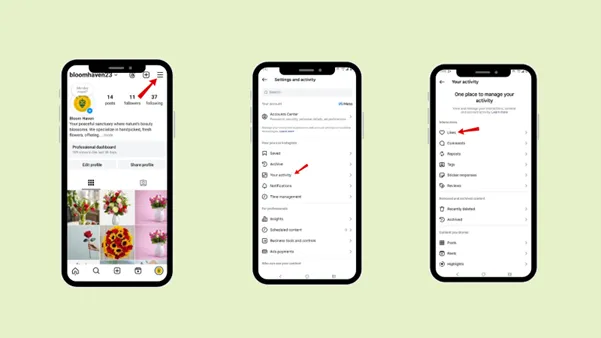
How to find liked videos on Instagram on Android
Step 1: Go to your profile icon
Step 2: Tap the hamburger menu
Step 3: Tap “Your activity”.
Step 4: Tap “Likes”.
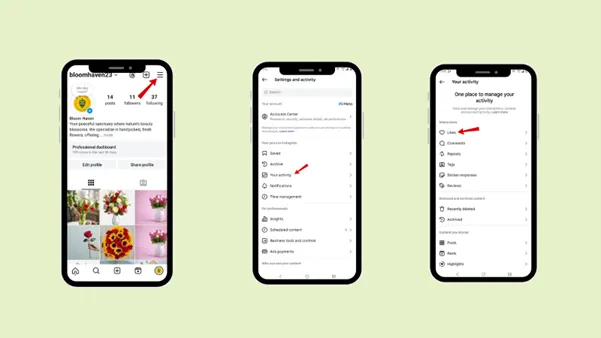
How to find liked videos on Instagram on iPhone
Step 1: Go to your profile icon
Step 2: Tap the hamburger menu
Step 3: Tap “Your activity”.
Step 4: Tap “Likes”.
Free · Instant · No signupSee what ZuAI generates from your website — right now.
Paste your URL. Watch ZuAI write a month of brand-on captions in seconds. Preview before you create an account.
What is the filter feature in the Likes section under Instagram Activity, and how do you use it?
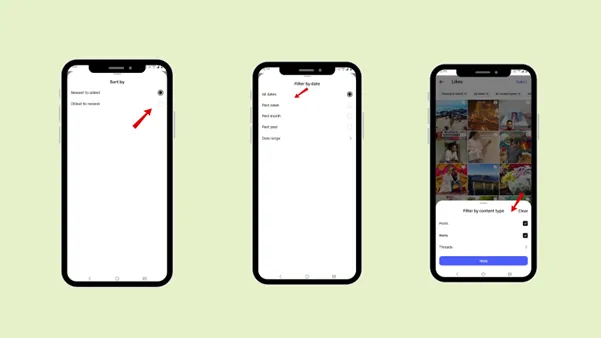
The Filter Feature is used to filter by newest-to-oldest videos, all dates, all content types, and all authors. It helps you quickly find the specific liked reel or post instead of endlessly scrolling through the entire list. Since users scroll through hundreds or thousands of videos, it becomes difficult to find a specific reel they liked a few months ago.
Step 1: Go to your profile icon
Step 2: Tap the hamburger menu
Step 3: Tap “Your activity”.
Step 4: Tap “Likes”.
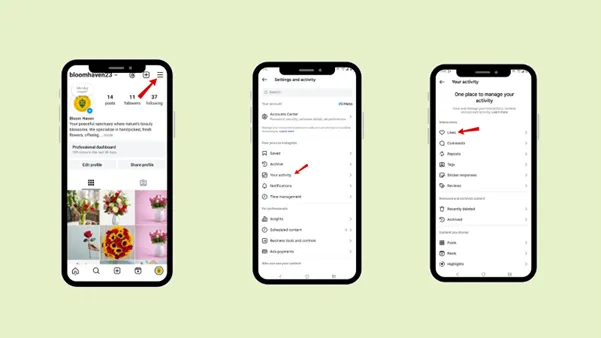
Step 5: Above, you can change the order to newest to oldest, all dates, all content types, and all authors, according to your requirements.
Speed · 10-minute setupOne coffee from URL to a full month of scheduled posts.
Drop your URL, brew your coffee, come back to 30 brand-on captions ready to publish.
The different features under the filter feature
Newest to Oldest videos,
You can sort your liked videos from the newest to the oldest. It means that your video order will be arranged from the newly liked videos to the old ones. You can also alternate it from the oldest to the newest.
All dates,
One of the most valuable options is sorting the liked videos by date or time range. You can sort your liked videos specifically from the past week, past month, past year, or a date range. It is a helpful filter feature that lets you find a video you liked a few weeks or a month ago.
All content types,
You can even filter by content type, such as posts, reels, and threads. It makes it easier when you are finding any specific liked videos.
All authors
Now, the filter feature also offers an interesting way to categorize liked videos: by author, allowing you to filter them by the selected author.
Blank tab. Six open browsers. No clue what to post.


 After · With Indzu
Paste one URL. Get 30 scheduled posts.
Alternative Methods to keep track of liked videos on Instagram
There are alternative ways to track your liked videos besides the ” Like Videos ” section.
1. Save feature
Likes are basically for appreciating creators’ content and engaging with it. But if you want essential content to be in a safe place, away from other liked videos, you can use the save feature.
You can find a save icon under the content. Just click it, and your content will be saved. You can use this feature to keep the vital content separate from the general content.
2. Screenshot and screen recording
The next best option is to take a screenshot or screen record of that content.
For Example, if you like an artwork, you can take a screenshot of it, which will be saved directly in your phone’s gallery. Or if you want any dress design.
3. Share
The third alternative is to share the specific reel or phone with one of your friends. If you do not want the particular reel or photo to get buried among your other liked or saved videos, or if you do not want to fill your phone’s gallery, use the share feature.
Time killer · Pain
Spending 6 hours writing posts that get zero traction?
Paste your URL. ZuAI turns it into 30 brand-on captions in 10 minutes — no blank-page panic, no generic AI filler.
Why do users want to find similar videos on Instagram?
Users react to videos when they feel they are relatable or when they like some creators’ work. But in the future, users may want to revisit it, so it might not appear in their feed, or they may have forgotten the creator’s name. It is when they want to visit and know how to view liked videos on Instagram.
Let’s explore the reasons why someone might find liked videos on Instagram.
1. To rewatch funny or entertaining content
If users have liked a funny meme or video in the past and want to revisit it, share it with their friends, or show it to one of their friends. Then they need to know how to view liked videos on Instagram.
Or if they are in a sad mood or just had a flashback to a creator’s particular reel, you can get back to your favorite video activity and watch it again.
2. To revisit educational or informative videos
Users often like videos that are educational or informative, that teach us something useful, such as a tip, explanation, or quick lesson. These are the reels users want to watch again when they need information or wish to learn about a specific study topic.
This is when a user needs to find similar videos on Instagram. The like feature helps you save a reel you liked even a few days, weeks, months, or year ago, and in the like activity, you can revisit it.
3. To save recipes, workouts, and tutorials for later
Another reason users would like to find liked videos is that they have liked a food recipe, a workout, a makeup tutorial, or a useful hack, and want to revisit it after a few days to apply it or use it.
4. To rediscover meaningful and nostalgic posts
Some posts are liked by users, and they prefer to watch it again and again. They also want to rediscover posts, that they found meaningful and motivated them in the past. when users want to revisit nostalgic posts or photos, or share them with their friends or followers, they can go to the liked activity section.
Outcome · RecommendedGet 30 days of social content from your website — in 10 minutes.
Conclusion
Finding liked videos is easier than it seems once you know how to do so on Instagram. By accessing your activity section, you can revisit content you have enjoyed or found relatable. The like feature not only helps you appreciate a creator’s content but also lets you save content you find relatable.
Follow the step-by-step guide to access your liked videos without any worries.
Proof · Verified
2k+ grew faster with one tool.
Faqs
Q1. Can I see someone else’s liked videos?
Ans 1: No, you cannot see someone else’s liked videos.
Q2. Can creators see who liked their videos?
Ans 2: Yes, creators can see who liked their videos. They will get a notification each time someone likes their videos.
Q3. Are likes permanent?
Ans 3: No, likes are not permanent. If your audience dislikes your content, it will decrease the number of likes. If you block someone who has liked your content, then it will also reduce the number of likes. If someone deletes their account, then it will also decrease the number of likes.
Q4. Do business, creators, and personal accounts view videos differently?
Ans 4: No, business, creator, and personal accounts do not view videos differently. They follow the same steps and all access the liked content in the same way.
Q5. Do Instagram ads and sponsored videos appear in the liked videos?
Ans 5: Yes, Instagram ads and sponsored videos appear in the liked video section. But once the ads and sponsored campaign are finished, your video will be deleted from the liked video section.