

Worried that your favorite post does not match your profile style. Explore archive a post on Instagram.
Deleting a post may seem like the easiest solution, but it comes with the cost of losing the content’s engagement ( likes, comments, shares ) and the memories forever. Instead of deleting, you can archive a post you’ve shared on Instagram.
When you archive a post on Instagram, your post disappears from public view, while it is safe in your private archive. You can restore it anytime and still have the same engagement and views.
Let’s get into the blog to know how to archive a post on Instagram.
What does “Archive” mean on Instagram?
Archive is a feature that allows users to hide content from the public view without deleting it. It helps your content get stored privately in your profile.
The archive feature acts like a private storage of your content within Instagram. You can only archive the post that you have posted in your Instagram profile. The archive content is only seen by the account owner, and it can be restored at any time.
History and Evolution of Instagram’s Archive Option
The Instagram archive feature was introduced in 2017. The profile post archive features were introduced on June 13, 2017. The option for archiving stories was brought in by December 2017.
The goal of the archive is to reduce the pressure around permanent posting and organise your profile without the fear of losing your post.
Type of Content that can be archived on Instagram
All types of content can be achieved that you post on Instagram
- Post – The post from your primary profile grid can be archived.
- Reel – Reels can also be archived from your profile grid.
- Stories – Stories are automatically archived once they expire from your profile after 24 hours.
- Highlights – You can also archive your customised highlight.
How to archive a post on Instagram? (Step – by – Step)
To archive a post you’ve shared on Instagram.
Step 1: Select the post you want to archive.
Step 2: Tap on the three dots above the post.
Step 3: Tap “Archive”.
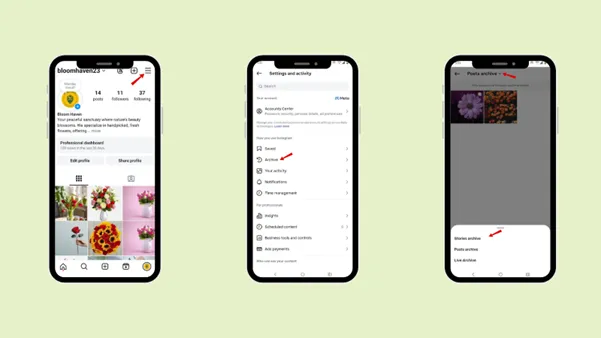
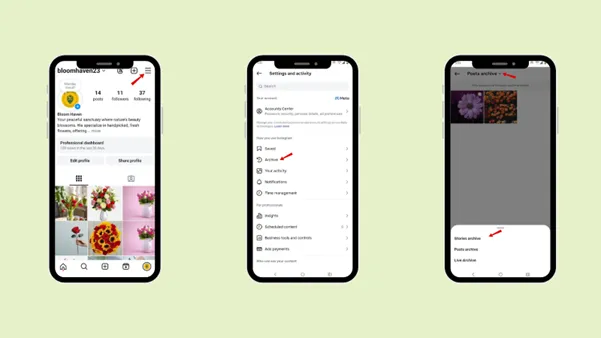
How to view the archived post on Instagram?
Step 1: Go to the profile page.
Step 2: Tap the “three line”
Step 3: Tap “Archive”.
Step 4: Tap the drop-down arrow.
And now you can view all your archive content ( post, story, live).
What happens when a post is archived?
When you archive a post, that you’ve shared on Instagram,
- The post is hidden from your followers and the public.
- All the engagement of your post is preserved exactly as it was.
- No, new engagement occurs when your post is archived.
- Your followers do not get notified when you archive any of your posts.
Can you archive multiple posts in one?
Yes, you can archive multiple posts at once.
Step 1: Go to the profile page.
Step 2: Tap the “three line”.
Step 3: Tap “Your activity”.
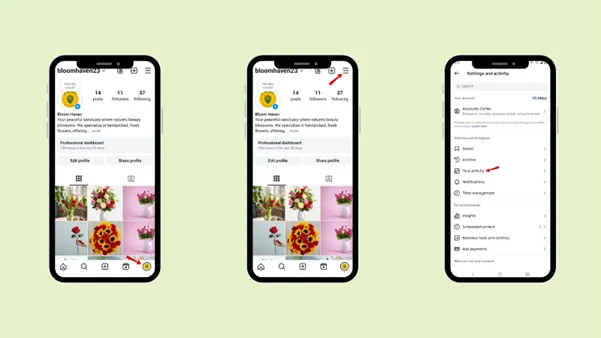
Step 4: Scroll down to “Content you shared”.
Step 5: Select all the posts or reels that you want to archive.
Step 6: Tap “Archive”.

Difference between Archive and delete post
|
|
Archive |
Delete |
|---|---|---|
|
Visibility |
The post is hidden from public view, but still saved privately. |
The post is permanently removed from the Instagram. And no, longer exist in any private folder. |
|
Reversibility |
The post that are archived can be reversible. You can unarchive the post. |
No, you cannot reverse the deleted post. |
|
Engagement |
When you archive the post, your engagement will not be lost. Once you unarchive the post you can get back all the same number of likes, comments and share. |
All engagement is deleted once you delete your post. |
|
Best use |
You can archive your post if you feel the post does not match with your profile aesthetic but you still want the post. |
When the post is no longer needed or appropriate at all. |
Why Might You Need to archive a post?
There are some instances for which you need to archive a story
1. To save Important memories
Some posts might be your personal favorite, but they do not match your profile personality; in that case, you can archive a post. Archiving your post ensures that these moments are saved privately so that you can revisit them anytime.
2. To improve your Profile
Archiving a post helps you maintain a clean, consistent, and visually appealing profile. With the help of the archive feature, you can style your profile according to your profile goal and style, where you can archive your old posts and upload profile-related posts.
3. Preserve Engagement
The best quality of the archive feature is that it preserves your post’s engagement. It means when you archive a post, its likes, comments, and shares all remain the same, and it is not deleted when you decide to restore it again.
4. Repost and Reuse
The archive feature helps you to repost and reuse your content. You can reuse the content by unarchiving it any time you want. These features help reuse during milestones, throwback posts, or future campaigns.
5. Regret from deleting the post
An archive saves you from the feeling of regret. It helps you to save your post privately without deleting the post. As deleting a post is a permanent option, archiving gives you the freedom and time to decide whether you want to keep the post or not.
Common Problems you may face while archiving a post you’ve shared on Instagram
The common problem you may face while archiving a post:
1. Not showing the Archive
When you tap the three dots menu on posts, sometimes you may not be able to get the archive option. This may happen when you are not logged in to the account or it may be a temporary app glitch. So, in that case, you can restart the app, log out, and again get logged in.
2. Outdated version of the app
If you do not have the updated version of the app, some features may not work correctly.
Conclusion
The best way to save your memories is by archiving a post you’ve shared on Instagram. Rather than deleting your favorite moments, the archive allows you to hide content that no longer fits your professional and personal personality.
Follow the steps to archive your post and refresh your profile, protect your privacy, or plan a new strategy. It gives you the flexibility to control and show the content that is relevant to your profile. Check out the difference between archive and delete to avoid confusion.
Now that you have archive the post, you need to create post related to your brand personality. With the help of Indzu social you can create post related to your product or service with minutes. Just enter the right prompt and you are good to go.
Indzu not only help you with create your post, stories, reel, you can also schedule your content at the exact day and time even if you have a hectic day planned for the week.
FAQs
Q1. Can followers see archive posts?
Ans: No, your followers cannot see your archive post.
Q2. Does archiving affect engagement?
Ans: Yes, archiving affects your profile engagement. Archiving means hiding a post from your profile. So, they are no longer able to get new likes, comments, and shares. Those posts are no longer shown to your new followers by Instagram.
Even an archived post helps your engagement in a positive way; you can hide your post that does not match your brand personality.
Q3. Does archiving notify followers?
Ans: No, when you’re archiving your post, your followers do not get notified.
Q4. Is archiving reversible?
Ans: Yes, archiving is reversible. You can unarchive a post any time you want. When you restore your post, it will return to your profile feed, its original date, its likes, comments, and captions.
Q5. How long do posts stay archived on Instagram?
Ans: The post that you have archived on Instagram stays as long as you have not deleted it or changed your mind to unarchive it.