
Whenever you post a video, there is always curiosity about who saw it and what they think of it. But can you see who views your Instagram videos and how they react to them?
The answer is “No”: you cannot see who views your Instagram videos. However, there are other smart ways to see what happened to your content on Instagram.
This blog will help you figure out exactly that.
Can you see who views your Instagram videos or profile?
No, you cannot see who specifically viewed your video on Instagram, but you can see the total number of views.
|
Who viewed your Instagram videos |
Cannot see |
|
Number of views on your Instagram video |
Can see |
How to check the number of views on Instagram reels?
On Instagram, you can have a personal or professional account.
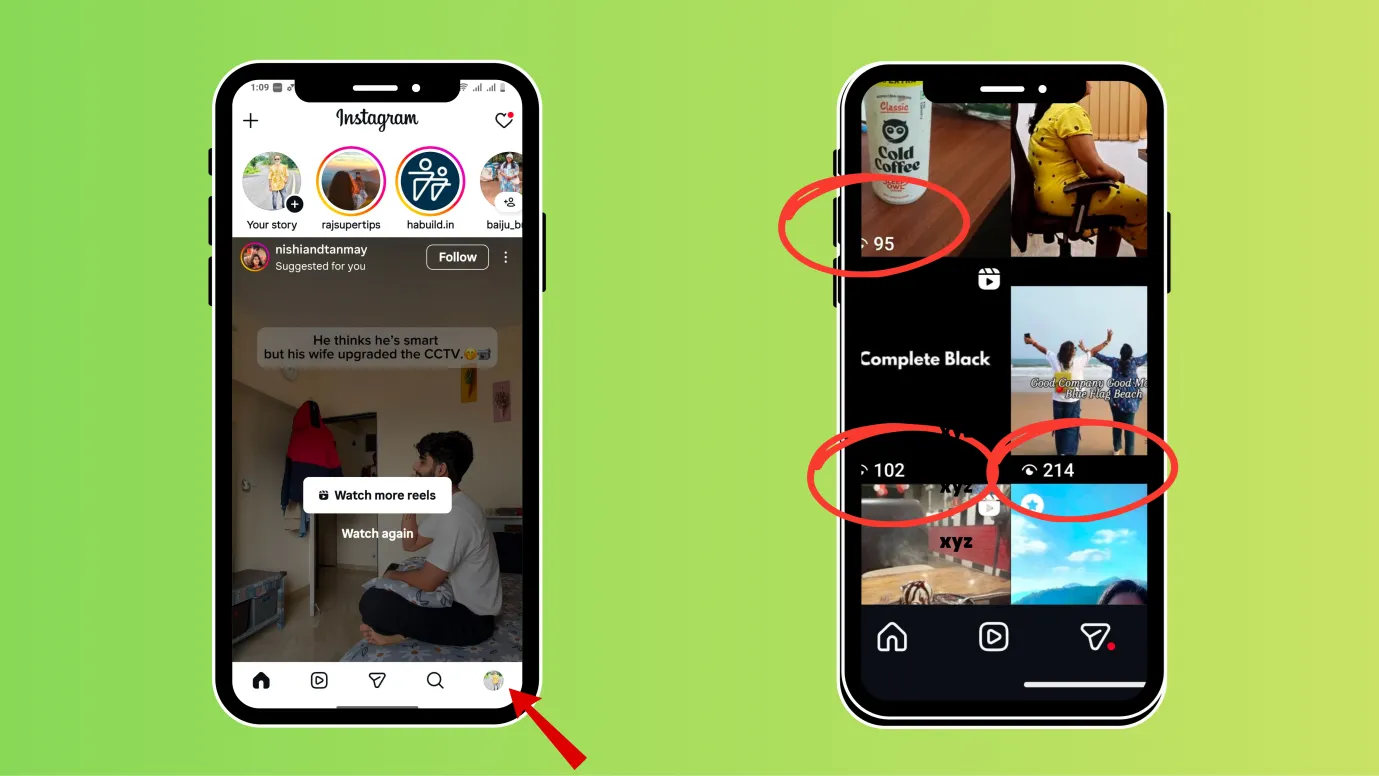
If you have a personal account, here are the steps to see number of views
- Open your Instagram and click on your profile picture at the bottom right.
- It would open a window where you can see all your contents, and there you can also see the number of views
If you have a professional account, here are the steps to see the number of views
Not only the views, but you can also see the full insights when you have a professional account.
- Open Instagram and click on your profile picture at the bottom right.
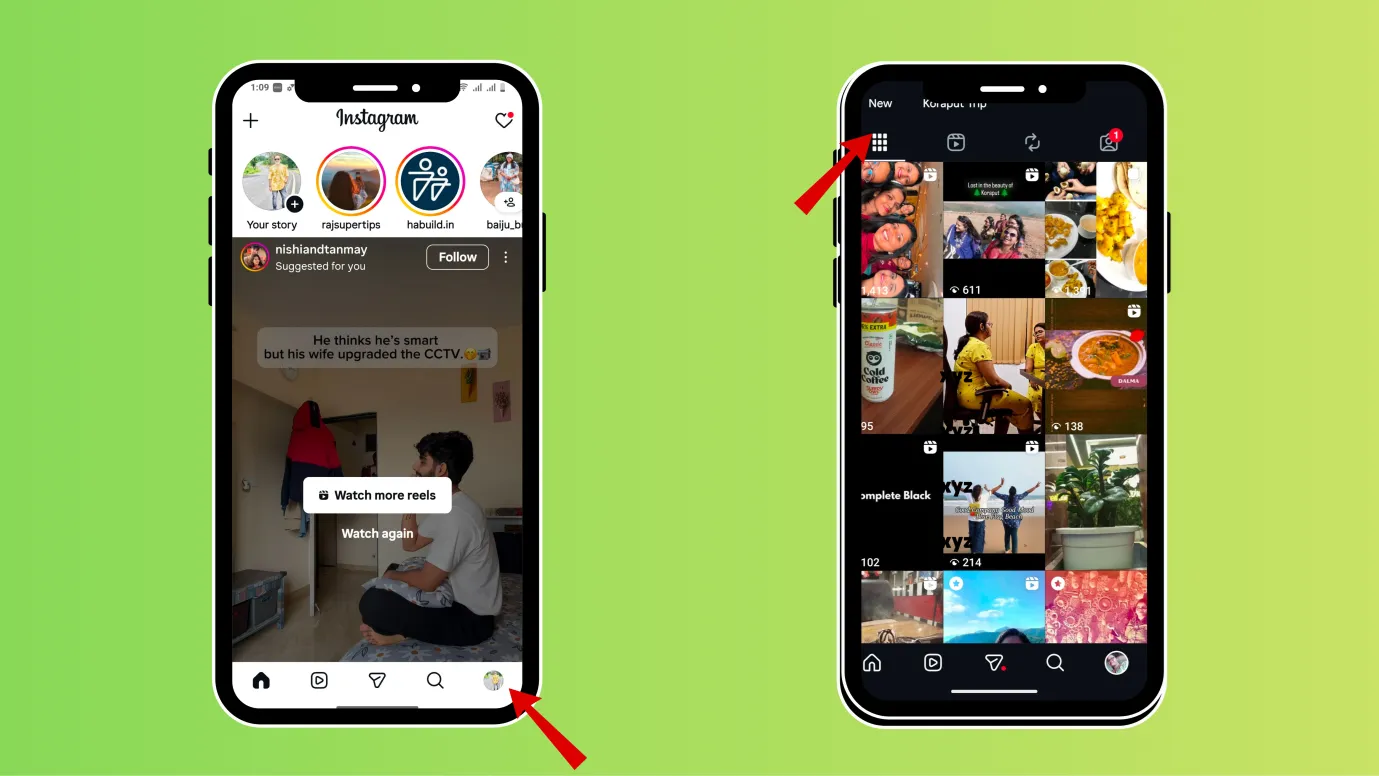
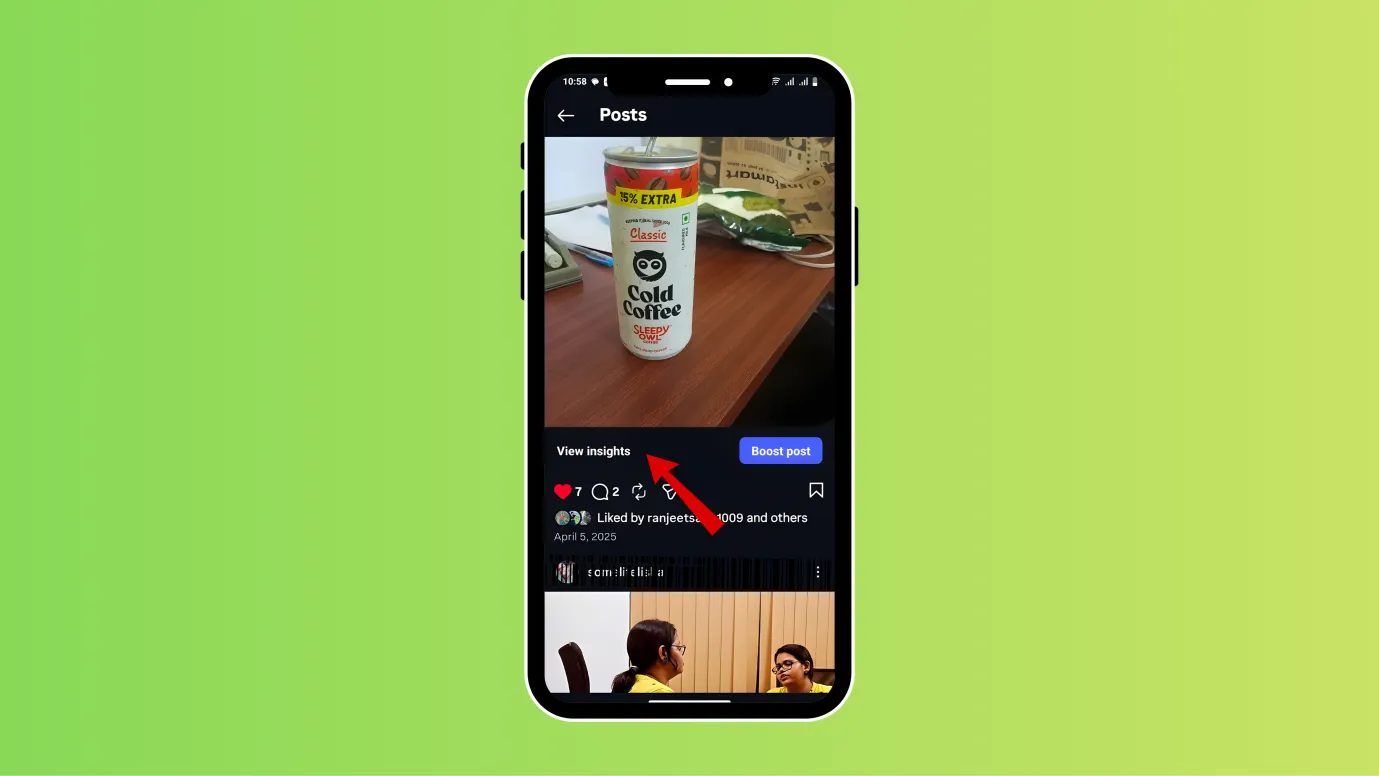
- There, you can access all your content, click on any reel, and then click on “See Insights.”
- You’ll be able to see how many follows, likes, comments, saves, and shares your reel received.
Why does not Instagram allow you to see the video views?
There are many reasons why Instagram does not allow you to see who exactly viewed your video.
Instagram values privacy, wants users to view any content without feeling tracked
Just imagine: one of your friends watched your reel on Instagram but didn’t react. Wouldn’t you feel the urge to DM them about it?
And due to this fear, that friend might not watch your reel in the first place.
Instagram does not want any of its users to feel this way. It encourages users to see content freely without getting judged.
Instagram is built to promote higher viewership and time retention on any content.
Social media platforms like Instagram are designed to maximize content consumption. They are more concerned about the number of views, engagement, and attracting more users. Instagram wants users and creators to grow.
Instagram knows your video views will scale up, and showing individual views will be messy
Even if you think your video views are limited now, Instagram knows they will grow into millions one day, and showing such large audiences by identity can be messy, heavy on infrastructure, and mostly unusable.
Are there any other ways to know who saw my Instagram videos?
There are no direct ways to know who saw your Instagram videos. But here we are mentioning some indirect ways to know who sees your videos.
Post reels + story

Post a reel, then post the same reel as a story, and you can see who views your stories.
It is a possibility that the person who viewed the story must have also watched the reel as well.
But this is not an actual measure of who all saw your reel. This is an indirect way to tap the Instagram reel viewers.
While posting a reel, encourage the viewers to comment or like

You must have seen many tricks used by the creators to make viewers comment, like “DM me for location”, “Comment to get the coupon code”, “Tag your friends in the comment section”, “Like, if you have also felt the same”, etc.
These kinds of hooks can be used to lure viewers to comment, like, or send a message. And you can see the viewers via their comments.
But remember that not all viewers might prefer to react; you can still track the maximum number of your viewers using this method.
You can announce to go live after posting your video
You can go live after posting a video on Instagram; many of your viewers would attend your live session, and you can track them.
Here is what you can do,
- Post your video or Reel first. In the caption, add a simple line like: “Going Live in 20 minutes to discuss this.” Let it sit for 10–30 minutes.
- Announce in your stories that you are going live in a few minutes and give a reference to the video or reel you posted, saying things like “let us talk about the reel I just posted.”
In your IG live, you can see which users have joined and can track them.
After posting a reel, check if you have got any new followers
You cannot see exactly who viewed your videos, but you can see who your followers are.
- After posting a new reel or video, check if you have gained any new followers. Wait for at least 30 or 40 minutes after posting a reel, and then check for any new followers.
- For example, if you had 200 followers earlier and now have 203, you have gained 3 followers after posting a new video.
Can you check who looked at your Instagram story?
Yes, you can easily know who viewed your Instagram story.
- Open your Instagram and click on your profile picture in the top left corner.
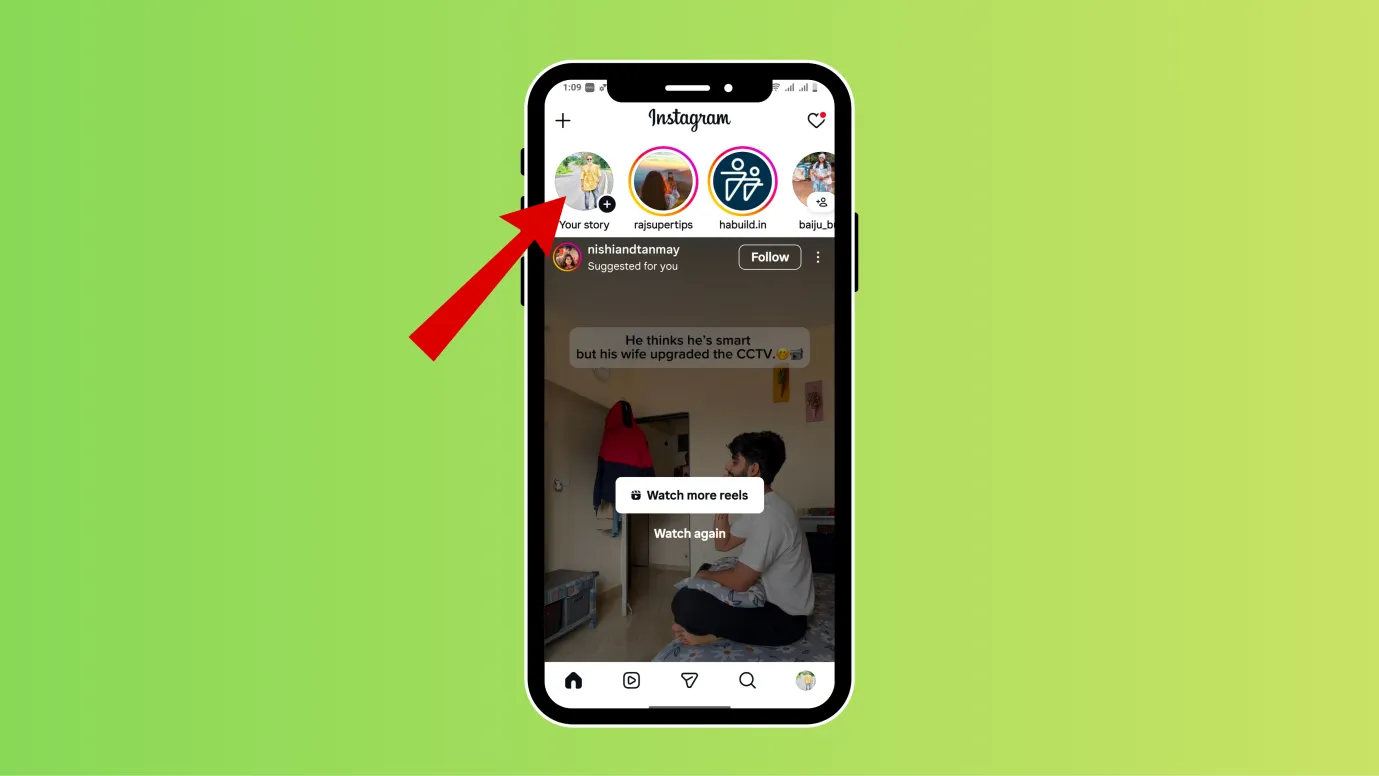
- If you have posted a story, your story will appear.
- Now, you can swipe up and see the total number of viewers and who has viewed your story.
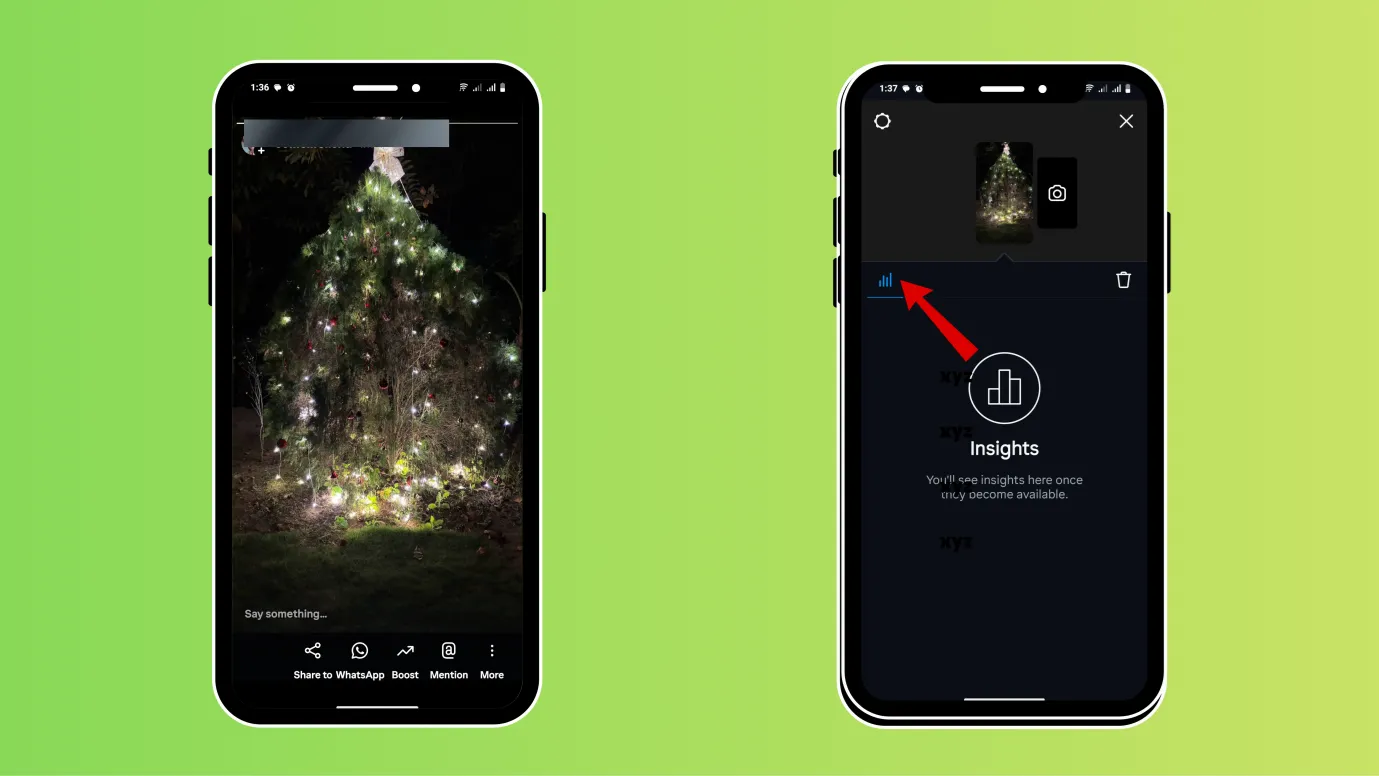
(Note- You can only see who viewed your Instagram story for 24 hours)
Can people see who viewed their Instagram stories after 2 days?
You can see your story insight even after 24 hours.
- Open your Instagram and click on your profile picture at the bottom right.
- Now, click on the three vertical bars in the rightmost upper corner (hamburger icon)
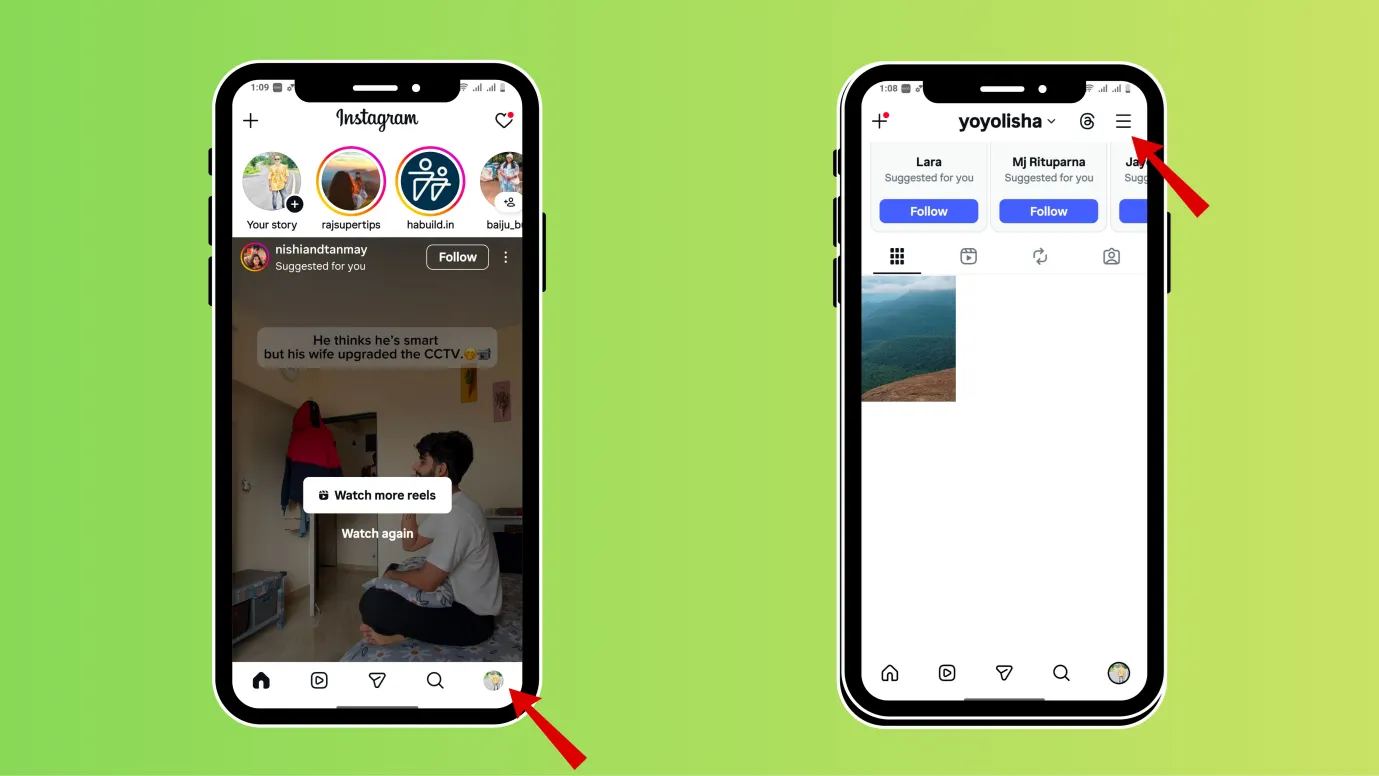
- Scroll down and reach” How you use Instagram”, tap Archive.
- You can see your previous stories, click on activity or insights to see what had happened your previous stories.
Can you see who viewed our Instagram profile?
You can see the number of profile visitors, but you cannot see who exactly visited your profile.
But let us discuss some indirect ways to know your profile visitors.
Post a story and check insight on the 23rd hour
When you post a story and check insights for the last hour (since insights disappear after 24 hours), you can see the names of followers or friends who have liked or visited the story more than once.
If you have a professional account, you can see the number of profile visits from the story.
See your highlight insights
When you add your stories to highlight you can see who has visited or liked them and you can also see the names of the viewers who have visited your highlights.
But remember, after adding your story to highlights; check the viewers within 48 hours.
(Insights are available for professional accounts, but private accounts can also see the viewers)
Note: If you have a professional account, you can go the professional dashboard and see the number of visits to profile.
Did you get an idea about who viewed your Instagram?
When we asked, Can you see who views your Instagram videos on Google or elsewhere, a lot of people and videos suggested using third-party apps, but most of them are unreliable, ask for a premium subscription, require login details, etc.
That is why in this blog, we have not included these 3rd party tools.
The Instagram platform is designed to promote more views, more followers, and more watch time. But if you want to remain private, you can switch to a private account on Instagram or post your content only to “close friends.”
You can also restrict people on Instagram. If you want to know more about who visits your Instagram profile, then keep reading.
FAQ
How To Know If Someone Read Your Message on Instagram?
- Open your Instagram and click on your profile picture at the bottom right.
- Now, click on the three vertical bars in the rightmost upper corner (hamburger icon)
- Now scroll down and reach” how others can interact with you” and go to “Messages and story replies”
- Next click on “who can see you are online” and “show read receipts”.
If you turn on read receipts, then only you can see who viewed your messages.
Why can’t I see the view count on Instagram?
If you cannot see the view count on Instagram, then
- Try updating Instagram app to the latest version
- You can also log out and log in again to help Instagram update the data.
- And you can also switch to professional mode to see the view count on Instagram.
Can someone see if I viewed their Instagram video?
No, Instagram does not show the creator who viewed their video. But if you see their story or highlight, then they can know your Instagram handle.
Can you tell who stalks your Instagram?
There is no direct way to know who stalks you on Instagram. But you can observe signs like frequent DMs, comments, story views, highlight views etc. to know who is constantly engaging with your Instagram profile.
Does Instagram tell you how many times someone viewed your video?
No, Instagram does not tell you this particular data, but there is a indirect way to know if someone views your story more than once.
If you have a professional account, then you can see how many people viewed your story and who exactly views your story.
If the number of views is higher than the number of exact people seeing your story that means some people has viewed your story more than once.