
Are you a YouTuber? Or planning to be a YouTuber? YouTube is a beautiful platform; not only does it give you the chance to earn, but it also gives you a chance to present yourself, build confidence, grow from scratch, and give a voice to your inner self.
But from where can one start? YouTube Shorts is a good place to start. But how to start it, and how long can a YouTube Shorts be? And what are the tips to create a viral YouTube Shorts? Let us explore all these in this blog.
What are YouTube Shorts?
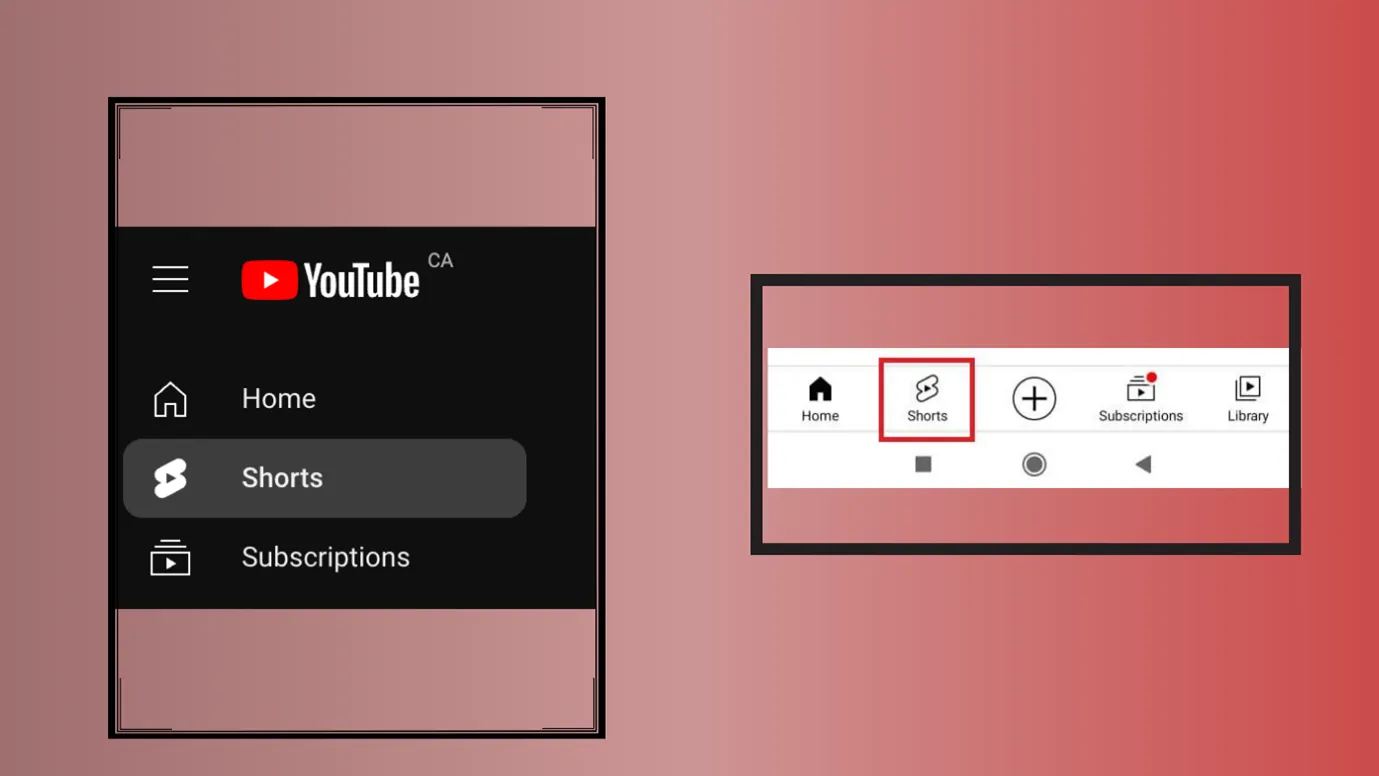
As the name suggests, they are short videos. When you open YouTube, in the bottom menu, tap “Shorts” ▶️(It’s usually in the center or near the center). Once you click on them, you can find short YouTube videos.
|
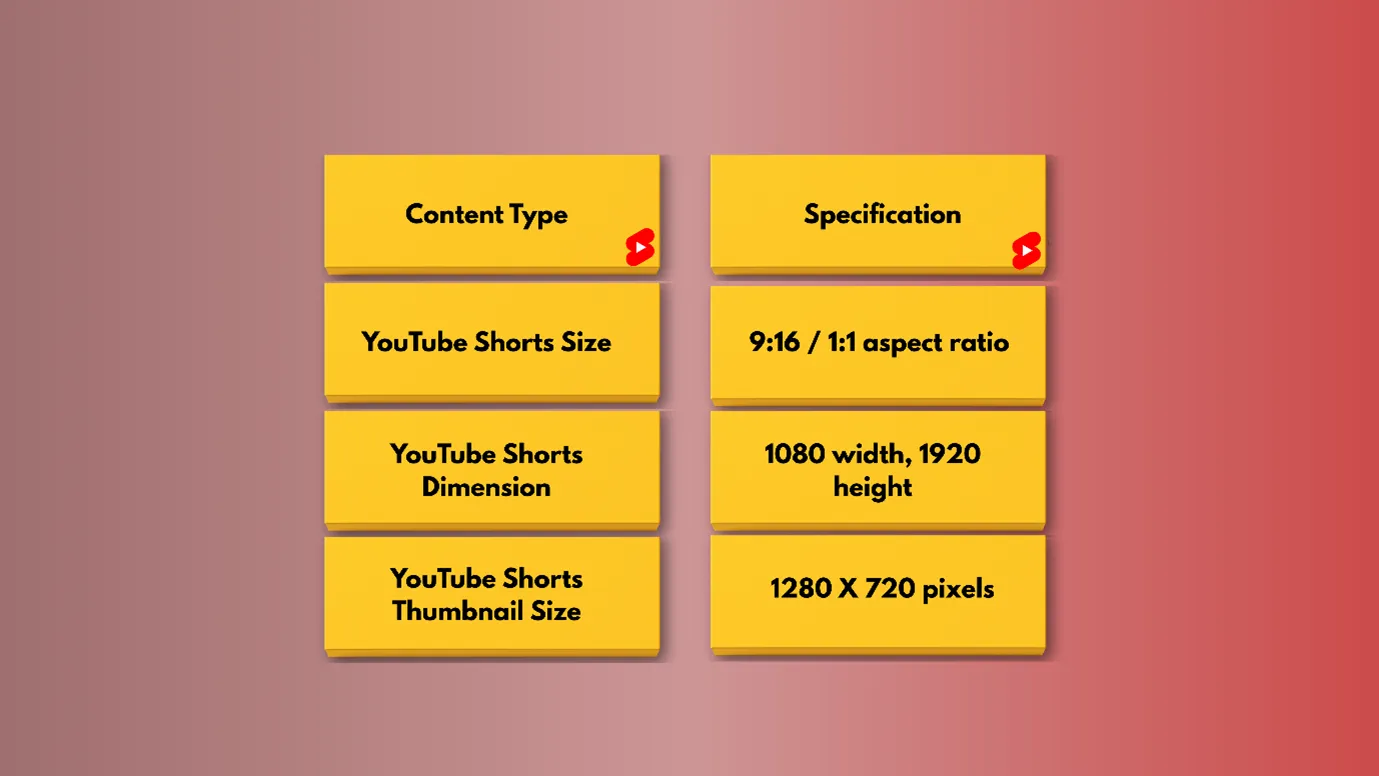
YouTube Shorts Size |
9:16 aspect ratio/ Square size |
|
YouTube Shorts Dimension |
1080 width, 1920 height |
|
YouTube Shorts Thumbnail Size |
1280 X 720 pixels |
Let us clear all the myths. How long can YouTube Shorts be?
Now we know that YouTube Shorts are short videos, but how short can they actually be?
As per Google’s latest update, a short can be of 3 minutes, and a minimum can be of 15 sec
|
Maximum Duration |
3 Minutes |
|
Minimum Duration |
15 Sec |
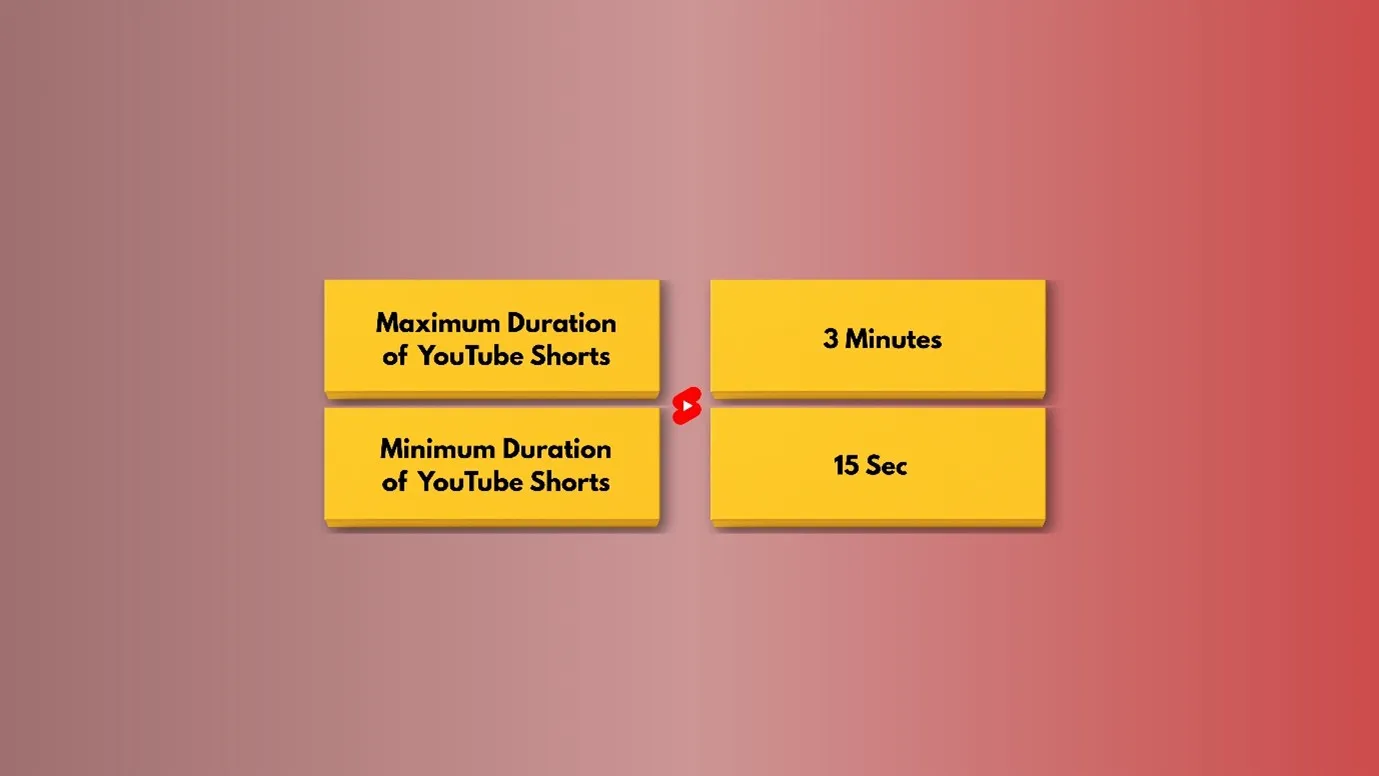
Or in other words, any video uploaded on YouTube after October 2024, which is 3 minutes, will be categorized as a Shorts Video.
Note- When you make your video in a wider aspect ratio, i.e., 16:9, then your videos will be taken as long-format videos. (For shorts, consider making vertical or square size )
YouTube Shorts Journey
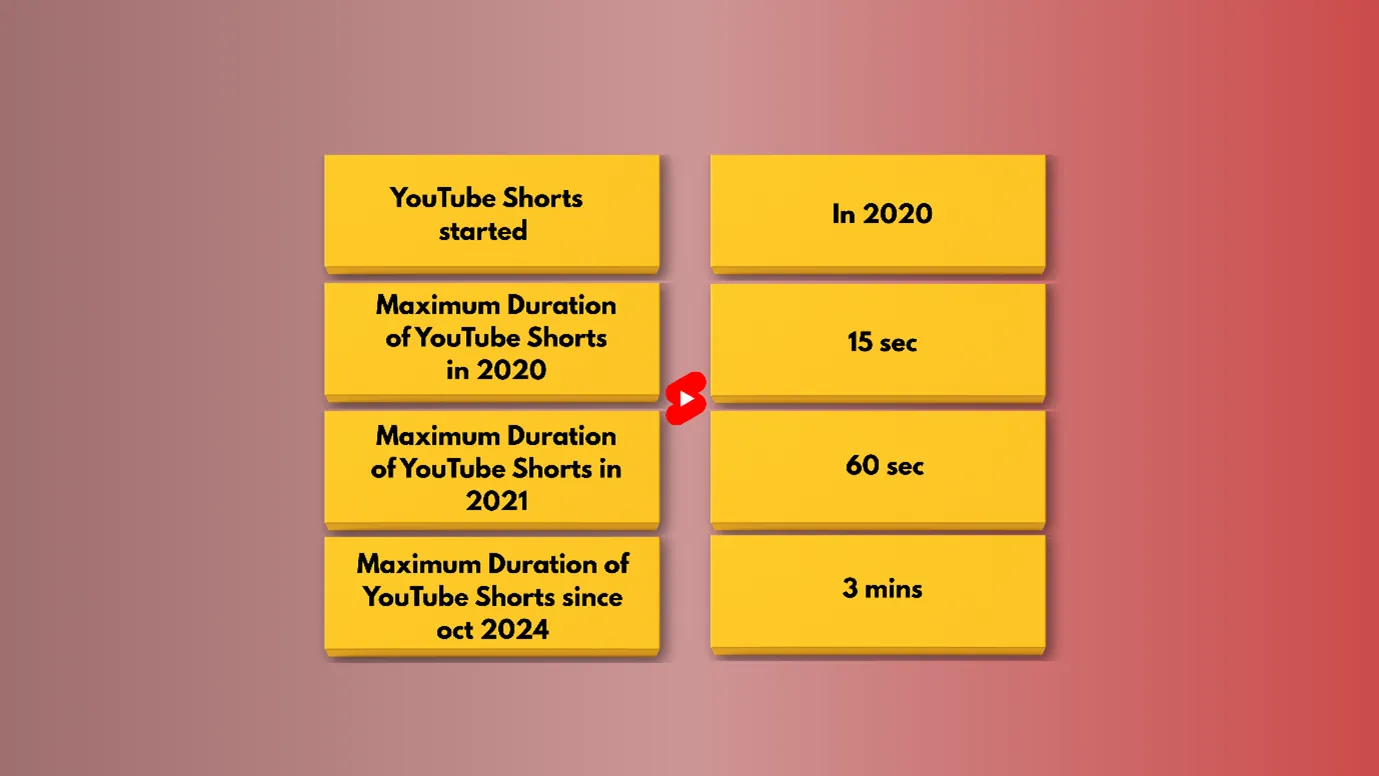
As TikTok reels were very much popular among the audience, YouTube started Shorts in 2020. Here is the table showing the YouTube Shorts journey.
| YouTube Shorts started | In 2020 |
|---|---|
| Maximum Duration of YouTube Shorts in 2020 | 15 sec |
| Maximum Duration of YouTube Shorts in 2021 | 60 sec |
| Maximum Duration of YouTube Shorts since Oct 2024 | 3 mins |
What is a good length for YouTube Shorts?
Although YouTube has extended its Shorts time limit up to 3 Minutes, it is advisable to keep the Shorts for between 15 and 60 seconds.
It is also seen that most of the YouTube trending videos are within 10 to 20 seconds.
Can you monetize YouTube Shorts?
Yes, as we also discussed in our previous blog, how much does YouTube pay for 1 million views ?, YouTube Shorts can be monetized.
But it is important to understand the details.
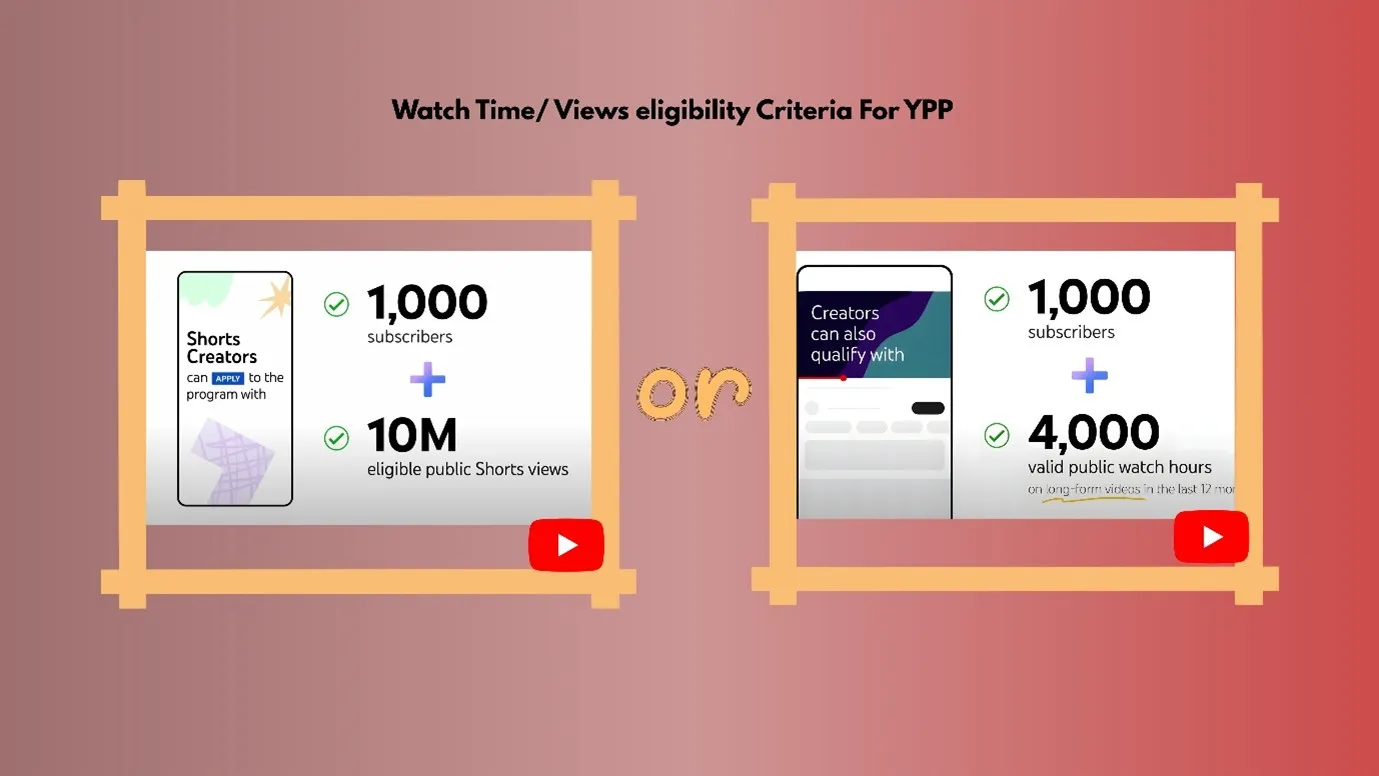
1. First, you need to apply for the YouTube Partner Program( YPP). Eligibility criteria for YPP
- 1000 Subscribers + 10 million eligible shorts views. The views should be in the last 90 days.
- Alternatively, you can 1000 Subscribers + 4000 public watch hours on long-format videos. The views should be for 365 days.
2. Now you have to create an AdSense account and link it to the YouTube Partner Program. Applying for YPP is just the permission; in most cases, money comes from ads only.
So, YPP + AdSense= earnings.
Linking YPP and AdSense is important.
3. Apart from YPP, you can also earn money via your YouTube Shorts if you get any sponsorship or brand deals.
4. You can also enroll in Affiliate marketing and promote a product via YouTube Shorts.
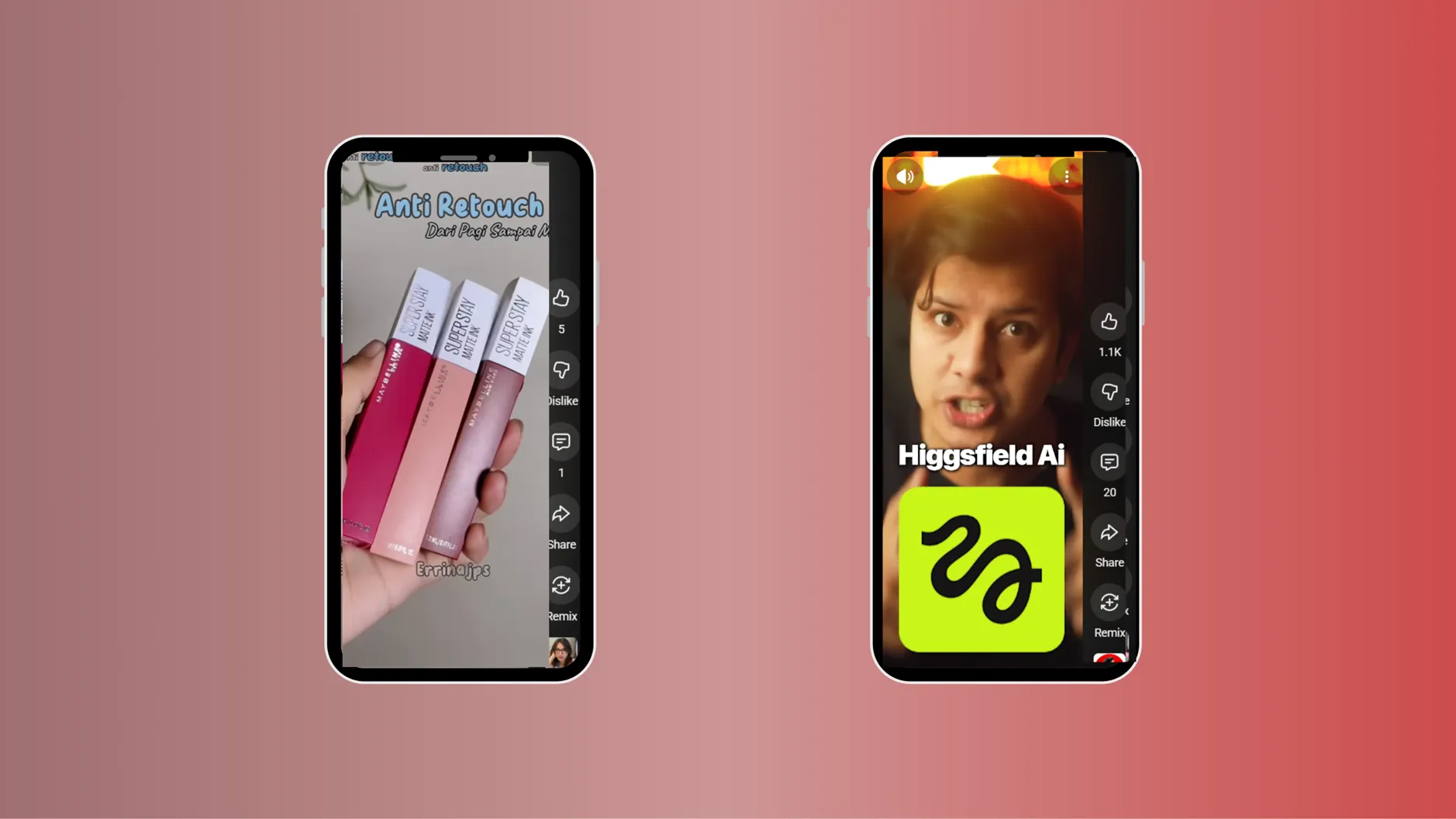
Here is an example of creators doing sponsored marketing ( of lipsticks or AI tools)
- You can also promote your own products or services via shorts.
- If you conduct YouTube Shorts Live, then you can earn money if any of your subscribers give you money through Superchats.
How much do YouTube shorts pay for $1 million views?
There is no exact answer to this question, but roughly we can say that one can make around $50–$200 per 1 million views.
Also, remember that vertical in-feed Shorts ads run between YouTube Shorts.
Your earnings depend on
- Number of total views on your shorts ( Higher views mean more chances of earnings)
- Location of your viewers
- The music used in your Shorts
How does the Shorts ad revenue sharing work?
Based on the four-step process, your YouTube ad revenue earnings can be calculated.
Short Feed Ad Revenue is pooled
You can see a short ad between many YouTube shorts.
The revenue from these ads is distributed among all short video creators (and this money is also used to purchase music licenses).
Creator Pool is calculated
If a creator is using songs in their shorts, then the revenue would be distributed to creators and music partners.
If the creator has used one song in their short video, 50 % of the Ad revenue part would go to the music partner, and the other 50% would go to the creator.
The creator pool is allocated to creators
Your Ad Revenue share depends on the number of eligible views you get on your shorts (regardless of the music used)
YouTube Shorts revenue is calculated
YouTube only gives 45 % of the ad revenue to the YouTube Shorts creators.
In simple words, YouTube gives 45% of the ad money to creators based on how many views their Shorts get, after paying music owners if any songs were used.
How to create YouTube Shorts?
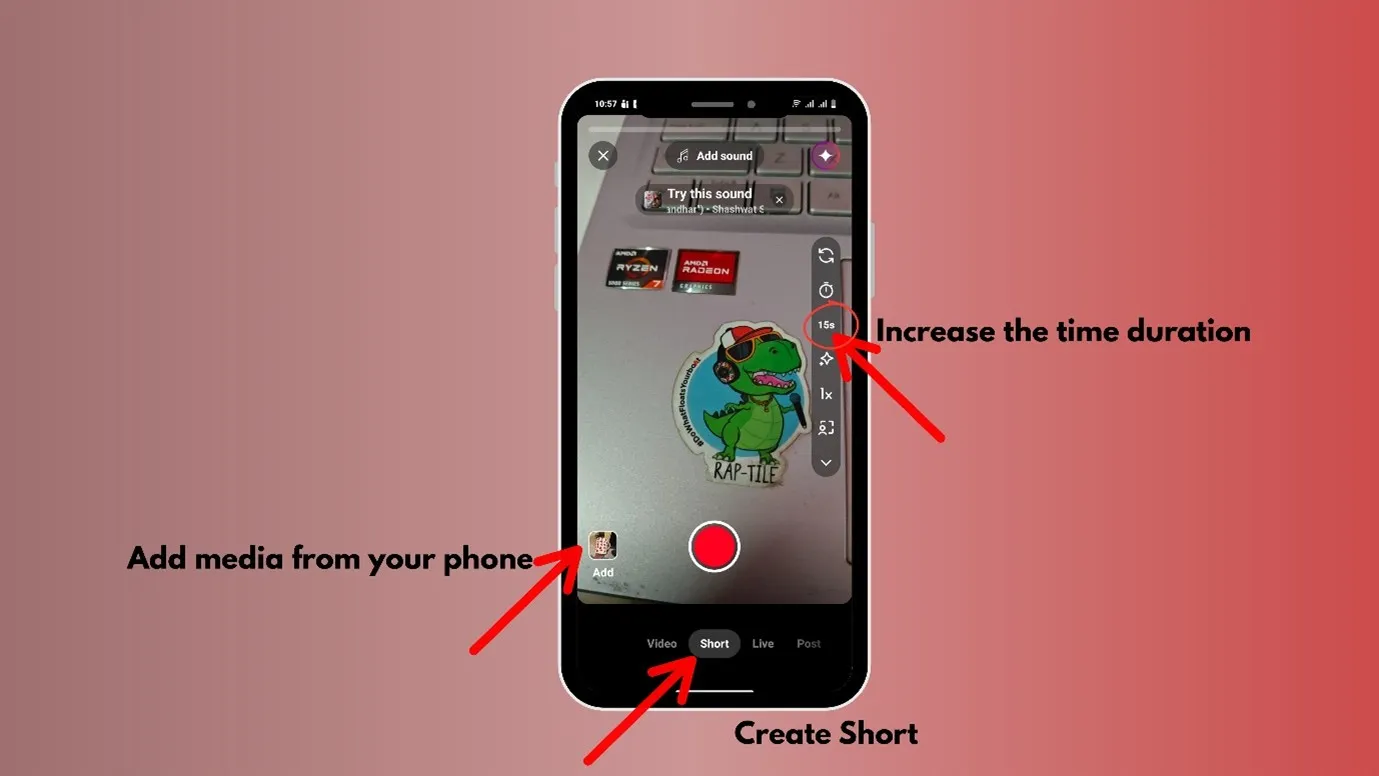
Step 1: Go to YouTube, Select Create
Step 2: And then click on “Shorts”
You can also upload any video from your device.
Also, you can create videos from Indzu and upload them as shorts. We promise that the reel will be unique, just made for you with your brand, tone, logo, color palette, etc.
It is very easy, just follow along these steps
Step 1: Sign up with your email ID
Step 2: Add your Organization
Step 3: You can take any plan or start a free plan.
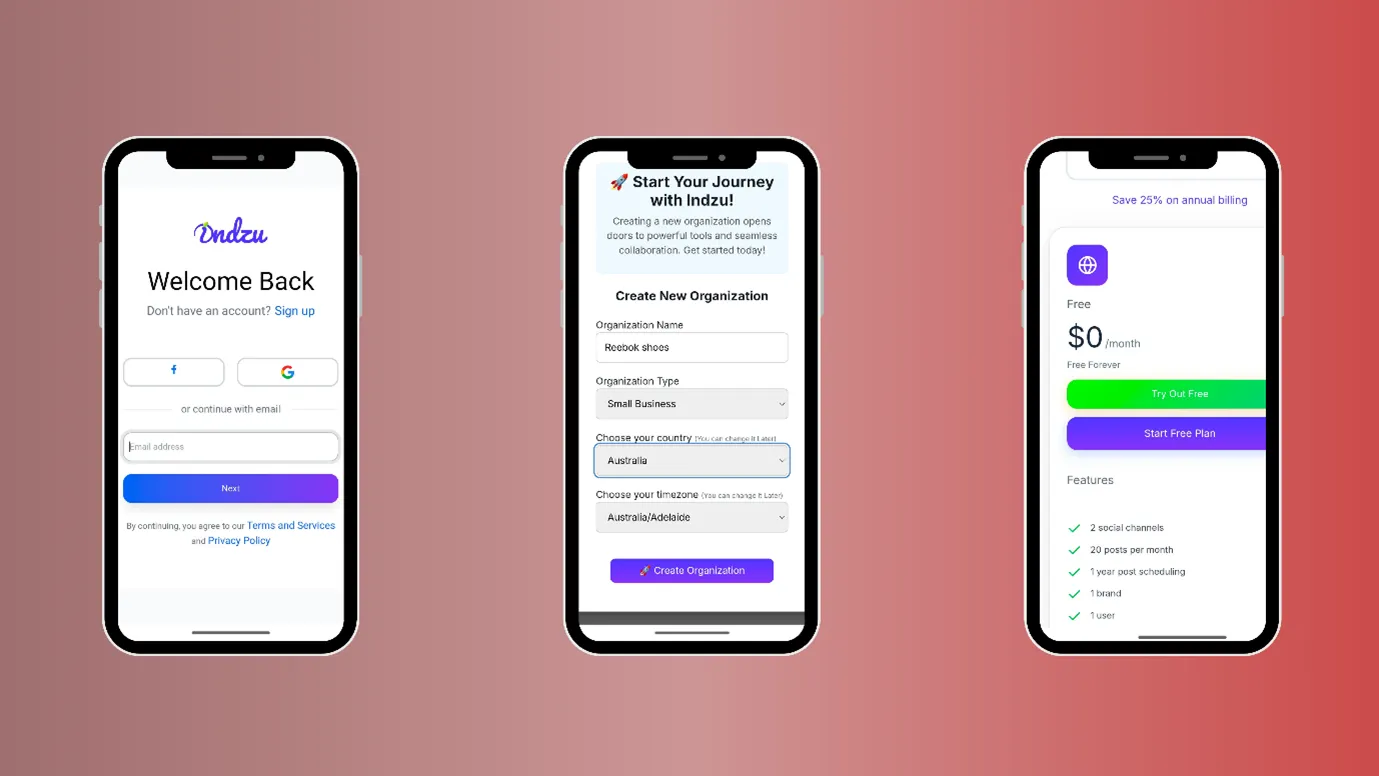
Step 4: Enter your website ( Indzu will automatically pull in your brand details, like your mission, vision, services, and tone. It will set your brand. You can also feed them manually.)
Step 5: Click “Generate Video.
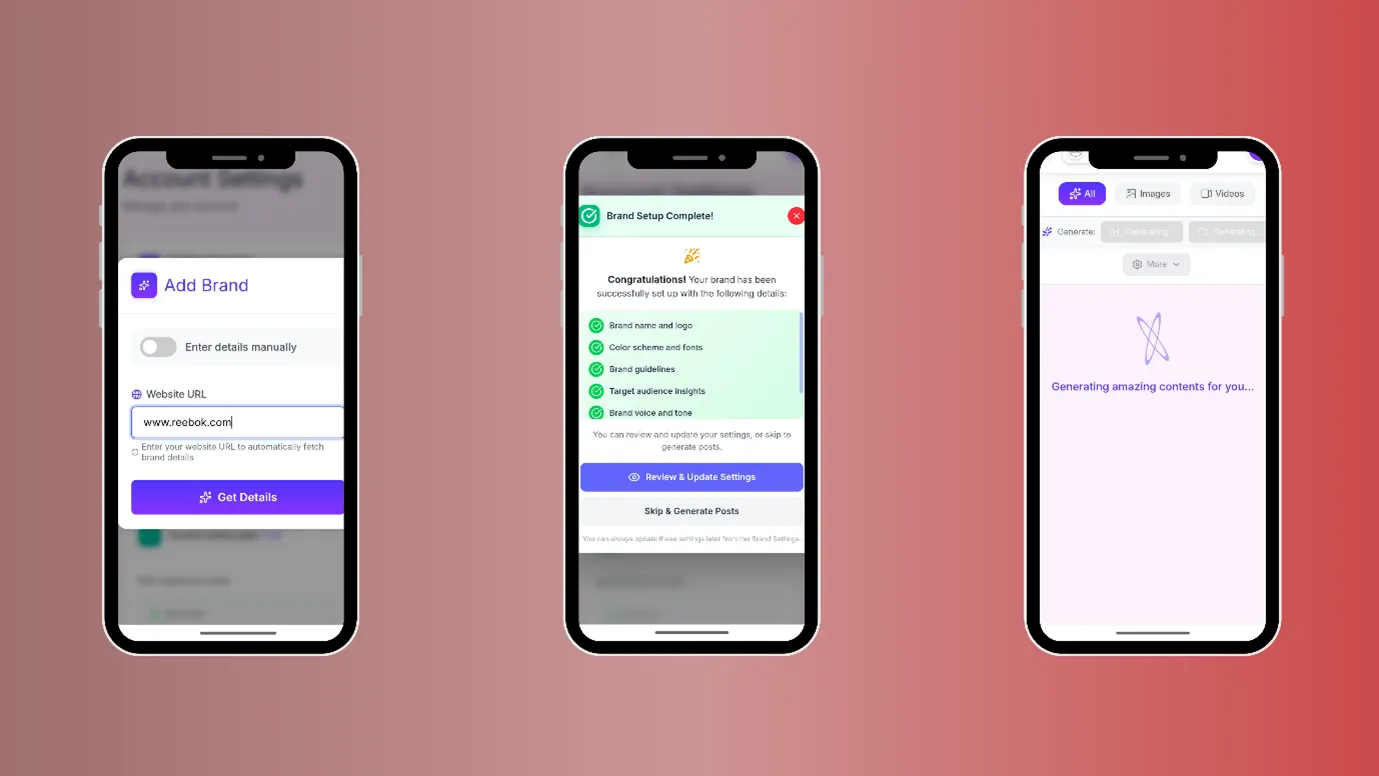
Step 6: You can edit the video after generation in the built-in video editor of Indzu.
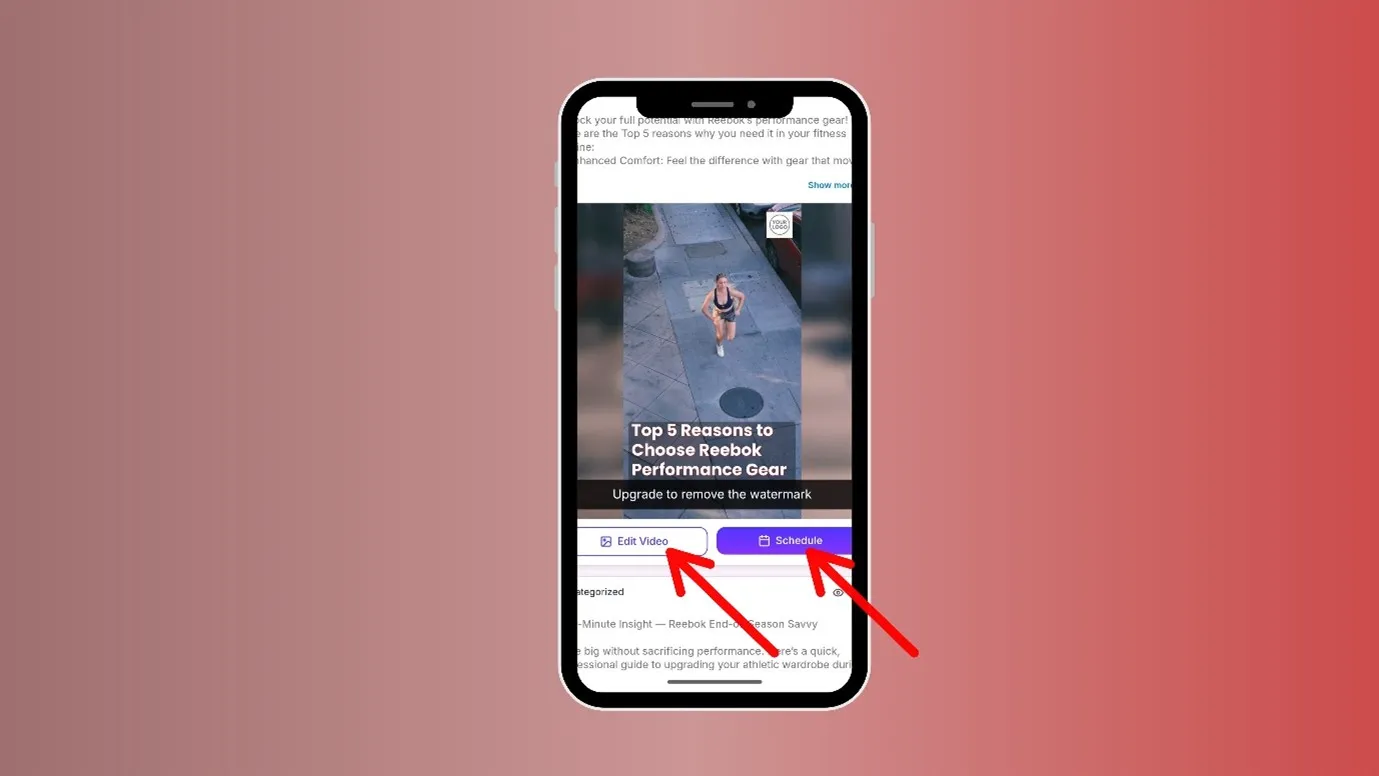
A reel would be generated, and you can post the reel by connecting your YouTube channel with Indzu.
Indzu is the one and only content creation + social media management tool in the market.
Hidden tricks to make your YouTube Shorts Viral
The first 30 characters of your Title should be interesting.
Only the first 30 characters of your title is visible to the audience while they are scrolling YouTube on their phones. So, write it in an interesting way.
For example- “ How to ignore someone.”, “ This trick works 100%.”, “ This is dangerously funny” etc
Also add emojis in your Titles to make them more interesting.
Use Pinned comments instead of the description box
Going to the description box of a YouTube Shorts is difficult, but going to the pinned comments or scrolling through comments is easier.
You can add your call- to-action, sources to follow, and see, etc., in the pinned comments
Choose an interesting Thumbnail
People won’t stop at your Shorts if they do not find any reason to stop. The reason could be your Thumbnail, your title, or your music.
So, choose your thumbnail and music wisely
Do content research using Google Trends.
Many of you might know how to use Google Trends. You can directly go and search what is trending on YouTube.
Step 1: Go to Google Trends
Step 2: Go to “ explore”, choose location, time frame, categories and in the “ web search” area choose “ YouTube.
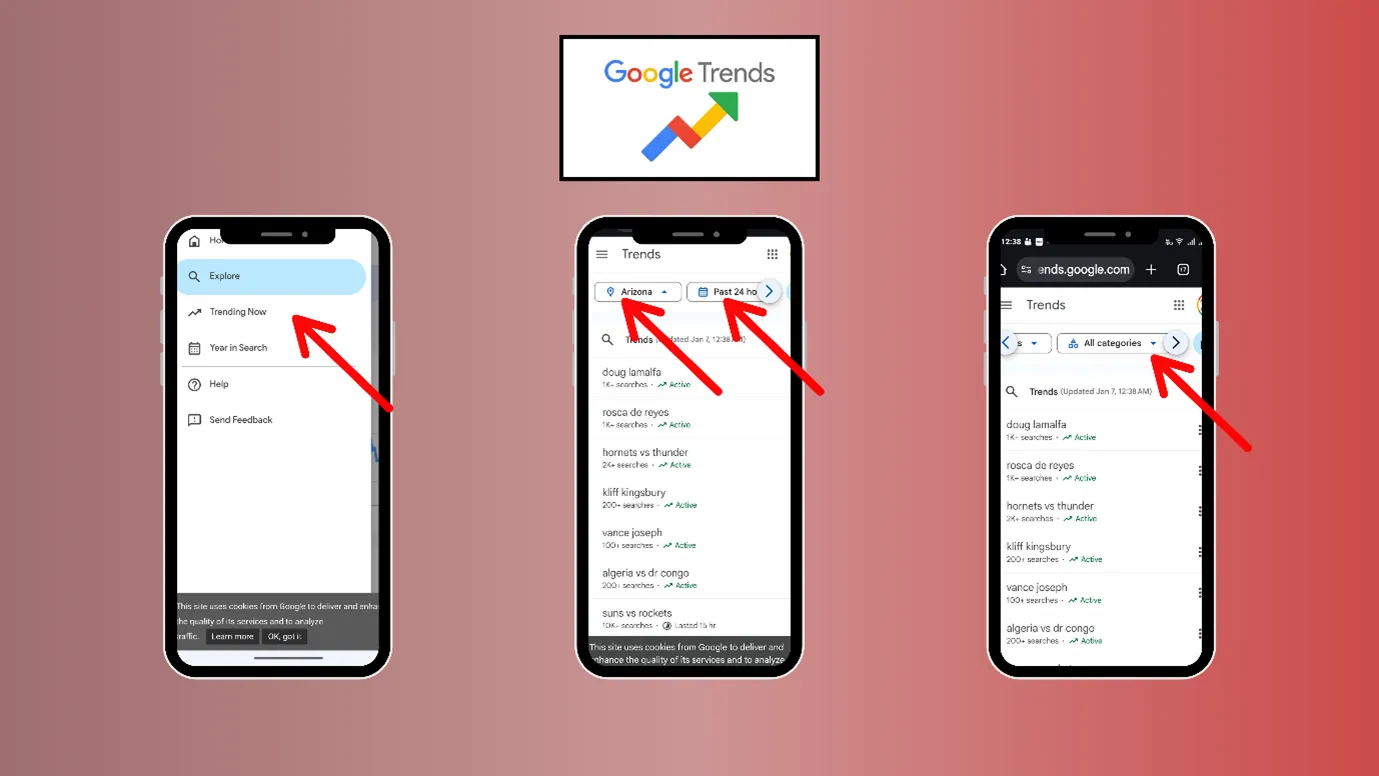
Search topics and queries would appear. This can be a gold mine for you. Now you have to just create shorts based on the queries.
Change something on your screen every 5 to 7 seconds
Any movement catches attention. So, there should be a change happening in your video every 5 to 7 seconds
For example, either the captions are changing, or there is some text popping up at the bottom, or new images are appearing, anything that gives a perception to the audience that things are moving fast.
Also, remember that you do not need very professionally edited videos or fancy equipment to film a YouTube shorts. You can randomly start making videos with your smartphone and post them.
Key Takeaway
Now that you know how long can YouTube Shorts be, you can do so much with YouTube Shorts. If you wanted to try storytelling or try making short videos before getting into long-format videos, this is the right time.
Also, remember that consistency matters more than perfection. When Indzu content creation and smart AI tools are available to you, your journey will be 70 % easier.
Also, if you want to know more about YouTube views or YouTube as a social media, you can keep reading.
FAQs
How long are yt shorts?
YouTube Shorts could be a minimum of 15 sec long and a maximum 3 minutes long.
|
Maximum Duration |
3 Minutes |
|
Minimum Duration |
15 Sec |
Can YouTube Shorts be of 2 minutes?
Yes, you can create a 2-minute short on YouTube. You can create up to 3-minute shorts on YouTube.
But do not make a video in 16:9 format, it will be taken as a long-format video. You need to make square or vertical format videos to be classified as shorts.
Can YouTube Shorts longer than 60 seconds be posted?
Yes, Shorts longer than 60 seconds can be posted. In 2021, YouTube Shorts were allowed up to 60 seconds, but now you can easily post up to 3 minutes. Make sure to make the video in vertical or square format.
Is Shorts 3 minutes now?
Yes, since oct 2024, YouTube extended the Shorts duration limit up to 3 minutes. So, shorts are 3 minutes now.
What is YouTube Shorts’ size ratio?
Here is the table showing all the data
|
YouTube Shorts Size |
9:16 aspect ratio/ Square size |
|
YouTube Shorts Dimension |
1080 width, 1920 height |
|
YouTube Shorts Thumbnail Size |
1280 X 720 pixels |
What is best length for YouTube shorts?
If you are targeting a wider reach, then try to keep the shorts short. You can make the length from 10 to 30 seconds.
But if you are into storytelling/educating/providing deeper values, you can make the shorts longer.
How much money is 1000 views on YouTube Shorts?
You can earn roughly $0.01 – $0.10 for 1000 views
Your earnings depend on
- Number of total views on your shorts ( Higher views mean more chances of earnings)
- Location of your viewers ( if your viewers are from the UK, USA, Canada, etc., your earnings would be higher.
- The music used in your Shorts.
Why are YouTube Shorts low resolution?
YouTube compresses the videos for faster speed. But here are certain things you can do to make your shorts’ quality better
- Upload at the correct size and settings (FPS: 30 or 60 fps, Bitrate: 12–20 Mbps, Codec: H.264, etc)
- Try to upload it from your desktop, so that you will have access to more settings. Wait till it shows 4K while uploading.
Can we only add 15 seconds of music to YouTube Shorts?
YouTube has changed its limit now; you can add music up to 2 minutes. Earlier, YouTube had set a cap of 15-second music, but now you can add music up to 120 sec.