
How many YouTube Shorts should I upload on Day 1?
A question frequently asked by new creators as soon as they step into the YouTube Shorts. But, before we answer how many YouTube shorts should you upload on Day 1, first you need to understand what YouTube Shorts is?
YouTube Shorts are a dominant force in content creation, significantly gaining more views and likes per video than regular long-form videos.
In fact as of November 2025, YouTube Shorts have received over 9 trillion views, averaging around 100 million views per day. Among the social media formats, YouTube Shorts is one of the fastest growing formats on the platform.
Even creators with zero subscribers can see explosive reach if you post at the right time. For a new creator and someone who has a bunch of questions like
- How many YouTube Shorts Should I Upload on Day 1?
- How to make a YouTube shorts?
- Should you post multiple YouTube Shorts a day
- How to grow on YouTube Shorts?
- How to create the best Shorts video?
- How often should you post on YouTube Shorts?
Indzu social has brought this blog as the answer. So let us probe into YouTube Shorts.
When did shorts come out?
YouTube Shorts was created in 2019 to compete with TikTok, the leading online video platform for short clips. YouTube started experimenting Shorts as 30 second videos within the YouTube homepage. The early beta version was released only for a few creators in 2019. YouTube brought Shorts for follower usage on September 15, 2020, when TikTok was banned in India on the same year.
Finally on July 13, 2021, YouTube Shorts was released globally. TO enhance the user experience, it later introduced YouTube Create, a video editing app on September 21, 2023. YouTube Shorts video length was increased to 3 minutes and all videos shorter than 180 seconds will be automatically turned into Shorts.
How to Make YouTube Shorts When Planning How Many YouTube Shorts Should I upload on Day 1?
Before learning How many YouTube Shorts Should I Upload on Day 1, you must learn how to make YouTube Shorts.
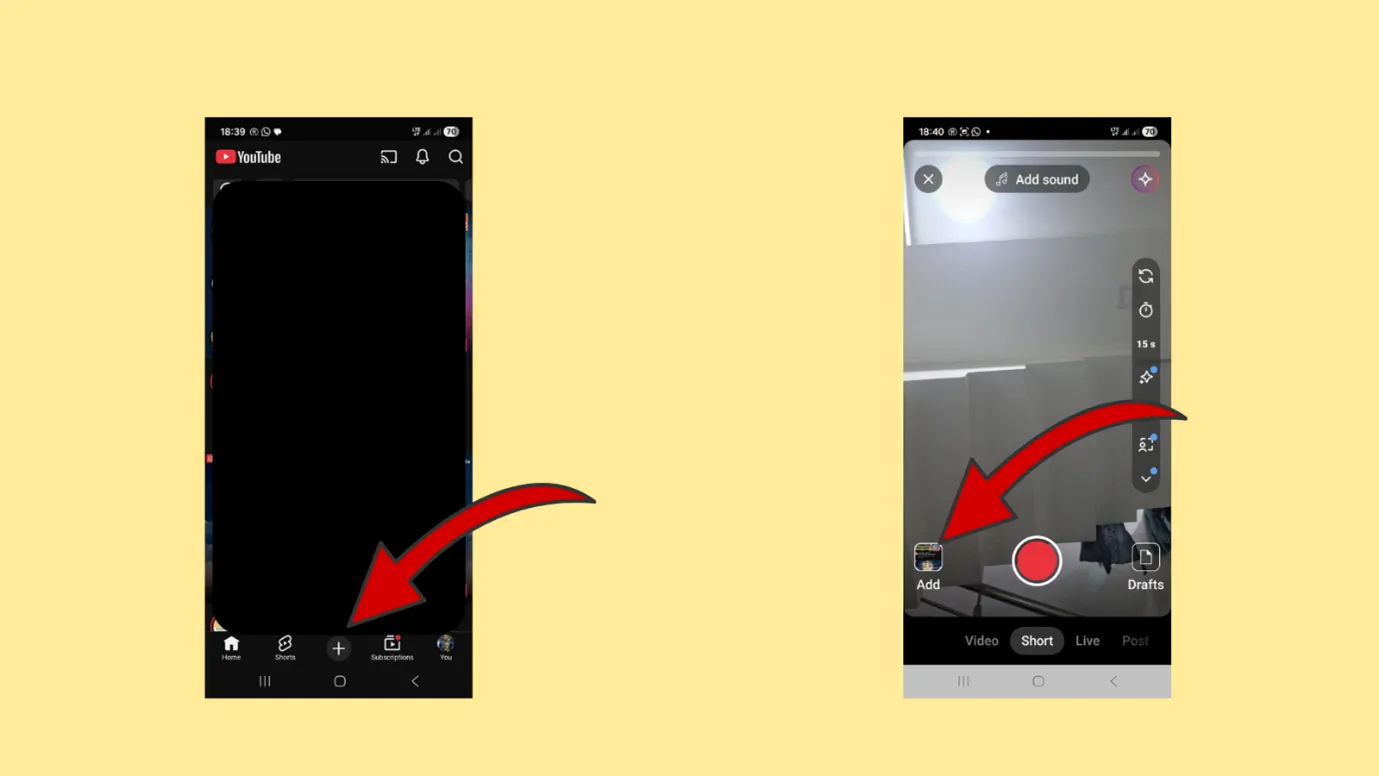
Step 1:
Open the YouTube App in your smart phone. And click create button shown at the bottom of the App.
Step 2:
Choose Shorts from the Options available at the bottom of the App and look for Add button just above it.
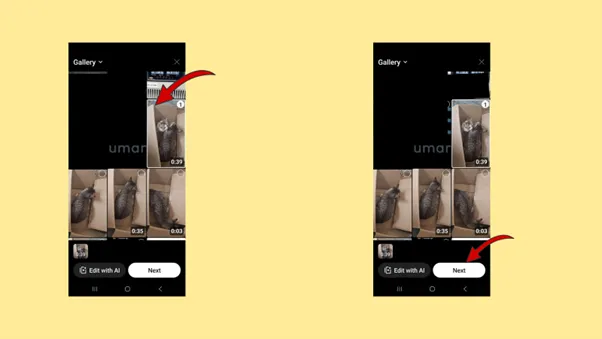
Step 3:
Once you click Add, you are directed to the Gallery section of your smart device.
Step 4:
Select the video that you want to upload from the gallery and click “Next”.
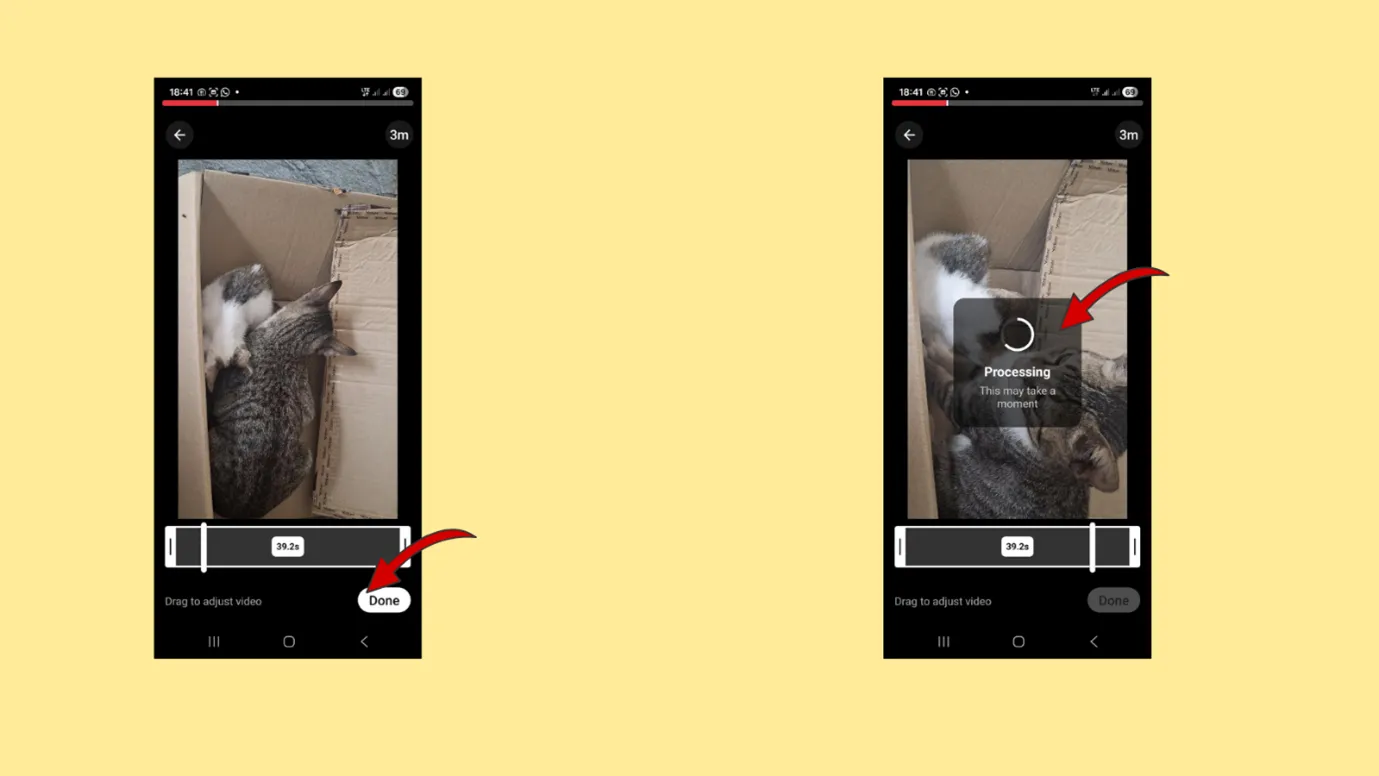
Step 5:
Your video gets uploaded to the platform. Click “Done” once the processing is complete.
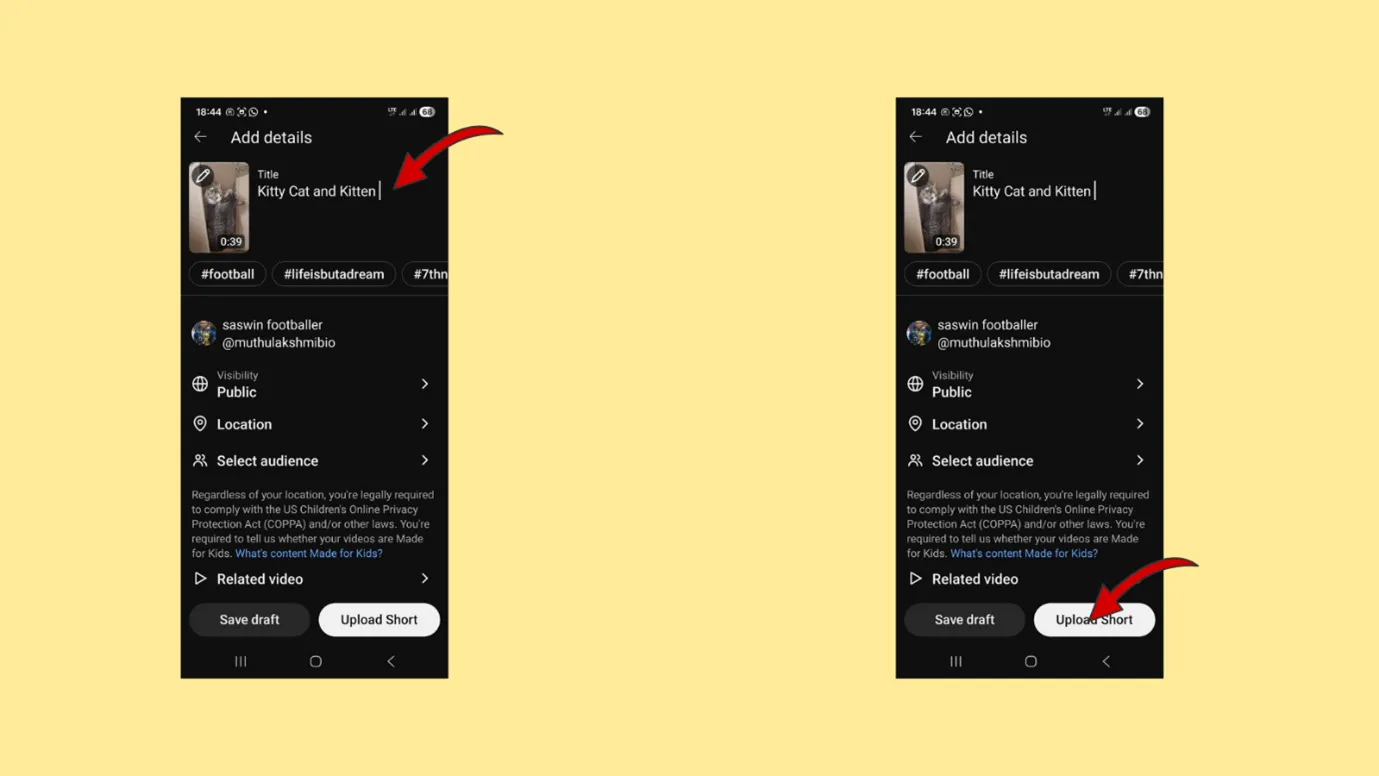
Step 6:
You are directed to the “Add Details”Page. Write a suitable title to the Short Video and add hashtags (it is optional).
Step 7:
Choose shorts visibility to Public, if you want to share it with the rest of the world. You can also select the Location and your Audience.
Step 8:
Once the details are added and verified, Click “Upload Short”.
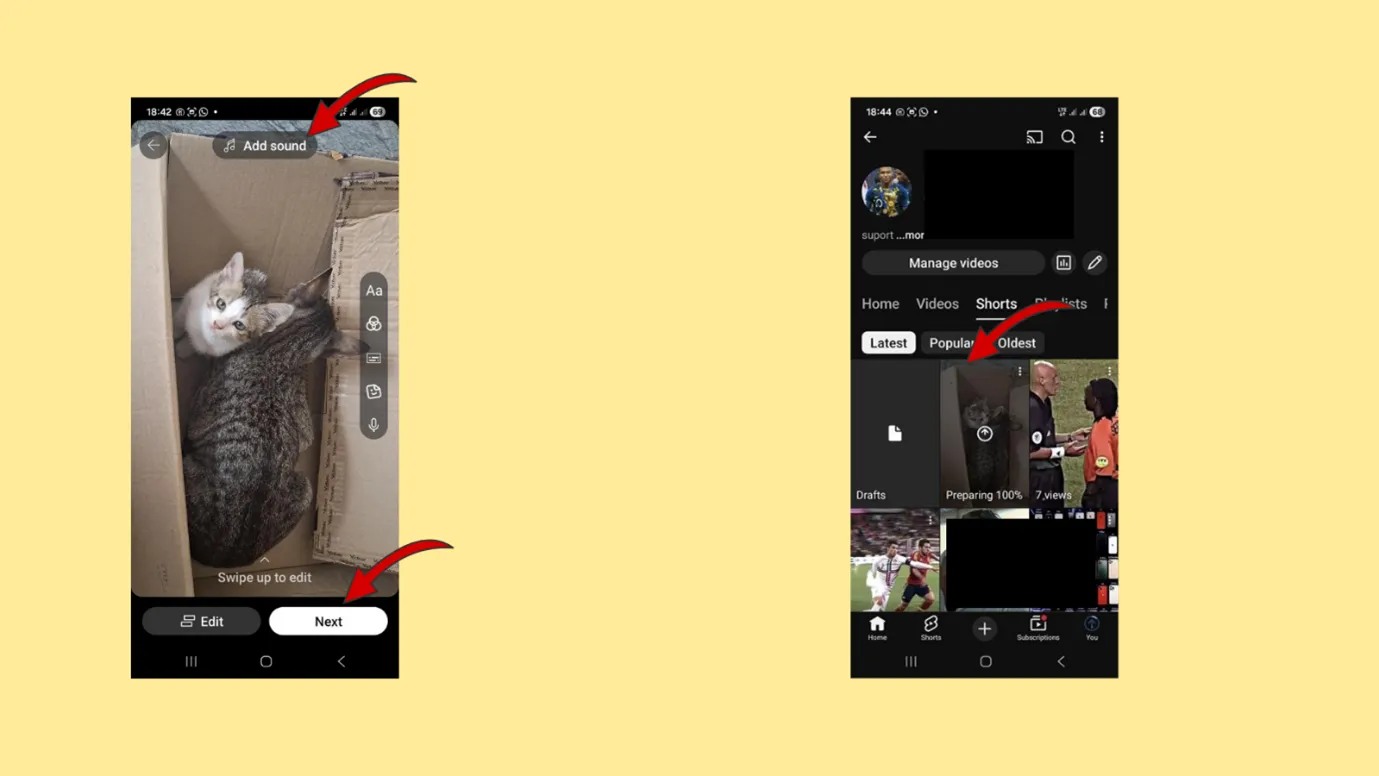
Step 9:
After processing, you can also add sound and text to the video.
Step 10:
You can see the video displayed in the gallery and ready for public view.
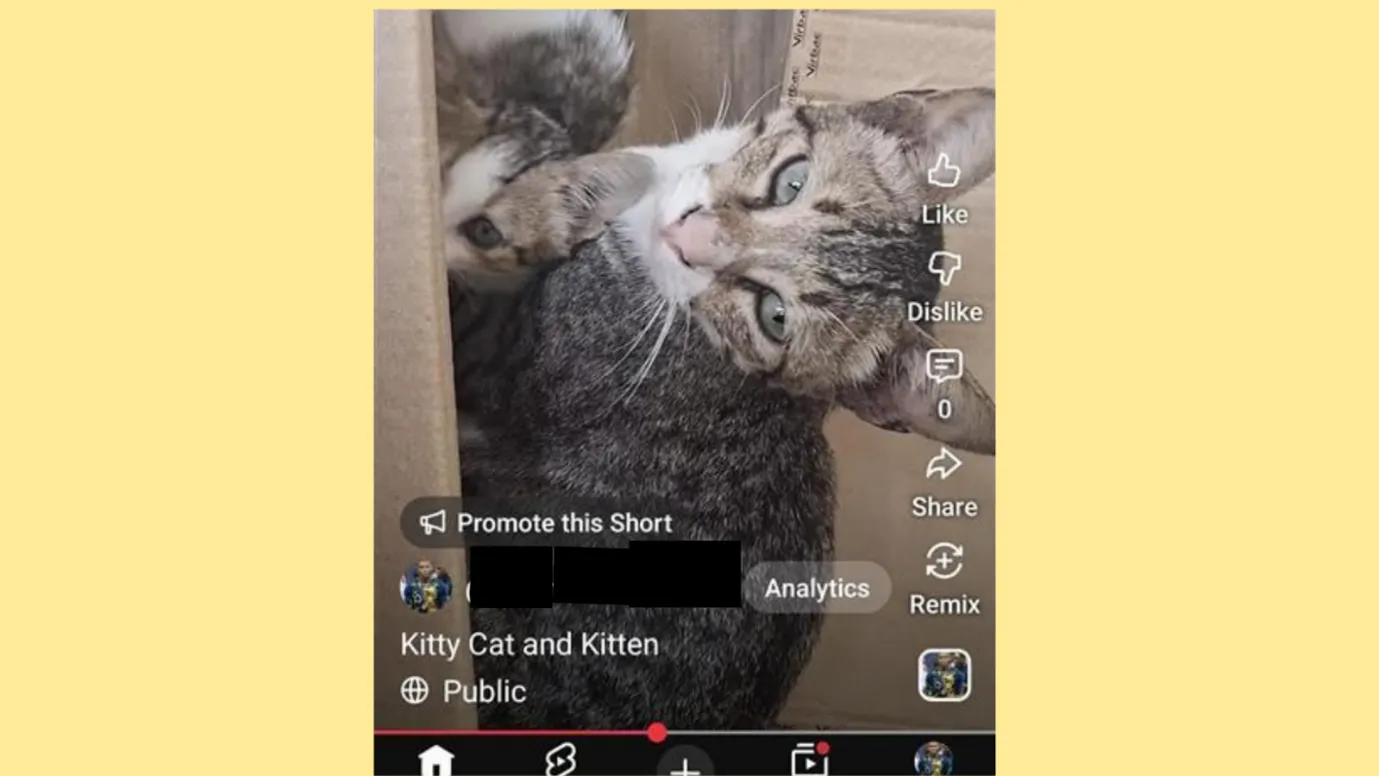
Step 11:
Once the upload is successful, your shorts will show the like, dislike, comment, share and remix option along with the video.
How often should you post on YouTube Shorts Based on How Many YouTube Shorts Should I Upload on Day 1?
Now that we have learned the history of YouTube Shorts and how to create one, let us look into the fame and money that Shorts can bring to your table.
To begin with, let us find how often a new creator must post YouTube Shorts per day.
For a new creator, the ideal posting frequency on Day 1 is
- 3-5 Shorts on your first day
Reasons for Posting 5 YouTube Shorts on First Day
- The YouTube Algorithm gets more data points
Posting 3 to 5 YouTube Shorts on Day 1 gives signal to YouTube algorithm about your
- Niche
- Content type
- Audience type
- Engagement hooks
- Approximate watch time for the Shorts.
Thus, by uploading 5 Shorts, you are actually giving more idea to YouTube about your channel.
- Multiple uploads increase your chances of going viral.
Not all creators hit this Jackpot for Shorts. But Jackpot is available for maximum Shorts video uploads.
When you upload 3-5 shorts:
- One might get average views.
- No views.
- Thousands of views with a little engagement.
- Stay one the Shorts Cycle for more than a day.
- Hit the right audience group.
Just like tossing a coin and expecting only heads, the more you post, the higher are your chances of going viral.
- You build consistency on Day 1.
For a creator on YouTube, the introduction of their channel to the algorithm is very important. Posting multiple YouTube Shorts shows that you are an active creator with some concept.
It helps you to enhance your early reach.
- You understand what type of content works with your audience.
Though day 1 content is not about perfect, it shares the dimensions for your channel.
You can learn,
- Which type of hook works best?
- Identify the topics that brings more views.
- Editing style.
- YouTube Thumbnail size that gets more clicks.
- Define Call-to-action for your channel.
Within 24 hours, you gain more insights for your channel and loads of ideas on what to post next.
How Often Should You Post on YouTube Shorts?
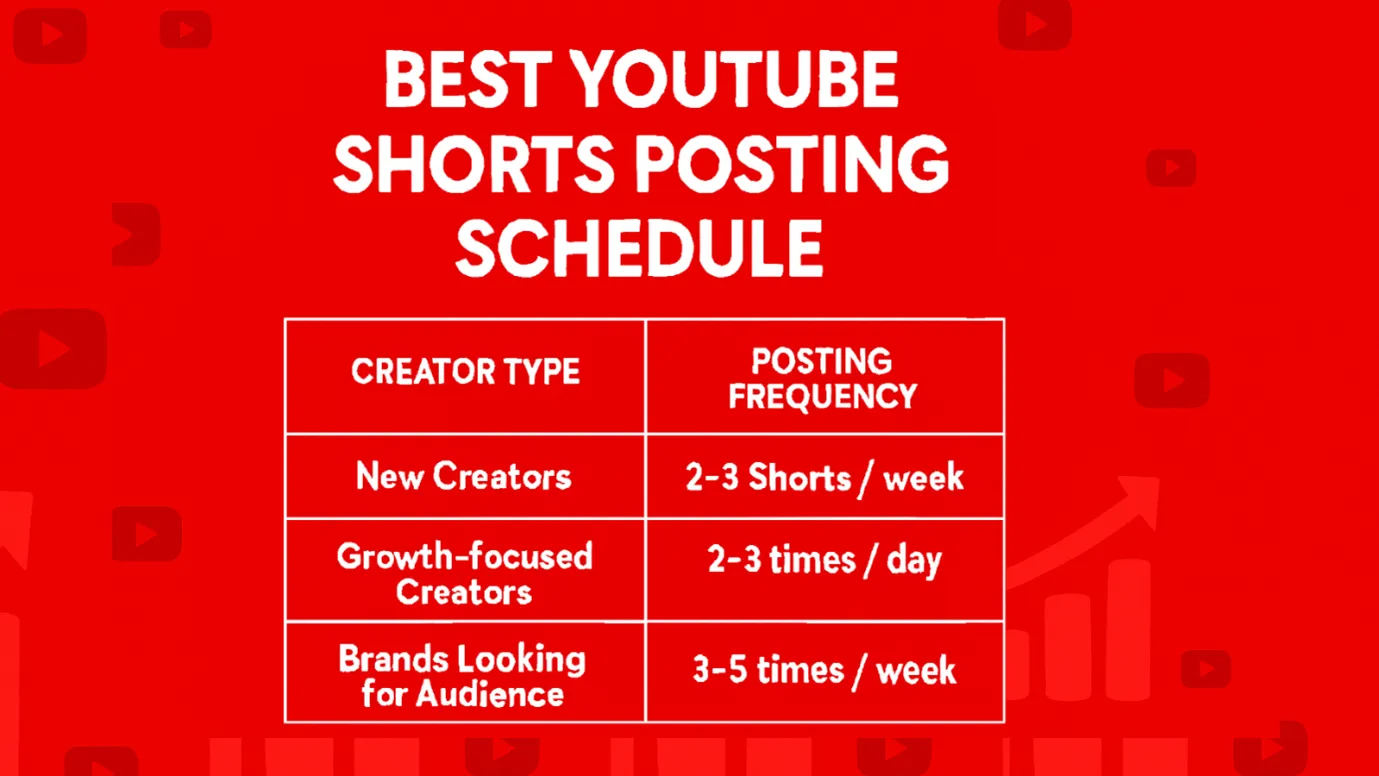
After Day 1, you can post YouTube Shorts regularly in a consistent pattern. Don’t flood the platform with videos. Try to post based on what you plan to achieve with your channel.
| Creator Type | Posting Frequency | Why? |
|---|---|---|
| New Creators | 2–3 shorts / week | Build your library and increase volume as you get comfortable with YouTube Shorts. |
| Growth-focused Creators | 2–3 times / day | Maximize viral potential through frequent Shorts. |
| Brands looking for Audience | 3–5 times / week | Focus on quality and consistency over volume. |
YouTube Shorts Video Size, Width and Height to Support How Many YouTube Shorts Should I Upload on Day1
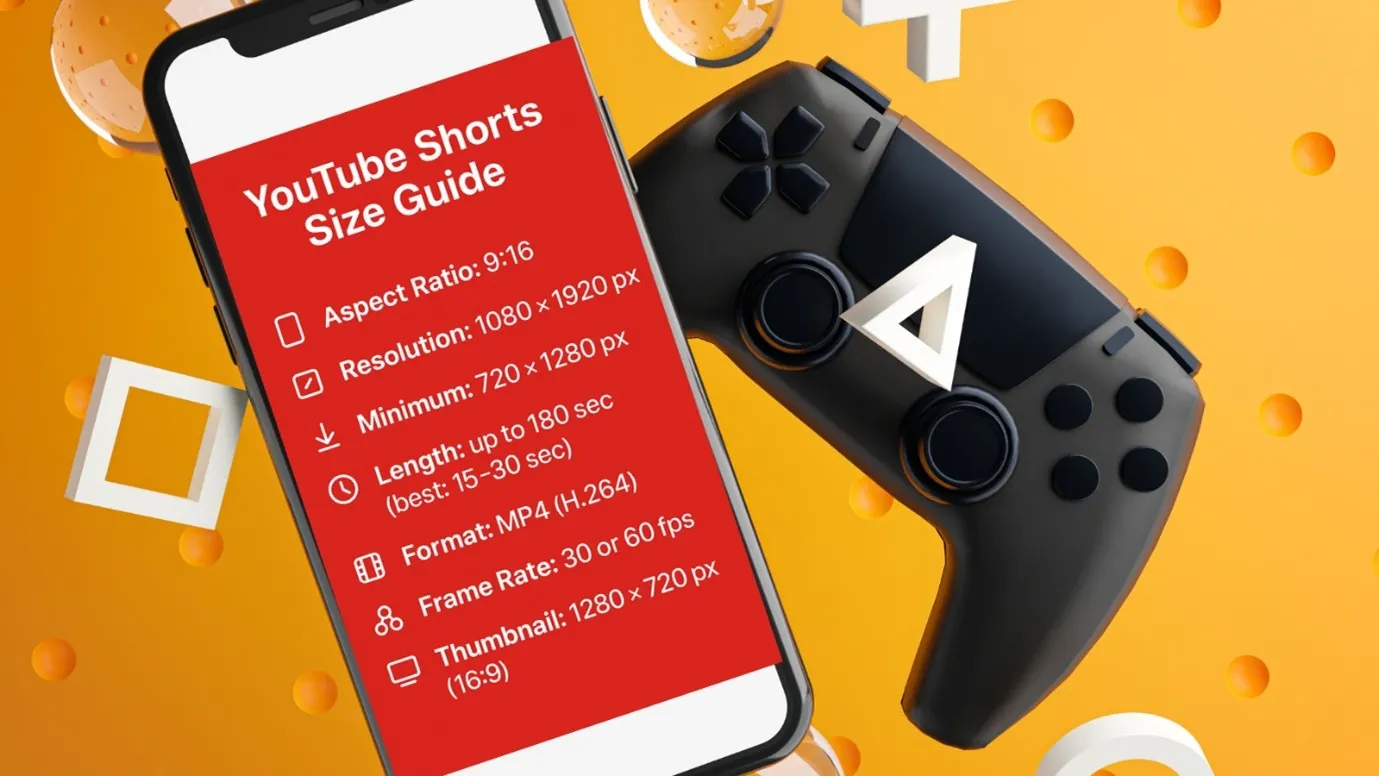
Here is the ideal video size for YouTube Shorts:
Aspect ratio: 9:16 (Vertical/ portrait format). This size is suitable for mobile view as most Shorts are watched via mobile globally.
Recommended resolution: 1080 x 1920 pixels for a full HD vertical. (width 1080 px and height 1920 px). This resolution ensures a sharp and clear visual for smart phones. It also avoids blur compression artifacts. Uploading the video in the correct size helps your video to get treated as a Short. If there is a variation in resolution, YouTube adds black bars, crop it and display that poorly. It will hurt customer engagement.
How long are YouTube Shorts?
The maximum length of YouTube Shorts is 180 seconds. Most creators create YouTube Shorts within 30 seconds for maximum engagement and likes.
Video Format: MP4 (H.264): This format works best for compression and excellent YouTube upload quality.
Acceptable minimum resolution: 720 x 1280 pixels ( this resolution also works but we recommended the standard resolution for optimal view).
Frame Rate: It is advisable to use the original recording rate. The recommended frame rate for YouTube Shorts is 30 fps or 60 fps.
YouTube Thumbnail size: The recommended size for YouTube thumb nail is 1280 x 720 pixels. The aspect ratio remains the same as 16:9.
H2: Best time to Post YouTube Shorts
Choosing the best time to post on YouTube Shorts can make a huge difference in how many people actually see your video. There is no guarantee that a quality content will reach more audience, when posted at the wrong time. YouTube is the most watched platform since 2020 and the viewing time has increased from 70 million views per day in 2023 to 100 million views per day in 2025.
Global YouTube data shows that there are certain hours when views, engagement, and watch time shots up. Posting during these peak hours increases your chances of getting discovered and landing on the shorts. It also adds to your subscriber count.
| Day | Best Time to Post on YouTube Shorts |
|---|---|
| Monday | 11:00 AM – 1:00 PM |
| Tuesday | 12:00 PM – 2:00 PM |
| Wednesday | 11:00 AM – 3:00 PM |
| Thursday | 12:00 PM – 4:00 PM |
| Friday | 10:00 AM – 12:00 PM |
| Saturday | 9:00 AM – 11:00 AM |
| Sunday | 9:00 AM – 12:00 PM |
These day-wise posting times will act as a starting point for creators to align your uploads with peak viewer activity. Posting at the right time on YouTube creates better chance to be seen, engaged with, and pushed by the algorithm.
Content Calendar for a SaaS Brand: YouTube Shorts ideas for a month
JANUARY – 2026
| Sunday | Monday | Tuesday | Wednesday | Thursday | Friday | Saturday |
|---|---|---|---|---|---|---|
|
1 Theme: Feature Teaser Idea: A 10-sec intro on “What is Indzu Social?” |
2 Theme: Before/After Idea: Manual posting vs AI-powered posting |
3 Theme: Feature Spotlight Idea: AI Caption Generator demo |
||||
|
4 Theme: Problem/Solution Idea: “Don’t know what to post?” – Indzu AI ideas |
5 Theme: Tutorial Idea: Generate 30 days of content in 30 seconds |
6 Theme: Myth Busting Idea: “AI can’t create original content?” Debunk |
7 Theme: Quick Tip Idea: Best time to post using Indzu insights |
8 Theme: BTS Idea: How ZU AI works (simple + fun) |
9 Theme: User POV Idea: “I planned 330 days in 5 minutes!” |
10 Theme: Trending Audio Idea: “Social media manager be like…” |
|
11 Theme: Comparison Idea: Canva-style vs Indzu workflow |
12 Theme: Customer Quote Idea: 10-second testimonial |
13 Theme: Productivity Tip Idea: “Stop wasting time on captions – use this instead” |
14 Theme: Mini Demo Idea: Bulk scheduling in seconds |
15 Theme: Listicle Idea: “3 Instagram mistakes brands make” |
16 Theme: Showcase Idea: Indzu Social template pack highlights |
17 Theme: FAQ Idea: “Is Indzu free?” Plan breakdown |
|
18 Theme: Storytime Idea: Why we built Indzu Social |
19 Theme: Engagement Prompt Idea: Ask viewers: “Need caption ideas daily?” |
20 Theme: Humor / Relatable Idea: When a client says, “Post something engaging…” |
21 Theme: Social Media Tip Idea: Hashtag strategy simplified |
22 Theme: Quick Win Idea: Repurpose one post into five formats |
23 Theme: Product Update Idea: Share new feature or UI update |
24 Theme: Motivational Idea: “Small creators grow with consistency” |
|
25 Theme: Case Study Idea: Before/after analytics results |
26 Theme: Demo Idea: Smart Publish Calendar walkthrough |
27 Theme: Carousel Preview Idea: Convert Indzu carousel into Shorts teaser |
28 Theme: Audio Hook Idea: “Stop scrolling! 5-sec content idea” |
29 Theme: Mini Tutorial Idea: Managing multiple brands in Indzu |
30 Theme: CTA Video Idea: Try Indzu Social today. Create smarter |
31 Theme: Bonus Day Idea: Recap: every feature you should try this year |
How Engagement and Reach Differ Between YouTube Shorts and Regular Videos
| Metric | YouTube Shorts Videos | YouTube Videos |
|---|---|---|
| Average Views | 4× – 6× more views on average | Lower average views |
| Engagement Rate | Higher engagement rate (5.91% in Q1 2024 – YouTube) | Lower engagement rate on average |
| Viewer Retention / Attention Span | Short and snappy | Harder to retain full views |
| Upload Frequency Potential | Can publish more frequently | Typically slower due to longer planning, filming, and editing |
| Barrier to Entry | Low. With minimal setup and a smartphone, creators can easily produce vertical videos | High. Requires scripting, filming, and editing for quality output |
| Potential for Virality | High | Moderate |
| Time Investment per Video | Low | High |
| Subscriber Conversion | Better chance to grow quickly, even with zero subscribers | Slower growth curve without strong distribution and assets |
| Content Longevity | Shorter shelf life. Fast spikes may fade quickly | Longer-term value with evergreen potential |
YouTube Shorts Ideas
Most viewed YouTube Shorts have one thing in common: They hook viewers instantly and deliver a payoff. The secret lies in creating moments that are bite-sized, addictively watchable, and worth looping. Whether content is about a surprising reveal or a relatable situation, a mini challenge, or a quick tip, the virality key is to strike fast and leave viewers hungry for the next bite.
Here are a few YouTube Shorts Ideas for a social media management tool.
- User Testimonials: (e.g.) See how John reduced workflow time by 50% using indzu.
- Mini case studies: (e.g.) One tip from a power user that changed your project direction.
- Industry Insights: (e.g.) 80% of teams waste hours on manual tasks. Fix it in 60 seconds with indzu.
- Trend Hijacking: (e.g.) Expectation vs Reality: Using Automated Captions.
- SaaS Humor: (e.g.) When your team discovers preview feature for the first time [ reaction clip in meme style].
- Before/ After Transformations: (e.g.) Before indzu: 10 hours spent. After indzu: 1 click and done.
- Problem/ Solution Format: (e.g.) Stop wasting time on spreadsheets! Try this instead.
- Tutorials in 30 – 60 seconds: (e.g.) How to set up Scheduling feature in under 60 seconds.
- Quick Tips: (e.g.) One-click tips to supercharge your workflow.
- Tricks: (e.g.) 3 hidden features in indzu you didn’t know existed.
How to create the best Shorts Video?
Any vertical video uploaded in your channel cannot bring views. You need successful Shorts that delivers value, grabs attention, and keeps your viewers watching all in under 180 seconds. Here are the simple steps to follow for best Shorts Video.
- Hook Viewers Immediately
For any type of YouTube Shorts, you have only 3 seconds to capture your audience attention. Start with a question or a surprising element or a bold visual.
- Keep your Shorts Snappy
Even though YouTube has allowed 180 seconds for Shorts, try to keep it snappy between 15- 30 seconds. Every second counts.
- Optimize videos for Vertical viewing
Use the standard 9:16 aspect ratio videos with a pixel rate of 1080 x 1920 to fit the phone screen. If you are cropping the video make sure that nothing is cut off.
- Add captions and Text Overlays
More than 80% viewers expect captions in the Shorts as they watch without sound. Hence use captions with bold text or on-screen highlights to convey your message clearly to viewers.
- Include a Clear Call to Action (CTA)
Even in YouTube Shorts, tell viewers what to do next. It can be either subscribing, liking or trying a tip from the Shorts.
- Experiment and Iterate
Try different formats, trends, style and hooks for a month. Analyze what works well for your channel and double down on successful content.
Why are my YouTube Shorts not getting views?
The Key reasons for limited or no views may be one of the following:
- Weak Hook.
- Video Length.
- Poor Thumbnail/ Title.
- Low engagement.
- Irregular uploads.
- Mismatch in content- audience.
- Lack of channel analysis.
FAQs
- How to get more views on YouTube?
Getting more views on YouTube shorts is not an easy job, and yet not tough one too. It requires posting valuable content consistently to entertain the viewers. Use
- Strong titles,
- Eye-catching thumbnails
- Relevant keywords for more views.
- How to customize thumbnails on YouTube?
Create a 1280 x 720 pixel image in JPG or PNG format. This is the best version of a thumbnail. Once your image is ready, upload it using YouTube App under the Edit thumbnail option. You can use tools like Canva, Photoshop, or indzu social to design attractive visuals. Include high-contrast colors, readable text and expressive faces to grab attention.
- How to hide YouTube Shorts?
For creators, YouTube has features to hide your own shorts.
- Go To YouTube Studio and select the content.
- Find the Short and click Visibility.
- Change the choice from Private to Unlisted.
- How much does YouTube pay per view for Shorts?
YouTube doesn’t pay a fixed amount for Shorts. Instead, it pays through the Creators Fund, with earning vary between 1 cent to 6 cents per 1000 views. It considers the viewers location, niche, ad engagement and music usage.
- How to make a YouTube video not a Short?
If you want to make a YouTube video not a Short, upload a video longer than 60 seconds and use a horizontal 16:9 aspect ratio (landscape) and upload through a Browser on YouTube Studio.
- Can I make YouTube Shorts from existing videos?
Yes, you can make Shorts from existing YouTube videos. Open your video in the YouTube App and tap “Remix”. Choose the option, “Edit into a Short”. Trim the video under 60 seconds and publish. It helps you to repurpose long-form content and reach more viewers quickly.
- Should you post multiple YouTube Shorts a day?
Yes, you can post multiple Shorts a day. If you are testing different ideas try to post multiple posts at different time. Sometimes posting too many shorts may cause quality to drop or overwhelm viewers.