
Do you have too many vacation videos to show your audience? And wondering how to put more than one video on Instagram story. We got you.
Instagram Stories are perfect for conveying a message to your audience, as you can upload multiple videos to your story. You can show your travel highlights, behind-the-scenes moments, or everyday moments.
You cannot post multiple videos in a single Instagram story, but you can post them in separate videos; it still won’t kill your aesthetic.
Let’s get into the blog to learn how to put more than one video on Instagram story.
What are Instagram Stories?
Instagram stories are the best way to engage with your audience as they appear in the bar at the top of the follower’s feed. It is temporary, in a vertical format, and disappears in 24 hours.
The best way to interact with your audience is to upload a video to your stories. It is essential to know how to put more than one video on Instagram story. In one flow, you should be able to convey the message shown across multiple short Instagram Stories.
How to put more than one video on Instagram story?
A step-by-step guide on how to put multiple videos on one Instagram story
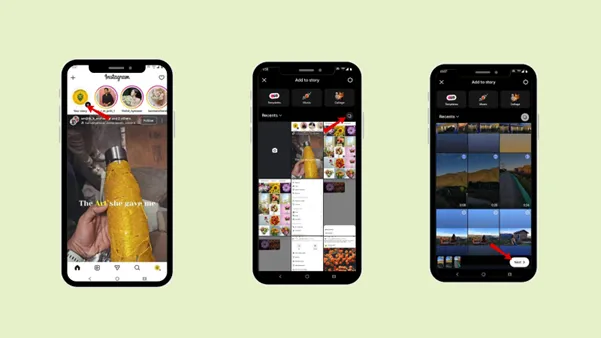
Step 1: Tap the profile picture in the top-left corner of the home page.
Step 2: Tap “Your story”.
Step 3: Select the multiple videos you want to post. Step 4: Tap “Next”.
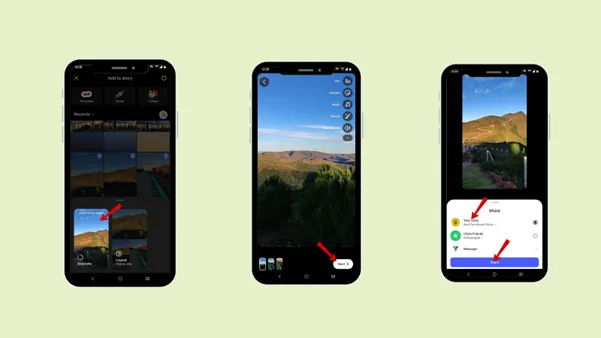
Step 5: Tap “Separate”
Step 5: Add music, caption, or filter.
Step 6: Tap “Your story”.
What is the maximum length of a video on Instagram Story?
The maximum length of a video on Instagram Story is 60 seconds (1 minute).
You can use the splitter app (a third–party app) to split the video into 60 segments. Then you can upload it to Instagram.
Dimension: 1080 X 1920 pixels ( 9 : 16 aspect ratio)
Can I add multiple videos to one Instagram story?
No, you cannot add multiple videos to one Instagram story. You need to select the number of videos you want to post, and then they will be uploaded to separate Instagram stories.
Instagram doesn’t offer a layout feature for videos. As each Instagram story last only 60 seconds, it divides each tale accordingly. You cannot merge multiple videos into a single Instagram story; you can only do so in Instagram Reels.
How to merge multiple videos into one video?
You can merge multiple videos into a single video using Instagram Reels. It has the features to merge multiple videos into a single Reel.
Step 1: Swipe left on the home page of your Instagram.
Step 2: Select “Reels”
Step 3: Choose multiple videos to merge into a single video.
Step 4: Tap “Next”
Step 5: Edit your video accordingly.
You can save the video to your camera roll, then upload it to your story.
But each story will show 60 seconds of your video.
Or you can use third-party apps like InShot, CapCut, or Adobe Premiere.
Creative Tips for Posting Multiple Videos on Instagram Story
Suppose you are planning to upload UGC (user-generated content). You need to add some creative tips to your videos.
1. Story telling
Storytelling is the best way to engage the audience when sharing multiple video clips. Instead of posting random videos, make sure your videos convey a clear, meaningful story. This keeps the audience curious about the next part.
How to create it
- Start with a strong storyline that grabs your audience in the first 1.7 seconds.
- Create the video in AIDA (Attention, Interest, Desire, Action) format.
- Keep your video short and focused.
- Arrange your video in sequence. Make sure it has curiosity to kill the audience while watching the video.
- End your video with a call to action.
2. Using Text and Music
Text and music are interactive features you should add to your video to make it more engaging.
Music Tips
- Add music from the Instagram in-built feature to your videos, or add it from a third-party app.
- Ensure your music matches your video’s mood.
- Music should be placed consistently across all clips.
Text tips
- Add short and focused captions.
- Use a bold and readable font.
- Highlight key moments.
3. Visuals
The first thing that catches the audience attention is the visuals. So, use attractive visuals in your video, as Instagram is a wide social media platform where different users post different UGC (user-generated content). It is vital to use visuals that are both attractive and content-related to your audience.
How to use the visuals
- Use visuals that relate to your content or the video to make your audience stop and watch.
- Keep the exact text placement in every story frame.
- If you are a brand, do not forget to mention your logo in your videos.
4. Engagement and Interaction
The main aim of your content creation is engagement and interaction. So, make sure to use Instagram’s built-in interactive tools.
How to engag
- Use polls, questions, emoji stickers, or quizzes.
- Interact with your audience and ask for their opinion on the UGC content.
- Reply to your audience’s comments, messages or feedback.
Common Mistakes while adding multiple videos to one Instagram story. And how to fix them
1. Upload issue
If you have a problem uploading a photo or video. Or stuck loading
How to fix it?
Check if you are connected to a stable Wi-Fi before uploading your post. If your videos are large, then trim or edit them.
2. Poor video quality
Sometimes your video appears blurry or overly compressed after posting try these solutions. Blurry video quality issues generally occur when you record video at low resolution or when you edit too much in a third-party app.
How to fix it?
To get your video in good quality, avoid too many filters. Record resolution in high quality (at least 1080p), and in vertical format ( 9: 16).
3. Audio issue
If your video has an audio issue, or the audio does not match the video.
How to fix it?
When editing, make sure each clip has clear audio. If you still have the same audio issue, refresh the Instagram page or use a third-party app to edit the background noise.
Or simply add music from Instagram to the video.
4. The Instagram app crashes.
The Instagram app crashes when it’s not updated or when you are uploading, arranging, or adding multiple videos from an older device.
How to fix it?
Clear all your background apps. Restart your phone and ensure the Instagram app is up to date.
If it still keeps crashing, uninstall and reinstall the app.
5. Syncing music across clips
If the music starts and stops awkwardly between clips or does not sync properly with the video throughout the story.
How to fix it?
Add music from the Instagram built-in music sticker rather than an external app. Select the same music from each clip and adjust it carefully from the starting video so it flows smoothly from one clip to the next.
Best Practices for Business, Influencers, and Creators on how to put more than one video on Instagram Story
The best way to connect with your audience, whether you are an influencer, content creator or business, is to communicate through videos. So, you need to know how to put multiple videos on one Instagram story.
The best practices you can follow while creating multiple videos:
Plan your story
The first step is to plan your story, so you can decide what should grab attention in the opening and what details you need to unfold later. Decide which content you will post on which day, so that you can schedule your whole week’s plan accordingly.
To schedule your content seamlessly, you can use Indzu, which also lets you create your stories with just one prompt in seconds.
Plan whether you want to post a promotional video for a product or service, behind-the-scenes content, or UGC content. Planning is not just about the days and content; it is about planning a strategic move: Which is the best content type for your audience?
Even arranging your video in a logical sequence will gain more engagement.
Utilise Instagram’s built-in features
Instagram offers a wide variety of interesting and engaging features, such as music, polls, and stickers. Adding these will boost your story’s engagement, as your audience can interact with them with just one click.
Keep each clip short and engaging
Nowadays, people want information in seconds. The shorter and crisper your video is, the more your audience will engage without getting bored. Avoid long Instagram stories; focus on one idea per story.
Businesses should focus on creating stories that convey a clear message. And influencers and content creators can create UGC that is to the point, encouraging the audience to engage more.
Interact with your followers
The main point is to interact and engage with your followers and audience. It does not matter if you are a business, an influencer or even a content creator; after uploading your story, focus on engaging with your followers’ feedback and response.
Followers’ feedback will motivate you to create more videos, or you can adapt to your audience’s requirements.
End with a call to action
The main goal of content creation is to convert your regular audience into customers, so it’s essential to include a call to action in your videos.
Always have a purpose in your story, either to educate your followers or to benefit them with your products or services. Encourage viewers to swipe up, tap a link, send a message, or follow your account.
Conclusion
Adding multiple videos to your Instagram story is the fastest way to reach your followers, compared to posts and reels. Though you cannot add multiple videos to one Instagram story, you can definitely post more than one video in your story at a time, one after another.
Follow the steps to add more than one video to an Instagram story. As the maximum length of one Instagram story is 60 seconds, each video would play for 60 seconds in your story. You can merge multiple videos into a reel and then post it in your story.
Focus on creative tips and avoid common mistakes to enhance and boost your engagement on Instagram Stories. And even keep best practices in mind as a content creator or brand. And to make your content creation much easier, make Indzu your assistant.
With just your content description, Indzu will help you create social media posts, stories, memes, and more that align with your brand personality. And even help you to schedule it at the exact time and day.
FAQs
Q1. How many videos can you add to an Instagram Story?
Ans 1: You can add up to 100 videos per day to your Instagram story. But it’s essential to add 7–10 videos tailored to your content and audience needs to boost engagement.
Q2. Can you combine videos and photos?
Ans 2: Yes, you can add videos and photos together. You can add 1 video and the rest of the images together.
Q3. Can you edit videos after posting?
Ans 3: No, you cannot edit videos after posting. You need to edit them (add music, caption, CTA) before posting.
Q4. Do multiple videos affect reach?
Ans 4: Yes, multiple videos affect reach. It depends on the quality of the video; if the audience appreciates it, the content will get more engagement. If it is a low-quality video, it will not get any engagement and will negatively affect your profile reach.
Q5. Can I save an Instagram story with multiple videos?
Ans 5: Yes, you can save your Instagram story with multiple videos. Either save your story to your device before posting, or add it to highlights within 24 hours.
Q6. How do I reorder multiple videos before posting a story?
Ans 6: Before posting, select the numbered videos in sequence; they will automatically be reordered.
Q7. Can I edit an individual video within the story
Ans: Yes, you can edit individual videos within the story. You can add music or captions that align with your content and brand.