
Facebook remains one of the largest social media networks worldwide, with more than 3 billion active users per month. Every post you share has a chance to be seen by people who aren’t on your friends list. That’s why knowing your followers’ count is crucial. Knowing how to see how many Facebook followers you have will help you to understand how many people actively choose to watch your videos, updates, and posts.
Research shows that posts shared with a growing follower base can receive 2x more exposure than posts shared only with friends. And yes, there is a difference between Facebook friends and followers. For small and medium-sized businesses, creators, and even brands, followers are often the first sign of online growth. An increase in your follower count or in the number of likes and comments is important for brands. It also reflects your followers’ interest, trust, and consistency in your product or service. It is also important to know how many Facebook followers you have on your page and personal profile.
Before you look at the numbers, we need to understand what Facebook followers really mean and why they are important for brands.
Facebook Followers and Their Importance for Brands
Facebook followers are people who use the Facebook platform and choose to see your public posts in their feeds. They might not be connected with you as friends, but they are concerned about the content.
Why is this important?
More popular content typically has higher engagement rates, including comments, likes, and shares. For creators and businesses, having more followers could lead to more page visits, profile views, and leads over time.
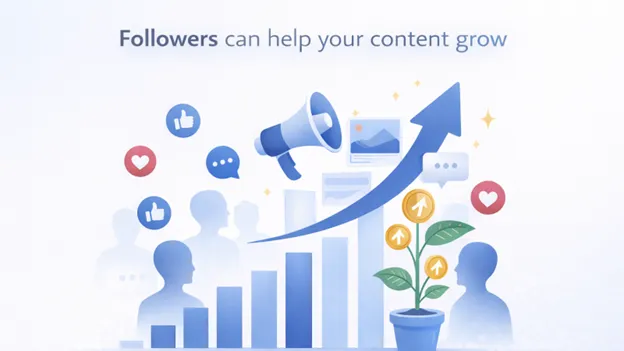
The simple answer is that followers can help your content grow.
Friends vs Followers: A Key Distinction on Facebook
Facebook provides two ways for users to communicate with you: friends and followers.
Friends are connections made through mutuality. You and your friend agree to be connected and view each other’s posts in accordance with your privacy preferences.
Followers are those who view your posts but are not your friends. It is important to know how many facebook followers you have in your page.
This configuration lets your content be seen by more people, especially when you post it publicly. It’s among the easiest ways to increase your visibility without adding more friends.
Overview of Methods: Personal Profiles vs Facebook Pages
The way you check your followers entirely depends on how you use the Facebook platform.
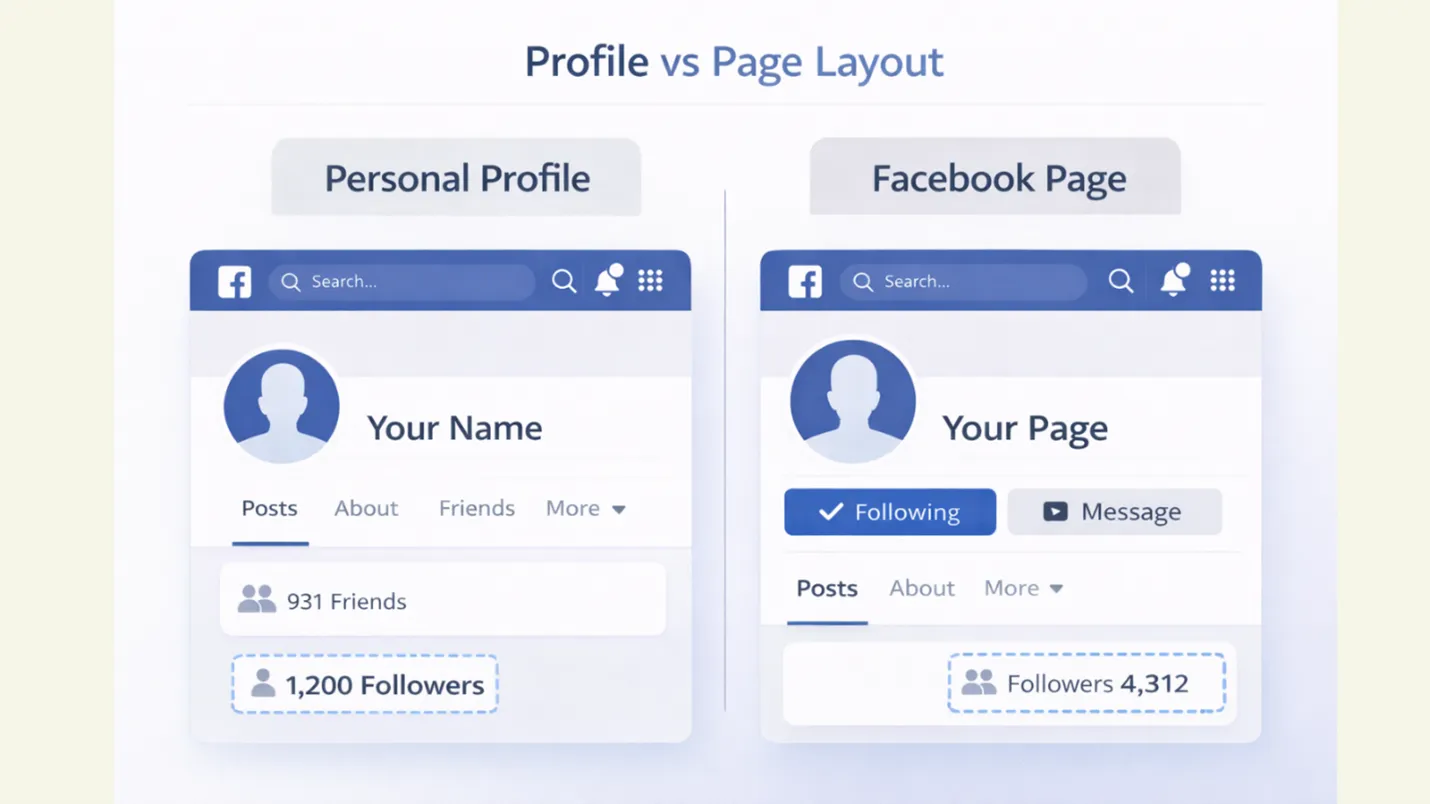
Personal profiles display those who have followed your social updates. Facebook Pages display followers who follow or like your page.
Each choice has its own design and layout, as well as a different way to view followers. In the following sections, we’ll guide you through “exactly how to find your facebook follower count, ” step-by-step for both profiles and Pages.
Discovering Follower Insights for Your Facebook Page
When you manage a Facebook page, your follower data will give more details than just numbers. This data will help you understand what people like on your page, the content type, the best time to post on Facebook, the rate of audience growth, and what their favorite content is. The built-in tools of Facebook help you to analyse this data without any extra setup.
If you need help in setting up your Facebook Business page, indzu team can help.
Accessing Your Page’s Follower Data
To view your followers’ insights, you must log in to the system as a “Page editor or administrator”.
When you log in to your Facebook Page, follower data is available directly in your Page Dashboard. Facebook organizes this data so you can quickly view totals, growth trends, and basic information about your audience.
It is easier to monitor progress and tweak your content strategy over time.
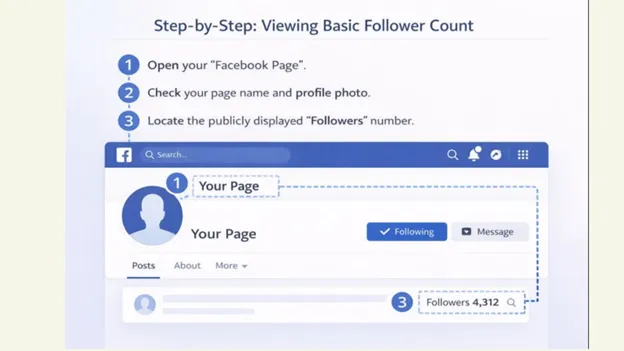
Step-by-Step: Viewing Basic Follower Count
To check your Page’s follower count:
- Open your “Facebook Page”.
- Check your page name and profile photo.
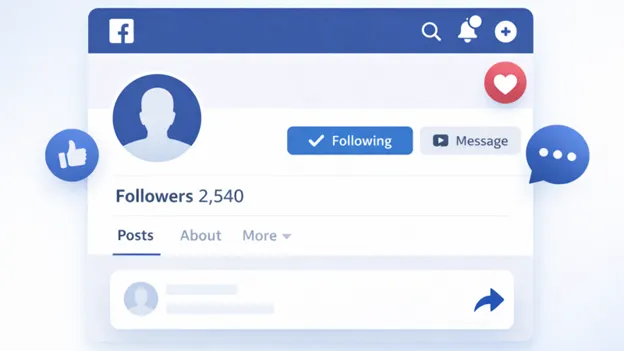
- Locate the publicly displayed “Followers” number.
You may also:
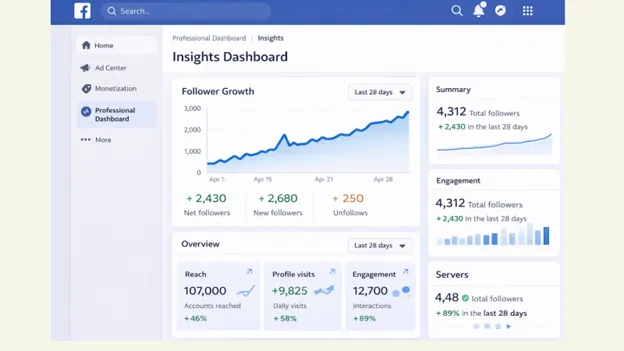
- Click on “Professional Dashboard”.
- Select “Insights”.
- Check out the number of your “total followers” and recent growth.
It provides an overview of how many people currently follow your Facebook Page.
A deeper dive into Facebook Insights
Facebook Insights lets you know more about audience behavior apart from numbers.
Inside “Insights”, you can see:
- Follower growth over time.
- Days when you gained or lost followers.
- How people discovered your Facebook page,
- Content liked by most followers.
These insights can help you determine what’s working and what requires improvement. If certain posts attract more fans, you can develop similar content to continue growing on Facebook.
Leveraging Professional Mode for Creator Profiles
When you unlock Professional mode on creator profile, you unlock the advanced follower insights.
If Professional Mode is turned on, you can:
- View Follower Growth Analytics
- Track the reach of your post and engagement
- View audience activity and trends
This feature combines the benefits of a personal profile with a creator-level tool. Professional mode makes it easier to own and manage your audience without switching to a Page.
Professional mode is perfect for those who wish to gain insight without altering how they use Facebook.
Interpreting and Leveraging Your Followers’ Data for Growth
Your follower count is much more than just a number. If used correctly, you can identify high-performing content strategies that support steady Facebook growth. Knowing what your data about followers signifies enables you to create content in a specific way, rather than just guessing.
Why Knowing Follower Count Matters
Your follower count is the number of people who have chosen to keep following your content. It’s an obvious sign of trust and enthusiasm.
Tracking your Follower count helps you to
- Measure your growth over time.
- Learn which content type attracts people.
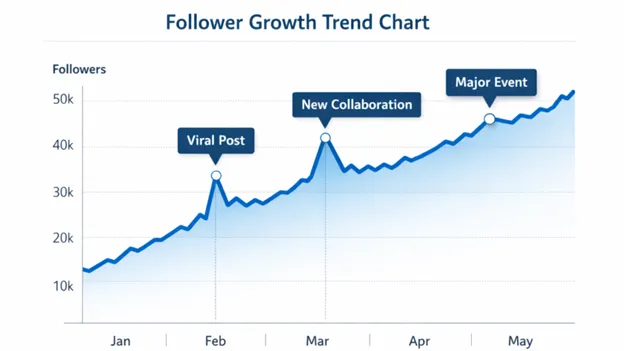
- Spot sudden changes after a campaign or post.
When your content reaches the right audience, your follower count increases. If it slows down, it’s a signal to change your approach.
Converting Follower Numbers into Actionable Insights
Follower data becomes powerful when you make use of it to make better choices.
Start by looking up:
- Posts that have brought in new followers
- Days during which follower growth was the highest
- Content formats that perform well.
Make use of these insights to:
- Create more content that your audience enjoys.
- Improve post timing and consistency.
- Test new ideas for more engagement while using standard formats.
A slight change in your post pattern or timing can lead to better results over time. It is notable to follow trends and post quality content.
Common Issues and Troubleshooting Your Facebook Follower Count
Sometimes, your follower count can be incorrect or not visible at all. This is not uncommon and typically simple to fix. In this blog, let us discuss the common issues related to follower counts.
Why is there a discrepancy in Follower Count?
The number of followers doesn’t always change instantly. Facebook might take time to refresh information across Pages, Profiles, and Insights.
You may notice differences because:
- The follower counts updates at different times.
- People unfollow, deactivate, or block accounts.
- Facebook removes spam and inactive accounts.
Small changes are normal. Concentrate overall growth trends rather than daily fluctuations.
What to Do If You Can’t See Your Follower Section
If your Follower section isn’t showing, it’s usually due to privacy or settings issues.
Follow these instructions:
- Make sure the follower setting is set to “Public.”
- Make sure you’re viewing your own profile
- Confirm that your Facebook App is up to date.
- Log out, then log back in.
For Pages, make sure you are logged in as an “admin”. After you have corrected the settings, the follower section should appear.
Managing Unwanted Followers (Unfollow or Block)
Not all followers add value, and Facebook lets you choose which ones are.
You can:
- “Block” users who are spammy or misuse your content
- “Restrict” Users to limit interaction
- Modify who can make comments on your public posts
Eliminating unwanted followers keeps your profile or page secure and focused on genuine engagement.
When to Seek Help and Support from Facebook
If your followers’ data is unavailable for a long time or the settings aren’t responding, it’s time to reach out to Facebook support.
Ask for help when:
- Your followers’ count disappears suddenly.
- Insights fail to update for several days.
- Access permissions aren’t working properly.
It is possible to report problems through “Facebook Support Center” or “Page Support inbox”. Facebook support will review your complaint and help restore lost information.
Track Followers, Understand Growth, Take Action
Knowing how many people are following you on Facebook is just the starting point on this platform. It is more important to understand “why” people are following you in the first place, and “how” you interact with them through your posts.
Checking your followers’ data regularly will help you understand what’s working, what’s not, and how you can make improvements.
No matter if you’re running a personal profile, a Facebook Page, or Professional Mode, the insights from your followers will help you create content with a purpose. Instead of making assumptions, you’ll be able to make better content choices that will result in steady, significant growth.
When you combine this knowledge with regular posting and the right tools like Indzu, growing your Facebook audience becomes simple and more manageable.
Frequently Asked Questions (FAQs)
Why can’t I see my Facebook followers?
This usually occurs because of privacy settings. Make sure that your follower option is set to “public”. Also, check that you are using the latest version of the Facebook app, and your profile is visible.
Is there a difference between followers and friends on Facebook?
Yes. Friends are mutual connections, while followers can see your public posts without being your friend. Followers help you expand the reach of your posts without adding more friends.
How often does Facebook keep track of followers?
The Facebook follower counts do not update immediately. Some delays are normal, particularly for the Insights dashboard. Concentrate on monthly or weekly trends rather than daily changes.
Can I remove or block followers?
Yes. There is a way to block, limit, or restrict interactions from followers you do not want to follow through your profile or Page settings. This feature helps maintain high-quality engagement.
Do Facebook pages and personal profiles show followers differently?
Yes, Facebook pages and personal profiles display followers differently. The variation occurs in how they present the information and the context around it. Facebook pages have no limit on the number of followers, whereas personal profiles are limited to 5000 friends. You can see a detailed analytics and insights view for Facebook pages, and it is limited to personal profiles.
Does follower count affect post reach?
A follower count alone isn’t a guarantee of visibility, but it can increase the likelihood of being seen. Consistent posting, engagement, and content quality have a greater impact on performance.