
Have you uploaded a new reel to your profile and want your followers to know about it? Then you must know how to share a reel to your story.
When you post a reel on your profile, it may not reach all your followers because it gets buried under other content in their feed. And even not all the users have time to come to your profile and check what new reel or post you have updated.
So, sharing the reel to your story makes it convenient for your followers to know you have uploaded a new content. Even sharing the reel in your story increases visibility, boosts engagement, and makes it easier for users to discover it.
Let’s get into the blog to learn how to share a reel to your story, why you can’t, and more.
What is an Instagram reel?
Instagram Reels are short, vertical videos that Instagram users can create and share. It can be up to 3 minutes long. You can create reels on any topic or niche. Reels usually include music, voiceovers, text, filters, and special effects. It has more potential to reach a wider audience, even users who do not follow you.
Reels are created by content creators, businesses, brands, or you can even make them just for fun. Both public and private accounts can build it. It stays permanently unless you delete it from your profile.
What is an Instagram story?
Instagram stories are photos or videos that appear at the top of the homepage and disappear within 24 hours. Stories are meant for quick updates rather than polished content. Normally, it is shared by content creators, brands, or even private account users to share daily moments, announcements, or reminders.
Posting an Instagram Reel to your stories is a great way to boost engagement with your Reel. Stories are the best place to remind your followers if you have uploaded a reel to your profile. Let’s have a look at a step-by-step guide on how to share a reel to your story.
How to share a reel on your story?
Step 1: Open the Instagram app.
Step 2: Select the reel you want to share on your story.
Step 3: Tap the “Share arrow” on the right-hand side.
Step 4: Tap “Add to story.“
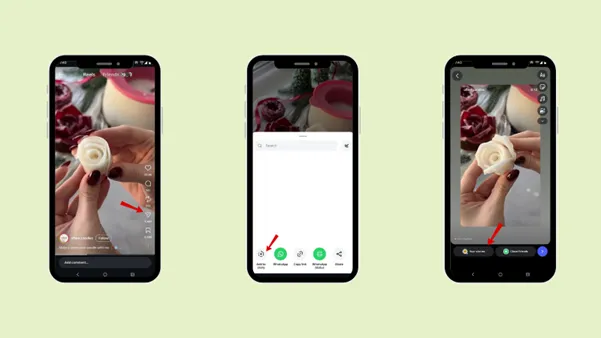
Now, according to your choice, add it to “Your story” or “close friends.”
How do you share someone else’s reel to your story on Instagram?
Step 1: Open the Instagram app.
Step 2: Select the reel from your favorite content creator or a friend you want to share in your story.
Step 3: Tap the “Share arrow” on the right-hand side.
Step 4: Tap “Add to story “.
Now, according to your choice, add it to your “Your story” or “close friends”.
Note: You can only share someone else’s video to your story if the account is public; you cannot share a private account’s video.
How to share your own reel to your story?
Step 1: Open the Instagram app.
Step 2: Select the reel you want to share on your story.
Step 3: Tap the “Share arrow” on the right-hand side.
Step 4: Tap “Add to story “.
Now, according to your choice, add it to your “Your story” or “close friends”.
How to customise the reel for better engagement?
Step 1: Open the Instagram app.
Step 2: Select the reel you want to share on your story.
Step 3: Tap the “Share arrow” on the right-hand side.
Step 4: Tap “Add to story “.
Step 5: On the right-hand side, you will find all the features
Text
Stickers
Add music
Mention
Background
Draw
You can use these features to align with your brand’s values or style and boost engagement.
Now, according to your choice, add it to your “Your story” or “close friends”.