

Stories are the most popular feature of Instagram. But what happens to stories after 24 hours? How do you bring them back? How to unarchive a story on Instagram?
If you’re looking to unarchive your story from the archived list, Indzu is here to help.
Instagram safely stores all your stories in the archived section. Once your Instagram stories disappear from the feed, they are moved to the archived section. Thus, they are hidden until you need them again. It is not a true unarchive feature, though. Your story cannot be moved back to its original 24-hour placement. You can view those stories privately and repost as a new story.
Whether you are using Android or iPhone, the steps are pretty simple. Let us jump directly into how to unarchive a story on Instagram.
What is Archive in Instagram Stories ?
The Archive is a feature on Instagram that saves your stories after 24 hours of updation. The stories are saved in an exclusive section that only you have access to.
This archive allows you to access and manage old tales at any time. You can also share them with friends, download them to devices, or add them to your account as Highlights. It allows you to keep those special memories instead of losing them in a single day.
Overall, the Instagram Archive section is a personal collection of your previous stories. It lets you recycle content, relive memories, and keep your favorite posts available whenever you need them.
Why Might You Need to Unarchive a Story on Instagram?
Sometimes, an old story gets relevant content again, and you want to publish it to match the vibe. It could happen with a blog post that received a lot of engagement, an experience you’d like to share with others, or content that is ideally suited to the post you are publishing at present. The process of archiving stories lets you reuse valuable content instead of creating everything from scratch. It also enables you to restore important announcements, such as promotions, events, or other content that matters to your target audience.
Comprehensive Guide to Mastering Your Archive
Your Instagram archives give you total control over the content of your previous posts. You can decide which content is hidden and what deserves another moment in the spotlight. By understanding how the archive works, you can better organize your content to avoid accidental deletions and make more informed decisions about what to share in the future.
Understanding Instagram Stories and Archive Feature
Instagram Stories are designed to disappear after 23 hours and 60 minutes (One day); however, it doesn’t mean that they’re deleted forever. The archive feature ensures that each story you share is stored privately in account. It lets you revisit your posts, review previous interactions, and decide whether to reuse or repurpose them.
The Purpose of Archive: Your Personal Content Library
Consider this archive like your own personal content library. It stores all your posts in one safe place that only you can access. It makes it easy to locate old posts, recall memories, and repurpose content that aligns with your goals or brand message.
How Stories Automatically Move to the Archive
After a story completes its 24 hours life cycle, Instagram immediately moves the story to the archive section. It is an automated process and doesn’t require your attention. Your stories are archived automatically as long as the archive setting is “ENABLED”.
Your stories will be saved securely and remain accessible until you decide to remove, unarchive, or add them to highlights.
Differentiating between Stories Archive and Posts Archive
Instagram provides two distinct archives: one for Stories and another for posts. Each archive section has a distinct reason. Stories are archived automatically, while blog posts must be archived manually by the user.
Both options let you control your content without deleting it, giving you the freedom to choose what appears on your Instagram account.
| Feature | Stories Archive | Posts Archive |
|---|---|---|
| What it saves | Instagram Stories | Instagram feed posts |
| How it gets archived | Saves automatically after 24 hours | You archive it manually |
| Who can see it | Only you | Only you |
| What happens on your profile | Story disappears | Post is removed from your profile |
| Engagement data | Views and replies stay saved | Likes and comments stay saved |
| Can you share it again? | Yes, you can reshare or add it to Highlights | Yes, the post can be restored to your feed |
Key Reasons to Unarchive an Instagram Story (The Why and When)
The archived stories can be repurposed in different ways. Here are a few reasons why a post is archived on Instagram?
Saving Special Moments and Milestones
Users share some stories that capture their milestones and special moments. By Archiving these stories, Instagram shares an opportunity to revisit them later or share them again with your audience.
Strategic Reusage of Content
Older stories may still be beneficial. A story from the past could fit your current content or campaign theme. Thus, archived stories save time and effort. It also avoids painstaking recreation of the story.
Correcting an Accidental Archiving
Sometimes stories are archived by mistake. If you’ve concealed an article without intending to reveal it, unarchiving can quickly correct the mistake and make it available to the public.
Storytelling Through Highlights
Stories that are not archived are added to the Highlights section, making them available to show visitors anytime. It allows you to present your story more effectively and ensure that important information remains on your profile longer.
Content Backup and Future Reference
Your archive can also serve as a backup to your content. Unarchiving the stories will help you reuse the old content, analyze what worked, and plan future posts with greater confidence.
Step-by-Step Guide: How to Unarchive an Instagram Story on Mobile
Unarchiving an Instagram story is straightforward and takes only a few taps.
Follow these instructions to restore the archived story back onto your profile.
Accessing Your Instagram Profile
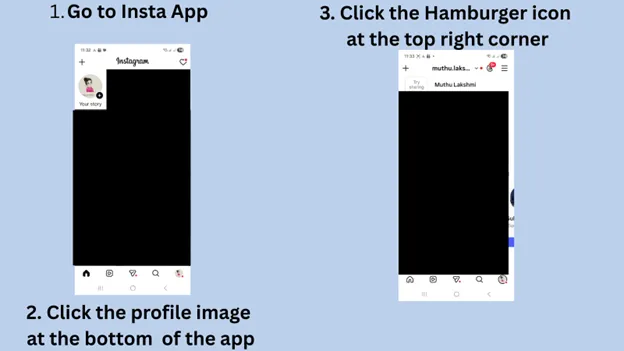
Open the Instagram App on your phone. Click on the profile picture in the lower right corner to access your profile page.
Navigating to the Archive Section
Once you’re on the profile page, click on the hamburger icon located in the upper right-hand corner.
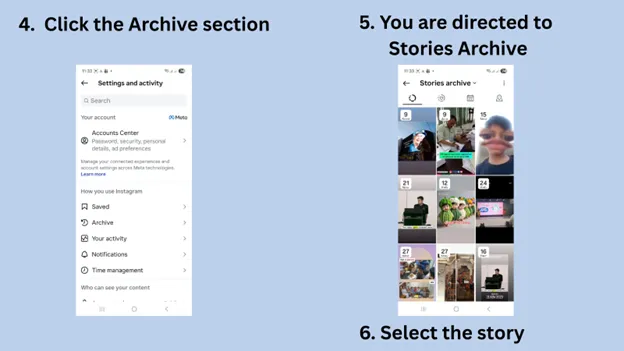
In the menu that pops up, select “Archive “.
Locating Your Stories Archive
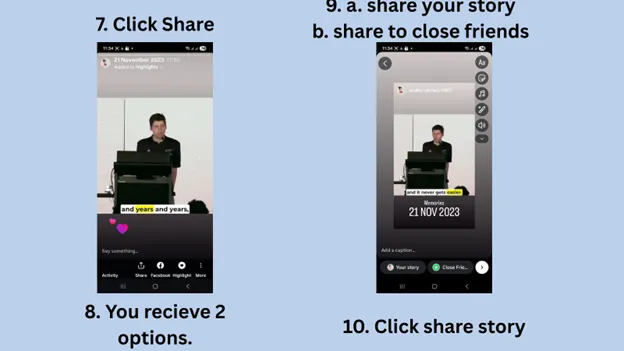
By default, Instagram opens the Stories Archive.
If you can see a different archive, tap the dropdown on top and select “Stories Archive” to view the stories you have saved.
Selecting the Specific Story You Wish to Unarchive
Explore your archived stories and select the one you’d like to post again.
The story will be displayed in full view.
Understanding the Unarchive Section
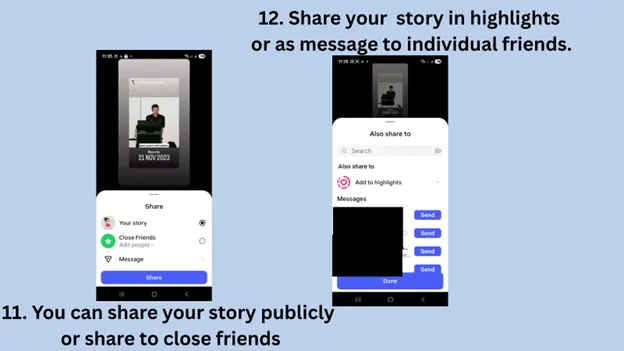
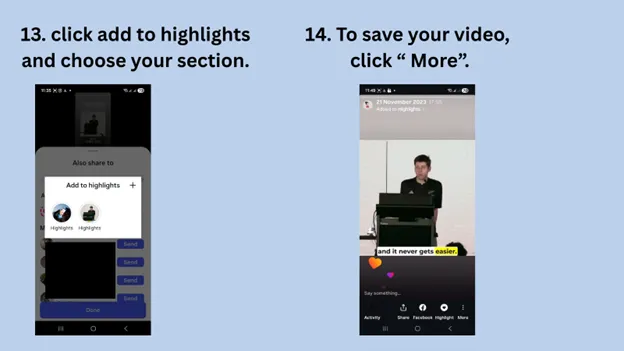
Click the three dots in the story and choose “Show on Profile” or “Add to Highlights”.
It will unarchive the story and make it visible again to your followers.
What Happens When You Unarchive an Instagram Story?
When you Unarchive an Instagram story, it becomes visible again, but not as a brand-new story. Here are the changes that will happen to your unarchived story.
Does It Reappear on Your Live Story or Feed? (Clarifying Common Misconceptions)
Unarchived stories are not displayed as live stories at the top of Instagram and aren’t displayed on your feeds either. The story will be added to the Highlights or shared as a brand-new story in the event that you want to. Your followers will not be able to see the story automatically, unless you choose to take an additional step.
Retaining Original Engagement Metrics (Likes, Views, and Comments)
When you unarchive a story, all its original engagement stays the same. Views, replies, and Comments are saved and not reset. This allows you to keep track of how the story has performed in the past.
Options for Repurposing Your Unarchived Story
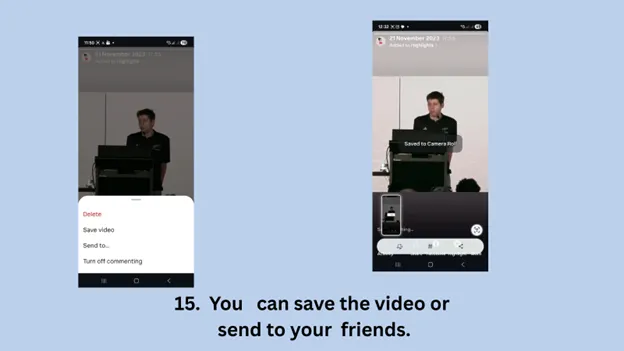
If you decide to unarchive a story, you have several options. You can upload the story to Highlights or republish it as an entirely new story or save it for later use or reuse it in subsequent blog posts. This is a good method to gain the most value out of the content you already have.
Maximizing Your Unarchived Stories: Strategic Applications
Unarchived stories always have a second chance to shine again. With the right approach, you can transform old stories into valuable resources to support your Instagram goals.
Transforming Unarchived Stories into Instagram Highlights
One of the most effective ways to utilize an unarchived story is to add the story to Highlights. Highlights make important stories easily visible on your profile to both current and new followers. This is ideal for key moments, product, events, and other evergreen content.

Reposting an Unarchived Story to Your Current Story or Feed
It is possible to republish archived content as a brand-new story, so it appears in the upper right corner of followers’ screens. If the content is in line with your brand’s message or image, you can also repurpose it into the feed for more exposure and reach.
Downloading Unarchived Stories for External Use or Backup
Instagram lets you download the stories. You can use these stories in other social media platforms for higher engagement and even as a marketing material. There is no strict rule to not reuse the content.
Integrating Unarchived Content into Your Content Strategy
Unarchived stories can be a valuable asset to your overall content strategy. It is possible to reuse successful stories, maintain consistent messaging, and save time.
Analyzing Performance of Revived Content
Analyzing views and interaction on unarchived stories lets you know what your audience is looking for. Story analysis and data will help your brand in future content choices and enhancing engagement metrics.
How to Troubleshoot Common Issues in Unarchiving Instagram Stories
Sometimes, unarchiving the story doesn’t perform as expected. These issues are simple to fix once you with a little understanding.
Can’t Find the Archive Icon or Feature
If you cannot see the archive option, ensure that you’re logged into your account page. Click the three lines on the upper right-hand corner to access the menu. Make sure that your Instagram application is up to date, as older versions might not display archives.
Story Not Appearing After Following Unarchive Steps
After unarchiving, the story won’t be available as a live story. That’s normal. It is best to include it in Highlights or share it again as a new story.
What if a Story Was Deleted, Not Archived?
The deleted stories can’t be retrieved. If a story is deleted before 24 hours, then it becomes permanently deleted. The archive can only store stories that were published and allowed to stay for 24 hours in feed.
General App Troubleshooting (Updating, Reinstalling the Instagram App)
If your Instagram archive isn’t loading properly, try closing and then reopening the application. The process of updating Instagram frequently fixes problems. If issues persist, reinstalling the app can help restore missing features.
Device-Specific Considerations (iPhone or Android)
The steps for unarchiving stories are the same for iPhone as well as Android. But the menu layout might appear slightly different. If an item does not appear as expected, try looking for similar menu icons or menus, depending on your device.
What Happens When You Archive a Story on Instagram?
When you save an Instagram story, here are the most important things that happen instantly:
- The story posted on Instagram is removed from the highlights section.
- Your followers cannot see your story anymore.
- The story has been moved to a private archive section.
- The interactions associated with the story are saved along with the story.
- You can unarchive the story anytime.
Best Practices for Managing Your Instagram Stories Archive
Managing your Instagram Stories archive well can aid in keeping it organized, save time, and make the most of your content over time. Here are some helpful tips to make sure your archive is functioning for you.
Proactive Archiving Strategies for Content Organization
While Instagram archives stories automatically, staying organized is the key. Make sure you regularly review your archives and eliminate those that don’t align with your brand’s message or image. Use Highlights to group similar stories, so that followers can easily discover important information within your personal profile.
Using Your Archive as a Creative Resource for Content Creation
Your archives are an untapped source of inspiration. Review past articles to discover content that you can edit or repurpose. It will help you maintain a consistent posting schedule without having to start all over again each time
Understanding Privacy Settings Related to Archived Content
The archived stories are private and only accessible to you. Be aware that when you share archived content again, it will follow the privacy settings you have set. Be sure to check who is able to view your content to ensure you have control of the content you share.
Staying Updated with Instagram Feature Changes
Instagram regularly upgrades its features, which include the archive. Make sure your app is up-to-date and follow Instagram news updates to take advantage of the new tools. Stay informed of the latest technologies and utilize your archived content.
Conclusion
The Instagram archive is a powerful tool that helps you manage, save, and reuse your Instagram stories in smart ways. By knowing how to unarchive a post on Instagram, you can make the most of this feature.
Your content will look fresh, connect better, and cherish your favorite memories.
Archive is your personal library for creativity and storytelling on Instagram.
Unarchiving posts may sometimes not be suitable, in that case, try out indzu for instant post creation.