How many Instagram stories can you post? Confused!
We got you. This is the most common question any creator or brand worries about. Instagram Stories are one of the fastest ways to stay visible and build daily connections. But the quality and number of stories directly impact how often the audience watch, tap, or skip your content.
Imagine knowing the exact number of stories that keep your audience engaged without letting them skip your story.
Let’s dive into the blog to learn How many Instagram stories can you post, How Many Instagram stories you can post per day, best practices, and more.
 Time killer · Pain
Spending 6 hours writing posts that get zero traction?
Paste your URL. ZuAI turns it into 30 brand-on captions in 10 minutes — no blank-page panic, no generic AI filler.
What are Instagram Stories?
Instagram Stories are temporary, vertical photos or videos that disappear after 24 hours. It appears round in your profile picture. And it appears in the bar at the top of the follower’s feed.
Outcome · RecommendedGet 30 days of social content from your website — in 10 minutes.
Key features of Instagram Stories
Features of Instagram Stories are:
- Instagram Stories disappear after 24 hours.
- Instagram Stories views remain visible for up to 48 hours after the story disappears.
- Instagram Stories has a feature that lets you use interactive stickers like polls, emojis, quizzes, countdowns, and more to boost engagement.
- You can control the privacy feature of your Instagram stories. Like, who can reply, view, or react to your stories?
- You can also control cross-posting of Instagram stories, like whether you want to post your Instagram story directly to your Facebook stories.
- Instagram Stories have a feature that lets you view story analytics, including story views, reach, replies, interactions, and even shares.
- Instagram stories also let you add music, sound effects, or even your own original voice.
- You can even add clickable links to your product Instagram story, website, or content.
Proof · Verified
2k+ grew faster with one tool.
How Many Instagram Stories Can You Post Per Day?
You can post up to 100 stories in a single day. But we recommend posting stories that are important or in smaller batches.
The ideal number of stories depends on your audience and content. You can spam your audience once in a while. ( Example:- If you have been to a place, reposting your audience mentions, comments, or replies, or the content your audience would like to watch again and again ).
Post 4- 5 quality Instagram stories to boost your engagement and reach. More than 7- 10 stories can decrease the completion rate.
Free · Instant · No signupSee what ZuAI generates from your website — right now.
Paste your URL. Watch ZuAI write a month of brand-on captions in seconds. Preview before you create an account.
What is the Instagram story length per story?
The Instagram story length is per story.
Instagram story video length – 1 min (60 seconds)
Instagram story photos – 7 seconds.
Speed · 10-minute setupOne coffee from URL to a full month of scheduled posts.
Drop your URL, brew your coffee, come back to 30 brand-on captions ready to publish.
How to post Instagram Stories on your profile?
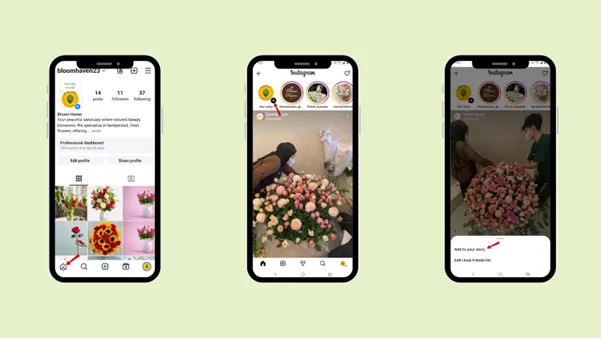
Step–by–step guide on how to post Instagram Stories on your profile.
Step 1: Tap the profile picture in the top-left corner of the home page.
Step 2: Tap “Add to your story”. Step 3: Select the photos and videos you want to post.
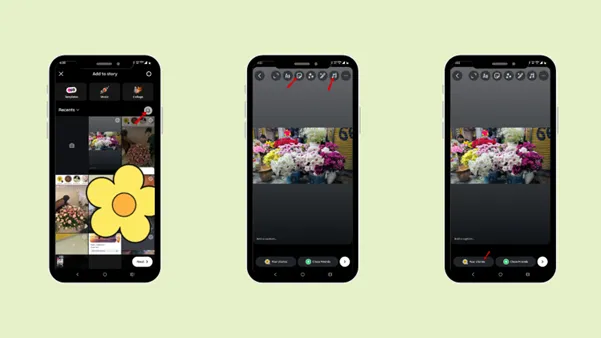
Step 4: Add music, caption, or filter.
Step 5: Tap “Your story”.
Blank tab. Six open browsers. No clue what to post.


 After · With Indzu
Paste one URL. Get 30 scheduled posts.
How can Instagram Stories be saved and reposted effectively?
You can save and reuse your Instagram stories by following these steps.
How to save an Instagram Story?
Step 1: While creating the Instagram story.
Step 2: Tap on the down arrow.
Step 3: Tap “Save”.
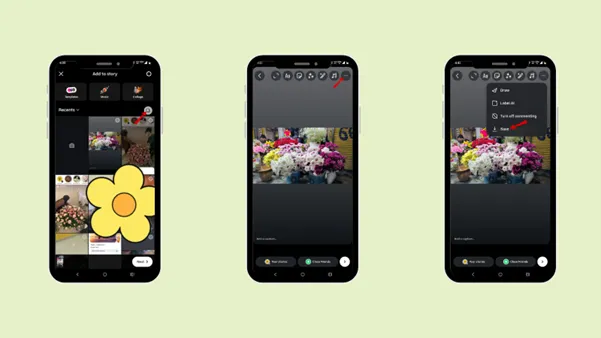
You can even use a third-party app to save your Instagram story, like a phone screen recorder.
How to repost an old story?
Step 1: Go to your profile.
Step 2: Tap the three-line menu option in the upper-right corner.
Step 3: Tap “Archive”
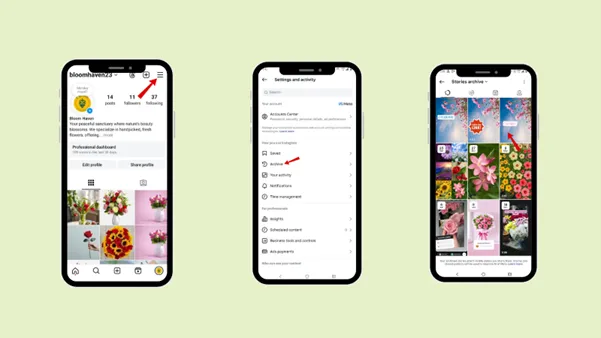
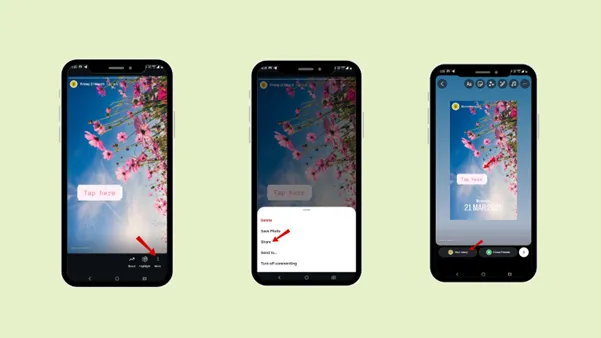
Step 4: Go to the story archive, select the story you want to repost.
Step 5: Tap “Share”.
Step 6: Tap “Your story”.
Time killer · Pain
Spending 6 hours writing posts that get zero traction?
Paste your URL. ZuAI turns it into 30 brand-on captions in 10 minutes — no blank-page panic, no generic AI filler.
Who can view your Instagram stories?
If you have a private account, only your followers can see your story.
If you have a public account, your followers and non-followers can also see your story. The audience needs to search for your name or visit your profile to see your story.
Outcome · RecommendedGet 30 days of social content from your website — in 10 minutes.
Best Practice you should follow after knowing how many stories you can post on Instagram
Instagram stories are the most powerful tool to build daily engagement and trust with your audience. Since stories disappear after 24 hours, they feel more real to your audience. It provides a short, temporary piece of content; you need to understand how to post Instagram Stories.
- Consistency
You need to be consistent with your posting stories if you are a brand or influencer. You need to be committed to your followers about the post or any update that you have promised them. It will build trust and encourage your followers to engage and interact with them.
- Interactive Features
Interactive features like polls, Q&A, quizzes, and emoji sliders. Add these interactive features to your stories and boost engagement. These features attract followers to engage with your stories more than they do with a typical story.
Due to these features, you can increase your Instagram story views. Even with just one click, you can see how many of your followers have engaged with stickers, polls, or what you have posted.
- Visuals
Add attractive visuals to your stories; they capture your audience’s attention. The clearer, easier-to-understand visuals you post, the more they will motivate your followers to visit your profile and get to know you better.
Use high-contrast colors, colors that match your brand image, or, if you are an influencer, colors that match your personality.
- Captions
Add interesting captions to your story that will attract your audience’s attention. A good, attractive caption will help the audience engage with your story.
Sometimes, due to an error, the music in the story isn’t played, so adding a short, engaging caption can help keep your audience engaged longer.
- Trending Music
Add trending music to your Instagram stories. Trending music helps your stories feel more up-to-date, engaging, and discoverable.
Combining a trending theme with your content will help followers trust you and feel you are also up to date with the current theme.
You can add the music sticker to the story, keep it small, or hide it so it doesn’t distract the audience from the main story.
- CTA
Make sure to add a proper call to action. A call to action lets your audience know exactly what the next move should be.
Keep in mind that the call to action should be:
1.Clear and specific
“Tap Reel”, “Vote in the poll”, “Send me a DM”, “Reply with Yes”.
2.Interactive
Poll, stickers, link stickers, emoji sliders, question box. It will make it easy for audience to interact with your story in just one click.
3.Visibility
Make sure to place the CTA at the centre and at the bottom-middle. So, the CTA is clearly visible to your audience.
4.One primary CTA
Avoid confusing your audience with multiple CTAs; focus on one primary CTA and create urgency. So, you can let your audience focus on one action at a time to improve the conversation.
5. Highlights
Categorize your story into different highlights. Highlights stay on your profile as long as you don’t deleted them. So, it’s best for the audience who have missed your stories to check them in the highlights.
Proof · Verified
2k+ grew faster with one tool.
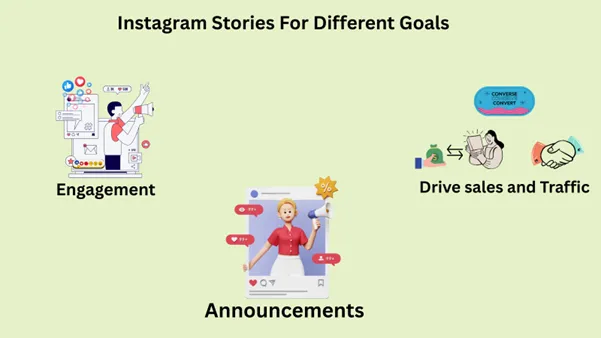
Instagram stories for Different Goals?
You can customise your Instagram stories based on your goals.
- Engagement
To increase engagement on your stories, focus on adding engaging polls, questions, quizzes, and sliders. Invite your followers and audience to share their thoughts.
When your story has more engagement, it tells the Instagram algorithm that your content is valuable.
- Drive sales and Traffic.
Instagram stories can be great for increasing traffic to your website and even promoting products and services. Add links to product or service in your Instagram stories. You can also add a quick demo of your product.
- Announcements
Instagram stories are best for announcements. You can announce or update your audience about the new post or let them know if they need to join your live broadcast. It is best for event reminders, updates on new releases, and more. Since stories appear at the top of the app, your audience can see them quickly.
Free · Instant · No signupSee what ZuAI generates from your website — right now.
Paste your URL. Watch ZuAI write a month of brand-on captions in seconds. Preview before you create an account.
Common Mistakes to Avoid While Posting Stories?
Instagram stories are best for quick updates and interaction. So, it’s important to avoid the following common mistakes to increase engagement.
- Overloading stories that do not relate to your content. You can spam your audience, but make sure the content is engaging and that they like it.
- Do not forget about professionalism. Make sure your story aligns with your brand’s value and voice. It will keep your audience engaged.
- Do not forget to use interactive tools. These tools help you to engage your audience with your story.
- Avoid constant promotion of your product or service, as it would make your profile look desperate. Instead, upload how your audience can benefit from your product or services.
Speed · 10-minute setupOne coffee from URL to a full month of scheduled posts.
Drop your URL, brew your coffee, come back to 30 brand-on captions ready to publish.
Conclusion
Instagram stories are the best temporary insta content format to engage with your audience. It disappears within 24 hours, and its per-day limit is up to 100 stories. But, it is best for the brand to stick to 10 stories per day. This is the answer to how many stories you can post on Instagram.
Too many stories will make your profile overloaded, and too little may make your audience forget you. It’s essential to know the exact number according to your niche.
Upload stories related to your content and audience interests, so even if you spam, your audience will be interested in engaging. The best story count is between 7 – 10.
Add interactive features, captions, music, and CTA to increase your story engagement, and customise your stories according to your goals.
Go through the steps on how to upload, save, and repost Instagram stories. If you have a busy workday, you can schedule your stories with the help of Indzu.
Blank tab. Six open browsers. No clue what to post.
After · With IndzuPaste one URL. Get 30 scheduled posts.
FAQs
Q1. Does posting too many stories hurt engagement?
Ans 1: Yes, posting too many stories can affect your profile engagement. Try to post content that your audience is interested in, or else they will not be willing to watch your other stories.
Q2. Why are Instagram stories designed for short-term engagement?
Ans 2: Instagram stories are designed for short-term engagement to create a
- Sense of urgency
- Real–time connection
- High engagement rate
- Temporary content that creates FOMO in your audience.
Q3. Difference between Reel, stories, post and lives?
| Feature | Reel | Stories | Post | Live |
|---|---|---|---|---|
| Content type | Short vertical videos | Vertical or horizontal photos/videos | Photos, videos, or carousels | Real-time video broadcast |
| Duration | Up to 3 minutes | 60 seconds per slide | Music up to 90 seconds | Up to 4 hours |
| Visibility |
Public: everyone Private: followers only |
Private: followers Public: profile visitors |
Appears on profile feed Public: wider reach | Only visible during live session |
| Lifespan | Permanent unless deleted | Disappears after 24 hours | Permanent on feed | Ends when broadcast stops |
| Engagement type | Likes, comments, shares, views | Views, replies, polls, Q&A, emojis | Likes, comments, shares, views | Live comments and reactions |
Why do people use Instagram stories?
Ans 4: People use Instagram stories for quick updates. Compared to posts and reels, Instagram stories appear on your followers’ home page, so it’s convenient for them to engage with your story quickly.
Q5. How to reuse stories effectively?
Ans 5: The best way to reuse Instagram stories is to categorize stories into different highlights. Highlights stay on your profile as long as you have not deleted them.