Shy about generating vlogs, but still want to create Instagram reels? Know how to make a reel on Instagram with photos.
Many users are not comfortable recording a video but still want to grow on Instagram and share their creativity. In this case, you can create an Instagram reel using multiple photos.
Photo-based Instagram reel lets you tell stories, share ideas, and showcase your work without pressure. You can use the pictures clicked while travelling, art, transformation, product image, and many more. Now combine these quality images with music, text, and captions, and have a smooth transaction.
Let’s dive into the blog to know more about how to make a reel on Instagram with photos and a few tips and tricks to make it more engaging.
 Time killer · Pain
Spending 6 hours writing posts that get zero traction?
Paste your URL. ZuAI turns it into 30 brand-on captions in 10 minutes — no blank-page panic, no generic AI filler.
Instagram Reel
An Instagram reel is a vertical, short-format video on Instagram that lets users create and share any type of content. It can be educational, entertainment, or any source of content that will benefit a wider audience.
An Instagram reel has more possibilities to gain more engagement than a post or stories.
Outcome · RecommendedGet 30 days of social content from your website — in 10 minutes.
Why reels are essential on Instagram
Reels are essential on Instagram, as they have a high chance of visibility. It has the potential to reach a wider audience, and even the Instagram algorithm favors reels much more than other content formats.
Reel has the potential to reach a wider audience, and even to users who do not follow you.
- Reels use music, motion, and video, which naturally grab attention, increasing engagement (likes, shares, comments).
- If you are a brand, reels can help you gain more followers. It reaches new followers, which will give you a chance to gain followers more quickly.
- Even reels allow you to showcase your products or services if you are a brand or business. If you are an influencer, you can showcase your own personality, which helps you to build trust with your followers.
- The most crucial point you can note down about why reels are essential on Instagram is that they help in cost-effective marketing. If you are a new brand or small business, you can simply showcase your product with the help of Instagram reels.
Proof · Verified
2k+ grew faster with one tool.
What is the Instagram Reel length and format
An Instagram reel can be up to 90 seconds (1 minute and 30 seconds).
Free · Instant · No signupSee what ZuAI generates from your website — right now.
Paste your URL. Watch ZuAI write a month of brand-on captions in seconds. Preview before you create an account.
How to make a reel on Instagram with photos?
Step 1: Swipe left on the home page of your Instagram.
Step 2: Select “Reels”
Step 3: Choose multiple photos to merge into a single video.
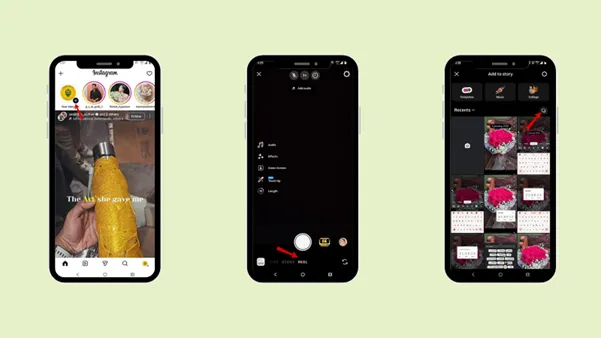
Step 4: Tap “Next”.
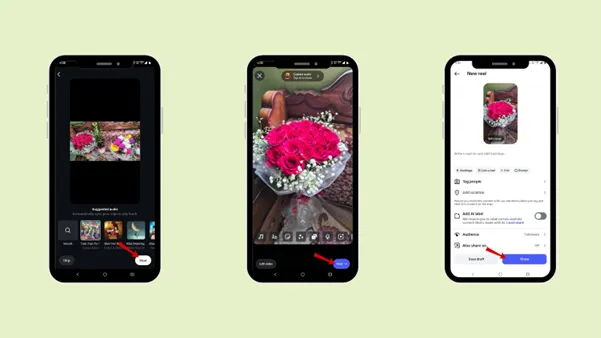
Step 5: Select the music or search for the music you want to add to your reel.
Step 6: Tap “Next”.
Step 7: If you want, you can add text “Aa”, also, you can explore other features like
Edit
Add clips
Audio
Text
Overlay
Sticker
Voiceover
Reorder
Filter
Import audio
Step 8: Tap “Next”.
Step 9: Tag people and add a location.
Step 10: Also explore “more options”.
Step 11: Tap” Share”.
Speed · 10-minute setupOne coffee from URL to a full month of scheduled posts.
Drop your URL, brew your coffee, come back to 30 brand-on captions ready to publish.
How to make a reel on Instagram with photos and add music?
Step 1: Swipe left on the home page of your Instagram.
Step 2: Select “Reels”.
Step 3: Choose multiple photos to merge into a single video.
Step 4: Tap “Next”.
Step 5: Select the music from the suggested audio or search for the music you want to add to your reel.
Step 6: Tap “Next”.
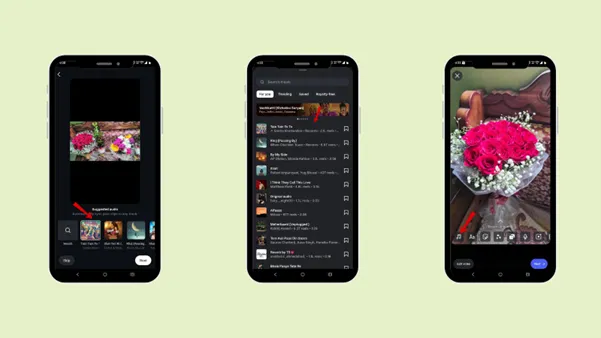
Then the audio will be added to your reel.
Blank tab. Six open browsers. No clue what to post.


 After · With Indzu
Paste one URL. Get 30 scheduled posts.
How do I add a cover image for a photo reel?
You can edit the cover image
After posting.
Step 1: Select the reel you want to edit the cover image for.
Step 2: Tap the “Edit”
Step 3: Select the reel again.
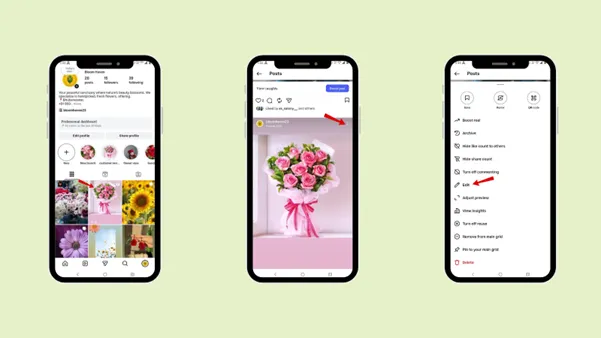
Step 4: Select the “Crop profile image”
Step 5: Edit the image to determine which part you want to keep as the cover image.
Step 6: Or else you can select the image from the reel you want to keep as the cover image.
Step 7: Tap “Done”.
Step 8: Tap the tick mark.
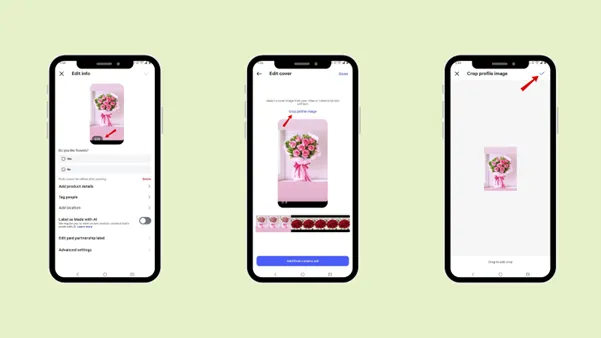
Then you are good to go. Your reel cover image has been edited.
Time killer · Pain
Spending 6 hours writing posts that get zero traction?
Paste your URL. ZuAI turns it into 30 brand-on captions in 10 minutes — no blank-page panic, no generic AI filler.
How to make a reel on Instagram with photos that have engaging captions and hashtags
If you want your reel to reach a wider audience, you need to focus on the captions and hashtags. A strong caption grabs the attention of your users, and the correct hashtag helps to have greater visibility of your reel.
1. Engaging Captions
Caption gives you the chance to connect with your audience, which you cannot express only by the visuals. The caption that you want to use in the reel visual should act like a hook line that creates curiosity or relatable emotions. Then add the detailed caption in the reel body to build more connections with the audience.
You can explain what the reel is about, share a short story, or provide helpful tips related to the content. Keep your writing naturally conversational, so the audience can feel they are connecting with a human and organic content, rather than a promotional reel.
Explore the Instagram caption generator to create captions within a few minutes and make your work much easier.
2. Right hashtags
The next important thing you need to use is the hashtag. Hashtags help to categorize your reel, which will increase the possibility of the reel’s visibility. The main aim is to balance the niche hashtags and broad hashtags.
When you use the right hashtag for the reel in the caption, to which niche your reel belongs, then automatically your reel will be seen by the right audience who will search for the same hashtag that you have used. Use 3-5 specific hashtags; do not overload them with unnecessary, random, unrelated hashtags. Use the Instagram hashtag generator to get specific hashtags with just one click.
Niche’s hashtags are specific and targeted; they may have fewer posts, but they will attract the right audience who are interested in that topic.
Broad Hashtags are the hashtags that target a wider audience.
Niche hashtag – #Photoreeltips, #Petcat #flower #food
Broad hashtag – #Instagram #Contentcreator
3. Adding locations and tags
The two bonus points that you need to add with captions and hashtags are the location and tags. Location and tags also help to gain your reel visibility.
Tags: When you tag brands and people, it makes your reel appear in their tagged content feed. It gives an excellent opportunity to be visible to a broader audience. A tag is essential when you are collaborating with someone or shoutout.
Location: Adding location is helpful when you post about a place, café, or restaurant. When you add location in your reel, it helps reach an audience who searches for content from a specific place.
Location tags are essential for business, travel content creators, and local influencers.
How to make a reel on Instagram with just photos according to different ideas
Photo-based stories are easy to make. They are best for story telling in an effective way. If you are shy to shoot a video, then creating an Instagram reel with just photos is the best idea for you.
We have mentioned a few ideas under which you can create your Instagram reel with just photos.
1. Before- after Transformation
The first, most common idea that you can is “the before-and-after” transformation reels. Start with the before images, then make a smooth transition to the after images. It will boost your audience’s curiosity and motivate them to watch until the end. Thus, it enhances audience retention and engagement.
This idea is best for a fitness journey, home makeover, skin care transformation, and DIY.
2. Photo Dumps
You can create an Instagram reel idea with photo dumps; it will be casual and highly relatable to your audience. Photo dumps focus on a collection of photos for a specific time period, which can be weekend-specific, month-specific, or event-specific content.
This photo dump idea is perfect for a personal account or lifestyle creator, as it does not need much editing. You can use the layout feature of Instagram to create a photo dump for your Instagram story.
An Instagram reel photo dump idea will make it look genuine, and the audience will enjoy it. You can even start a trend and encourage your audience to make a photo dump reel and tag you.
Example: #Winterphotodump, #Skincarephotodump, etc.,
3. Travel Highlights
Travel vlogs can be created with just photos. Reels share the story, and the emotions and details can be from a photo too. Forget videos and editing. You can create travel highlights with just photos; all you need is to make a smooth transition video to make it more engaging.
A travel highlight reel is perfect to showcase photos of the destination, arrival, moments and your entire journey. You can combine the scenic view, food photos, candid moments, and other interesting facts about the place. Arrange the photo in logical order, such as the arrival, exploring, journey, and then end with a memorable moment.
Pair the reel with a trending audio, and it will increase the visibility, and the audience will love to view the travel reel.
4. Business Showcase
If you are a business or brand, it would be best to showcase different products through Instagram reels. Create a video to tell the world about your product and another behind-the-scenes video for your customers. Not only photos, remember to add a strong call to action in the caption, such as “DM now”, “Book today”.
Tips to remember how to make an engaging reel.
Target the first few seconds
Your storyline should be captivating with colorful visuals and enhance the curiosity for the reel. The first three seconds of the reel decides whether the viewer stays there or scroll past them.
2. Keep it short
In the era where people are fond of scrolling and where they get every vital thing just with a tap, you need to create a reel that is short and relatable to the audience. When your audience watch the whole reel without missing a beat, then Instagram will show the reel to more users.
3. Match the photo timing with the music.
When you create a reel on Instagram with just photos, make sure to match the photo timing with the music perfectly. If the music does not match the photo sequence, then it will look unprofessional.
If your visuals match the music beat, it makes your reel more engaging and increases visibility.
4. Preview the reel before posting.
To make your reel game stronger, preview the reel before posting. Check the spelling, caption, and the timing of the music beat and the photos that you have selected.
5. Be consistent
The last step is to be consistent. The type of content you create will be more appreciated by the audience if you are consistent. Be consistent with your story, font, and theme; it helps in enhancing your brand identity and voice.
Outcome · RecommendedGet 30 days of social content from your website — in 10 minutes.
Common Mistakes to Avoid while making a reel on Instagram with photo
1. Images
Make sure to use high-quality images while making a reel with multiple photos on Instagram. Poor quality images will make your reel look unprofessional. If you are a brand, focus on clicking good-quality photos of your product or service, and create a reel with professional editing.
A professional reel that has good visuals will get a much better engagement.
2. Music
Music has the power to get discovered by the audience according to mood and emotions. Add relevant music, or create your own with an ai music video generator, while making a reel on Instagram with photos.
Avoid using music that does not relate to your content. You can create your own music or a mashup music without copyrights. It will help your audience to recognize you immediately.
3. Filters
Avoid using too many filters, effects, or transitions that will make your content look messy. Simple edits make your reel look professional. The right kind of filter can boost real engagement.
4. Format
As reels are in the vertical format, focus on keeping your photos in the vertical format. Avoid Horizontal images, as they would create problems while editing.
5. Purpose
Avoid posting without a clear purpose. A reel with bad content quality will not rank in the trending feed. Create content that your audience will find relatable, or that has a purpose to entertain or educate them.
Proof · Verified
2k+ grew faster with one tool.
Conclusion
Creating an Instagram reel does not mean always making videos; if you are uncomfortable making videos, then you can simply create an Instagram reel using photos.
Follow the steps that we have mentioned above and learn how to make a reel on Instagram with photos. Explore different features, add music, and text; make sure to add high-quality images.
Do not forget to add a caption, use specific and relevant hashtags, and even add locations and tags. Make different Instagram reels with photos and create your own style.
Keep your reel short, focused, and post consistently. To make your work consistent and your workflow smooth, use indzu. It helps you to create content within a few minutes and allows you to schedule your reel at the exact time and date.
Avoid common mistakes, as they would affect your engagement rate. Explore indzu to create Instagram photos, videos, memes, and many more with the right prompt.
Free · Instant · No signupSee what ZuAI generates from your website — right now.
Paste your URL. Watch ZuAI write a month of brand-on captions in seconds. Preview before you create an account.
FAQs
Q1. What kind of Photos work best for Reels?
Ans: Photos that work best for Reels are:
- Bright and clear ones,
- Relatable to your audience ( If it’s a brand or public content),
- Visual consistent ,
- Easy to understand at a glance .
Q2. Should I use trending audio for every audio reel?
Ans: Yes, you can use a trending audio for every audio reel. But make sure the audio matches the reel that you have created. Or make sure it is related to your audience, which will help to increase engagement.
Q3. Is it okay to use a screenshot in Photo Reels?
Ans: Yes, you can use a screenshot in your Instagram Reels.
If you are a brand, you can make a reel of your customers’ reviews, text messages, and screenshots.
Q4. Can I reuse a photo that I have already used?
Ans: Yes, you can reuse the photos in your reel that you have already posted on your Instagram. But to get better engagement in your reel, you can
- Changing the order
- Adding new music
- Adding text or content
Q5. Can I make a photo reel without showing my face?
Ans: Yes, you can create faceless content and still build a good relationship with your audience. All you need to focus on is making content that your audience can relate to.
You can create your content around
Object
Art work
Screenshots ( Customer review, or chats, texts )
Scenery