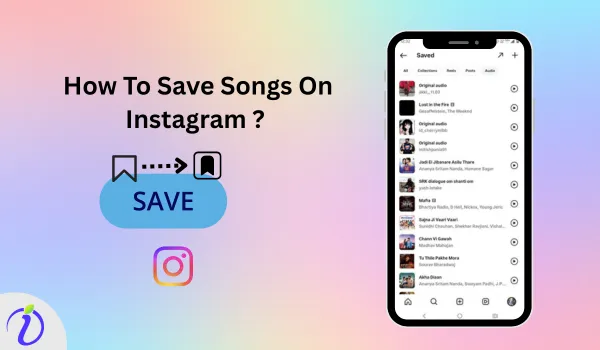
Are you looking for the song you just lost in the ocean of content? It’s better to know how to save songs on Instagram than to overthink it.
Saving a song lets you keep track of your favourite music and even quickly reuse it in your Instagram reels, stories, or posts. Whether you enjoy discovering new music or want to create more engaging Reels and stories, saving songs helps you stay organised, creative, and ready to post at any time.
Let’s get into the blog to learn how to save songs on Instagram and some tips for using saved Instagram songs creatively.
 Time killer · Pain
Spending 6 hours writing posts that get zero traction?
Paste your URL. ZuAI turns it into 30 brand-on captions in 10 minutes — no blank-page panic, no generic AI filler.
What is an Instagram song?
Instagram has a built-in music feature with a different collection of music. You can use this music in your Instagram stories, posts, and reels. Instagram allows users to use licensed songs directly from its music library, making it easy to pair visuals with sound. These songs can be short clips, instrumental sections and even a popular hook full-length track.
Outcome · RecommendedGet 30 days of social content from your website — in 10 minutes.
Why has Instagram music become so popular?
Instagram lets users use music, songs, and original audio from its built-in music feature to make their reels, photos, and stories more engaging. Instagram music has become so popular because it helps connect better than a normal photo or video.
The most important feature of Instagram music is that it helps build an emotional connection between the content and its audience, as music has a powerful ability to trigger memories and feelings. When you attach music to your story, it makes the content more aesthetic and relatable.
Let’s explore how to save a song on Instagram in step-by-step methods.
Proof · Verified
2k+ grew faster with one tool.
How to save songs on Instagram?
Here is the step- by step guide how to save songs on Instagram from different reels, post and stories.
Free · Instant · No signupSee what ZuAI generates from your website — right now.
Paste your URL. Watch ZuAI write a month of brand-on captions in seconds. Preview before you create an account.
How to save songs on Instagram reels?
You can save an Instagram song from a reel
Step 1: Open the Instagram app.
Step 2: Select the reel from which you want to save the music.
Step 3: Tap the audio icon in the bottom-right corner.
Step 4: Tap the “save” icon.
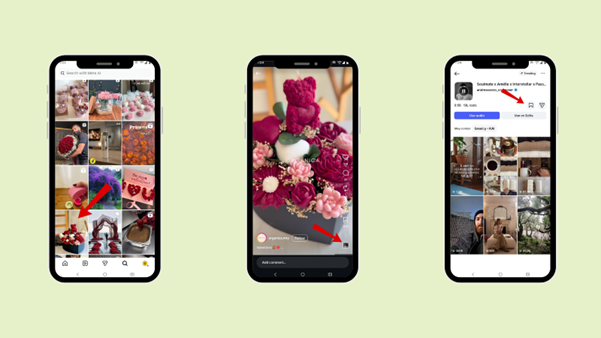
The audio will be automatically saved.
Speed · 10-minute setupOne coffee from URL to a full month of scheduled posts.
Drop your URL, brew your coffee, come back to 30 brand-on captions ready to publish.
How to save an Instagram song from a post?
Step 1: Open the Instagram app.
Step 2: Select the post from which you want to save the music.
Step 3: Tap the audio above the post
Step 4: Tap the “save” icon.
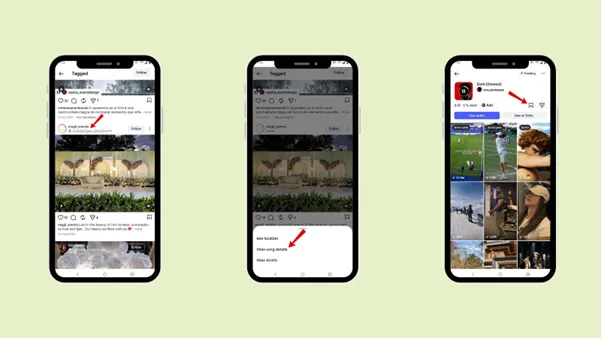
The audio will be automatically saved.
Blank tab. Six open browsers. No clue what to post.


 After · With Indzu
Paste one URL. Get 30 scheduled posts.
How to save songs on Instagram story?
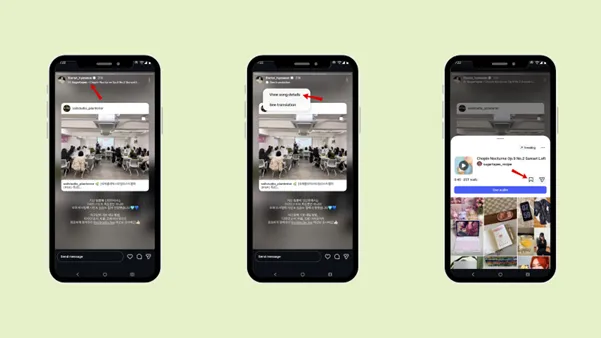
You can save a song from an Instagram story. Follow the steps if you want to save a song from an Instagram story.
Step 1: Open Instagram story
Step 2: While swiping right through Instagram stories, if you like an audio, tap the music icon above the story.
Step 3: Tap the “save” icon.
Time killer · Pain
Spending 6 hours writing posts that get zero traction?
Paste your URL. ZuAI turns it into 30 brand-on captions in 10 minutes — no blank-page panic, no generic AI filler.
How to use a saved reel song later?
You can use a saved Instagram song in your new reel or photo.
Step 1: Open the Instagram app.
Step 2: Select the Instagram reel from which you will use the audio.
Step 3: You can create a reel by using the audio.
Outcome · RecommendedGet 30 days of social content from your website — in 10 minutes.
How to find the saved song on Instagram?
Step 1: Open an Instagram account in the app
Step 2: Tap the hamburger icon.
Step 3: Under “How you use Instagram, ” tap on “Saved”.
Step 4: Tap “Collection” or “Audio”.
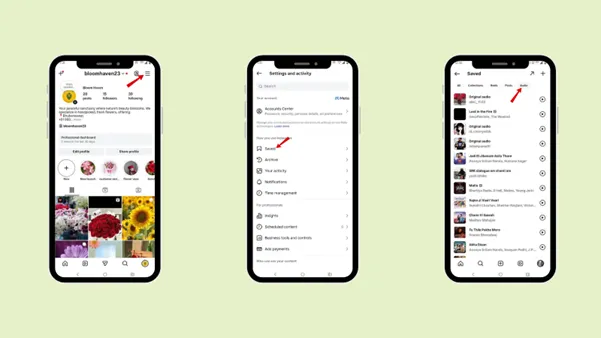
Then you will be able to find all the saved audio or Instagram songs.
Proof · Verified
2k+ grew faster with one tool.
Common Reasons why users will save songs on Instagram
- To use in reels, posts, or stories
Sometimes, while scrolling on Instagram, you may come across a song or piece of music you want to use in your reel, story, or post. For that reason, many users save a song, which helps them quickly access it while creating content in the future.
- To keep up with the trend
Posting content on a trending or viral song can help you get viral on Instagram. If you can create content that perfectly matches the song, it will gain more engagement (in the form of likes, comments, and shares).
If you are a brand, creator, or professional, keeping up with trends is essential to gain more engagement and visibility with your audience.
- You liked it
You can also simply save the song if you like it too, or want to listen to the full track.
- To support a favourite creator or artist
Saving and using the song in your post, reel, or stories helps boost the song’s visibility and even the singer’s or original music creator’s visibility.
Free · Instant · No signupSee what ZuAI generates from your website — right now.
Paste your URL. Watch ZuAI write a month of brand-on captions in seconds. Preview before you create an account.
Where can you use the saved songs on Instagram?
There are 3 main content formats you can use your saved song in. To increase the content engagement and boost visibility. That is why you should know how to save songs on Instagram.
- Instagram Reel
The most commonly used content format for using your saved song is Instagram Reels. When you save a song, it becomes easy for you to find later when you want to create an Instagram reel. Music helps make the reel more entertaining, emotional and engaging.
Reels have greater potential to reach a wide audience than posts or stories. So using a trending song gives you an advantage to boost your engagement.
- Instagram Post
Instagram also lets you add music to your regular feed posts. So, saving a song will help you get the exact song for your post without having to search through the ocean of content. Music in your regular feed post makes it more engaging and stands out from other posts.
- Instagram stories
You can use the saved song in your Instagram story to add feeling and personality to your photos or short videos. Whether you are sharing a daily moment, a memory or an update, music makes your story more fun and expressive.
Saving songs helps you to get the right song that matches your story vibes, without searching again and again.
Speed · 10-minute setupOne coffee from URL to a full month of scheduled posts.
Drop your URL, brew your coffee, come back to 30 brand-on captions ready to publish.
Difference between audio track, original music and artist released music.
After you have know how to save a song on Instagram. Now know the difference between audio track, original music and artist released music, to figure out what type of music are you actually saving and using in your different content format.
| Audio Track | Original Music | Artist-Released Music |
|---|---|---|
| Any audio used in Instagram content, including music, dialogue, voice, or sound effects. | Music or audio created and uploaded by Instagram users or creators. | Professionally produced songs released by official music artists. |
| It can be created by any Instagram user, creator, brand, or artist. | Usually created by individual creators or users on Instagram. | Created by verified musicians, record labels, or music publishers. |
| Can include music, speech, background noise, or sound effects. | Includes custom beats, voiceovers, remixes, or unique sounds. | Includes full songs or official clips from albums or singles. |
| Copyright status depends on the original source of the audio. | Copyright is usually owned by the creator. | Copyright is licensed and protected by the artist or record label. |
Blank tab. Six open browsers. No clue what to post.
After · With IndzuPaste one URL. Get 30 scheduled posts.
Tips for using saved Instagram songs creatively
Now that you know how to save a song on Instagram, let’s look through some tips you can apply to your content to make it more engaging.
- Plan your content
You can create your own music library by saving the songs you like and planning which song you want to use in which content format. You can use different songs for different types of posts, such as fun videos, educational content, or emotional stories.
Planning your content ahead of time helps your content feel more organised and consistent. To maintain your posting consistency, even on a hectic day, use Indzu. social.
- Match your song to your content’s mood.
Make sure the song matches your content type, as music can trigger emotion. So, depending on the music, you will attract an audience.
For example, if one of your users is in a jolly mood and you post content with music that complements it, they will surely engage with it.
Happy and upbeat songs work well for fun or energetic videos, while slow or soft music is better for emotional or calm posts. When the content music matches the mood, it feels more natural and relatable to viewers. A good song can make a simple video more powerful and memorable.
- Follow the trend but still keep your own twist.
Trending songs help your content reach a wider audience. But make sure you do not forget your niche or your account’s goal and vision. Mix both the trending song and your own style and message.
- Use lyrics
Lyrics clarify the song and make it easier to understand, and they make it more meaningful. You can match the song to a particular part of your content to make it more meaningful.
Time killer · Pain
Spending 6 hours writing posts that get zero traction?
Paste your URL. ZuAI turns it into 30 brand-on captions in 10 minutes — no blank-page panic, no generic AI filler.
Conclusion
With so much content scrolling, it’s easy to lose track of the music you love. That is why it is important to know how to save a song on Instagram. Having the saved song with you makes content creation much easier and faster. Go through the steps to save a song on Instagram, whether from Reels or posts.
Go through the common reasons why someone would save a song on Instagram. And a different content format that lets you use your saved songs. Keep in mind the tips to make the most of the saved and trending songs. To build consistency in your content posting and content creation, use Indzu. social.
Outcome · RecommendedGet 30 days of social content from your website — in 10 minutes.
FAQs
Q1. Are saved songs available offline?
Ans 1: No, saved songs on Instagram are not available when you are offline.
Q2. Why can’t I save some songs?
Ans 2: Sometimes you cannot save some songs for
Q3. How many songs can you save on Instagram?
Ans 3: Instagram does not have any official limit on saving songs. You can save more than 100 songs without any issues.
Q4. Does Instagram notify someone when I save their audio?
Ans 4: No, Instagram does not send a notification when you save a song or another user’s audio.
Q5. Why is Instagram music not available in my country?
Ans 5: Music availability depends on licensing agreements, which vary by region. That is the reason some Instagram music may not be available in your country.