Have you uploaded a new reel to your profile and want your followers to know about it? Then you must know how to share a reel to your story.
When you post a reel on your profile, it may not reach all your followers because it gets buried under other content in their feed. And even not all the users have time to come to your profile and check what new reel or post you have updated.
So, sharing the reel to your story makes it convenient for your followers to know you have uploaded a new content. Even sharing the reel in your story increases visibility, boosts engagement, and makes it easier for users to discover it.
Let’s get into the blog to learn how to share a reel to your story, why you can’t, and more.
 Time killer · Pain
Spending 6 hours writing posts that get zero traction?
Paste your URL. ZuAI turns it into 30 brand-on captions in 10 minutes — no blank-page panic, no generic AI filler.
What is an Instagram reel?
Instagram Reels are short, vertical videos that Instagram users can create and share. It can be up to 3 minutes long. You can create reels on any topic or niche. Reels usually include music, voiceovers, text, filters, and special effects. It has more potential to reach a wider audience, even users who do not follow you.
Reels are created by content creators, businesses, brands, or you can even make them just for fun. Both public and private accounts can build it. It stays permanently unless you delete it from your profile.
Outcome · RecommendedGet 30 days of social content from your website — in 10 minutes.
What is an Instagram story?
Instagram stories are photos or videos that appear at the top of the homepage and disappear within 24 hours. Stories are meant for quick updates rather than polished content. Normally, it is shared by content creators, brands, or even private account users to share daily moments, announcements, or reminders.
Posting an Instagram Reel to your stories is a great way to boost engagement with your Reel. Stories are the best place to remind your followers if you have uploaded a reel to your profile. Let’s have a look at a step-by-step guide on how to share a reel to your story.
Proof · Verified
2k+ grew faster with one tool.
How to share a reel on your story?
Step 1: Open the Instagram app.
Step 2: Select the reel you want to share on your story.
Step 3: Tap the “Share arrow” on the right-hand side.
Step 4: Tap “Add to story.“
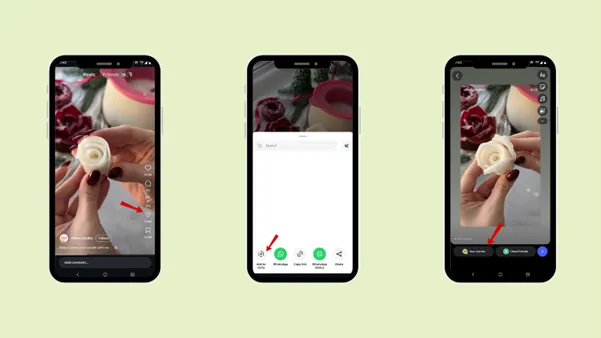
Now, according to your choice, add it to “Your story” or “close friends.”
Free · Instant · No signupSee what ZuAI generates from your website — right now.
Paste your URL. Watch ZuAI write a month of brand-on captions in seconds. Preview before you create an account.
How do you share someone else’s reel to your story on Instagram?
Step 1: Open the Instagram app.
Step 2: Select the reel from your favorite content creator or a friend you want to share in your story.
Step 3: Tap the “Share arrow” on the right-hand side.
Step 4: Tap “Add to story “.
Now, according to your choice, add it to your “Your story” or “close friends”.
Note: You can only share someone else’s video to your story if the account is public; you cannot share a private account’s video.
Speed · 10-minute setupOne coffee from URL to a full month of scheduled posts.
Drop your URL, brew your coffee, come back to 30 brand-on captions ready to publish.
How to share your own reel to your story?
Step 1: Open the Instagram app.
Step 2: Select the reel you want to share on your story.
Step 3: Tap the “Share arrow” on the right-hand side.
Step 4: Tap “Add to story “.
Now, according to your choice, add it to your “Your story” or “close friends”.
Blank tab. Six open browsers. No clue what to post.


 After · With Indzu
Paste one URL. Get 30 scheduled posts.
How to customise the reel for better engagement?
Step 1: Open the Instagram app.
Step 2: Select the reel you want to share on your story.
Step 3: Tap the “Share arrow” on the right-hand side.
Step 4: Tap “Add to story “.
Step 5: On the right-hand side, you will find all the features
Text
Stickers
Add music
Mention
Background
Draw
You can use these features to align with your brand’s values or style and boost engagement.
Now, according to your choice, add it to your “Your story” or “close friends”.
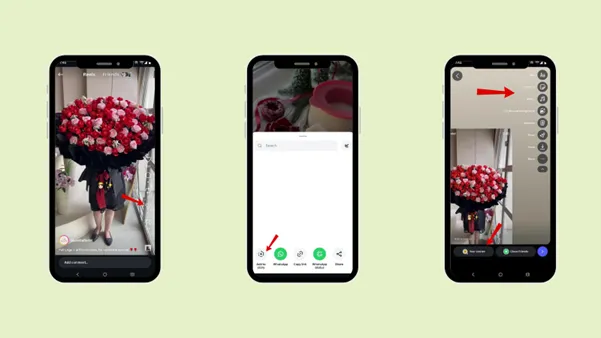
For example, when you update your profile with a new reel, use the “New reel” sticker or emoji, or even “Follow, like, share” stickers to get your audience’s attention.
Time killer · Pain
Spending 6 hours writing posts that get zero traction?
Paste your URL. ZuAI turns it into 30 brand-on captions in 10 minutes — no blank-page panic, no generic AI filler.
How long does a Reel stay on your Story?
A reel stays on the story for 24 hours, until the story disappears. You can create a reel up to 3 minutes long, but the first 60 seconds will appear in the Instagram story.
Outcome · RecommendedGet 30 days of social content from your website — in 10 minutes.
Why can’t you share a reel to your Instagram story?
While in the whole process of posting a reel to your story, there are certain cases where you will not be able to post an Instagram story.
1. Private Account
You cannot share a reel from a private account to your story. You can only share a public account reel to your story. Even if you follow the private account user or are tagged in it, you cannot share the reel to the story.
2. Sharing Disability
In some cases, the reel’s owner turns off sharing. Here, you will not be able to share a reel to your Instagram story.
It does not matter if it is a public account reel; even public accounts can turn off the ability to share their reel to stories.
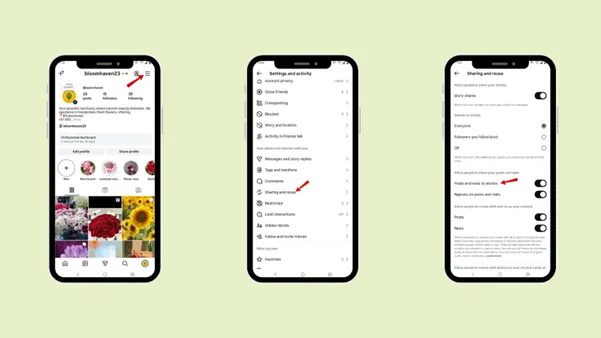
If you want to check the sharing ability in your account
Step 1: Open the Instagram app.
Step 2: Go to profile
Step 3: Tap the hamburger icon “Settings and activity”.
Step 4: Tap “Sharing and reuse” under “How others can interact with you”.
Step 5: Check whether “Post and reel to stories” is turned on.
3. You are using the website version.
Now, even if you are sharing a public account reel with the shareable option, you are still unable to share it to your story. Check whether you may be using the website version of Instagram (Instagram.com).
The Instagram website does not allow you to share reels to your story, even if the account is public.
The solution to this is to save the reel you want to post, then download the Instagram app from the App Store.
4. Update the app
Now that you are using the Instagram app, you are still unable to share a reel to your story. Then there must be a small glitch in the app. Try uninstalling and reinstalling it, then log in to your account and share the reel to your story.
What are the benefits of knowing how to share a reel to your story on Instagram?
It’s not just about sharing a reel to your story; it also offers a few benefits for your content creation.
1. Increase Visibility and engagement.
Knowing how to share a reel in your Instagram story increases views and engagement on your content. Sometimes when you post a reel on your profile, it can get buried under other content, so it’s important to post a new reel to your story so your audience knows you have uploaded a new one.
And even followers won’t check your profile to see what you have uploaded, so sharing the reel to your story will be beneficial. They can click the story to go directly to the original reel and engage with it.
2. Helps promote content and build your brand
For content creators and businesses, sharing a reel to your story helps promote content, highlighting new product launches, announcements, and more.
You can add text, stickers, and a call to action to your story, to the reel that you have posted to your story. Using stories to promote real helps maintain a consistent online presence and strengthens the personal or brand identity. It shows the audience you are active, organized, and intentional about your content strategy.
Proof · Verified
2k+ grew faster with one tool.
Conclusion
In this ocean of content, knowing how to share a reel to your story has a higher possibility of getting more attention and engagement for your reel. Stories appear at the top of the home page, so they have a higher chance of being seen by your followers and of letting them know you’ve uploaded new content.
Go through the steps on how to share a reel to your story, to be able to upload the reel to your story without any issues. Even check the points that prevent you from uploading your story to the reel. It’s very important to be consistent in your posting. If you have a hectic day but still want to update your followers about your new content, use Indzu. Social to seamlessly schedule your content without any worries.
Not only does it schedule, but it also helps you create, and even AI tools help you with captions, hashtags, and more.
Free · Instant · No signupSee what ZuAI generates from your website — right now.
Paste your URL. Watch ZuAI write a month of brand-on captions in seconds. Preview before you create an account.
FAQs
Q1. Do shared reels count as views?
Ans 1: No, shared reels are not counted as views; they are counted under the shared feature.
Q2. Can you delete a Reel from your Story without deleting the Reel?
Ans 2: Yes, you can delete the reel from the story without deleting the actual reel.
Step 1: Tap the three dots “More” option in the bottom left-hand corner.
Step 2: Tap “Delete”.
Q3. Can you share a Reel from a private account?
Ans 3: No, you cannot share a reel from a private account.
Q4. Can you share a Reel to your Story after posting it?
Ans 4: Yes, you can share a reel to your story after posting it.
Q5. Does sharing a Reel to my Story actually increase views and engagement?
Ans 5: Yes, sharing a reel in your story will increase its views and engagement.
Q6. How to schedule a reel to your story?
Ans 6: Log in to Indzu. Social to schedule a reel to your story.