Do you feel that you are watching some random reels on Facebook that serve you no good? Or lately, you feel that Facebook does not treat your posts the way they should be treated? Does it seem that spending time on Facebook or posting on Facebook is futile, and you feel like quitting it?
But wait, before you even think of such a drastic step, let me tell you that you need a reset. Just like your body needs a good warm-up, stretching or exercise to feel like itself again, your Facebook needs a reset to function like your favorite place. But how to reset the Facebook reels algorithm? Can you really change the algorithm in your favor?
We will see all that in this blog. So, hang on it will only take 5 mins to go through this blog and seven or ten days to reset the Facebook algorithm.
Facebook is a dark horse; there are thousands of tips and tricks you can apply to ride this horse in your favor and direction. Keep reading our blogs to know them.
 Time killer · Pain
Spending 6 hours writing posts that get zero traction?
Paste your URL. ZuAI turns it into 30 brand-on captions in 10 minutes — no blank-page panic, no generic AI filler.
What is a Facebook algorithm reset, and why do we need it?
What do you do when your phone, TV, and laptop start behaving in a weird way? You try to restart them. But why? So that they can reset themselves and start behaving normally.
Sometimes when you have not been using Facebook lately or you or your friends or community on Facebook have indulged in liking or engaging with your different types of content, pages etc., Facebook algorithm kind of resets itself.
Facebook’s algorithm is always learning:
- What you like
- What you ignore
- What you or your connections on Facebook are engaging with.
Facebook algorithm also starts testing by
- Pushing new content categories
- Reducing reliance on old patterns
So, it is important that when you feel that Facebook is not clicking, try to do a Facebook algorithm reset.
Outcome · RecommendedGet 30 days of social content from your website — in 10 minutes.
How to reset Facebook reels algorithm? (If you are on the audience side)
There is no point in wasting time on things that do not entertain or provide value to you.
Let us learn all the ways so that Facebook will show you the reels that genuinely interest you (in other words, let us reset the Facebook reels algorithm).
Change directly from Content Preferences settings
Let us learn how to reset Facebook Reels algorithm on Android.
Step 1: Go to your Facebook app.
Step 2: Click on the upper right side of your screen and go to settings. Step 3: Under settings, go to content preferences.
Step 3: Under settings, go to content preferences.
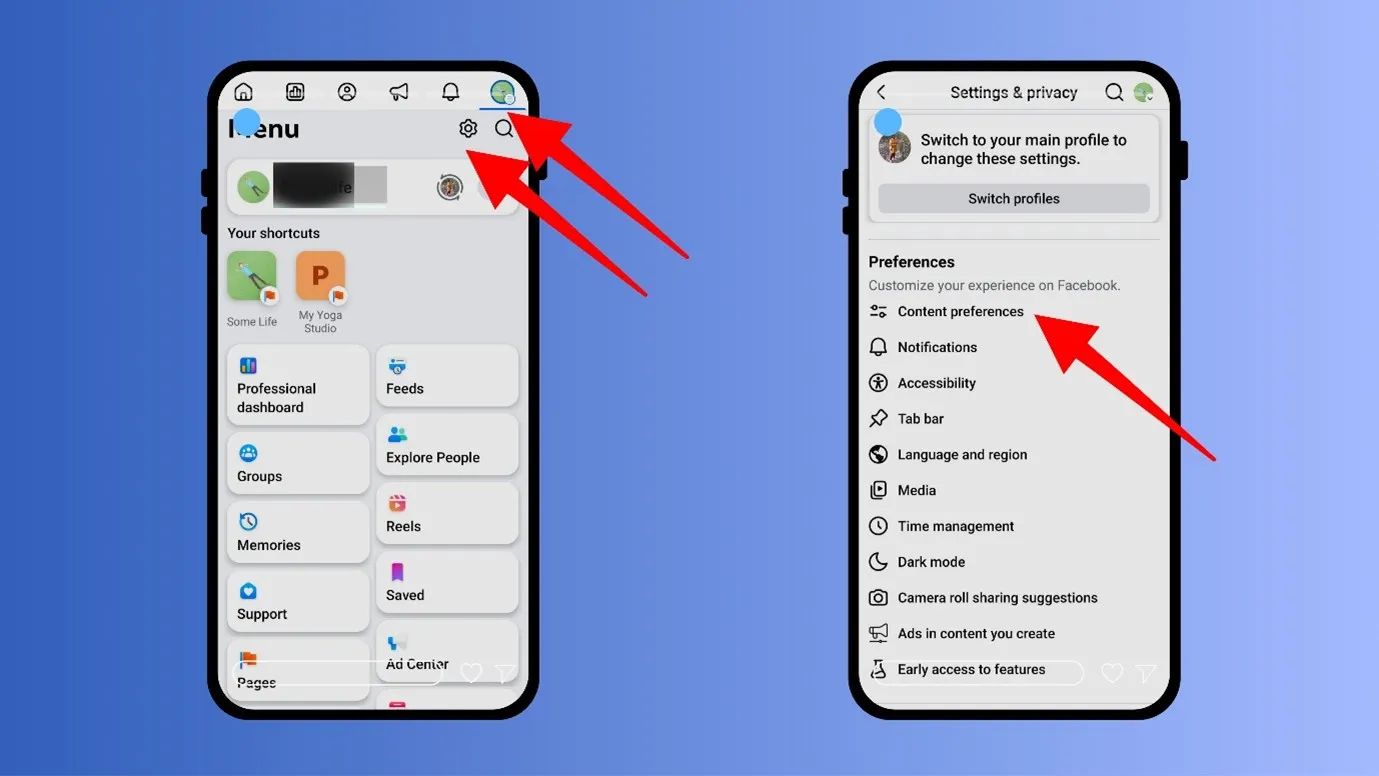
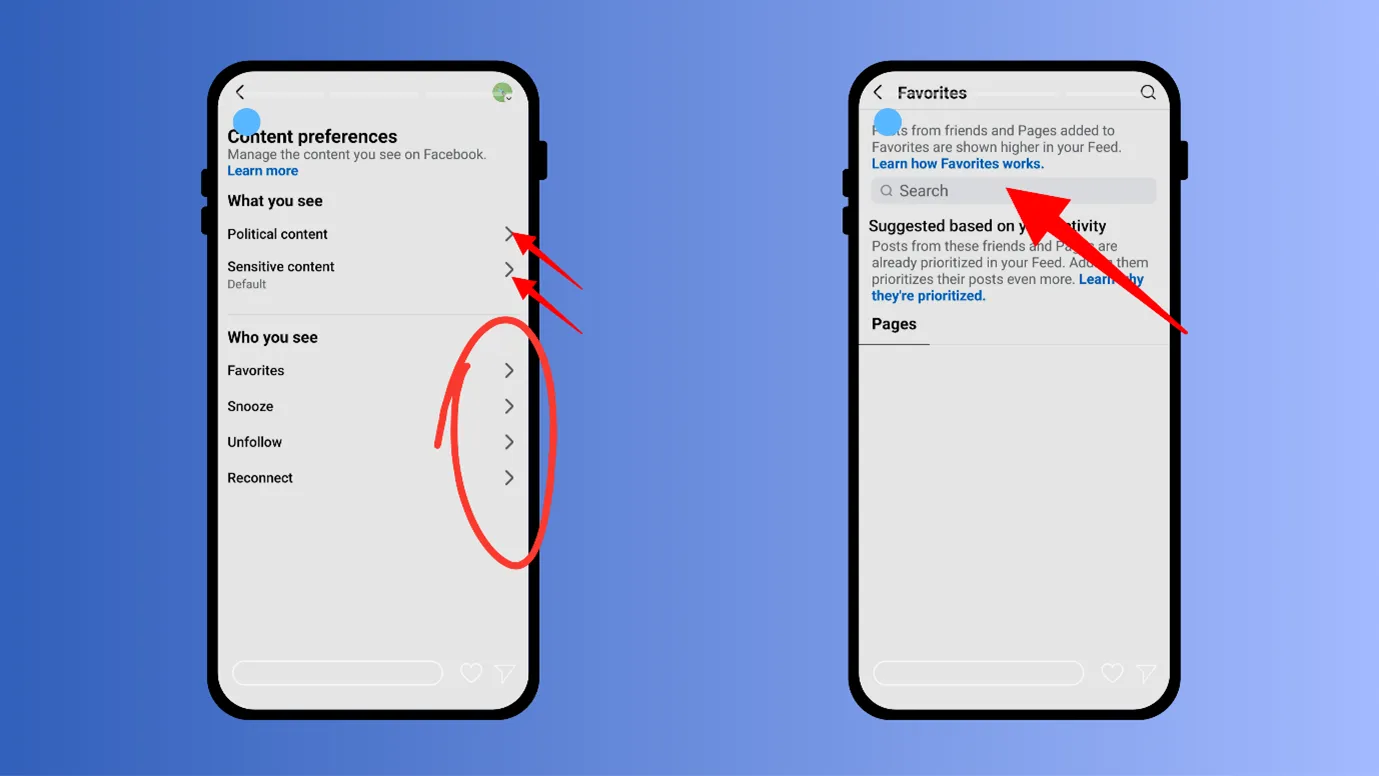
Step 4: Here you can choose “Political Content”, Sensitive Content”, and “Favourites.”
- You can also snooze (temporarily stop seeing posts from a page for 30 days), unfollow, or reconnect your Facebook pages.
- Under Favourites, you can search for your favourite pages or people and add them.
- Similarly, you can unfollow any unwanted page or person.
Clear your unwanted reactions
Step 1: Go to your Facebook app.
Step 2: Click on the upper right side of your screen and go to settings.
Step 3: Go to “Activity Log” (under Your Information).
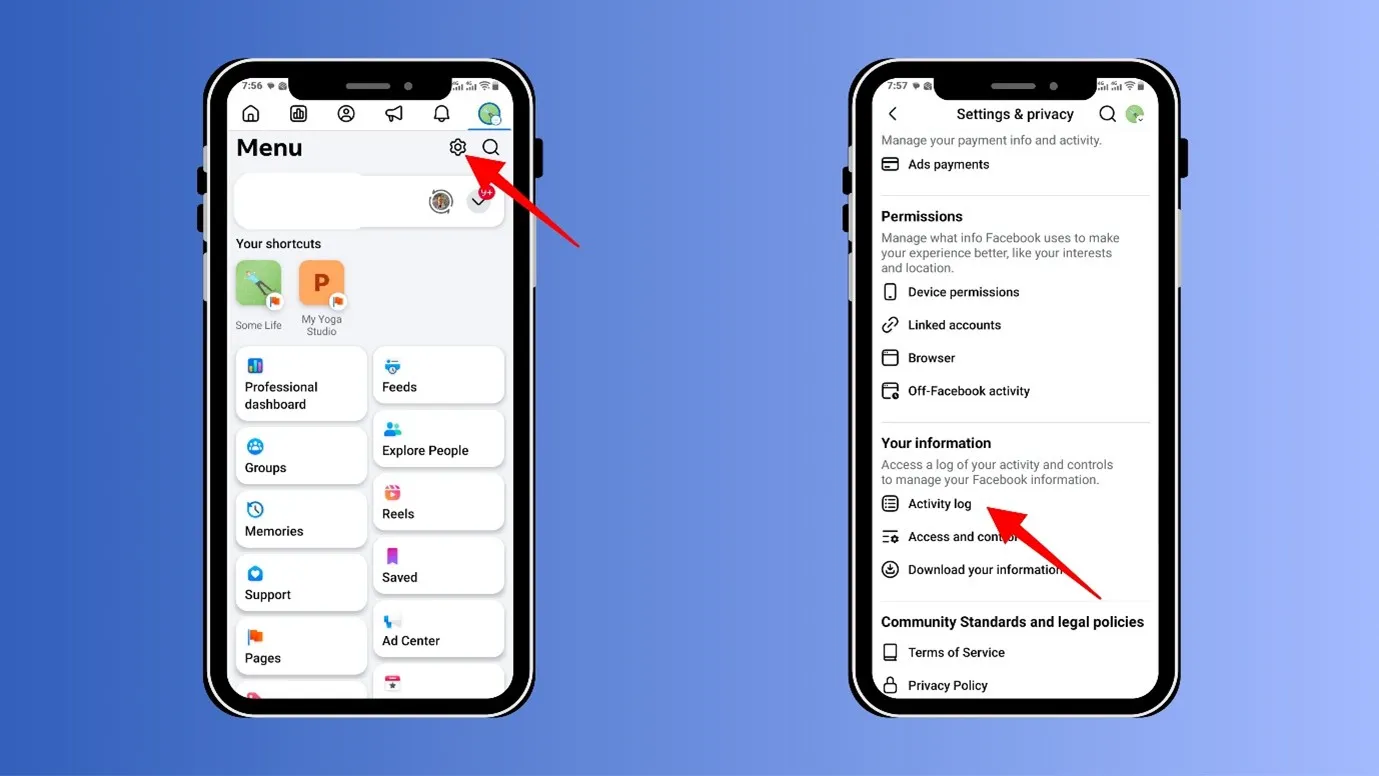
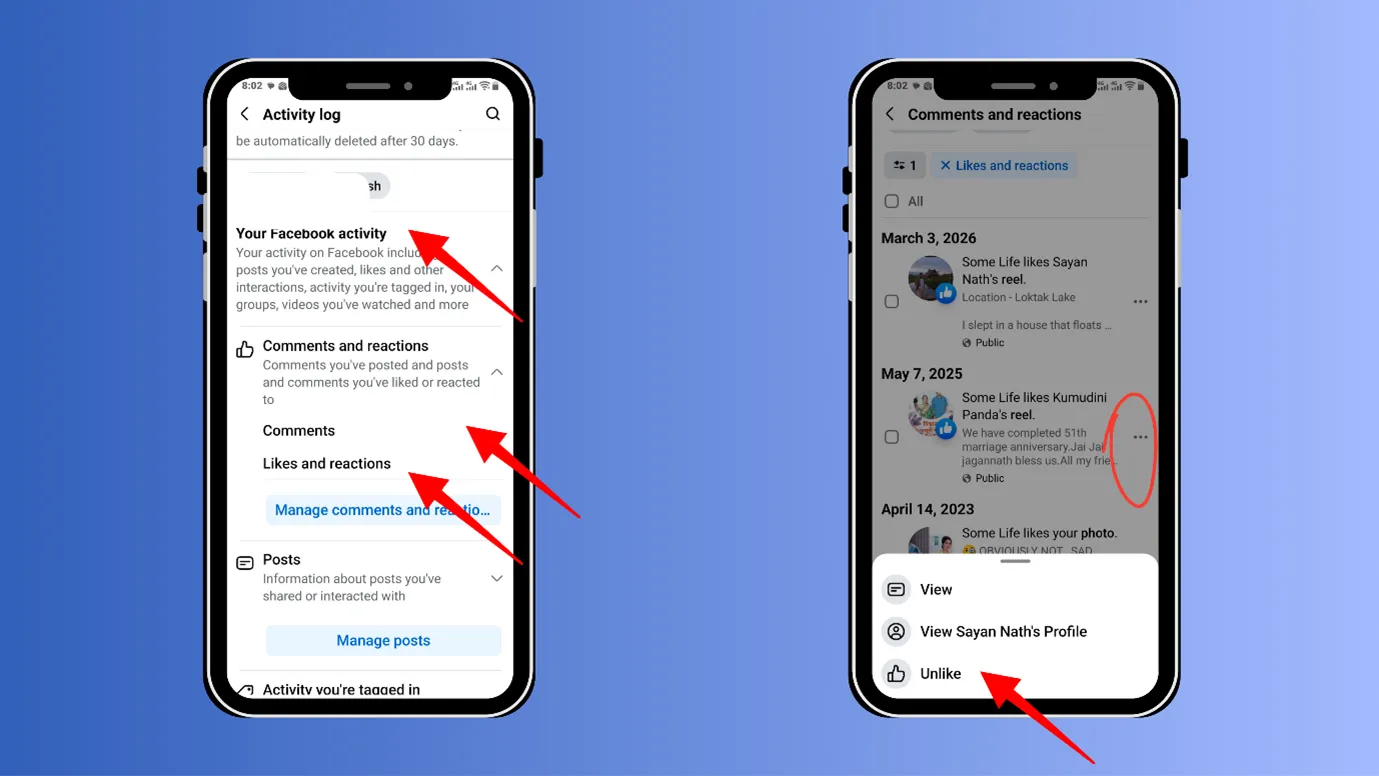
Step 4: Next, go to “Your Facebook Activity” and click on “Comments and Reactions”
- If you had liked any reels or content of any kind previously, which you do not want to see anymore, you can manage that. (You can unlike them or remove the comment)
While seeing any reel, directly command the algorithm whether you are interested or disinterested.
Step 1: While you are seeing any reel, click on the 3 horizontal lines above the reel.
Step 2: And hit “Interested” or “Uninterested”.
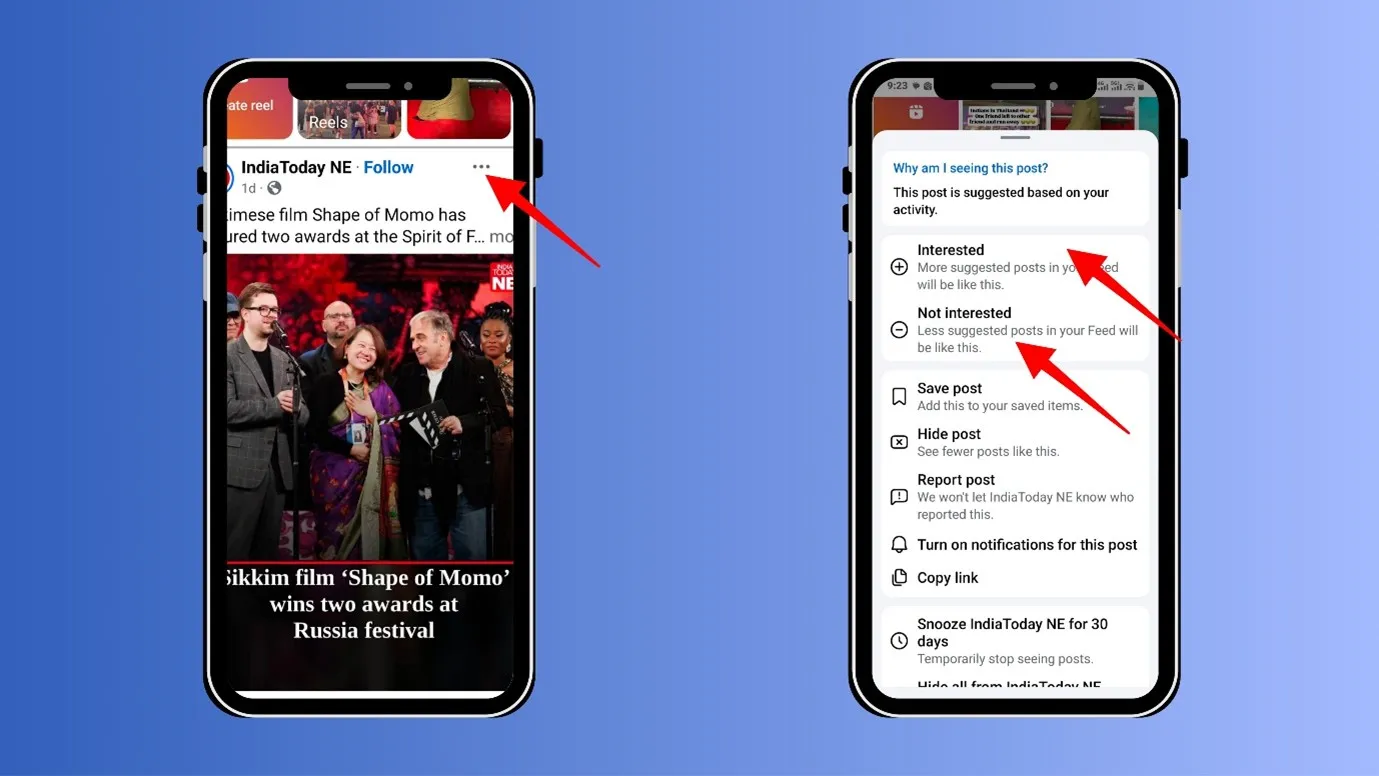
In this way, you are directly telling the algorithm what you like and dislike.
Go ahead and show the algorithm what you like
Now go to the pages and people from whom you want to see content from, follow them, like their content, and comment on their content.
(It is like directly signalling the Facebook algorithm about your preferences.)
Clear your browser settings in Facebook.
Step 1: Go to your Facebook app
Step 2: Click on the upper right side of your screen and go to settings.
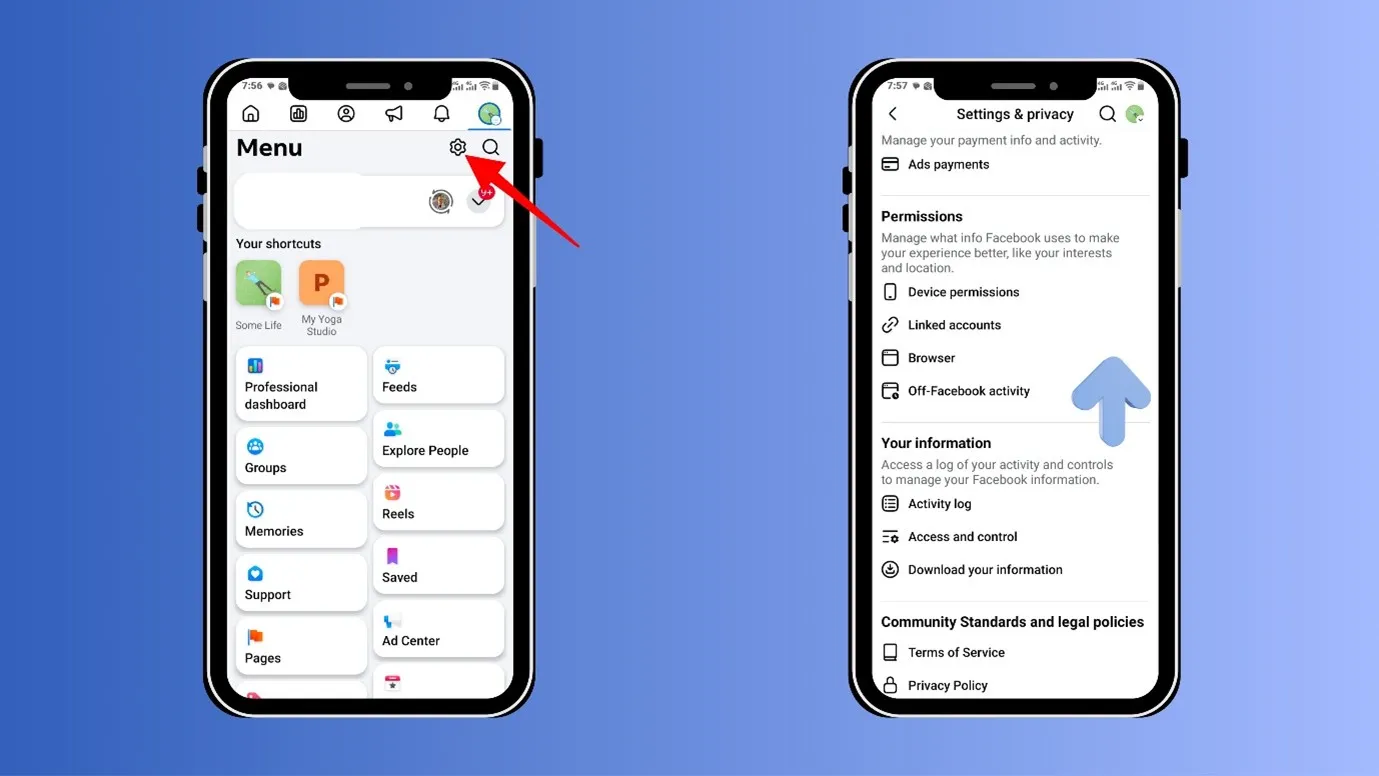
Step 3: Next, go to “Browser” (under Permissions)
Step 4: Here you can clear your “Cookies and Cache”.
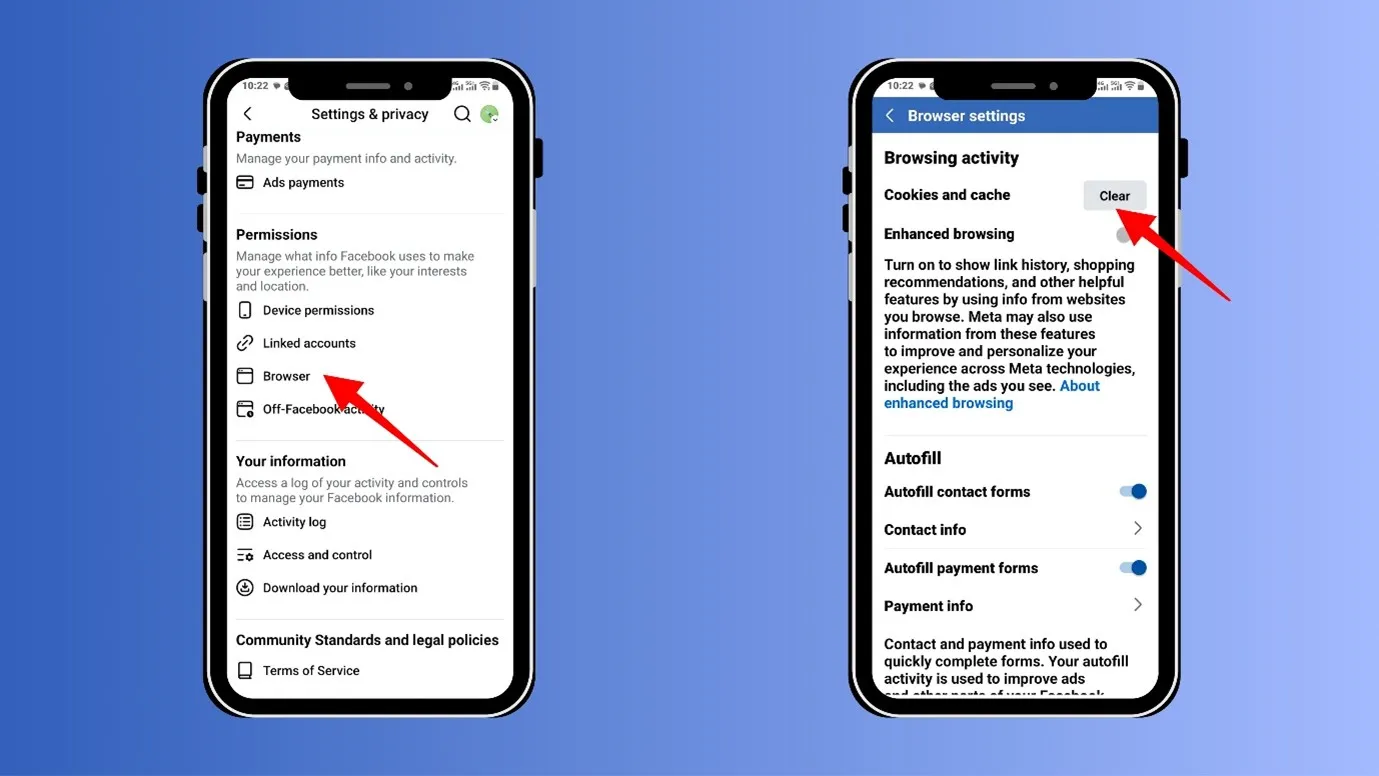
By doing this, you are deleting your previously browsed data and the search history of Facebook.
Proof · Verified
2k+ grew faster with one tool.
How to reset the Facebook reels algorithm and increase organic reach (if you are a creator)
Have you been posting consistently and seeing no results? As if Facebook has been purposefully ignoring you.
Do not worry, here we will share four easy and powerful tips on How to reset Facebook reels algorithm so that the algorithm will only push your content.
4 easy ways for a Facebook algorithm reset
Before trying for a Facebook algorithm reset, check the account status. Whether Facebook has placed any restrictions on your account
Step 1: Go to your Facebook profile.
Step 2: Click on the 3 horizontal dots.
Step 3: Go to Profile status, and check “Account Status”.
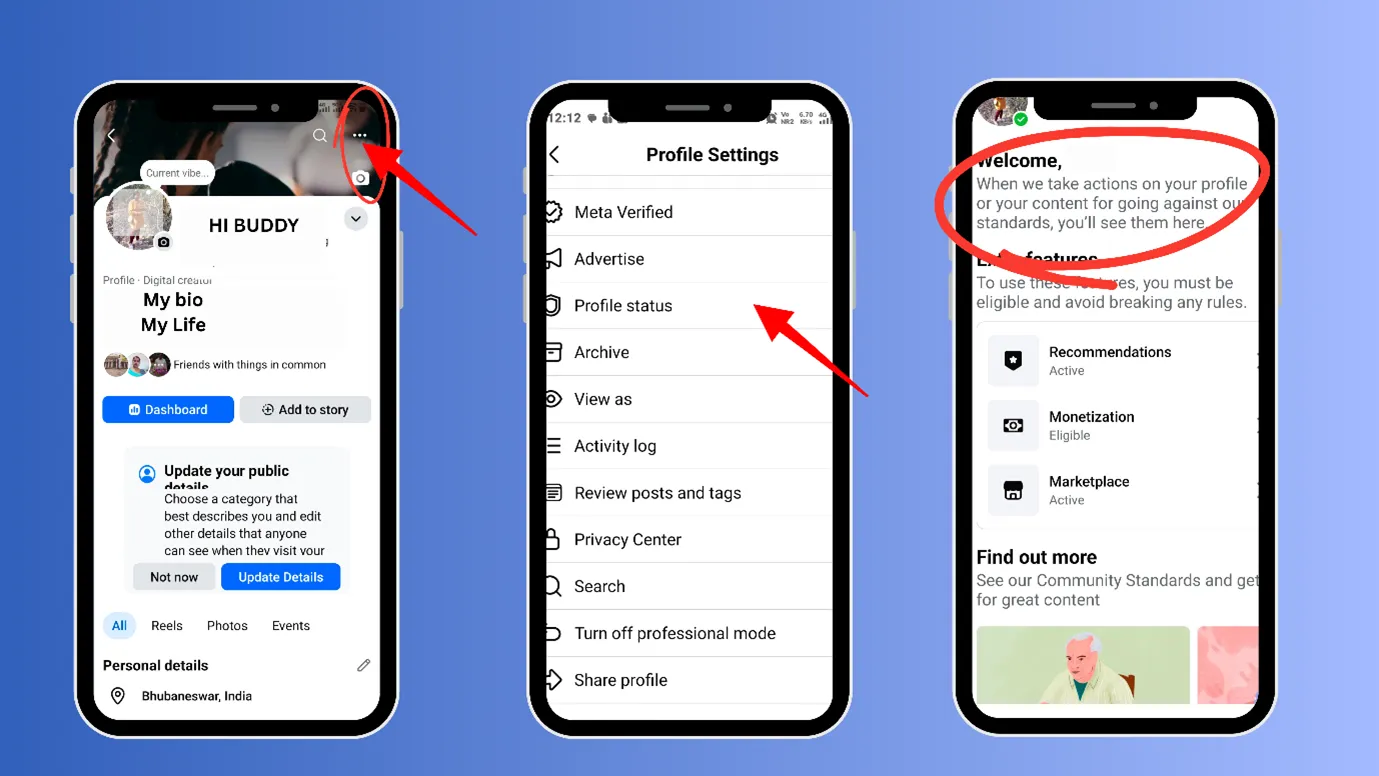
If there is any restriction, it will show there.
Free · Instant · No signupSee what ZuAI generates from your website — right now.
Paste your URL. Watch ZuAI write a month of brand-on captions in seconds. Preview before you create an account.
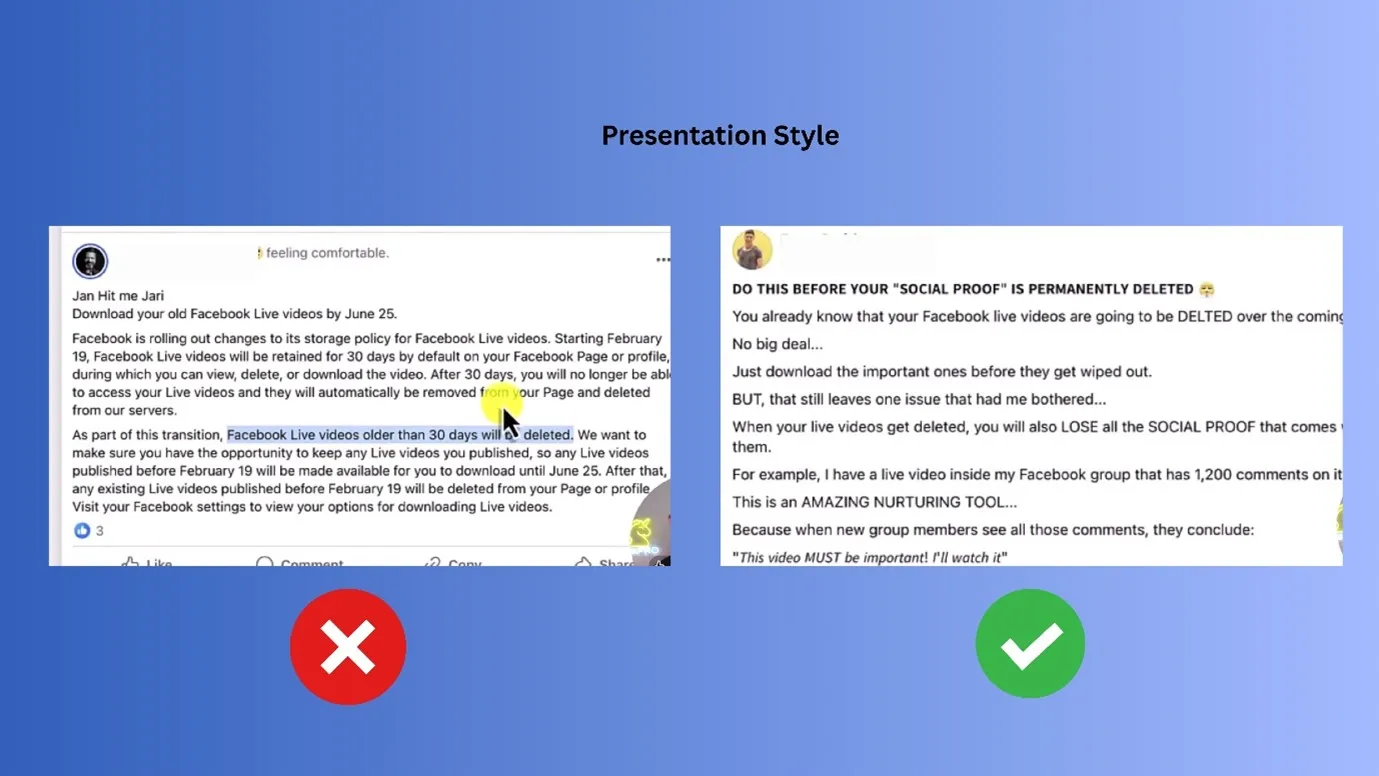
Content matters, but content presentation style matters more
Always make content that is easily digestible, consumable, and shareable. Whatever your audience shares, the Facebook algorithm will share even more.
Good visuals and Short reels catch more attention on Facebook.
Speed · 10-minute setupOne coffee from URL to a full month of scheduled posts.
Drop your URL, brew your coffee, come back to 30 brand-on captions ready to publish.
Make content that people would like to “Save.”
When you save content on Facebook, that means you would like to revisit that content. And that content must be valuable.
This is a good sign for Facebook’s algorithm, it will promote valuable content, to keep people intact within the platform.
Before posting your content, ask yourself:
- If I were the audience, would I like to consume it?
- If I were the audience, would this be interesting to me?
- Would I like it, share it, or save it?
Note: when we make content, we are always in a hurry to post it. We suggest that you wait for at least half a day before posting. This will give your mind a break, and you can look at your content with a fresh perspective.
Blank tab. Six open browsers. No clue what to post.


 After · With Indzu
Paste one URL. Get 30 scheduled posts.
Tag your followers
When you promote your posts, Facebook will also promote your posts.
After posting content, you can go to the comment section and tag all your followers at once by typing @followers.
But do not do this every time, as this can irritate your followers. Also, use this method while you are posting valuable content or content that your followers have previously requested.
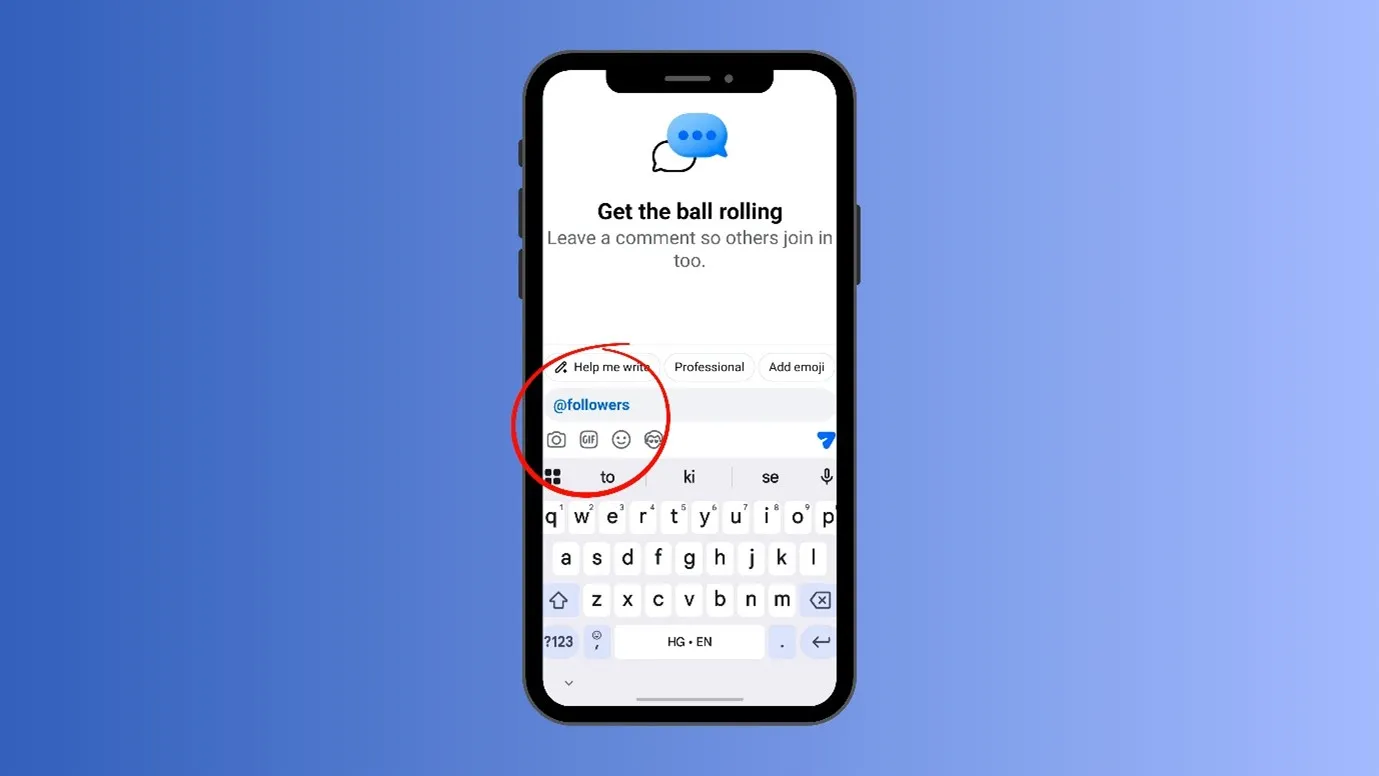
You can also share your reels link via DMs to some of you interested followers.
Time killer · Pain
Spending 6 hours writing posts that get zero traction?
Paste your URL. ZuAI turns it into 30 brand-on captions in 10 minutes — no blank-page panic, no generic AI filler.
Reciprocate Engagement
We are all always curious about how to reset the Facebook reels algorithm, to increase our reach or traffic.
But we also need to appreciate others and support others on Facebook.
Before posting any reel, visit your followers, like their content. You can also visit a page or profile that is in your niche, like their content or comment on their content.
This will send a signal to the algorithm that you want to build a strong community inside Facebook.
And a Facebook algorithm reset will happen in your favor.
If the audience loves you, the Facebook algorithm will automatically do the same.
Outcome · RecommendedGet 30 days of social content from your website — in 10 minutes.
Thinking of a reset?
The resetting process is simple and easy, but it can make a difference. If you are on the audience side, it will save you time and allow you to watch your kind of content.
If you are a creator, then reset could help you get more genuine and loyal attention.
Therefore, you should try these simple steps rather than taking any drastic steps or worrying about how to reset the Facebook reels algorithm.
Do you know you can easily reset the Instagram algorithm, too?
Are you someone who is managing Facebook, Instagram and many other social media platforms at once? You should try our smart management tool.
Proof · Verified
2k+ grew faster with one tool.
FAQ
Is a Facebook algorithm reset possible?
Yes, and no, you can give signals to the algorithm that your tastes have changed, and the algorithm will start taking notes.
But there is no direct setting inside Facebook to reset the algorithm
How many days would it take to have the Facebook algorithm reset?
As mentioned earlier in this blog, it can take an average of 10 days to show results.
You should expect a minimum of 7 days and a maximum of 14 days to see the results.
If I unfollow people, would it not decrease my reach?
Yes, it can decrease your reach, but it is important to filter out unnecessary people and pages from your Facebook follower list.
This will increase your Facebook profile or page’s efficiency.
How can I keep my Facebook Feed Clean After Resetting?
Follow these steps to keep your feed clean
- Unfollow when required
- Hit “interested” and “Not Interested” to let the algorithm know your taste
- Do not like or engage with random content
- Follow your niche or interest-related topics or people
- Be consistent with your postings or visiting Facebook.