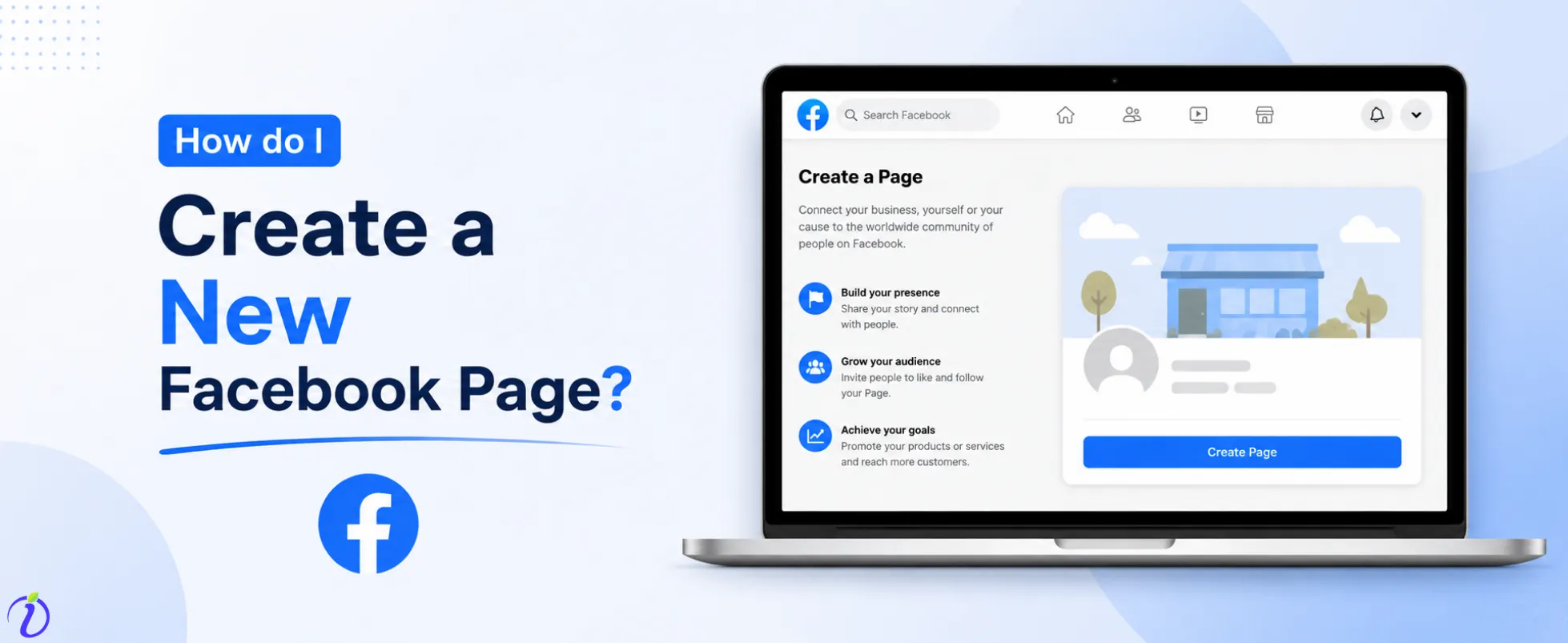
Already have a Facebook account? Wondering how to create a new Facebook page. We’ve got you covered.
If you are a brand, business, or even an influencer, creating a Facebook page allows you to connect with a wider audience and showcase your product, service, or content.
Imagine having a platform where you can upload all content related to your niche, product, or services, and reach the right audience who engage with your content. A Facebook page is the perfect place for that.
Let’s get into the blog to learn how to create a new Facebook page. And explore more about Facebook pages.
 Time killer · Pain
Spending 6 hours writing posts that get zero traction?
Paste your URL. ZuAI turns it into 30 brand-on captions in 10 minutes — no blank-page panic, no generic AI filler.
What is a Facebook Page ?
A Facebook Page is a free, public profile specifically created for businesses, brands, creators, and organizations to connect with an audience.
Compared to a normal profile, a Facebook page allows you to promote products or services, share updates, and run ads.
It is normally best for one-way communication, but your audience can comment, like, and engage with the content that you have uploaded on your Facebook page.
Whether you are a small business owner, content creator, or freelancer, a Facebook page helps your brand to grow its online presence and reach a wider audience.
Outcome · RecommendedGet 30 days of social content from your website — in 10 minutes.
How to Create a New Facebook Page Step- by Step
Creating a Facebook page takes just a few minutes.
Step 1: Log in to your Facebook account.
Step 2: Tap the hamburger icon.
Step 3: Tap “Create Facebook Page”.
Step 4: Tap “Create a new page”.
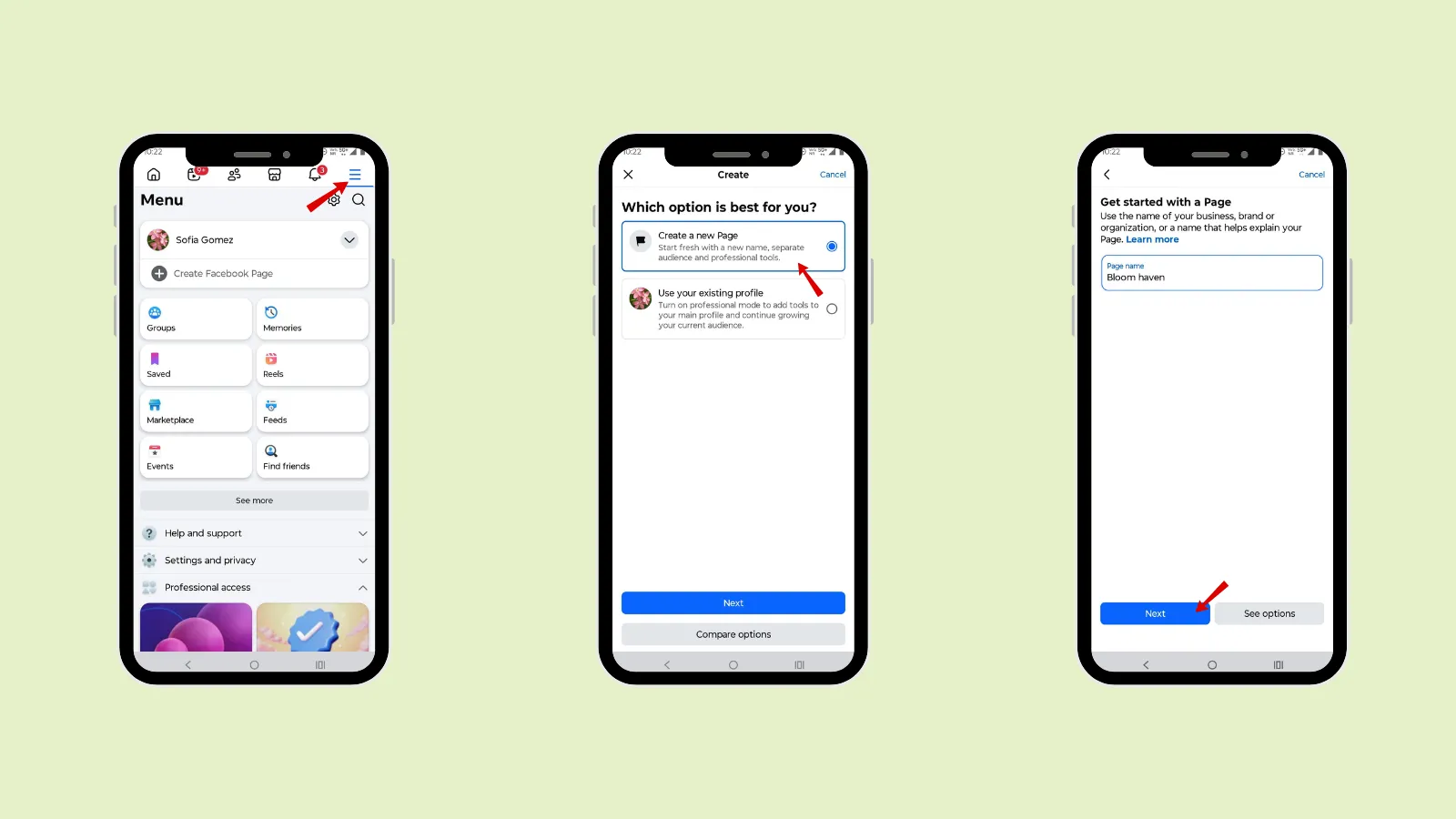
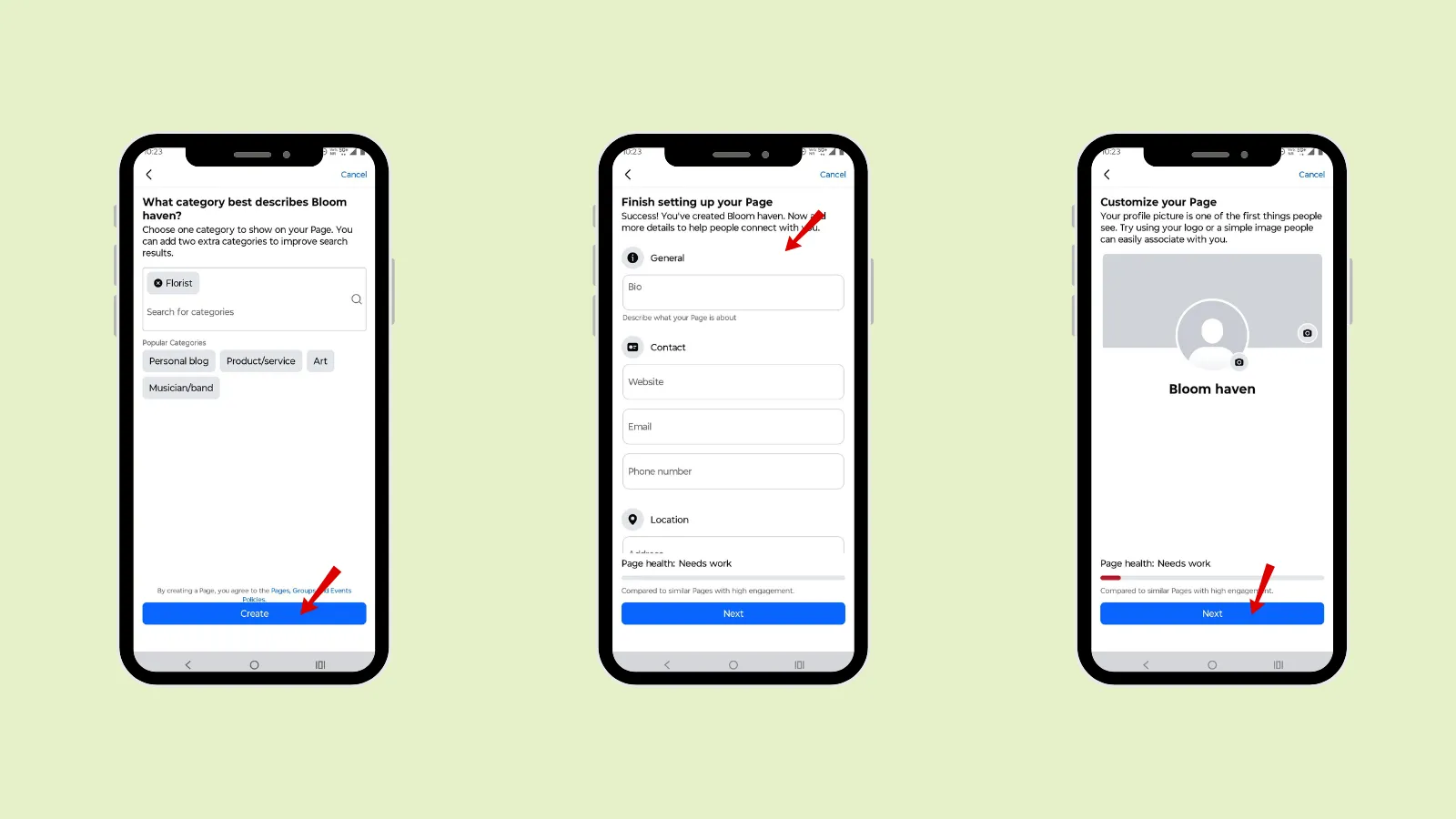
Step 5: Add a page name related to your business, brand, or organization.
Step 6: Add your page category.
Step 7: Add bio, contact details, and location.
Step 8: Add a profile image.
Proof · Verified
2k+ grew faster with one tool.
Why should you create a Facebook page?
As a business or brand, you need to have a Facebook page. It offers several benefits.
- Brand Identity
The reason you should create a Facebook page is to create your brand’s identity.
A well-structured Facebook page builds trust with your audience. Through a Facebook page, you can even attract new customers.
- Reach
Through a Facebook page, you can grow your account reach. There are millions of active Facebook users, which means you have a great chance to get more users with the right keywords, hashtags, or posts.
You can even target a specific market: local, national, or a global audience.
- Promotion
A Facebook page is a powerful marketing platform where you can showcase your products or services. You can even have an individual Facebook page to promote yourself if you are a content creator or influencer.
- Engagement
A Facebook page helps you build a strong relationship with your audience. This is because you will post all your content in one place, targeting the right audience, and increasing engagement.
Hence, the better engagement and relationship you build with your audience, the higher the conversion rate.
To maintain consistent engagement of your Facebook page, you need to respond to your audience’s comments, acknowledge feedback, and participate in conversations.
It helps build trust in your brand and even helps your audience feel valued or heard.
To make your Facebook page more interesting and engaging, you can use polls, live videos, and Q&A sessions.
- Traffic
A Facebook page can be the best platform to drive traffic to your blogs or website. On the Facebook page, you can share a link to your article, product pages, or landing pages.
When you post valuable content consistently, it will drive traffic to your page and website. It will encourage the audience to click through and explore more about your business.
An increase in traffic to your website or Facebook page will lead to higher conversion and business growth.
Free · Instant · No signupSee what ZuAI generates from your website — right now.
Paste your URL. Watch ZuAI write a month of brand-on captions in seconds. Preview before you create an account.
Things you need before creating a Facebook page
There are a few things you need to have before creating a Facebook page.
- Facebook account
- Purpose
- Brand Name
- Brand details
- Content plan
Speed · 10-minute setupOne coffee from URL to a full month of scheduled posts.
Drop your URL, brew your coffee, come back to 30 brand-on captions ready to publish.
How to optimize your Facebook page
To improve your Facebook page’s reach, you need to optimize it. Optimizing your page helps improve visibility and engagement.
1. Complete all page information
The first step when creating a Facebook page is to update all the information and clearly define your purpose.
You need to fill out every section, which includes
- About
- Contact details
- Location
- Business hours
2. Keywords
The next important step is to include relevant keywords related to your brand, business, or niche. Your audience can easily find your page when searching for relevant keywords.
3. CTA (Call to action)
The last important thing you need to have on your Facebook page is a proper CTA (call to action). CTA helps encourage your audience to take specific actions.
A CTA helps drive action, increase conversions, improve user experience, and boost engagement.
4. High-quality images
Use high-quality images while posting. Quality images attract more attention and encourage users to engage.
Blank tab. Six open browsers. No clue what to post.


 After · With Indzu
Paste one URL. Get 30 scheduled posts.
What to post on the Facebook page ?
The most important thing that you should know while posting on a Facebook page is what kind of content should be posted, or what will work best.
- Education
Post educational content. Where can you create a post so that your audience can benefit from the product or service? You can share a specific knowledge of your brand’s niche, share tips, guides or any useful information.
- Engaging
To interact and engage with your audience, post engaging content. You can ask questions, run polls, hold live Q&A, or start discussions.
- Behind the scenes
Post behind-the-scenes where you can show your work process, or any fun moment. Posting behind-the-scenes content makes your audience feel like they are part of your journey. This helps humanize your brand and build a deeper connection with your audience.
- Customer testimonials
The most important content you should post to build your audience’s trust is customer testimonials. It is the social proof that increases your brand’s credibility.
When the right audience, who are interested in your niche, see positive feedback from real people, they are more likely to convert.
- Trending topic
Posting on trending topics helps you to stay relevant and reach a wider audience. You can share your opinion, create content around trending news or participate in the viral challenges related to your niche.
- Promotion content
You can post promotional content that showcases the importance of your product or services. And you can even post about discounts, special offers, new launches, or limited-time deals.
Time killer · Pain
Spending 6 hours writing posts that get zero traction?
Paste your URL. ZuAI turns it into 30 brand-on captions in 10 minutes — no blank-page panic, no generic AI filler.
Tips to grow your Facebook page
You need to keep a few tips in mind to grow your Facebook page and increase engagement.
- Consistency
Develop a content calendar and post consistently on the platform. Posting regularly will keep your brand in front of your audience’s eyes. Even consistency lets the Facebook algorithm know that your page is active.
- Engage
Interact with your audience, making them feel valued, which will increase trust and conversions.
- Run Facebook ads
Organic reach has a limit, and it takes time. To target the right audience in a short time frame, Facebook ads are the best option.
You can target a specific audience based on location, interests, and behaviour.
- Collaborate
To reach a wider audience and build trust with your audience, you can collaborate with creators, influencers, or businesses. Even collaborating and creating unique content can go viral.
- Hashtag
Use hashtags when posting on the Facebook page, as they help categorize your content and make it easier for Facebook users to discover your posts.
Avoid overloading your post with unnecessary hashtags. Only use 3- 4 relevant hashtags.
- Insight
After creating and uploading your post on your Facebook page, check your Insights. It will help you to understand your audience and content performance.
You can track
Engagement rate
Reach
Best posting time
Your top-performing content.
Outcome · RecommendedGet 30 days of social content from your website — in 10 minutes.
Conclusion
A Facebook page is a free, public profile where you can build your brand online presence. Go through the steps to create a Facebook page. Once you have a Facebook page, with proper optimization, consistent posting, and active engagement with your audience, it will help you increase your brand visibility and conversion rate.
To maintain consistency while posting, use Indzu. social to make your content creation easier.
Proof · Verified
2k+ grew faster with one tool.
Faqs
Q1. Is creating a Facebook Page free?
Ans 1: Yes, creating a Facebook page is free.
Q2. Can I create multiple Facebook Pages?
Ans 2: Yes, you can create multiple Facebook pages using one account.
Q3. Do I need a business to create a page?
Ans 3: No, you do not need a business to create a Facebook page. Anyone can create a Facebook page.
Q4. How long does it take to create a Page?
Ans 4: It takes a few minutes to create a Facebook page.
Q5. Can I change my page name later?
Ans 5: Yes, you can change your Facebook page name later, if you have the Facebook page admin access.