
Before writing a tweet, do you need a guide for things about Twitter like the Twitter Character Limit? Whether you are a business, brand, or creator, it is important to understand the Twitter (x) character limit to create a clear, engaging, and impactful post.
From the original 140-character limit to an expanded one, it encourages its users to share ideas concisely. The Twitter character limit guide gives you everything you need to know about Twitter (x) characters in one place.
Let’s get into the blog to learn more about the Twitter Character Limit guide and more.
What is the character limit?
Character limit is the maximum number of letters, numbers, spaces, punctuation marks, and emojis you can use in your tweet, or any other social media post. Each platform uses its specific character limit to keep its content short, clear, and easy to read.
What is the current X character limit?
On Twitter (X), there are two account types: free and premium. Accordingly, the current X character limit varies.
Free – 280 characters.
X premium/ Verified account – Up to 25000 characters.
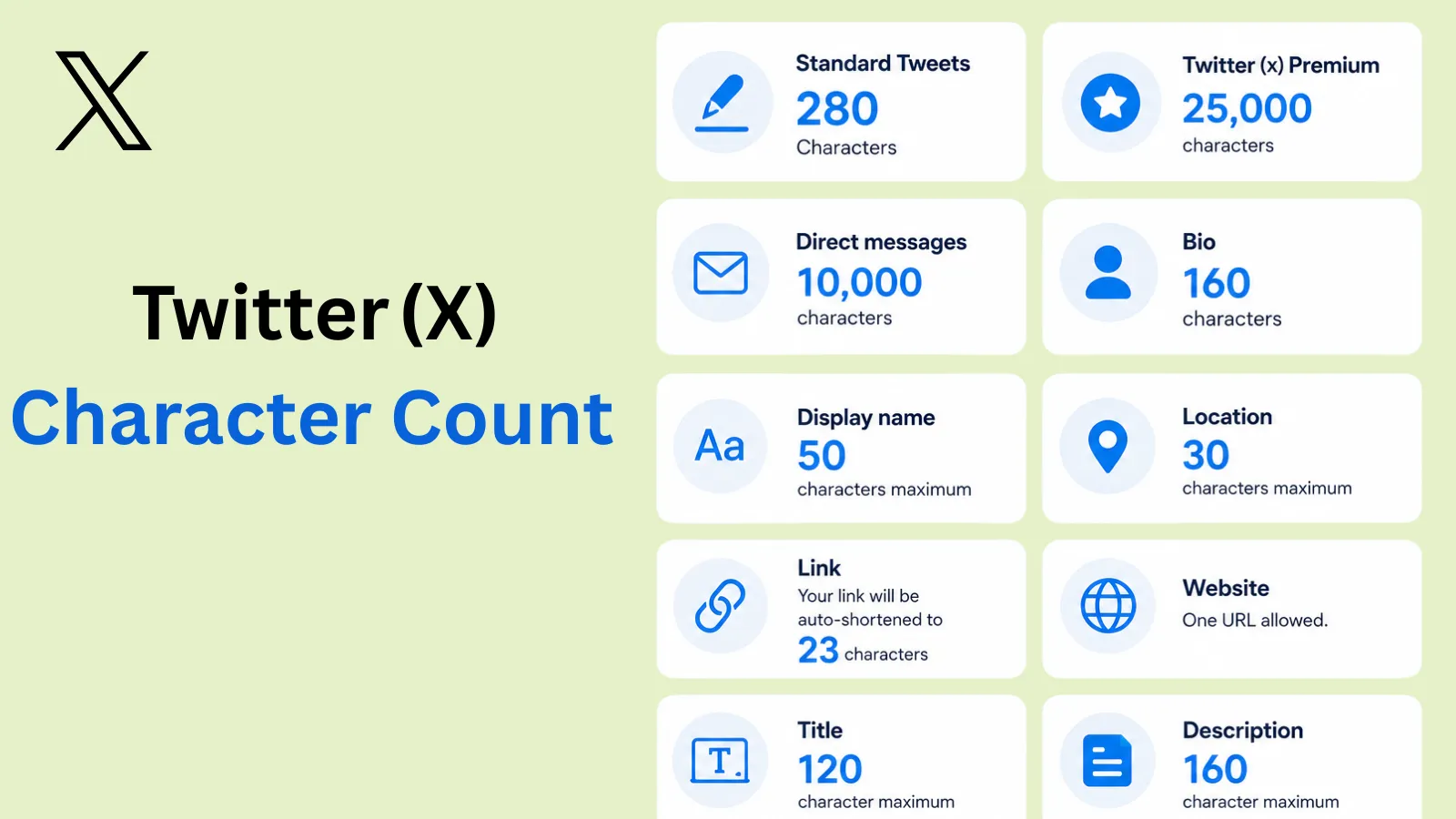
Twitter (X) Character count
Standard Tweets – 280 Characters
Twitter (x) Premium – 25,000 characters
Direct messages – 10,000 characters
Bio – 160 characters
Display name – 50 characters maximum
Location – 30 characters maximum
Link – Your link will be auto-shortened to 23 characters
Website: One URL allowed.
Title – 120 character maximum
Description – 160 character maximum
How does Twitter (X) count characters in Tweets?
Twitter (X) calculates the character limit by counting every letter, number, space, and punctuation, which is marked as a single character.
There is a specific way in which Twitter counts characters
Letters, Numbers, and basic punctuation are counted as regular characters.
Emojis, some Asian characters, and a Unicode symbol each count as 2.
History of Twitter (X) Character limit
2006 – 2017 – 140 Character era
2017- 2022 – 280 Character
2023 – present – 280 characters, and for premium, 25000 characters
How to check Twitter (X) character count
Once you have written in the compose section of Twitter (X), if you exceed the required character limit, your remaining characters will be highlighted in red.
Or
Use the exact character count to write a tweet within the limit; you can use Indzu’s Twitter character count.
What does not Count Towards the limit?
Certain elements do not count towards the Twitter (x) character.
- Media attachments – the photos, videos, or GIFs that you have used in your tweet will not be considered as characters.
- Quoted tweets – While replying to a tweet, the tweet that you have quoted will not be counted as characters. It means the quoted tweet’s character count will not be included.
- Mention – If you have mentioned any username, brand, etc., their username will not be counted as a character (e.g., @username)
- Polls – Adding a poll to your tweet counts as zero characters. (The poll option has a separate 25-character limit per choice. The poll character limit is different from the main text limit.
The other Twitter (X) limit you need to know
Post | 2400 tweets daily, including the reposts. |
Direct Messages | For the unverified account, Twitter (x) allows up to 500 direct messages. |
Followers and following limit | You can follow 5000 accounts. You can follow 400 accounts daily. It does not have a limit for the follower list |
Video length limit | The maximum video length for a free account is 2 minutes and 20 seconds. As a premium subscriber, you can upload a video for 2 hours at 1080p resolution. It can take up to 3 hours for a 720p video. |
Age limit | You must be 13 years or older. |
Tips for Writing Effective Tweets to Maximize the Character Count
- Cut filler words – Delete unnecessary phrases like “the fact that,” “that is,” or “it is”.
- Use active voice – it’s shorter and gets to the point.
- Avoid unnecessary characters – Even has its way to speak to the audience, so be mindful while using them.
- Since Twitter limits tweets to 280 characters, keep them between 71 and 110 to keep them highly engaging.
Tips to write an effective Tweet
- End your tweet with a call- to action.
- Avoid repeating the same idea multiple times in one tweet.
- Include relevant keywords naturally to improve discoverability
- Break longer thoughts into readable sentences using line spacing
- Manage your tweets with Indzu. Social where you can write and schedule your post on time.
 Time killer · Pain
Spending 6 hours writing posts that get zero traction?
Paste your URL. ZuAI turns it into 30 brand-on captions in 10 minutes — no blank-page panic, no generic AI filler.
Conclusion
Twitter character limit guide plays an important role in creating content. Creators need to know within what limits they can produce their content. The Twitter character limit counts letters, numbers, and punctuation as regular characters. Basic emojis and special keywords are counted as 2 each.
Understanding how character counting works helps you create your tweets and content effectively. Use the indzu Twitter (x) character count to create your tweet within the limit.
Outcome · RecommendedGet 30 days of social content from your website — in 10 minutes.
FAQs
Q1. Do spaces count toward the tweet character count?
Ans 1: Yes, Space counts as a character in your tweet.
Q2. Can you write a longer post on X?
Ans 2: Yes, you can write a longer post using the X premium.
Q3. Do hashtags reduce available tweet characters?
Ans 3: Yes, when you use a hashtag, your tweet character count reduces according to the hashtag words you have used.
Q4. What happens if your tweet exceeds the character limit?
Ans 4: If your tweet exceeds the character limit, then the words exceeding the character limit will be highlighted in red. So accordingly, you can edit before publishing.
Q5. Do emojis count as characters on Twitter?
Ans 5: Yes, emojis count towards tweet character count.