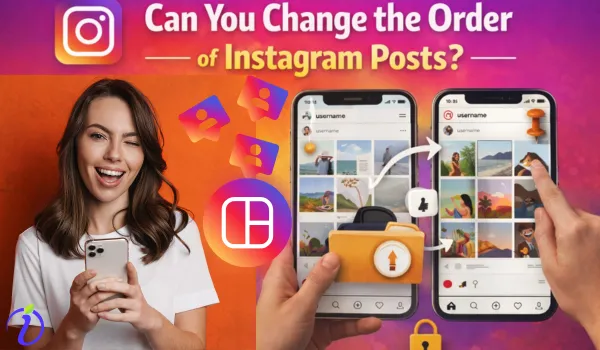

Instagram has become a vital part of everyday life and for influencers, it is the heart of business. While posts are very important in enhancing sales and business, your profile look and the arrangement of posts are equally important.
What if your posts are shared without any plan or strategy? Can you change the order of Instagram posts after publishing? Is there any way to categorize your Instagram posts? With so many questions arising regarding the Instagram posts, let us take the bait for this particular question “ Can you change the order of Instagram posts?”
The answer is Yes, but it depends on how you want to reorder Instagram posts.
Difference between Profile Grid and Other Post Types
When an Instagram user mentions about changing the order of the Instagram post, they literally mean the profile grid that is seen when they open their profile section.
Grid is a 3 – column layout seen in the profile section. This grid works on a chronological order. It shows the posts as and when published on Instagram with the newest one at the top of the grid.
Other post types behave differently on Instagram.
- Feed posts appear in followers’ home feeds. It is purely based on algorithmic relevance.
- Stories posted on Instagram disappear after 24 hours.
- Reels have a separate tab with a ranking system.
- Highlights are seen above the grid, and they can be easily curated.
Grid is the only place where your posts are not arranged based on ranking or popularity. It is arranged chronologically and the tricky part is Instagram doesn’t have the option to change the order of Instagram posts.
Step-By-Step Guide on How to Change the Order of Instagram Posts
Instagram officially does not allow reordering of posts, once they have been published. However, we can use a bit of creativity and effort to achieve a more visually cohesive grid.
You can either pin your favorite post or archive some posts to bring your post to the top of the grid. Here is a step-by-step guide on how to change the order of Instagram posts using pin and archive options.
Pin your Instagram Post
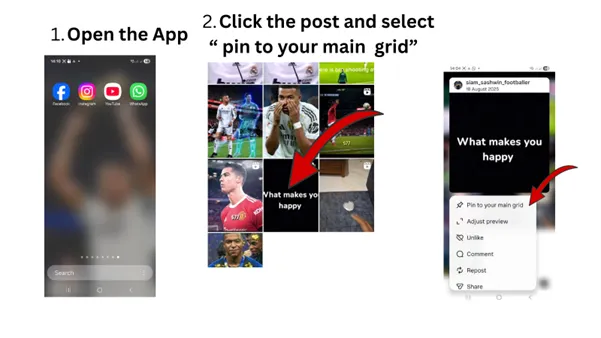
Step 1: Open the Instagram App on your Device.
Step 2: At the bottom. click the Profile icon.
Step 3: Tap and hold the post you want to rearrange.
Step 4: Under options, Select “Pin to your main grid.”
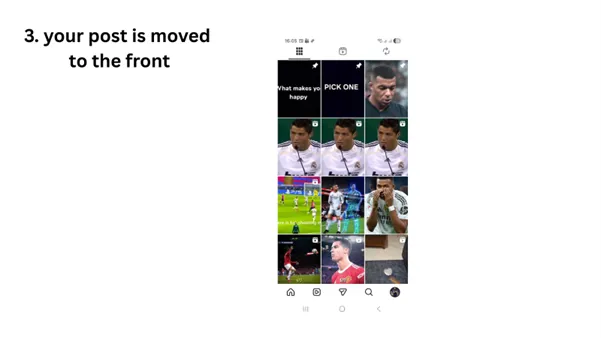
Step 5: Repeat the above step to pin up to 3 posts.
Your post instantly jumps to the top of your profile.
Using this method, you can only move three posts. If you want to move more than three posts, try the archive option.
Archive option:
Step 1: Tap and hold on a post and select the archive option.
Step 2: The post disappears from your grid, causing older posts to shift upward.
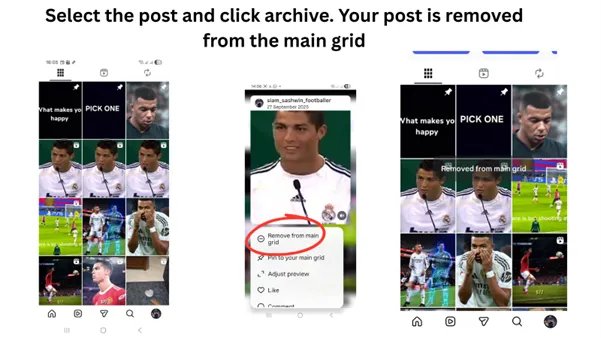
In this way, you can rearrange the posts on Instagram. The archived posts can be restored back in the grid whenever it is required.
Limitations of Reordering Instagram Posts
Though the idea of reordering or curating a perfectly organized instagram feed is tempting, there are still some limitations.
- Instagram has no actual reordering feature. Once your post is live, its position is fixed in the grid according to the posting time.
- Archiving and reordering posts are a time-consuming job. One needs careful planning and execution for the same.
- Frequent re-uploading might be confusing to followers, and they will gradually lose interest.
- Archiving one post to bring up the second one will lead to the loss of all existing engagement data.
Reasons behind Instagram’s Limitations in reordering the posts
There are several reasons behind Instagram’s limitation in reordering the posts. The most prominent ones are
1. User Experience comes first: Instagram aims to maintain a consistent user experience across the platform. Allowing the reordering of posts could potentially lead to confusion, as most followers will experience frequent changes in their feed’s look and content.
2. Engagement metrics: Engagement metrics such as likes, comments and shares are highly related to the placement of the posts in the grid. If you reorder the posts, there will be a disruption in data tracking, and it also affects the way in which content performance is evaluated.
3. Platform Focus: The main aim of Instagram is to showcase authentic and timely snapshots. Similarly, Instagram encourages spontaneity and authenticity among users.
4. Technical Constraints within Instagram: Instagram must make a big shift in their current architecture to accommodate a feature to reorder. There are more technical glitches in this process, and it may bring down the entire platform/
5. Creator Intent Protection of Instagram: There will be a lack of data on how content is perceived by its followers. It will rapidly affect the content creators.
6. Collapse in Advertising Sector: For businesses and influences, post-scheduling often aligns with the promotional calendars and advertising strategies. Reordering will affect this structured approach.
What are the best practices to maintain a clean Instagram grid?
Some of the best practices used by successful creators and brands are
- Plan posts in sets of three. Instagram grid works in rows of three. Posting in rwos of three will help you maintain visual balance, align colors and themes horizontally, and avoid awkward layouts.
- Use a cohesive grid with consistent color palette, similar filters or lighting, and repeating fonts or layouts.
- Pin posts if they truly matters for your profile. Pin your best-performing posts, welcome or introduction post, or a current campaign or offer post.
- Use carousel posts for story flow. They are a smart work around. Tell a full story in one post, avoid clutters, and maintain a grid alignment. Carousels are useful for announcements, tutorials and storytelling content.
- Preview your feeds before posting. Planning ahead always beats fixing later.
Does Reordering (or Archiving) Affect Engagement and Reach?
When you are a creator, influencer or a businessman, this reordering feature often confuses the followers. When Instagram doesn’t allow true reordering, action like pinning and archiving will raise questions about their impact on engagement and reach. So, avoid archiving your posts frequently.
What is the impact of archiving on Instagram Engagement?
When you archive a post, it is removed from the public profile, but its engagement data remains intact in the backend. But still, you cannot receive new engagements. Archived posts will no longer contribute to profile-level engagement metrics.
Even when you restore an archived post, its charm is lost forever.
What is the impact of Pinning on Instagram?
Pinned posts behave differently on Instagram because they are introduced by Instagram to help users highlight content, such as:
- Introductions
- Announcements
- Offers
- Evergreen posts
The main advantage of pinned posts is
- They stay at the top of your profile grid
- They continue to receive likes, reposts, and comments.
- They do not negatively affect algorithmic reach.
Pinning Instagram posts actually improves the visibility for profile visitors.
Does Instagram penalize you for these actions?
No, Instagram does not penalize users for archiving or pinning their posts. They are the official features added to Instagram and using them correctly will not harm your account.
Important Tip:
If you are into excessive archiving, avoid it. It disrupts analytics.
Frequent changes in the grid will confuse your followers.
Conclusion
So, can you really change the order of Instagram posts? The honest answer is: not directly. Instagram does not support drag-and-drop reordering. Once a post is published, its position is fixed by time. But with features like pinning, archiving and strategic content planning, we can have meaningful control over how the profile looks.
FAQs
Is it possible to change the order of Instagram posts in my profile?
No, you cannot change the order of posts on Instagram once published. You can either pin or archive the posts, if you want to reorder them.
Can third-party apps reorder Instagram posts?
No third-party apps can change the order of Instagram posts. Third-party apps are useful for previewing and planning posts. There are no apps to reorder Instagram posts.
How many posts can you pin on Instagram?
You can pin up to three posts on your profile grid at a time. Use pin to bring your introduction and service related posts to the top of the profile grid.
Is it better to delete and repost content?
No. Reposting will confuse your Instagram followers and fragment the engagement data. It is always better to archive the post.