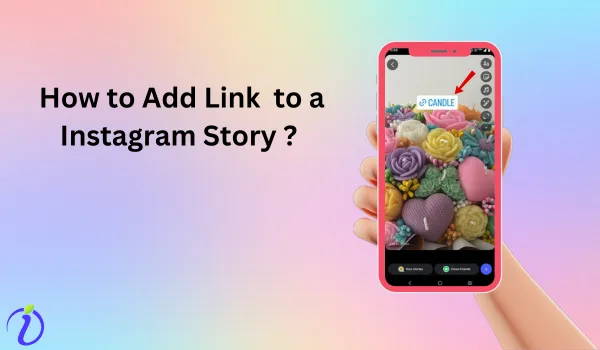
Have you launched a new product and want to show it to your Instagram audience? Know how to add a link to Instagram story. With just one link, you can connect your audience directly to the content, products, or services.
Instead of making your audience navigate from the home page to your profile page, add a link in the Instagram story to improve user experience and increase engagement and conversions.
Let’s get into the blog to learn more about the link sticker and how to add a link to an Instagram story.
 Time killer · Pain
Spending 6 hours writing posts that get zero traction?
Paste your URL. ZuAI turns it into 30 brand-on captions in 10 minutes — no blank-page panic, no generic AI filler.
Link sticker 2026
The traditional way Instagram used to redirect to an external website was the “Swipe up feature”. But the swipe-up feature was replaced by “Link sticker” in 2021.
Now, in 2026, the link sticker is available to all Instagram users, regardless of their follower count or account type (public or private). You can even customise the text on your link sticker. Let’s see what an Instagram link sticker is in brief.
Outcome · RecommendedGet 30 days of social content from your website — in 10 minutes.
What is an Instagram link sticker?
Instagram link stickers are a feature that lets users add clickable external links to their stories. It is mainly used when you want to provide your audience with a link to a product or service.
The Instagram link sticker is only used in Instagram Stories. As we all know, Instagram stories last up to 24 hours, so the link used in the story and the Instagram link sticker will remain visible and valid until the story expires.
Instagram link sticker lets your audience tap it and be instantly redirected to an external website, product page, blog post, landing page, or any other page you specify. Now that you know about the Instagram link sticker, let’s learn how to add a link to an Instagram story.
Proof · Verified
2k+ grew faster with one tool.
How to add a link to an Instagram story?
Step 1: Open the Instagram app.
Step 2: Go to the home page.
Step 3: Swipe left on the home page, and tap “story.”
Step 4: Choose an image from your gallery.
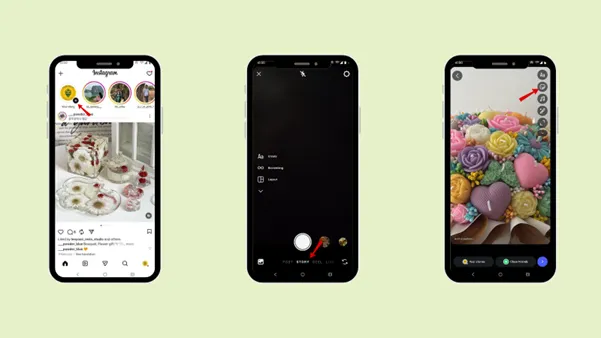
Step 5: Tap on the “Sticker” icon.
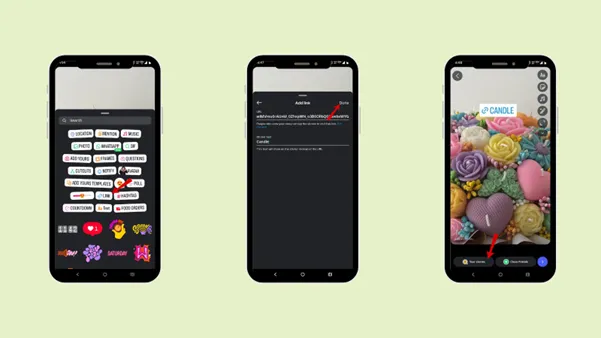
Step 6: Select the “Link” sticker.
Step 7: Add the URL link.
Step 8: Tap “Done”.
Step 9: Add to “Your stories”.
Free · Instant · No signupSee what ZuAI generates from your website — right now.
Paste your URL. Watch ZuAI write a month of brand-on captions in seconds. Preview before you create an account.
How to customise your link for a brand or personal account on Instagram Stories?
Step 1: Open the Instagram app
Step 2: Go to the home page
Step 3: Swipe left on the home page, tap “story”
Step 4: Choose an image from your gallery
Step 5: Tap on the “Sticker” icon.
Step 6: Select the “Link” sticker.
Step 7: Add the url link.
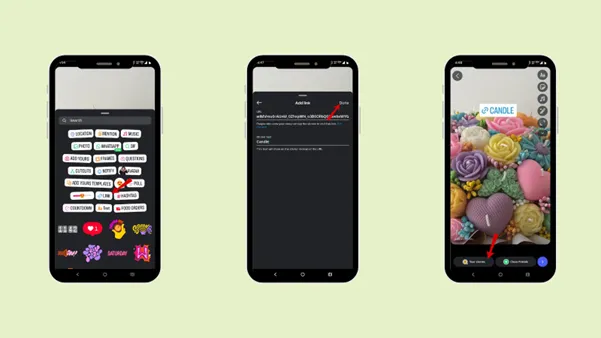
Step 8: Tap “Customize sticker text”.
– You can customise your sticker text name, and the text will show on the sticker instead of the URL.
Step 9: Tap “Done”.
Step 10: Add to “Your stories”.
Speed · 10-minute setupOne coffee from URL to a full month of scheduled posts.
Drop your URL, brew your coffee, come back to 30 brand-on captions ready to publish.
What are the benefits of adding a link to an Instagram story?
There are certain benefits of adding a link to an Instagram story
- Drives Traffic
Adding a link to an Instagram story helps you drive traffic to your external link. With just one click on your Instagram stories, you can redirect your Instagram followers to your external website.
Even the link ensures that users land exactly on the page you want them to reach. It has overall benefits in increasing your traffic.
- Boost Engagement
Instagram stories are more engaging than posts and Reels. Adding a link to your Instagram story increases the engagement even more. The more interactive and engaging your content is, the more it will increase trust and loyalty.
- Increase Conversion
An engaging story is more likely to increase conversions. Adding a link to your Instagram story increases your chances of increasing conversions for your products or services. With just one click, your audience can land on your product or service page.
When you create an engaging Instagram story and add a link, users can relate to the content and land on the main page within seconds, increasing the likelihood of conversion.
- Save Time
The best part of adding a link to an Instagram story is that it saves time for both you and your audience. Rather than navigating here and there, the audience can reach the target product or service with just one click from the story.
- Build Brand Authority
Adding links also helps build brand authority. When you post creative, useful content that helps your audience, you build trust and showcase your expertise in your niche.
Blank tab. Six open browsers. No clue what to post.


 After · With Indzu
Paste one URL. Get 30 scheduled posts.
Importance of adding a link to an Instagram story for marketing and brands
Let’s discuss how adding a link to an Instagram story is important for marketing and brands.
- Turns views into action
Adding links to the Instagram story helps you redirect your audience to the required page. So, your audience can move from being a normal viewer to becoming your customer.
So, the marketing team or the brand should know how to add a link to Instagram Story.
- Support sales funnel
The brand’s mission is to increase sales. Knowing how to add a link to Instagram Stories actually supports your sales funnel, as it has a high chance of converting your regular Instagram followers into customers.
- Generate qualified leads
The moment you add a link to an Instagram story, the link will only be clicked by the audience who are genuinely interested in the product or service. Hence, it automatically filters out your actual prospects or interested clients.
- Improves ROI
Adding a link in an Instagram story is the easiest way to get a return on investment (ROI). By getting likes and views, brands can measure website clicks and conversions.
- Enhance product launch
The easiest way to enhance a product launch is to add the product’s link to an Instagram story. A brand can redirect its audience directly to the product page.
Time killer · Pain
Spending 6 hours writing posts that get zero traction?
Paste your URL. ZuAI turns it into 30 brand-on captions in 10 minutes — no blank-page panic, no generic AI filler.
How to customise your Instagram link for a brand and a personal account?
To make the best use of the link feature, whether for brand or personal use, you can customise the Instagram link in various ways.
- Call to action
The best way to customise your Instagram link is to do so in the call-to-action form. You can customise it as “Shop now”, “Limited offer”.
Rather than using the link by default, you can customise the text.
- Match brand colour
Another way to customise your Instagram link is to match it to the brand’s color. It makes it look professional, and the audience will even remember the brand name when purchasing.
- Create urgency
It also helps you to create urgency for the product by using the countdown sticker.
Outcome · RecommendedGet 30 days of social content from your website — in 10 minutes.
Conclusion
Adding a link to an Instagram story is a simple yet powerful way to convert casual viewers into action takers. With the help of the Link sticker, you can drive traffic from an Instagram story to your product or service page.
Follow these steps to add a link to an Instagram story and customise the link sticker to make it more personal. If you want to generate content ideas for your Instagram stories and schedule them in advance, explore Indzu.
Proof · Verified
2k+ grew faster with one tool.
FAQS
Q1. Do links in the Instagram stories expire?
Ans 1: Yes, the links in Instagram Stories expire 24 hours after upload. Once the story expires, you can no longer access the URL.
Q2. Can I add more than one link to a single Instagram story?
Ans 2: No, you cannot add more than one link to a single Instagram story. Instagram allows one clickable link per story slide. However, you can create multiple story slides and different links to each one.
Q3. Is it better to say “Link in bio” or use a link sticker?
Ans 3: You should use “link sticker” in your stories rather than using link in bio. A link sticker is much more engaging and encourages sudden clicks. For “link in bio,” users have to navigate to your profile, which may not be as engaging as a link sticker.
Q4. What types of links can I add to Instagram stories?
Ans 4: You can add links to
- Website
- Blog posts
- Online stores
- YouTube videos
- Contact forms
- Registration form
- Landing pages
Q5. Can I track how many people click my story link?
Ans 5: Yes, you can track how many people have clicked your story link. For business and creator accounts, you can use Instagram Insights to view link and story clicks.