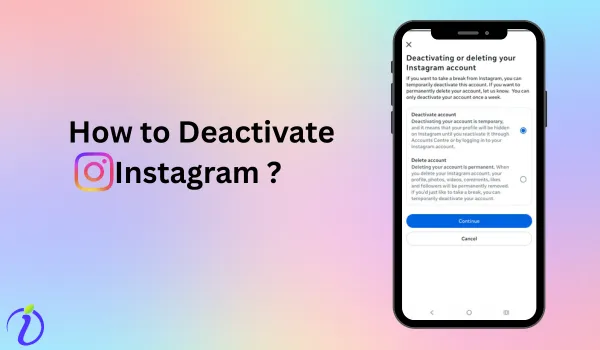

Feeling sick from continuous scrolling? And want to get back to your productive era. We got you
Instagram is the best social media platform to stay connected. But as soon as you unlock your mobile and click one notification, you end up scrolling for hours.
Imagine logging off your day without guilt, waking up without reaching for your phone, and finally having the mental space to mark a to-do off your list. And this is what you can achieve by deactivating your Instagram ID.
You do not need to worry about your post and followers. Let’s get into the blog to learn how to deactivate your Instagram account.
Before learning how to deactivate an Instagram account, have a look at what deactivation means.
What is a deactivated Instagram account?
Deactivating your account means temporarily deleting it. This feature helps you hide your profile from the public, keeping your data (posts, likes, comments, followers, direct messages) safe until you reactivate your account by logging in.
What happens when my Instagram Account is deactivated?
After deactivating your account, certain features will no longer apply to it.
- Profile becomes inaccessible
Once you deactivate your account, your profile will no longer appear in search or be accessible to other users.
- Photos, comments, and likes to disappear from public view
Once you deactivate your account, all your photos, comments, and likes will disappear from public view. It means it will get hidden. Once you restore your account, all your data will be restored.
- The Account can be Restored
Even if you have deactivated your account, you can restore it by just logging in with your username and password.
Step–by–Step Guide on How to Deactivate Instagram
How to deactivate Instagram from the Desktop
Step 1: Log in to your Instagram account.
Step 2: Click your profile icon in the bottom right corner.
Step 3: Click the settings icon on the left-hand side.
Step 4: Click “Accounts Centre”.
Step 5: Click “Personal details”.
Step 6: Click “Account ownership and control”.
Step 7: Click “Deactivation or deletion”.
Step 8: Click on your account name.
Step 9: Click on Deactivate account.
Step 10: Click “Continue”.
How to deactivate Instagram on Android
Step 1: Log in to your Instagram account.
Step 2: Tap your profile icon in the bottom right corner.
Step 3: Tap the three lines in the upper-right corner.
Step 4: Tap “Accounts Centre”. Step 5: Tap “Personal details”.
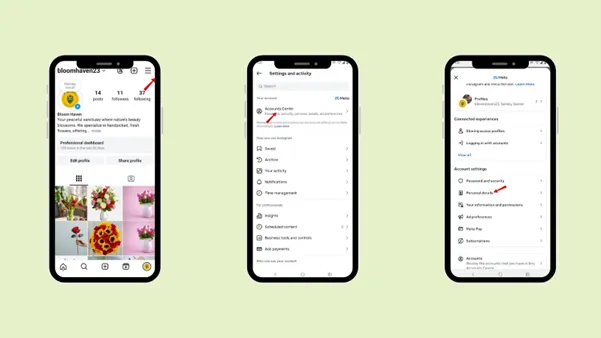
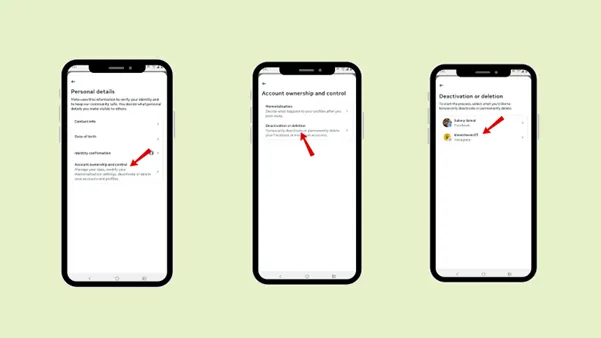
Step 6: Tap “Account ownership and control”.
Step 7: Tap “Deactivation or deletion”.
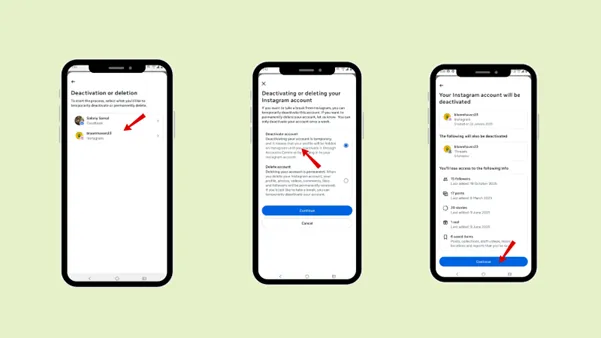
Step 8: Tap on your account name.
Step 9: Tap on Deactivate account
Step 10: Tap “Continue”.
How to deactivate Instagram on an iPhone
Step 1: Log in to your Instagram account.
Step 2: Tap your profile icon in the bottom right corner.
Step 3: Tap the three lines in the upper-right corner.
Step 4: Tap “Accounts Centre”.
Step 5: Tap “Personal details”.
Step 6: Tap “Account ownership and control”.
Step 7: Tap “Deactivation or deletion”.
Step 8: Tap on your account name.
Step 9: Tap on Deactivate account
Step 10: Tap “Continue”.
Reason to deactivate Instagram
As deactivating Instagram focuses on temporarily deleting your account, users prefer to deactivate their account for various reasons.
- Reduced screen time
Instagram can be addictive, leading to scrolling and wasting time. Deactivating Instagram will reduce your screen time. If you are having exams or want time to focus on healthier activities, hobbies, or personal growth; temporarily deleting your account will help you achieve it.
- Privacy Concern
Users often deactivate their accounts for privacy reasons. Deactivating your account helps you to safeguard your privacy by keeping your data hidden from public view.
- Take a Break from Social Interaction
If users are willing to take a break from social interaction and focus on personal growth and private space, then deactivating Instagram should be considered.
- Improve Focus and Productivity
Instagram’s scrolling feature can be a distraction for students, professionals, or anyone with an important goal. Temporarily deleting your account will help to increase focus and productivity.
- Mental Heartbreak
Most users prefer to take a break from social life to protect their mental peace. In this case, deactivating Instagram is the perfect move. Your data will be hidden from the public, and you can restore it after logging in to your account.
The difference between permanently deleting and deactivating Instagram
| Permanently Delete Instagram | Deactivate Instagram |
|---|---|
| Permanently deleting Instagram means once deleted, the account cannot be recovered or restored. | Deactivating Instagram means temporarily disabling your account. You can reactivate it anytime by logging in. |
| Your entire profile and all your content are permanently removed. | Your posts, followers, comments, and likes are hidden and restored when you log back in. |
| You cannot log in again after your account is deleted. | You can reactivate your account anytime using your username and password. |
| Best when you want to completely remove your online presence or start fresh. | Best when you want a temporary break, reduced screen time, or focus on work or studies. |
How to deactivate an Instagram account permanently?
To deactivate your Instagram account permanently, you can permanently delete your account or, after deactivating it, do not restore it. Your account will be permanently deleted after 30 days.
How to reactivate your Instagram account
To reactivate your account
Step 1: Open Instagram account.
Step 2: Enter the username and password for your deactivated accounts.
Step 3: Tap “Login”.
Your account will be reactivated.
Conclusion
Deactivating your Instagram account can be a step toward achieving your goal. Instagram is the best social media platform for building a network and engaging, but it can be distracting for students and professionals.
Follow the steps to temporarily deactivate your Instagram ID and create an opportunity to refocus on your work. Deactivating your Instagram account is a much better option than permanently deleting it. Once you want to activate it, you can follow the steps to restore your account.
Go through the differences between permanently deleting and deactivating an account to determine which option best suits your requirements quickly.
Suppose you are a student who posts on Instagram and wants to stay on track with your daily goals. You can use Indzu to create your social media post without getting trapped in endless scrolling.
With your prompt, Indzu will create the post, and you can even schedule the posting time. And your post will be uploaded on Instagram or any other social media platform you select.
FAQs
Q1. Will I lose my followers if I deactivate my account?
Ans: No, you will not lose your followers if you deactivate your account.
Q2. Does Instagram notify anyone when I deactivate my account?
Ans: No, Instagram does not notify your followers or friends when you deactivate your account. Only if you have messaged your friends or followers directly can they know you have deactivated your account, since it will appear as a blank account.
Q3. Can I deactivate my Instagram account more than once?
Ans: Yes, you can deactivate your Instagram account more than once. But there is a limit to deactivation: you can deactivate your account only once a week.
Q4. Can people still mention my username while my account is deactivated?
Ans: Yes, your followers and friends can still use your username. But it won’t link to your account until you reactivate it.
Q5. Can I reactivate my account anytime I want?
Ans: Yes, you can reactivate your account at any time. You just need your username and password, and you are good to go.
Just like you login to your existing account, the same way, you can log in to your deactivated account.
Q6. Will my message disappear when I deactivate?
Ans: No, your messages will not disappear from the chat box. Only your account will appear deactivated.
Q7. How long can I keep my account deactivated?
Ans: You can deactivate your instagram account indefinetly. There is no time limit set for reactivation. Instagram suspends the account for 30 days before permanently deleting it. If you restore your account within 30 days, you can get it back from Instagram.
Q8. Does deactivating affect the linked account?
Ans: Yes, deactivating affects the linked account; your account will be disconnected from the linked account or any platform your account is mentioned on.