

Instagram story creation is an epic. But how to put a date on an Instagram story? Why date is important on an Instagram story?
Date helps your audience know when your content was created and shared on Instagram. Dates add trust to your profile. It brings extra credibility to your profile.
Whether you are sharing a memory, announcing an event, or promoting a limited-time offer, adding a date instantly gives your story context.
When dates are used correctly, your Instagram stories look more professional,and engaging. It helps your audience to remember important dates, take action, and connect with your Instagram story.
Let’s dive into the blog to learn how to add a date to an Instagram story.
Instagram Story
Instagram Stories are temporary, vertical photos or videos that disappear after 24 hours. It appears in your profile picture, at the top of the follower’s feed.
Why is it essential to add a date to your Instagram story?
Here are some solid reasons to add dates to your Instagram story.
- Clear context
You can provide your audience with a clear context about when your video was created or when a photo was taken. This feature is handy for throwbacks and events.
- Make memories more meaningful.
Dates preserve memories by showing the exact time. It makes your memories more meaningful. Your stories get more specific, personal, and memorable.
- Announcements
Instagram story with date simplifies event announcement, birthdays, and special occasions. You can even announce offers and discounts if your brand is offering them.
- Improve Organization and Professionalism
When you upload stories with dates, they appear more organized and professional. Brands, creators, and businesses can build trust and credibility with their audience.
How to put a date on Instagram story (Step–by–step)
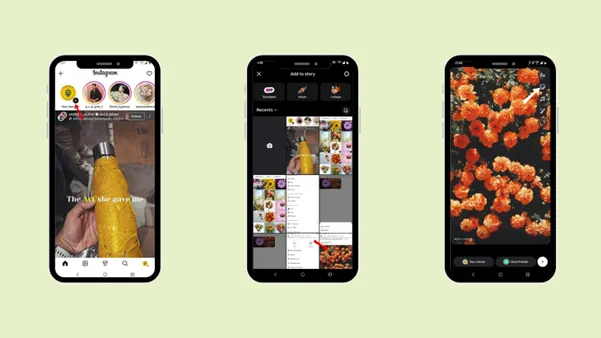
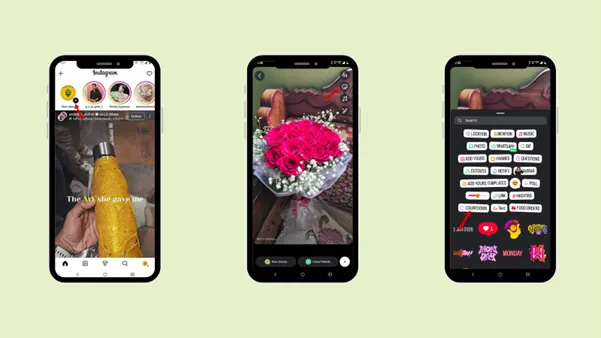
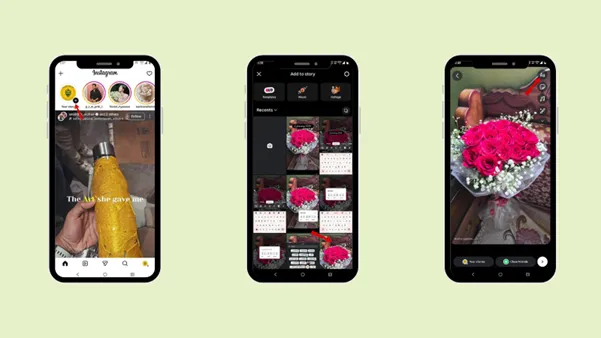
Step 1: Tap the profile picture in the top-left corner of the home page.
Step 2: Tap “Your story”.
Step 3: Select the photo that you want to upload
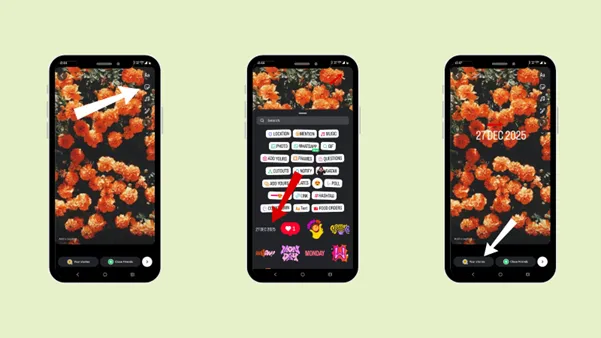
Step 4: Tap the smiley icon.
Step 5: Tap on the date. The date is added to the story.
Step 6: Tap “Your stories” to add the story.
How to add a countdown feature to your Instagram story?
Step 1: Tap the profile picture in the top-left corner of the home page.
Step 2: Tap “Your story”.
Step 3: Select the photo that you want to upload.
Step 4: Tap the smiley icon.
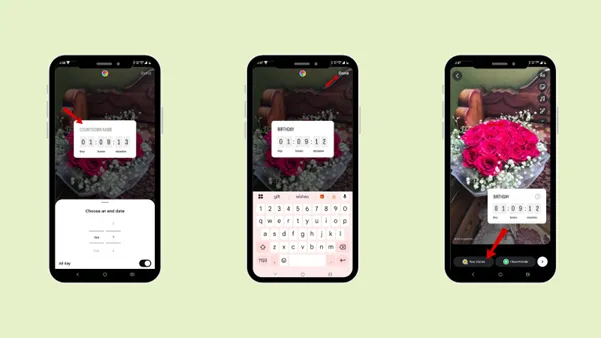
Step 5: Tap the “countdown” feature.
Step 6: Select an end date.
Step 7: Add countdown name.
Step 8: Tap Done
Step 9: Tap “Your stories” to add the story.
What is a countdown sticker feature?
The Instagram Stories countdown sticker lets users build excitement for an upcoming event by displaying a live countdown timer. This feature helps you give exact dates and times, and the sticker automatically counts the real time until the event begins.
Countdown stickers can be used for birthdays, promotions, sales, product launches, streams, or any special announcements. One of the most significant advantages of the countdown sticker is that it creates a sense of urgency or excitement among your audience.
When your audience sees the time passing, it creates a sense of urgency to pay attention and take action. It can easily be customised; you can edit the event name, date, and time as you wish.
How to add the date using the Text?
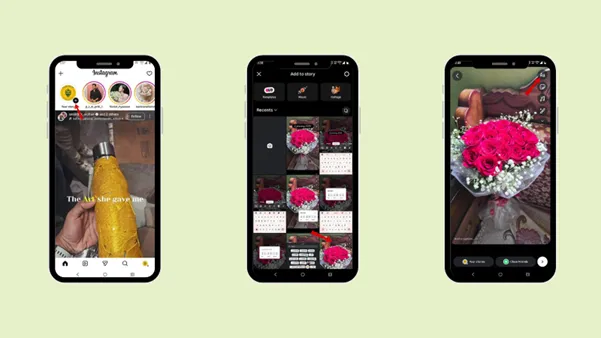
Step 1: Tap the profile picture in the top-left corner of the home page.
Step 2: Tap “Your story.”
Step 3: Select the photo that you want to upload.
Step 4: Tap on the text icon “Aa”.
Step 5: Write the date.
Step 6: Tap on “Done”.
Step 7: Tap “Your stories” to add the story.
How to put a date on your Instagram story using a different font style?
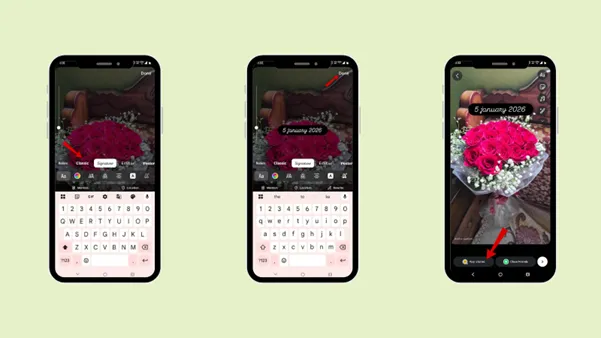
Step 1: Tap the profile picture in the top-left corner of the home page.
Step 2: Tap “Your story”.
Step 3: Select the photo that you want to upload.
Step 4: Tap on the text icon “Aa”.
Step 5: Select the font style in which you want to write your date.
Step 6: Write the date.
Step 7: Tap on “Done”.
Step 8: Tap “Your stories” to add the story.
Font Style Names:
- Journal
- Modern
- Classic
- Signature
- Editor
- Poster
- Bubble
- Deco
- Squeeze
- Typewriter
- Strong
- Meme
- Elegant
- Directional
- Literature
How to put a date on an Instagram story using different colors?
Step 1: Tap the profile picture in the top-left corner of the home page.
Step 2: Tap “Your story”.
Step 3: Select the photo that you want to upload.
Step 4:Tap on the text icon “Aa”.
Step 5: Select the color in which you want to write your date.
Step 6: Write the date.
Step 7: Tap on “Done.”
Step 8: Tap “Your Stories” to add the story.
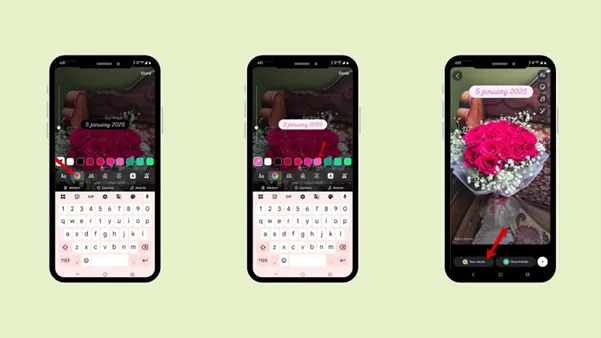
Note: Explore different features in the Text “Aa” option.
Creative style you can use to display dates on Instagram stories
You can use a creative date format to make your story more engaging for your audience.
- Bold highlight text
From the text “Aa” feature, you can use the “strong” feature to write in bold highlight text.
- Sticker-style design
Turn the date into a sticker-like element using different background highlights and shapes.
- Timeline format
The best use of the date feature is to create timeline feature content. You can create multiple story posts and display dates in sequence to create a visual timeline. You can apply this idea to progress updates, trips, or events.
Common Mistakes to Avoid
It is not only essential to know how to add a date to your Instagram story, but also to avoid common mistakes that can affect its visibility.
1. Font size
Avoid using a font size that’s too small for dates. Keep the font size readable and visible to your audience. Font size matters a lot; there are plenty of different font styles under “Aa” you can use to write your date.
Make sure the date stands out without overpowering the rest of the story. It should match your content but remain easy to read.
2. Color
Avoid colors that blend with your image or video, as they will not be visible to your audience. Color plays a vital role in the visibility of your content. Use a color that contrasts nicely with your background, so the date is clearly visible.
Use simple, clean colors that give your overall story a professional look.
3. Overcrowding
Make sure you do not make the mistake of overcrowding the story. Don’t add too many texts, images, or sticker. Your story will look overcrowded, and the main point won’t be visible to your audience.
4. Using the wrong date format
Avoid using the wrong date format, as it will confuse your audience. Stick to a familiar or straightforward date format that your audience can easily understand.
Tips for Different Types of Stories where you can use Date
Adding dates to different types of stories makes it more organized, detailed, and engaging. Dates may vary depending on the kind of story you are posting.
1. Events and Announcements
Dates are essential for events such as product launches, live sessions, and webinars. Place your date in a clear, noticeable area that will be visible to your audience.
Examples:
Use a bold font and contrasting color that will match your content and make it attractive and engaging to your audience.
Use countdown stickers to create a sense of urgency that engages your audience.
2. Promotional and sales stories
Under Promotions and Sales, you can create stories for offers, discounts, or limited-time deals. Using dates will increase the clarity and trust in the product. Make sure to use easy to read offer dates at the start and end date. Avoid keeping the date and call to action too close together; place them appropriately.
3. Travel and lifestyle
While creating travel and lifestyle stories, use data to create more relatability with your audience. It shares more details about the moments.
Dates are most useful when you want to upload throwback stories or memories.
4. Behind- the- scenes stories
Use dates for behind-the-scenes stories. Use it to note progress and create a timeline. When you consistently start uploading stories with dates, they become your visual journal, enabling you to engage more with your audience.
This idea works best for creators who want to show their daily routine.
5. Brand- business stories
For a brand/business, it’s essential to include dates for a professional look. Use the same fonts and colors in your story as that of your brand. Only then your posts will look more engaging and attractive.
Conclusion
Adding date to your Instagram story is more than just a design. It is a way to connect your audience with the real-time moment. It is a way for users to feel excited about their birthday through the countdown feature or to create urgency in promotional content.
Follow the steps to add a date to an Instagram story, and even explore applying different font styles, colors, and text. Avoid common mistakes to enhance your story, create other types of stories to entertain your audience, and engage them in your profile.
If you have a busy schedule, you can use Indzu to create and schedule your Instagram story.
FAQs
Q1. Can I add a date to a Video story?
Ans 1: Yes, you can add a date to a video story. A date can be added to both photos and videos.
Q2. Should I always add a date to my Instagram Stories?
Ans 2: No, you do not need to add a date to all your Instagram stories. But dates are helpful when you want to showcase events, travel, throwbacks, and memories.
Q3. Does adding a date affect who can see my Story?
Ans 3: No, adding a date does not affect your story viewer list. Your stories will be visible to your audience based on your privacy settings. If you have a public account, it will be seen by public followers; if you have a private account, it will be seen by your account followers or close friends.
Q4. Will the date stay on my story if I save it to my highlights?
Ans 4: Yes, the date will remain in your story if you save it to your highlights. Highlights are best for long-term visibility. So, it’s best to add the date and save it in your highlights.
Q5. Can I remove a date after Instagram automatically adds it?
Ans 5: Yes, if Instagram automatically adds, you can simply drag the sticker to the trash bin at the bottom of the screen to remove it.