
Is being connected everywhere a good thing? Anyone who sees your TikTok could jump to your Instagram page, reach your Facebook, and see all your channels. Is it a good thing to be this transparent and reachable?
Depends on who you are, if you are a business or a mature brand, who knows how to manage visibility well, then yes, it is a great opportunity. But if you are a creator who has just started or a regular TikTok user, then of course, staying a bit private would feel comfortable.
Are you also searching for How to remove your Instagram account from TikTok? That is exactly what we will discuss in this blog, along with the pros and cons of linking Instagram to TikTok.
How to unlink IG from TikTok?
It is a very easy process to unlink both platforms from each other (and get mental sanity!)
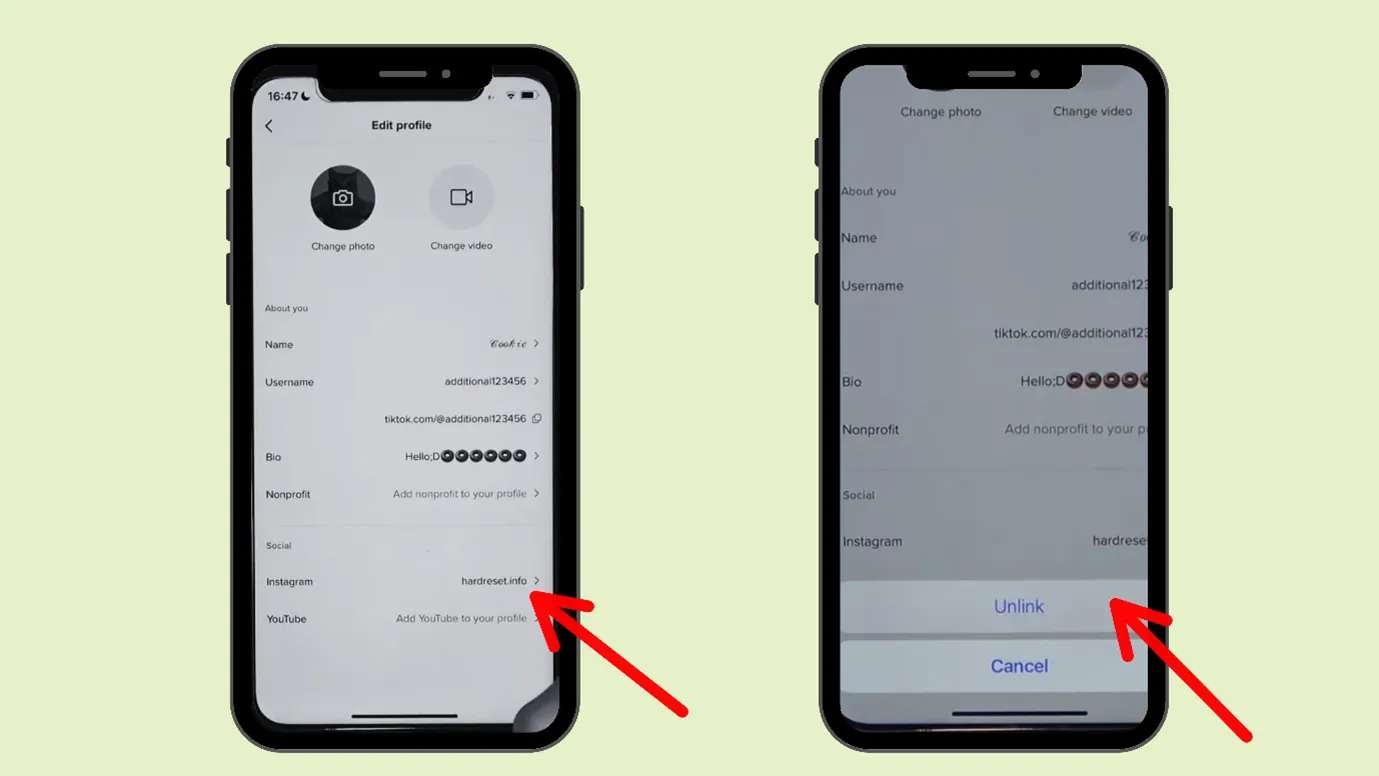
Step 1: Open TikTok, go to your profile
Step 2: Then tap on “Edit Profile”
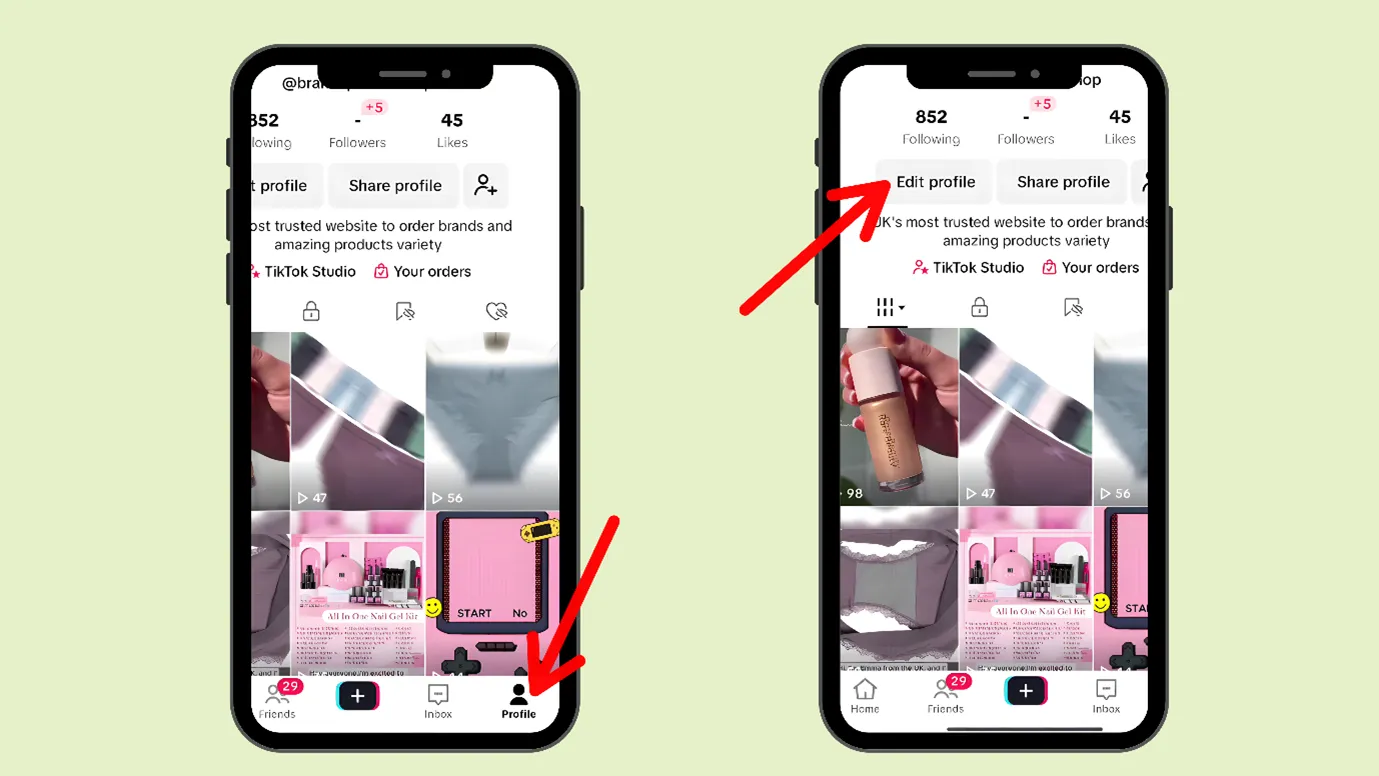
Step 3: Next, you can scroll down and see the channel links you had provided, select Instagram
Step 4: Go to that Instagram link and click on it. A new window will appear, then click “Unlink”.
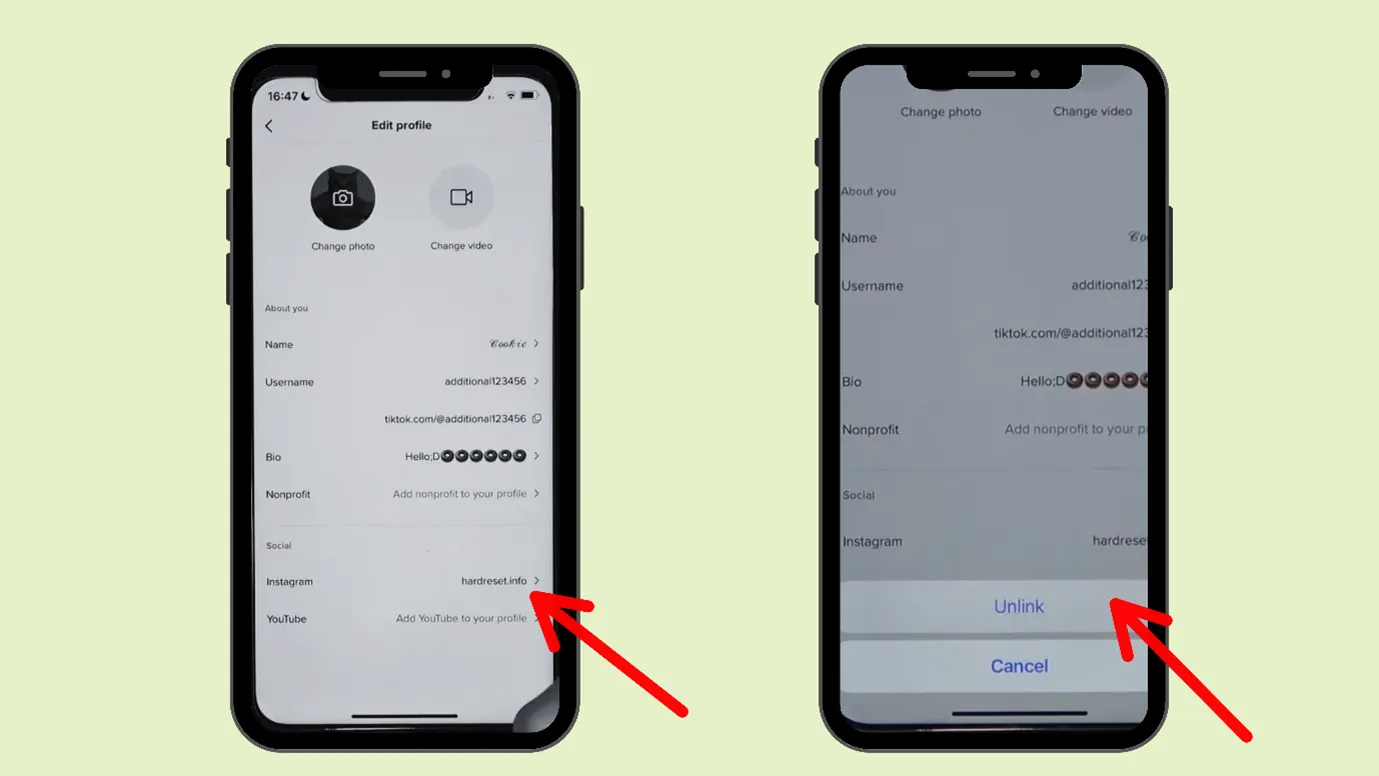
Step 3: Next, you can scroll down and see the channel links you had provided, select Instagram
Step 4: Go to that Instagram link and click on it. A new window will appear, then click “Unlink”.
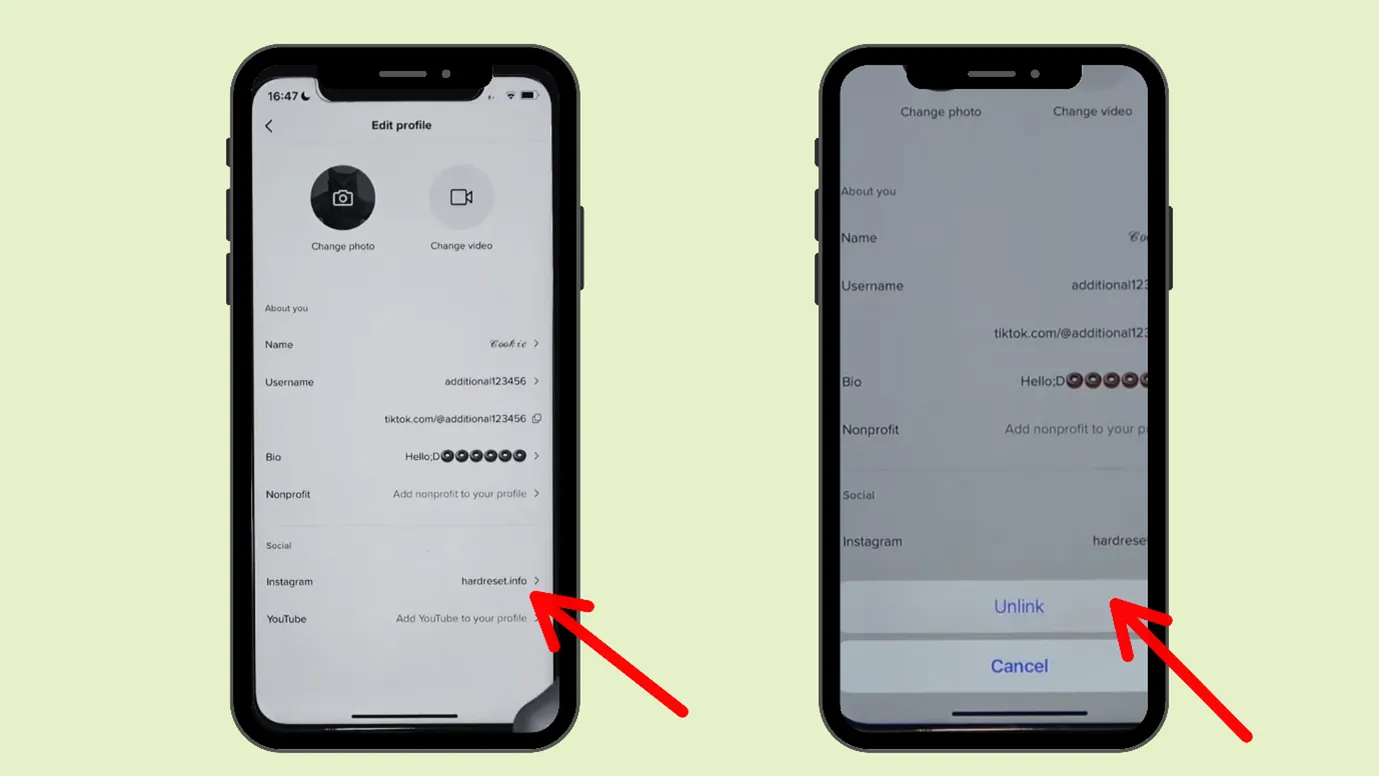
That would unlink Instagram from TikTok.
Why can’t I unlink my Instagram from TikTok?
If you are unable to unlink Instagram from TikTok, then try the following methods.
- Update your TikTok app
- Restart your device
- Check your internet connection. If it is connected to a stable connection, then wait for some time before trying to unlink and try again
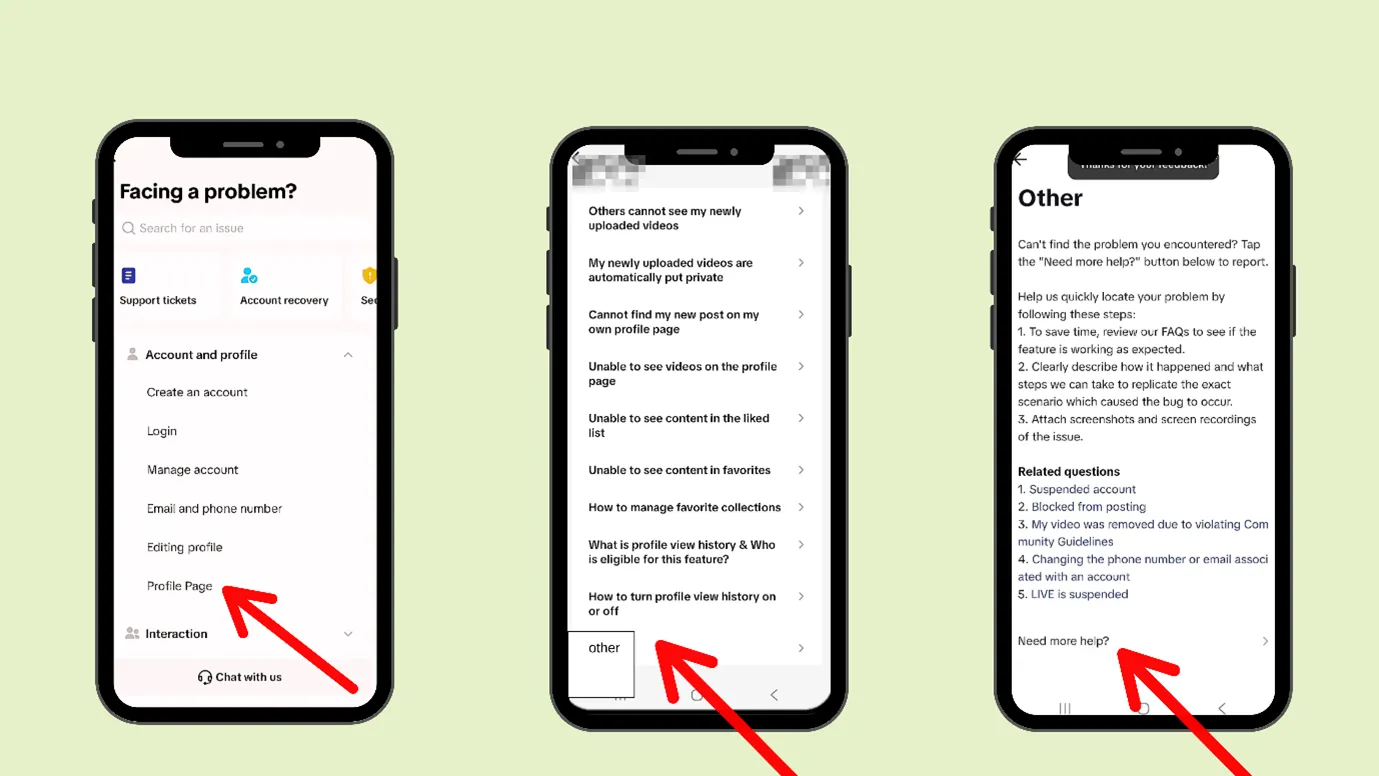
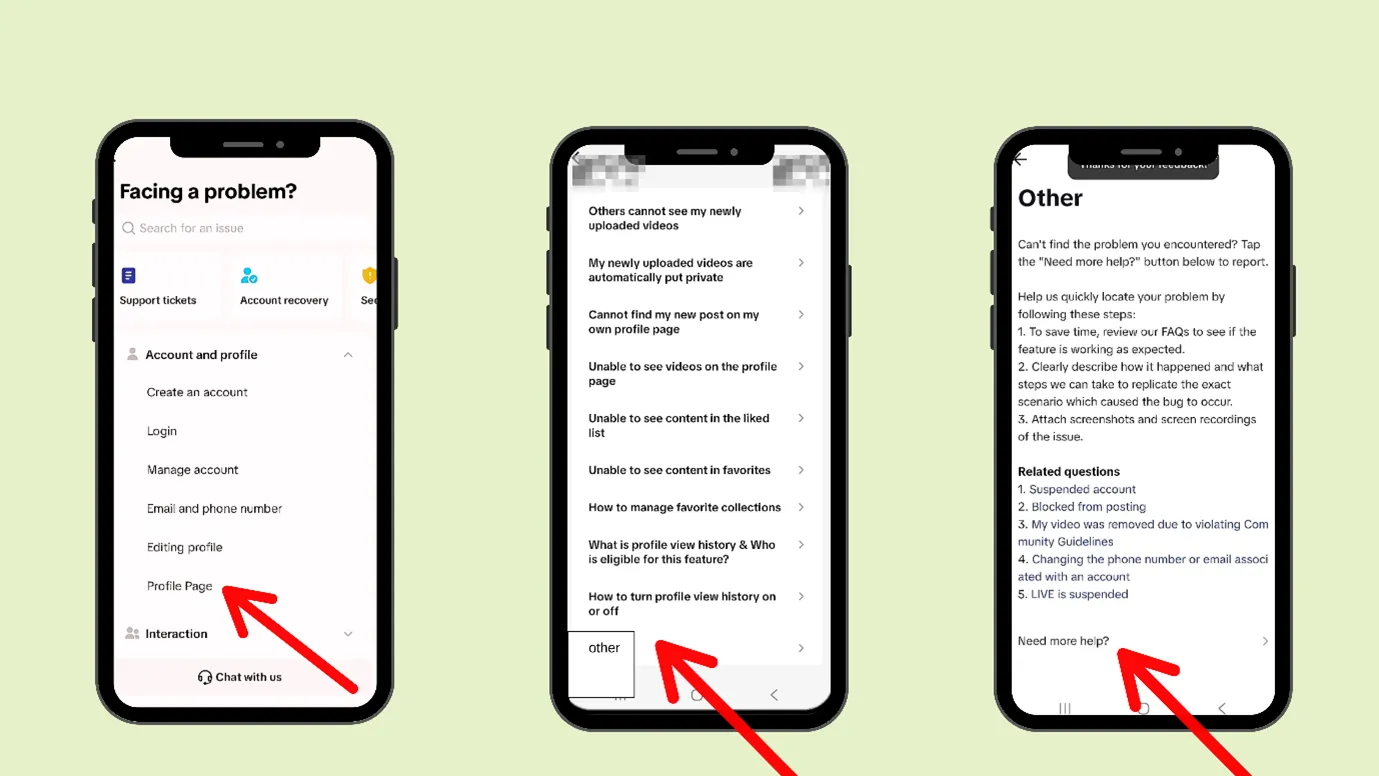
- If nothing works, then you can report the problem.
Step 1: Open your TikTok
Step 2: Go to the hamburger icon and tap on it
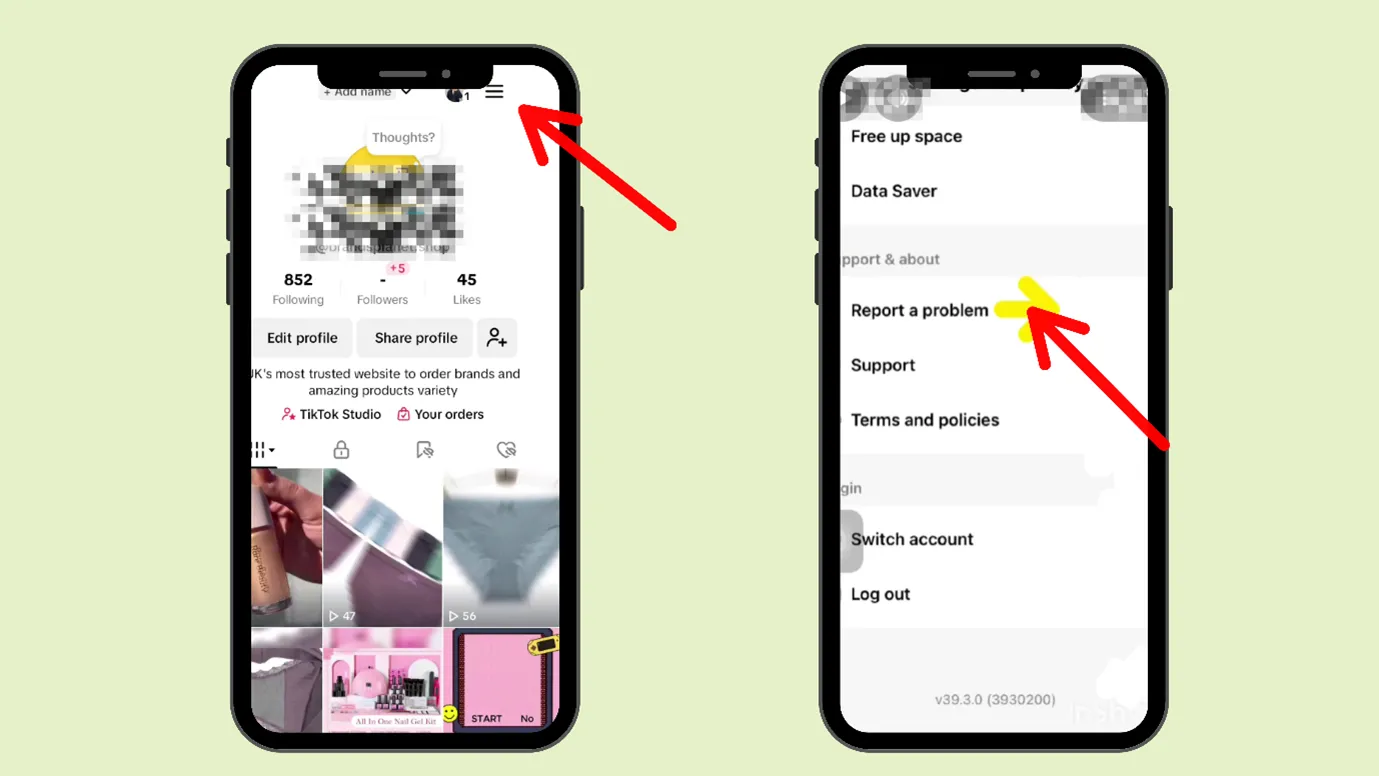
Step 3: Next, click on “Settings and Privacy”
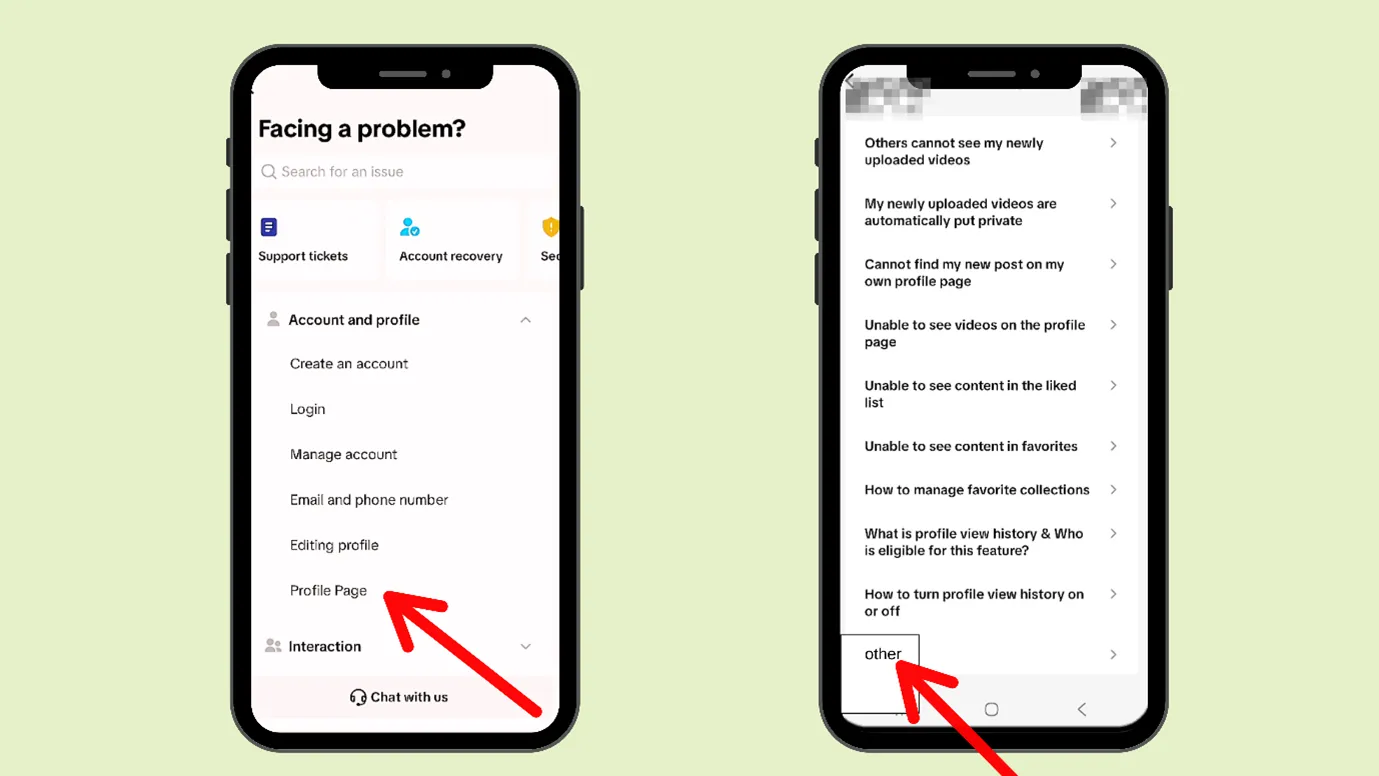
Step 4: Go to help, select “Profile Page”
Who Should Unlink Instagram and TikTok?
If you want to be visible, have convenience, and post the same kind of content on all platforms, then linking TikTok and Instagram is a good idea. Although platforms encourage linking and cross-posting, one approach won’t work for everyone.
If you belong to the following category, then you can consider unlinking Instagram from TikTok.
- If you have different sets of audiences on each platform
- If you have multiple accounts, or if you are an agency managing accounts for many people
- If you are seriously targeting growth on these two platforms, you need different strategies for growth. TikTok and Instagram have different best posting times, different demographics, different aesthetics, etc.
- If you are worried about security, if one platform gets hacked, the other can also be affected.
- If you run ads, campaigns, or host live events, then mistakenly cross-posting
Basically, Linking makes sense for brands that share the same content across platforms and want convenience over customization.
What could be the problems after delinking TikTok and Instagram?
While linking Instagram and TikTok might give convenience, delinking can cause some issues
- You might need some extra manual work, as you have to now post for both platforms separately.
- It could reduce the chances of more reach, as linking both platforms would make it easy for users to reach your Insta from TikTok, and delinking would cause the opposite
- Once you delink the platforms, you start seeing different growth paths. Each platform attracts a different kind of audience, and you can clearly notice how Instagram and TikTok respond to your content in their own way.
Pros and Cons of Linking TikTok and Instagram
There are always two sides of a coin
Let us discuss the pros and cons of linking TikTok and Instagram
Pros of Linking TikTok and Instagram
|
Saves time with easy cross-posting |
|
Simple account discovery for users |
|
It is good for casual content creators or very mature or established businesses |
|
Posting similar content on both platforms keeps the brand’s tone, logo, and perception consistent, which helps maintain uniformity. |
Cons of Linking Instagram and TikTok
|
When content isn’t specialized or customized for each platform, overall growth tends to be slow |
|
Linking will mix distribution, timing, and context. So, you cannot judge anything from analytics |
|
Audience behavior can overlap; your brand may perform well on one platform and poorly on others. |
|
Higher risk when running ads or brand campaigns |
How To Relink Instagram to TikTok?
After delinking TikTok and Instagram, you can again relink them. And that is very easy.
Let us go step by step
Method 1
Step 1: Open TikTok, go to your profile
Step 2: Then tap on “Edit Profile”
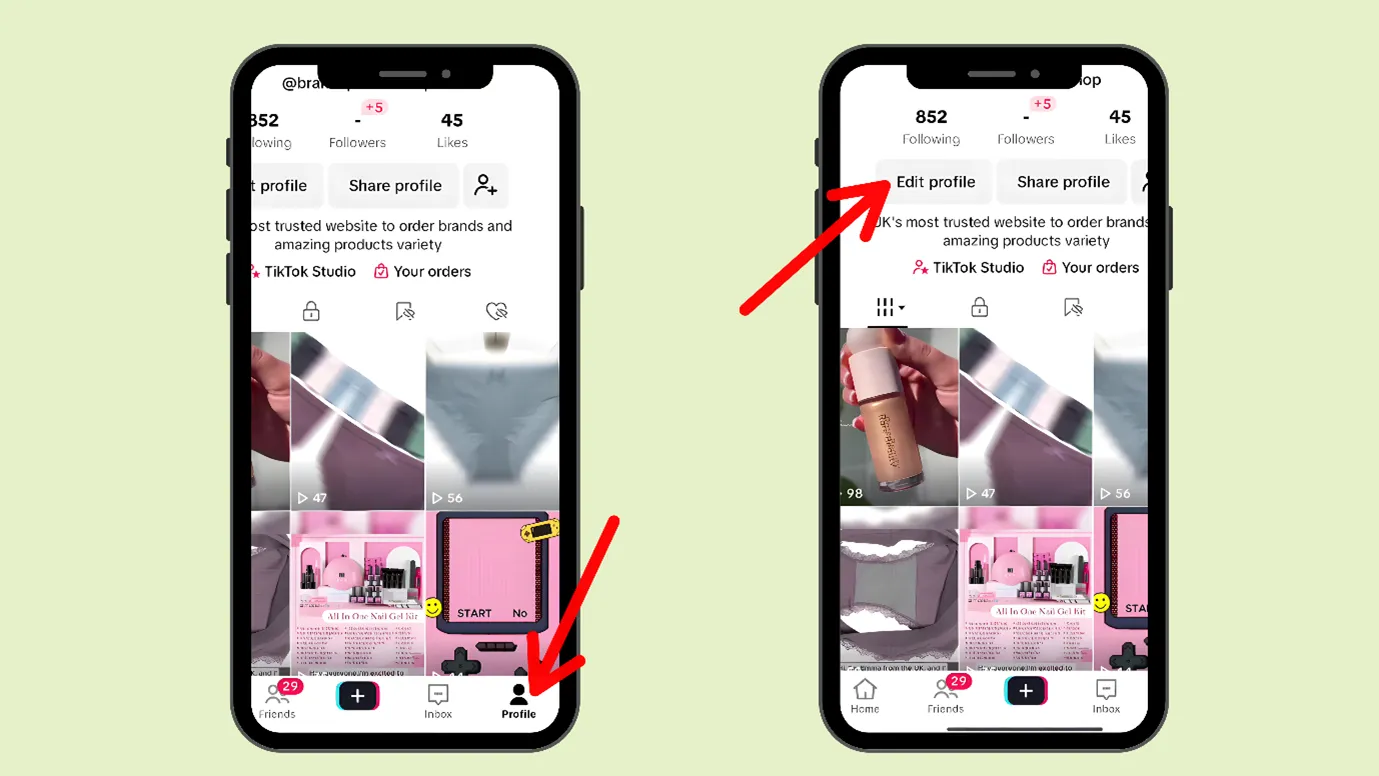
Step 3: Next, you can scroll down and see the channel links you had provided, select Instagram
Step 4: Go to that Instagram link and click on it. A new window will appear, then click “Unlink”.
That would unlink Instagram from TikTok.
Why can’t I unlink my Instagram from TikTok?
If you are unable to unlink Instagram from TikTok, then try the following methods.
- Update your TikTok app
- Restart your device
- Check your internet connection. If it is connected to a stable connection, then wait for some time before trying to unlink and try again
- If nothing works, then you can report the problem.
Step 1: Open your TikTok
Step 2: Go to the hamburger icon and tap on it
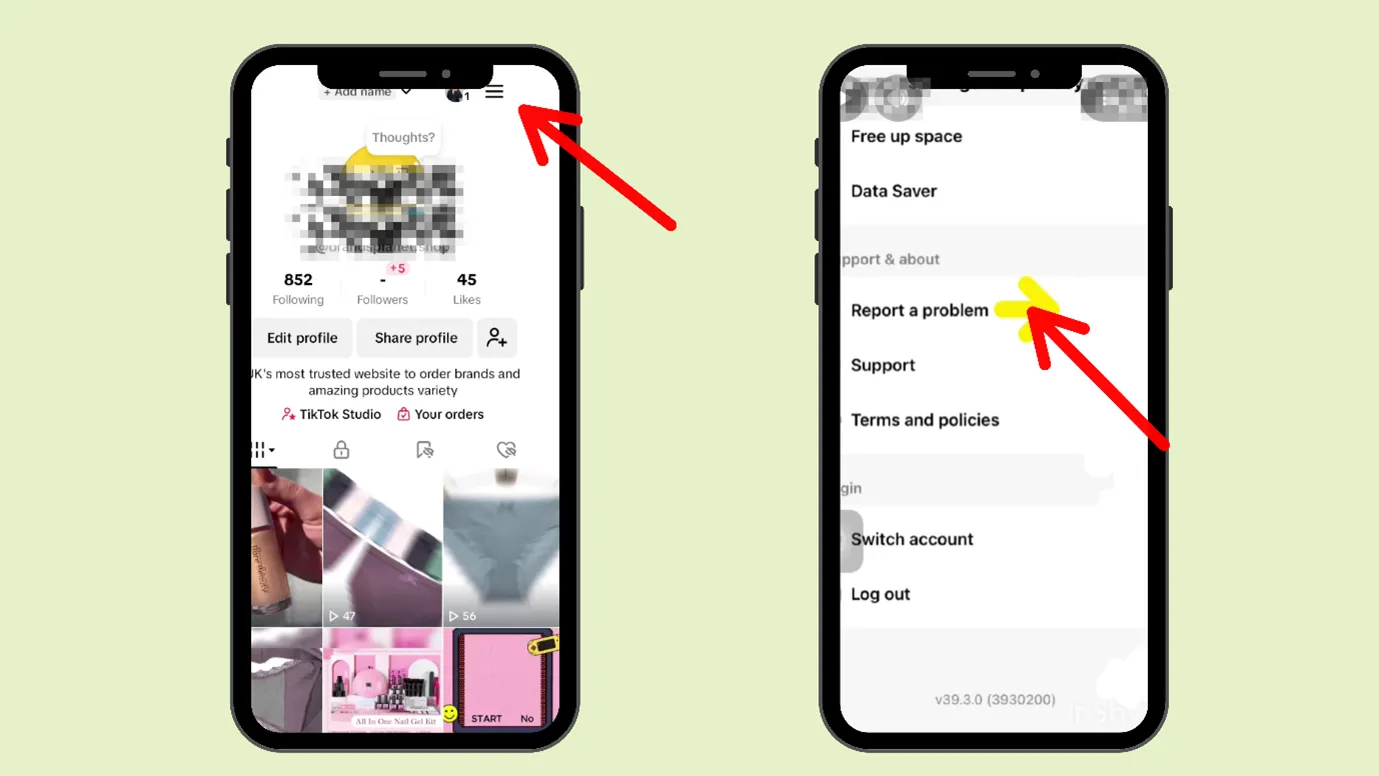
Step 3: Next, click on “Settings and Privacy”
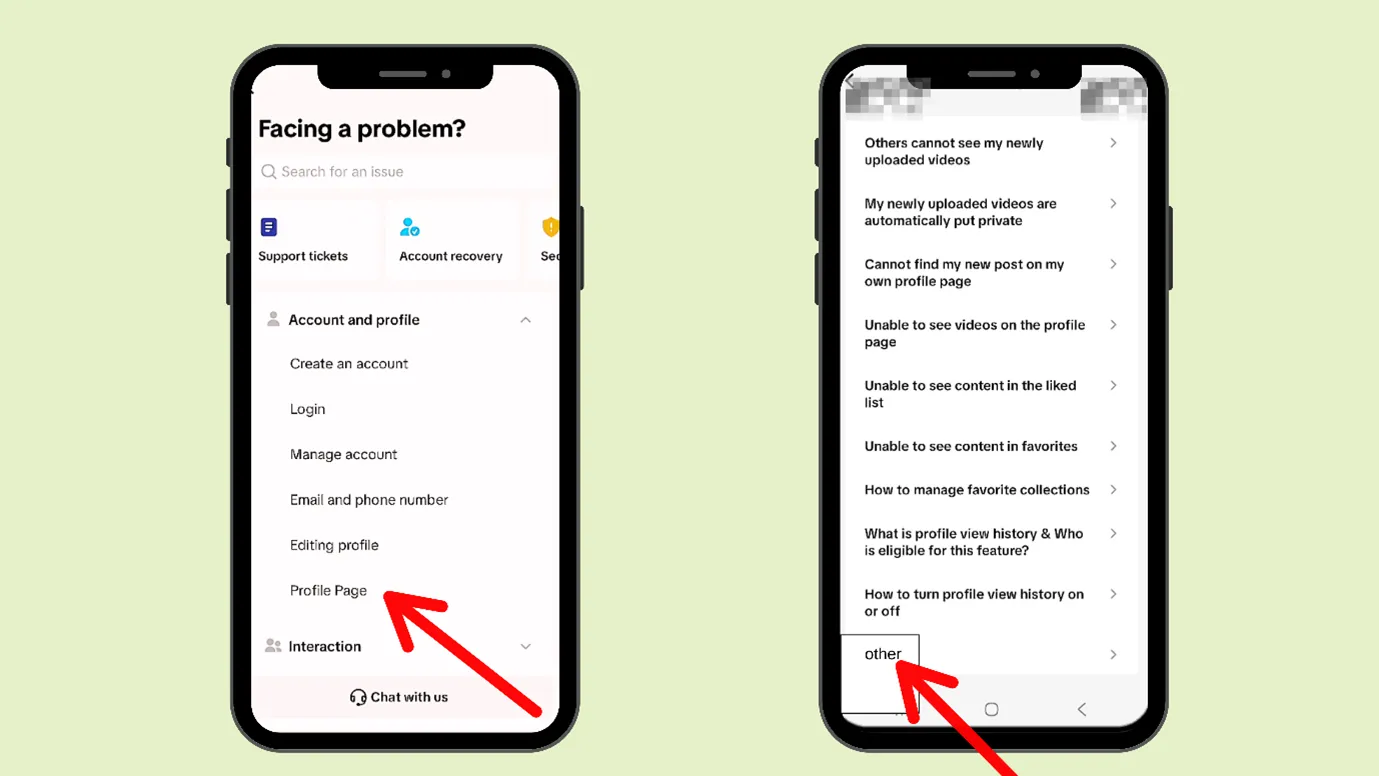
Step 4: Go to help, select “Profile Page”
Who Should Unlink Instagram and TikTok?
If you want to be visible, have convenience, and post the same kind of content on all platforms, then linking TikTok and Instagram is a good idea. Although platforms encourage linking and cross-posting, one approach won’t work for everyone.
If you belong to the following category, then you can consider unlinking Instagram from TikTok.
- If you have different sets of audiences on each platform
- If you have multiple accounts, or if you are an agency managing accounts for many people
- If you are seriously targeting growth on these two platforms, you need different strategies for growth. TikTok and Instagram have different best posting times, different demographics, different aesthetics, etc.
- If you are worried about security, if one platform gets hacked, the other can also be affected.
- If you run ads, campaigns, or host live events, then mistakenly cross-posting
Basically, Linking makes sense for brands that share the same content across platforms and want convenience over customization.
What could be the problems after delinking TikTok and Instagram?
While linking Instagram and TikTok might give convenience, delinking can cause some issues
- You might need some extra manual work, as you have to now post for both platforms separately.
- It could reduce the chances of more reach, as linking both platforms would make it easy for users to reach your Insta from TikTok, and delinking would cause the opposite
- Once you delink the platforms, you start seeing different growth paths. Each platform attracts a different kind of audience, and you can clearly notice how Instagram and TikTok respond to your content in their own way.
Pros and Cons of Linking TikTok and Instagram
There are always two sides of a coin
Let us discuss the pros and cons of linking TikTok and Instagram
Pros of Linking TikTok and Instagram
|
Saves time with easy cross-posting |
|
Simple account discovery for users |
|
It is good for casual content creators or very mature or established businesses |
|
Posting similar content on both platforms keeps the brand’s tone, logo, and perception consistent, which helps maintain uniformity. |
Cons of Linking Instagram and TikTok
|
When content isn’t specialized or customized for each platform, overall growth tends to be slow |
|
Linking will mix distribution, timing, and context. So, you cannot judge anything from analytics |
|
Audience behavior can overlap; your brand may perform well on one platform and poorly on others. |
|
Higher risk when running ads or brand campaigns |
How To Relink Instagram to TikTok?
After delinking TikTok and Instagram, you can again relink them. And that is very easy.
Let us go step by step
Method 1
Step 1: Open TikTok, go to your profile
Step 2: Then tap on “Edit Profile”
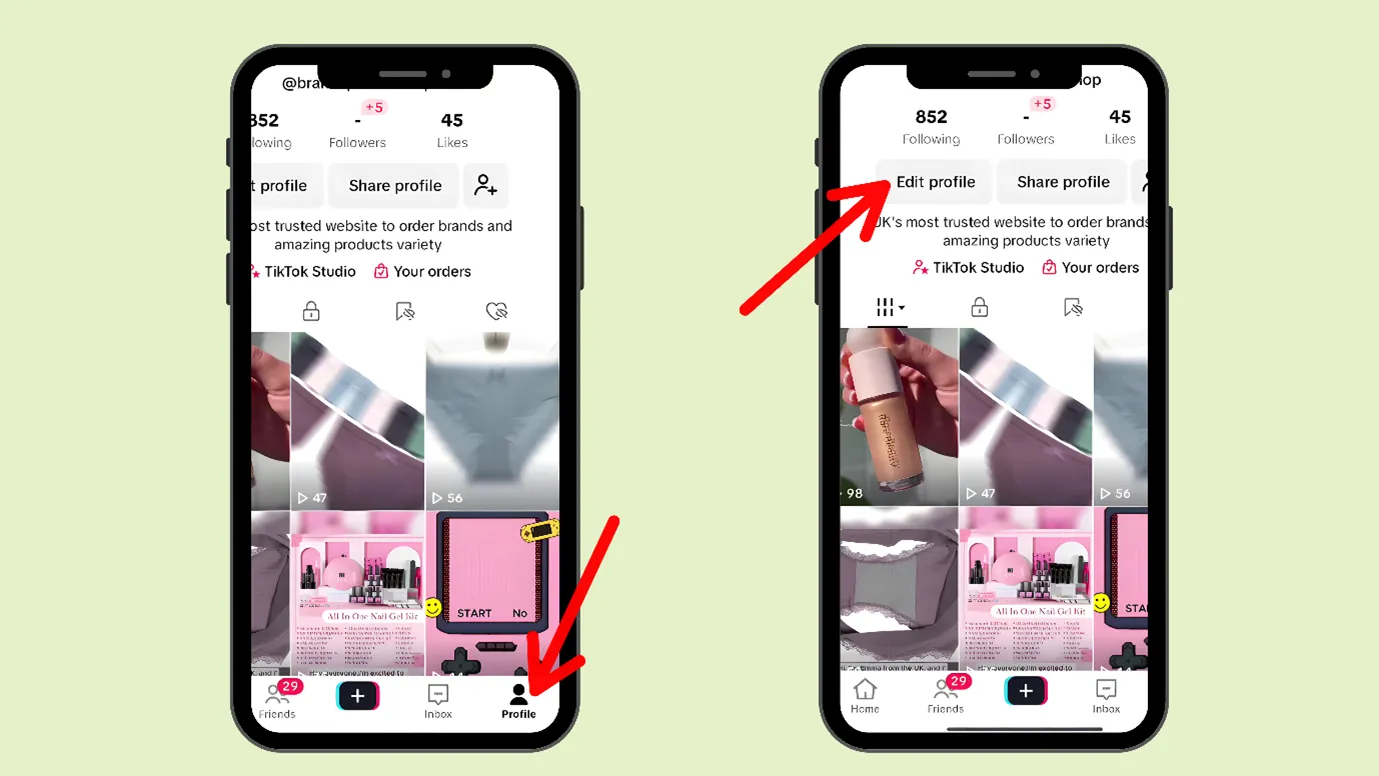
Step 3: Scroll down and go to “Links”
Step 4: Click on “Links”
Step 5: A new window would open, and then you can click on “Instagram”
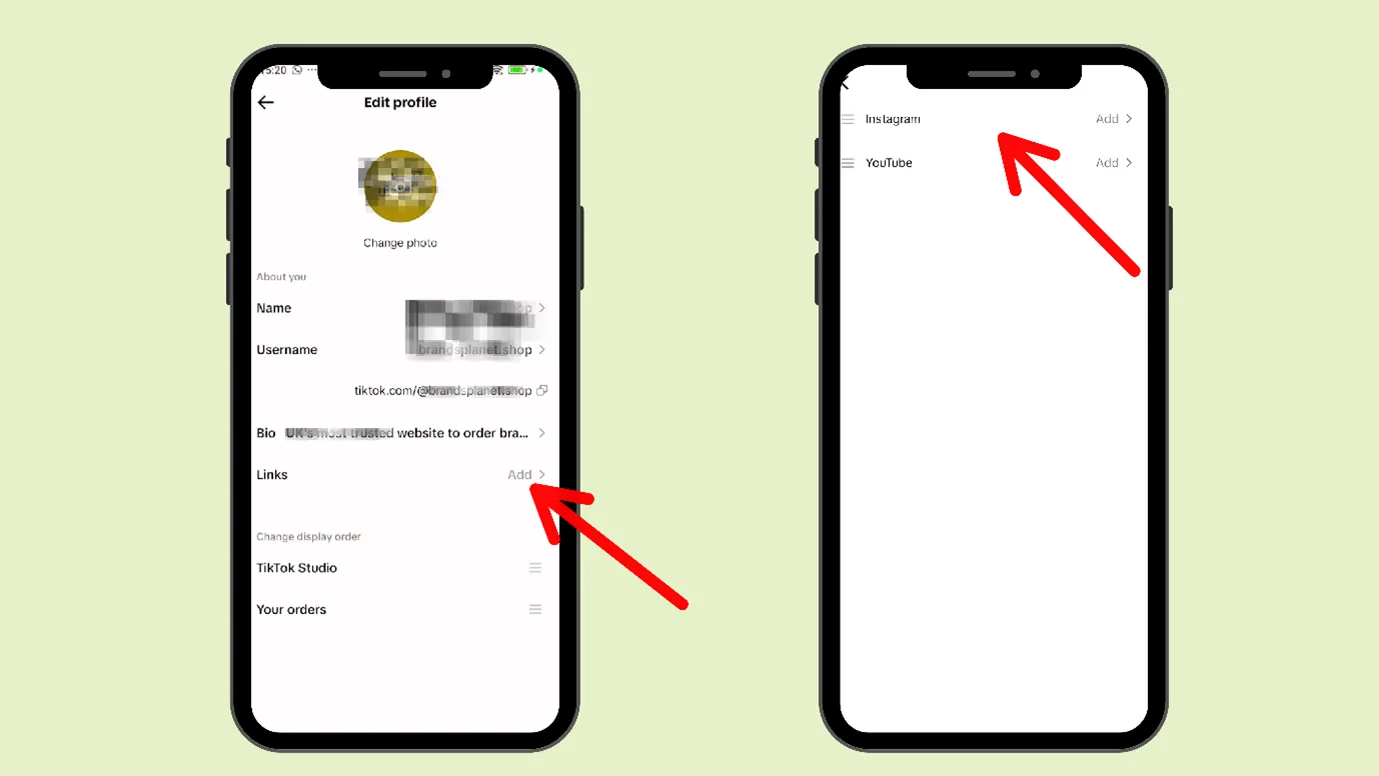
Step 6: You will now be prompted to log in to your Instagram. You can log in now and connect both your accounts.
If this does not work for you, you can choose Method 2
Method 2
Step 1: Open TikTok, go to your profile
Step 2: Click on “Share your profile”
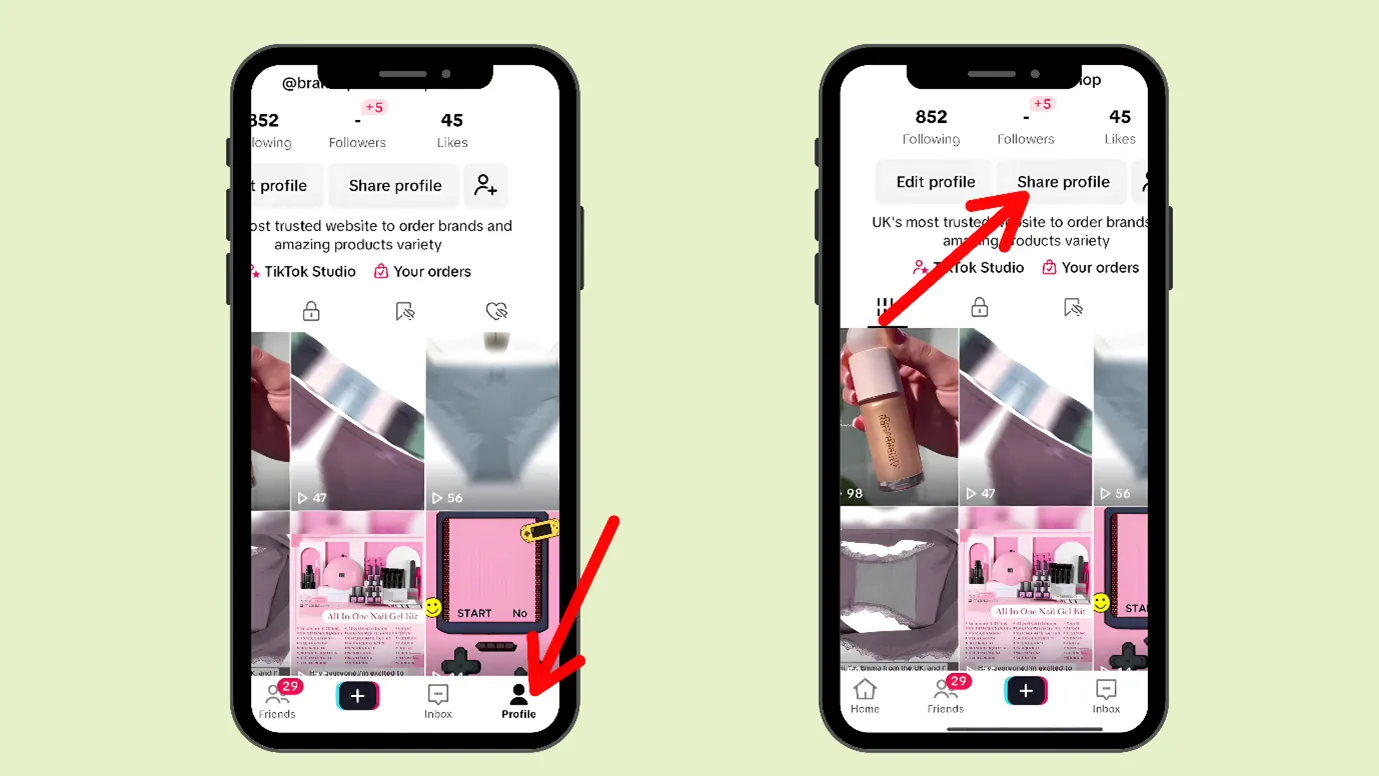
Step 3: Now, copy the link
Step 4: Open your Instagram, go to your profile (you might have to log in)
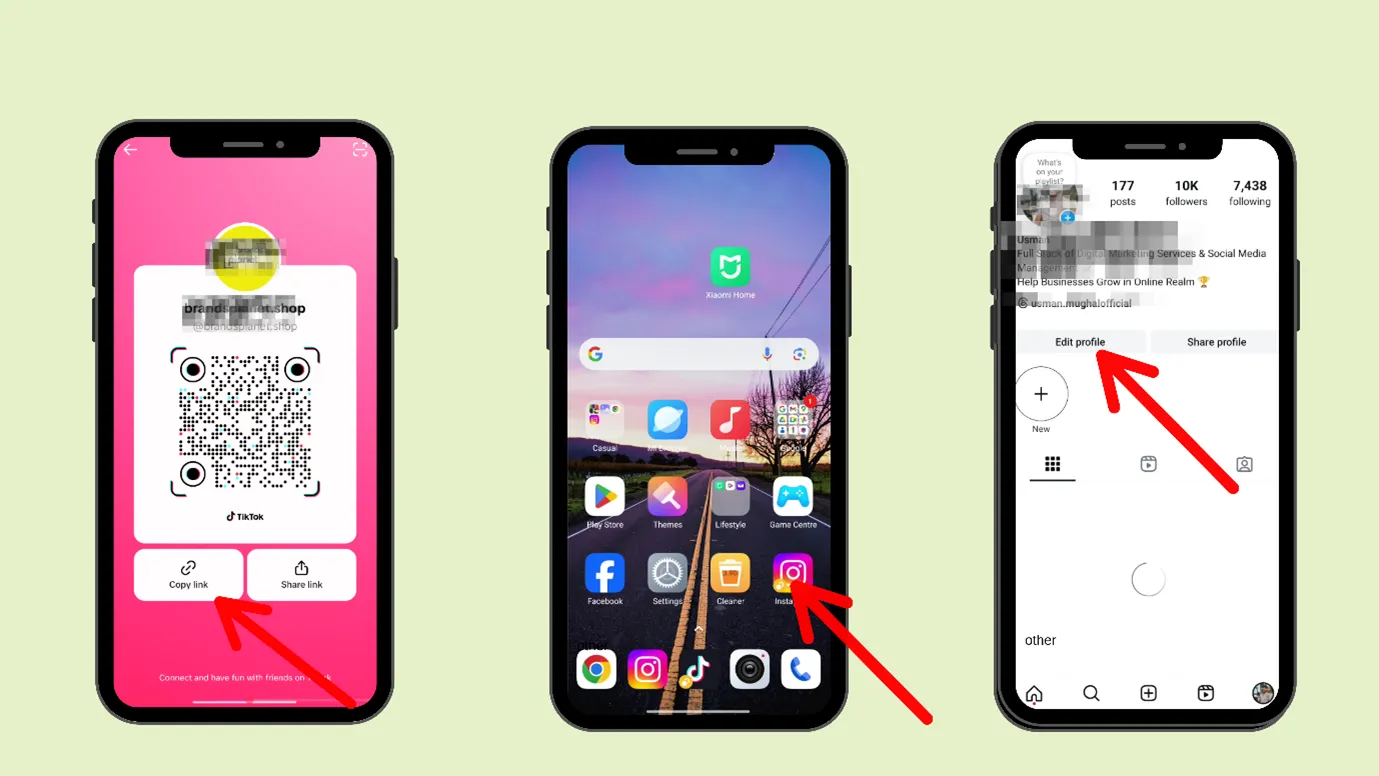
Step 5: Go to edit profile
Step 6: Go to the “Add link” section, and tap on it
Step 7: Now, in the ” Add link section, you can paste the TikTok link
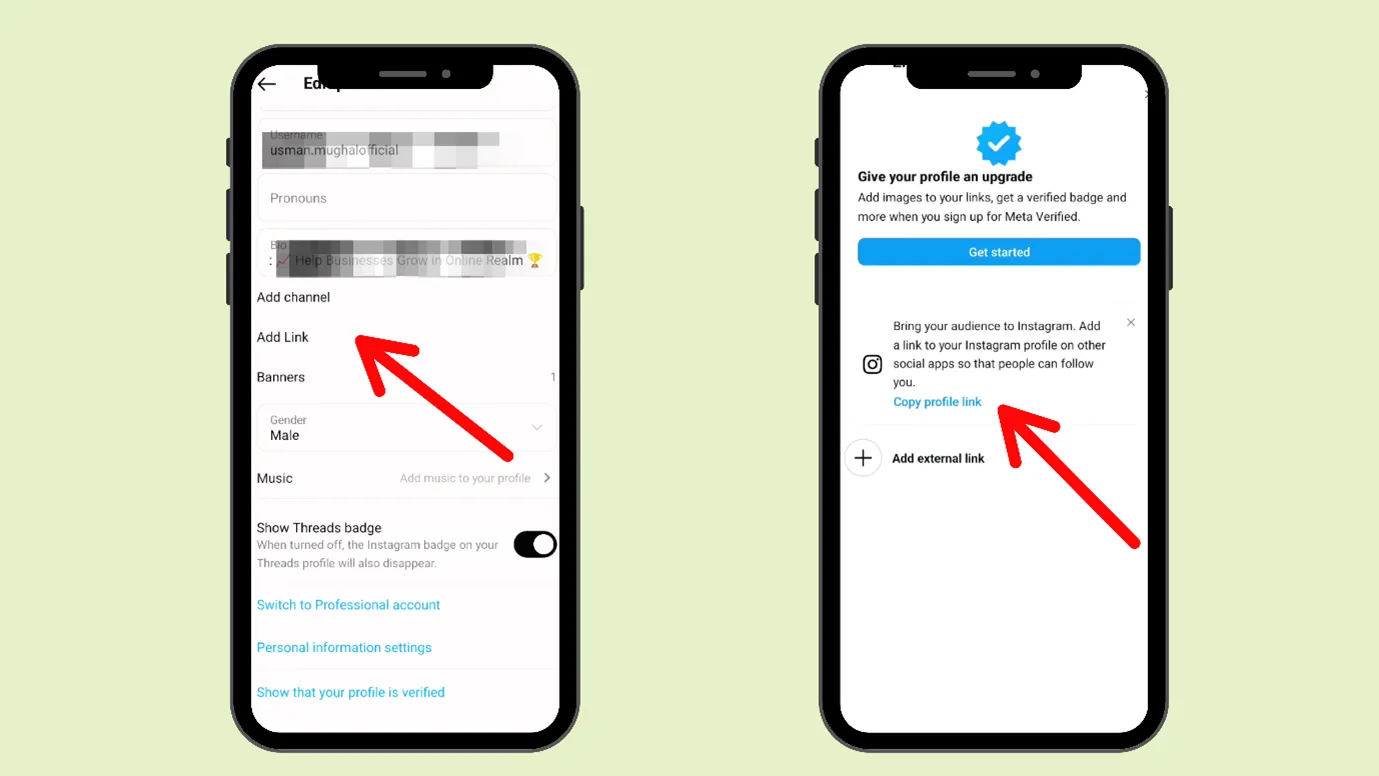
Step 8: In the “Title” section, you can name it “TikTok”
TikTok vs Instagram
TikTok and Instagram are two different platforms; we can see some differences between them. This table would show you the difference.
|
Category |
TikTok |
|
|
Total users |
1.925 billion users worldwide |
2 billion monthly active users |
|
Average daily time spent |
~58 minutes per user (2024) |
33.9 minutes per Android user |
|
Major age group |
18–24 |
18–24 |
|
Share of 18–24 users |
34.8% |
31.7% |
|
Good for targeting |
Millennials |
Gen -Z |
|
Male users |
54.8% |
50.7% |
|
Female users |
45.2% |
49.3% |
Here are the Major reasons to use TikTok.
|
Reason |
Percentage of Users |
|
Following or researching brands/products |
45% |
|
Keeping up with news and current events |
39% |
|
Posting or sharing photos/videos |
29% |
|
Messaging friends and family |
18% |
Here are the Major reasons to use Instagram
|
Reason |
Percentage of Users |
|
Post or share photos or videos |
70.1% |
|
Look for funny or entertaining content |
66.6% |
|
Follow or research brands and products |
62.3% |
|
Message friends and family |
59.7% |
|
Keep up to date with news and events |
54.4% |
How is TikTok and Instagram content different?
This is the table showing the content format difference between TikTok and Instagram
|
Content Type / Format |
TikTok |
|
|
Feed posts |
Mostly Short-form videos only (up to 3 minutes) |
Photos, videos, and carousels |
|
Short-form video (Reels-style) |
Yes, core format with advanced effects and editing library |
Yes, available with editing tools |
|
Editing tools & effects |
Extensive in-app effects and tools |
Available but less extensive |
|
Live streaming |
Yes, with digital gifts |
Yes, no gifting system |
|
24-hour disappearing content |
Not available |
Available (Stories) |
|
Long-form video uploads |
Not available (no 60-minute videos) |
Available (up to 60 minutes) |
|
Overall format variety |
More limited, video-first |
More diverse content formats |
Here is the table showing the difference between TikTok and Instagram content.
|
Content Type |
Instagram works best for |
TikTok works best for |
|
Overall content style |
Clean, well-designed posts |
Casual, trend-based videos |
|
Videos |
Neatly edited Reels |
Fast, trend-driven short videos |
|
Photos & carousels |
Photos, carousels, and slides |
Not available |
|
Trends |
Nice to use, not required |
Very important for reach |
|
Storytelling |
Clear, planned stories |
Quick, relatable stories |
|
Educational posts |
Step-by-step, save-worthy tips |
Simple tips and quick hacks |
|
Behind-the-scenes |
Planned, brand-safe moments |
Real, unfiltered moments |
|
Promotional content |
Soft, visually appealing promos |
Needs Humor or trends to work |
|
Community interaction |
Stories, polls, replies |
Duets, stitches, reactions |
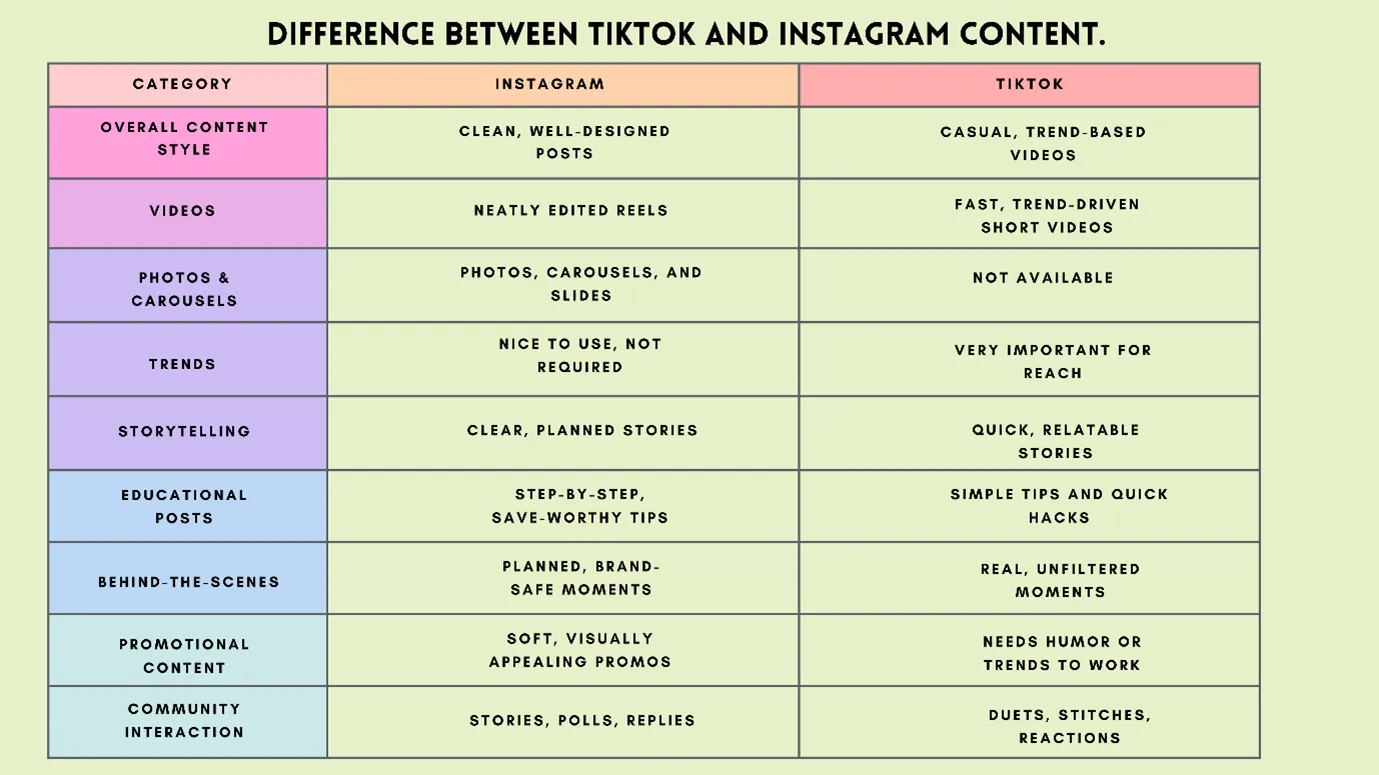
The content that works on TikTok will not work on Instagram.
But we understand that if you are targeting to grow on both TikTok and Instagram, then making content for both separately can be a daunting task. That is why we recommend you try our content creation tool. It can create posts, carousels, polls, and reels as per requirement, tone, brand, palette, niche, etc. You can try it for free.
It is the one and only content creation and social media management tool in the market.
Can TikTok watermarks cause problems in Instagram?
In some cases, TikTok leaves a watermark on its videos
- When you download a video from TikTok
- When you save your own TikTok video to your phone
- When you repost a downloaded TikTok video on Instagram or elsewhere
When you post a watermarked video on Instagram, the Instagram algorithm recognizes it, and it does not distribute it or see it as low priority.
Therefore, you should always post an original video on Instagram. Or try to remove the watermark while posting on Instagram.
If we sum up
We hope you understood How to remove your Instagram account from TikTok, and all the pros and cons regarding TikTok linking to Instagram.
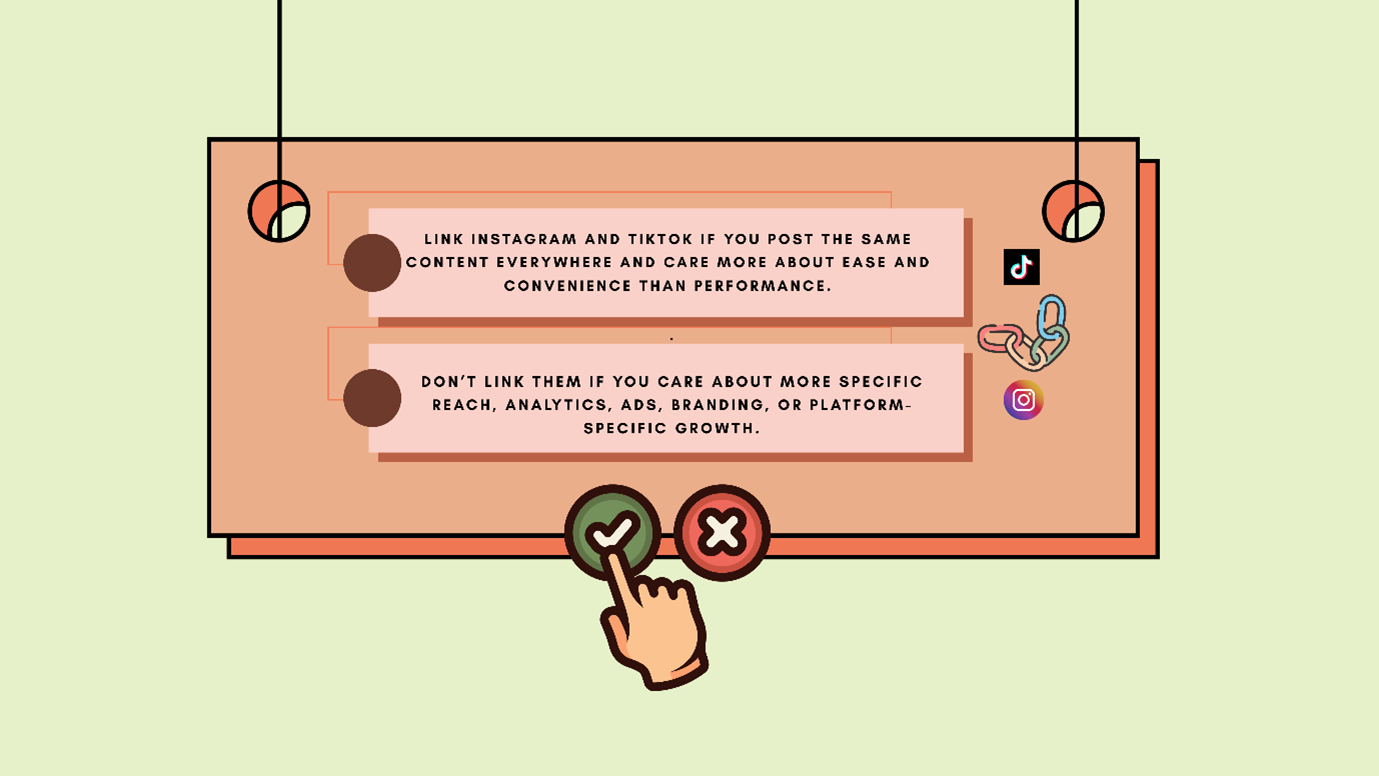
In short,
|
Link Instagram and TikTok if you post the same content everywhere and care more about ease and convenience than performance. |
|
Don’t link them if you care about more specific reach, analytics, ads, branding, or platform-specific growth. |
And also, with Indzu, you can easily schedule or post content on both platforms at once, without interlinking them.
Would you like to know more about Instagram and TikTok?
FAQs
How to remove your Instagram account from TikTok?
Step 1: Open TikTok, go to your profile
Step 2: Then tap on “Edit Profile”
Step 3: Next, you can scroll down and see the channel links you had provided, select Instagram
Step 4: Go to that Instagram link and click on it. A new window would appear, then click on “Unlink. You can click on “Unlink.”
That would unlink Instagram from TikTok.
How to find link in bio on TikTok?
You can easily find the link in bio on TikTok.
Step 1: You have to click on the profile pic
Step 2: You will reach the profile information section (Bio), where you can find links.
Which one is safer, Instagram or TikTok?
There have been security breaches on both platforms; both are unsafe and safe. Instagram is owned by META, an American company but TikTok is owned by Byte Dance, a Chinese company.
You have to decide what kind of audience you want to target, on which platform they are more active, and focus on that platform.
Which is more popular, TikTok or Instagram?
- TikTok has 1.925 billion monthly active users. It ranks 3rd among the most used social media platforms
- Instagram has 2 billion monthly active users. It ranks 2nd among the most used platforms.
Both platforms are popular.