

Feeling lazy to upload yesterday’s night photos? Just repost your friend’s Instagram story if you are wondering how to repost an Instagram story. We are here to tell you that it’s a very simple process.
On Instagram, you can quickly share a story in which you are tagged, and that is known as reposting an Instagram story. Imagine showing appreciation to your followers and increasing the reach and visibility of your content with just one simple Instagram feature: reposting an Instagram story.
Let’s get into the blog to learn how to repost an Instagram story, its benefits, and more.
 Time killer · Pain
Spending 6 hours writing posts that get zero traction?
Paste your URL. ZuAI turns it into 30 brand-on captions in 10 minutes — no blank-page panic, no generic AI filler.
Instagram story
Instagram Stories is a feature that lets users share photos and videos that disappear after 24 hours. Stories appear at the top of the home page, making them one of the first things your audience notices, ahead of reels or posts.
But unlike reels and posts, Instagram stories are temporary. Because Instagram stories are temporary, reposting becomes one of their biggest strength.
Let’s learn more about reposting Instagram stories and their importance.
Outcome · RecommendedGet 30 days of social content from your website — in 10 minutes.
Importance of reposting an Instagram story?
Reposting an Instagram story is important as it shows appreciation and builds trust. It saves time on content creation, encourages reach, and even boosts brand awareness by showcasing real interaction and user-generated content.
As a brand, you can post customer reviews or stories featuring your brand. As a personal account user, you can even repost your birthday wish or your friend’s story in which you’ve been mentioned.
Let’s know the step-by-step process on how to repost an Instagram story
Proof · Verified
2k+ grew faster with one tool.
How to repost an Instagram story you are tagged in?
To share someone else’s Instagram story to your story
Step 1: Open the Instagram app.
Step 2: Tap on the “heart”
Step 3: You will see all notifications showing which story you were mentioned in.
Step 4: Tap on the mentioned story.
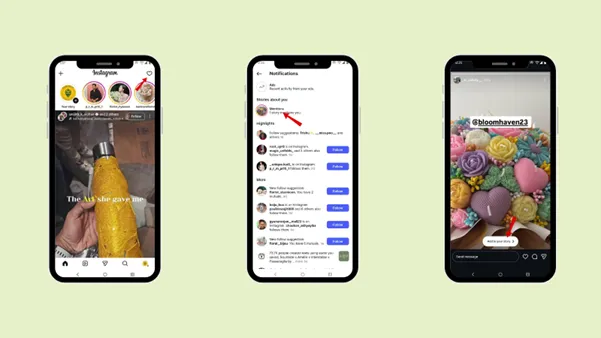
OR
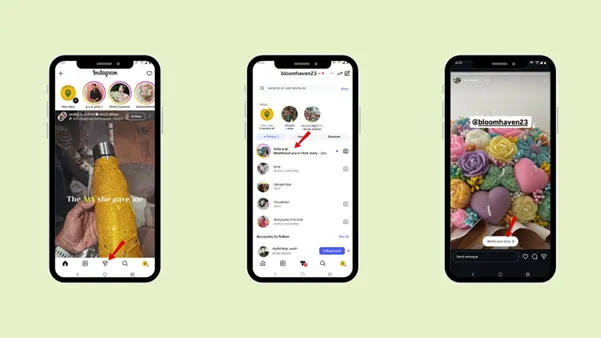
Step 5: Open the direct message of the user who has tagged you in their story.
Step 6: Tap “ Add to your story”.
Step 7: Add to “Your stories” or “Close friends” according to the requirement.
Free · Instant · No signupSee what ZuAI generates from your website — right now.
Paste your URL. Watch ZuAI write a month of brand-on captions in seconds. Preview before you create an account.
How to repost an Instagram story where you are not tagged in?
You cannot repost an Instagram story until you are tagged in it. But still, if you want to repost a story in which you are not tagged,
1. Screenshot
You can screenshot the story that you want to repost on your Instagram story.
Step 1: Open the Instagram app
Step 2: Go to the home page. Above the home page, you can view all the stories of users you follow.
Step 3: If you like someone’s story and want to repost it, take a screenshot.
Step 4: Now, from your gallery, upload it to your story.
2. You can repost an Instagram story to your story. If a public account has enabled the sharing feature
Step 1: Open the Instagram app.
Step 2: Go to the home page.
Step 3: While swiping through the story, you will see a small arrow in the bottom-right corner.
Step 4: Tap the ‘arrow” and tap “Add to your story.”
Speed · 10-minute setupOne coffee from URL to a full month of scheduled posts.
Drop your URL, brew your coffee, come back to 30 brand-on captions ready to publish.
How to repost someone else’s post on Instagram story?
If you like someone’s post or want to increase its engagement, you can repost it on Instagram Stories.
Step 1: Open the Instagram app
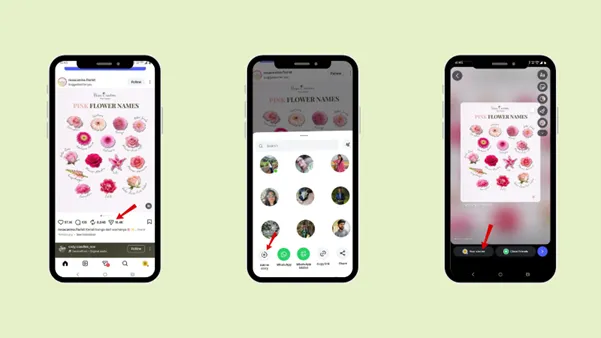
Step 2: Select the post you want to share in Instagram Stories.
Step 3: Tap “Share arrow” under the post.
Step 4: Tap on “add to story”.
Blank tab. Six open browsers. No clue what to post.


 After · With Indzu
Paste one URL. Get 30 scheduled posts.
What are the benefits of reposting an Instagram story ?
Reposting an Instagram story is not only for fun; you can actually increase engagement on a particular post, piece of content, or account. Let’s go through a few benefits you can avail yourself of by reposting an Instagram story.
1. Increase your reach
The first benefit you can get is increased reach for your content. When you repost an Instagram story, it’s seen by your followers and can help you reach a new audience.
The more frequently your account appears in Instagram Stories, the more familiar the audience becomes with your brand and content. You will automatically increase profile visits, engagement, and followers.
2. Encourages more tags and mentions
People appreciate recognition. When your audience notices that you repost stories that you are tagged in, they are likely to tag you in the future. Reposting encourages more tags and mentions.
Example: The best examples of reposting are posting customer reviews and reposting appreciation posts.
The more you repost tagged stories, the more people will mention you, as mentions increase visibility and credibility. It builds trust with your audience because reposting makes them feel seen and appreciated.
3. Save time on content creation.
Rather than creating new content, reposting helps you to save time and stay active without creating something entirely new.
Through reposting, you can also engage with your audience with the tag and mentions features.
4. Keeps your profile active
Consistency is essential in social media. When you post regularly, you are likely to be shown in your followers’ feeds and stories. Reposting helps you maintain consistency when you do not have the content ready.
Even if you do not post new content, you can still engage with your followers through stories. So, they will know that you are an active account.
5. Support brand awareness
When you repost an Instagram story, it gets seen by your audience, thereby increasing story views. It also supports the brand whose story you have mentioned, thereby increasing brand awareness. Whether you are promoting a personal brand, a small business, or a content page, reposting on Instagram builds recognition over time.
It also builds trust in the brand. When you post about the brand, reposts act as social proof.
Time killer · Pain
Spending 6 hours writing posts that get zero traction?
Paste your URL. ZuAI turns it into 30 brand-on captions in 10 minutes — no blank-page panic, no generic AI filler.
Conclusion
If you want to build trust and boost engagement, learn how to repost an Instagram Story. Whether you want to share memories from last night or highlight content where you are tagged, reposting makes your content creation simple and faster.
Follow the steps on How to repost an Instagram story where you are tagged and not tagged. To even make your content creation much easier, use Indzu.
Outcome · RecommendedGet 30 days of social content from your website — in 10 minutes.
Faqs
Q1. Can you repost a private account’s story?
Ans 1: You can only repost a private account’s story if you are following the private account’s user or the user has tagged you in their story. If you are not tagged in the story, then you cannot repost the story.
Q2. Does Instagram notify when you repost?
Ans 2: Yes, Instagram does notify users when you repost a story. You will get notified when someone tags you in their story, and they will get notified when you repost their story.
Q3. Can you repost a story after 24 hours?
Ans 3: No, you cannot repost a story after 24 hours, as the story will be deleted.
Q4. Can you repost someone’s story to your feed instead of your story?
Ans 4: No, you cannot repost someone’s story to your feed. The stories that you have been tagged in can only be posted to your Instagram story. But if you want to post the story, you can take a screenshot and post it in the feed, though it will not be as clear as the original story.
Q5. Can business accounts repost stories differently than personal accounts?
Ans 5: The reposting rules are the same for business and personal accounts. Both the business and personal accounts can repost an Instagram story if they are tagged in it.