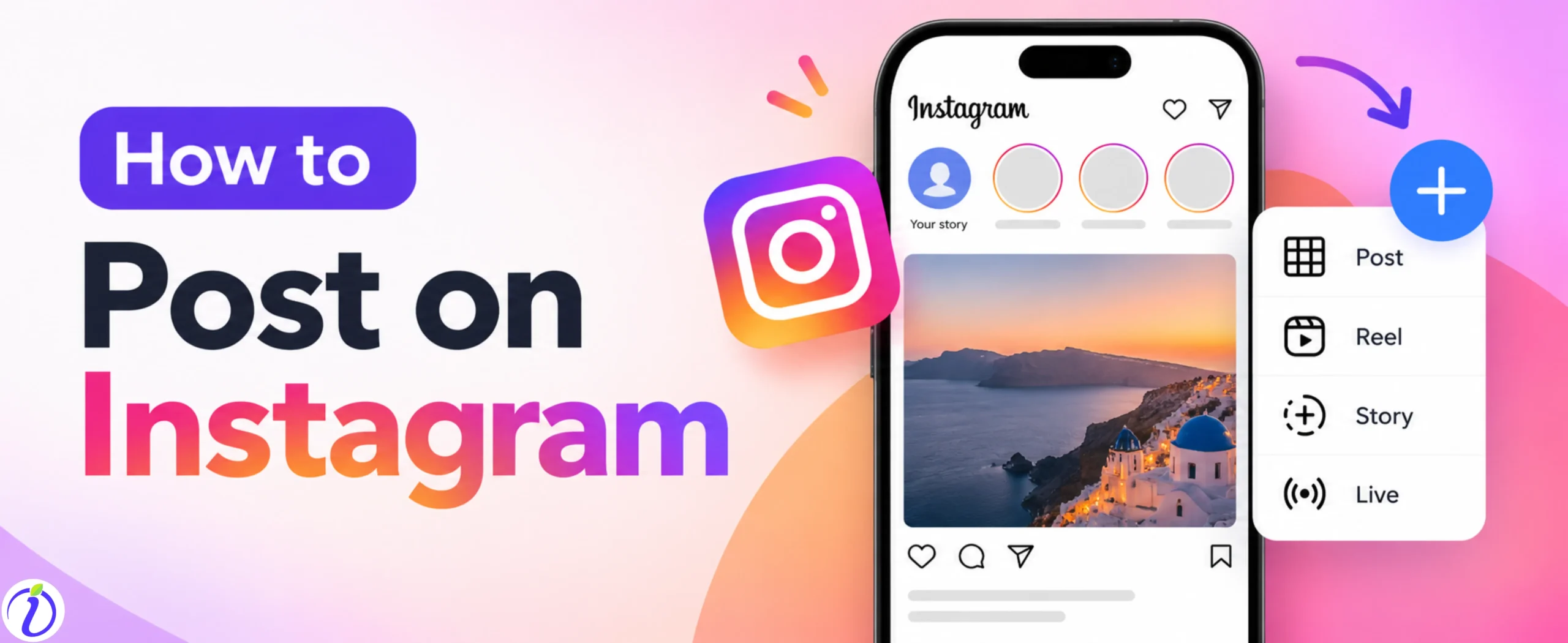
Do you want to share and store your memories on Instagram? Know How to post on Instagram. Stories vanish after 24 hours of posting, but a post on Instagram stays forever. You can create your own style of aesthetic grid which will showcase your personality to your followers and even memories that stays forevers, unless you delete the account.
If you are a brand or business, posting on Instagram can be extremely valuable. Your profile will act as a digital storefront where potential customers can discover your products, services, and brand story. A well-curated profile will attract potential customers, build trust, and turn normal audience into loyal customers.
Let’s get into the blog to know How to post on Instagram and tips to boost your post.
 Time killer · Pain
Spending 6 hours writing posts that get zero traction?
Paste your URL. ZuAI turns it into 30 brand-on captions in 10 minutes — no blank-page panic, no generic AI filler.
Post On Instagram
You can post different types of content on Instagram. You can post Instagram stories, post, reels.
Let’s have a step-by-step guide on how to post on Instagram.
Outcome · RecommendedGet 30 days of social content from your website — in 10 minutes.
How to post on Instagram
Directly from your phone
Step 1: Open the Instagram app .
Step 2: Tap the “+” Create button.
Step 3: Select the post or reel option as per your plan.
Step 4: Select the photo or videos from your gallery.
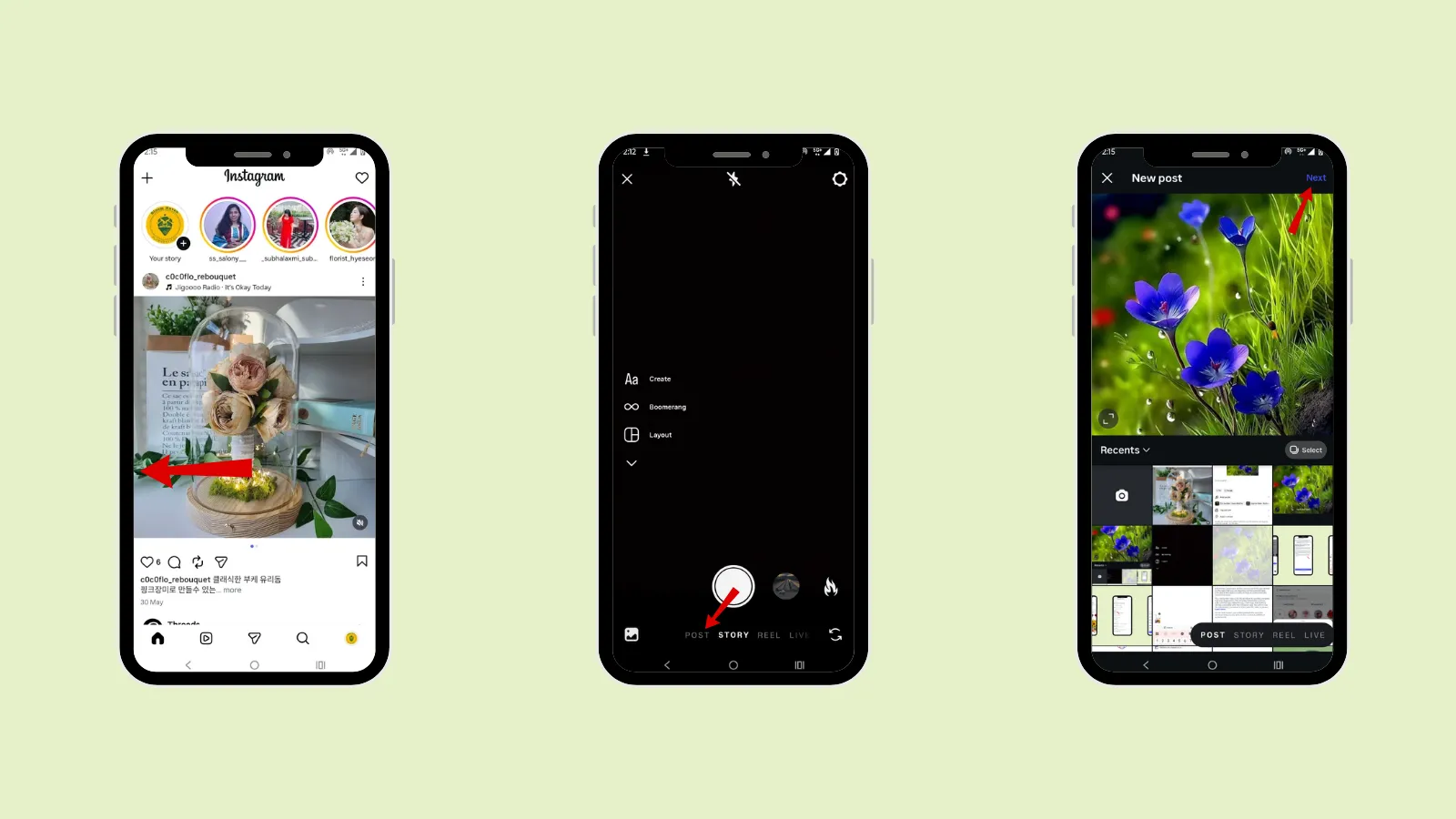
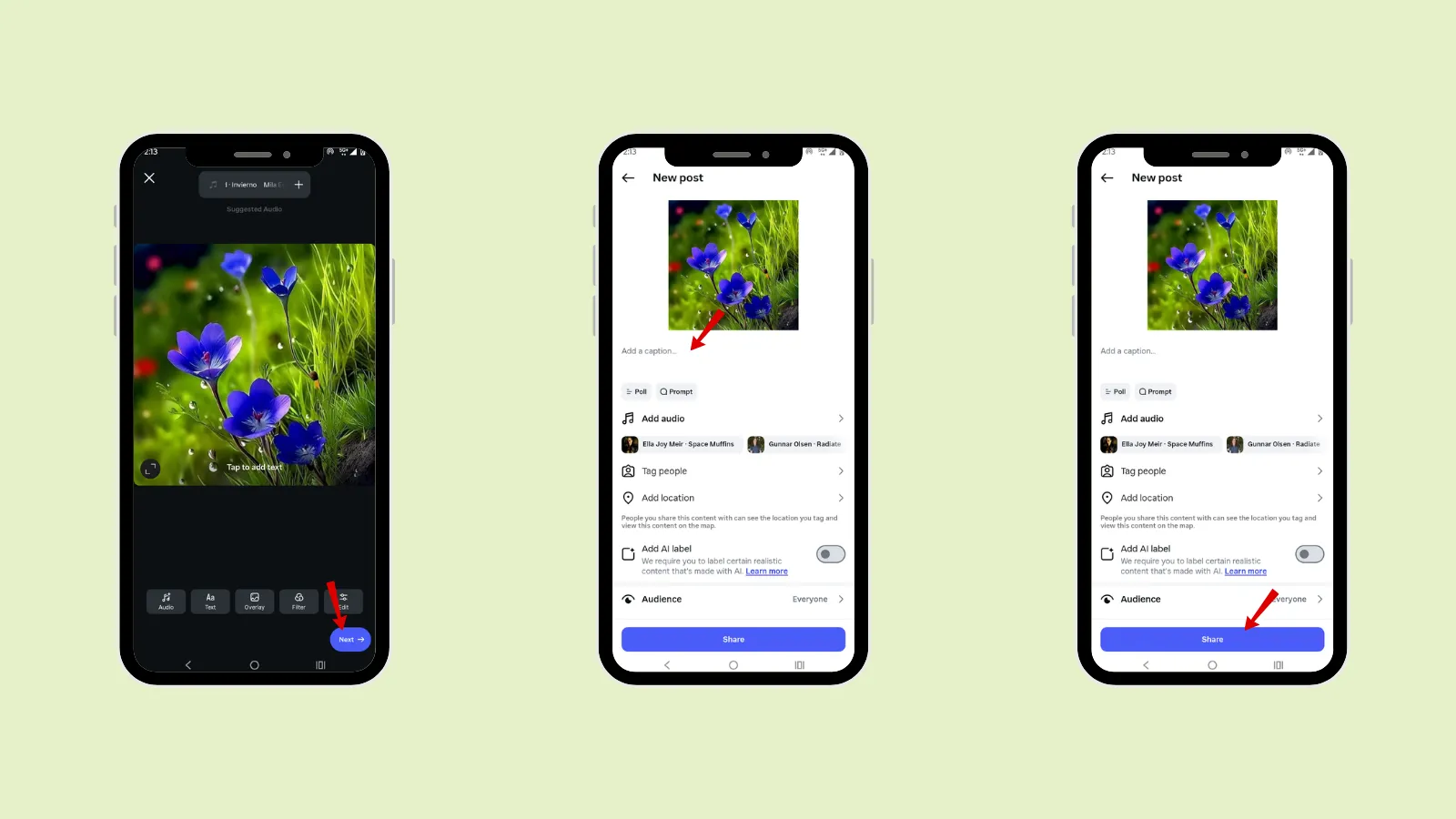
Step 5: Write your caption.
Step 6: Add hashtags.
Step 7: Tap people or brands with whom you are collaborating.
Step 8: Add a location.
Step 9: Share your post.
From a desktop
Step 1: Open the Instagram browser.
Step 2: Open your Instagram account.
Step 4: Click the “+” sign .
Step 5: Click “Post.”
Step 6: Select the image you want to upload.
Step 7: Crop the post, add a filter if required.
Step 8: Click “Next”.
Step 9: Add a caption, hashtags, location, and collaboration.
Step 10: Click “Share.”
Proof · Verified
2k+ grew faster with one tool.
How to post multiple photos (Carousel post) on Instagram
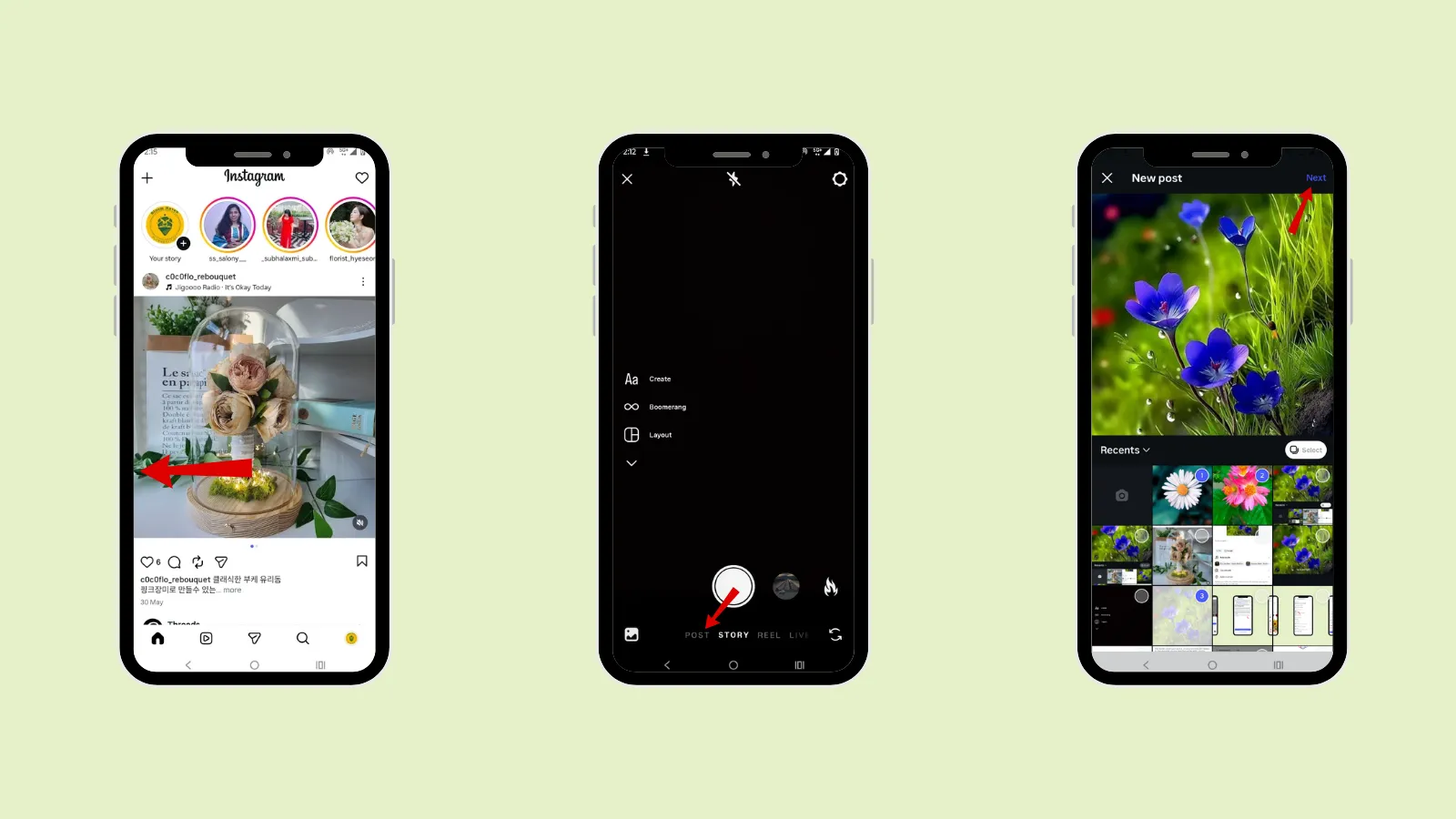
Step 1: Open the Instagram app
Step 2: Tap the “+” Create button
Step 3: Select the post or reel option for what you want to upload
Step 4: Tap “Select”
Step 5: Select the photo or videos from your gallery
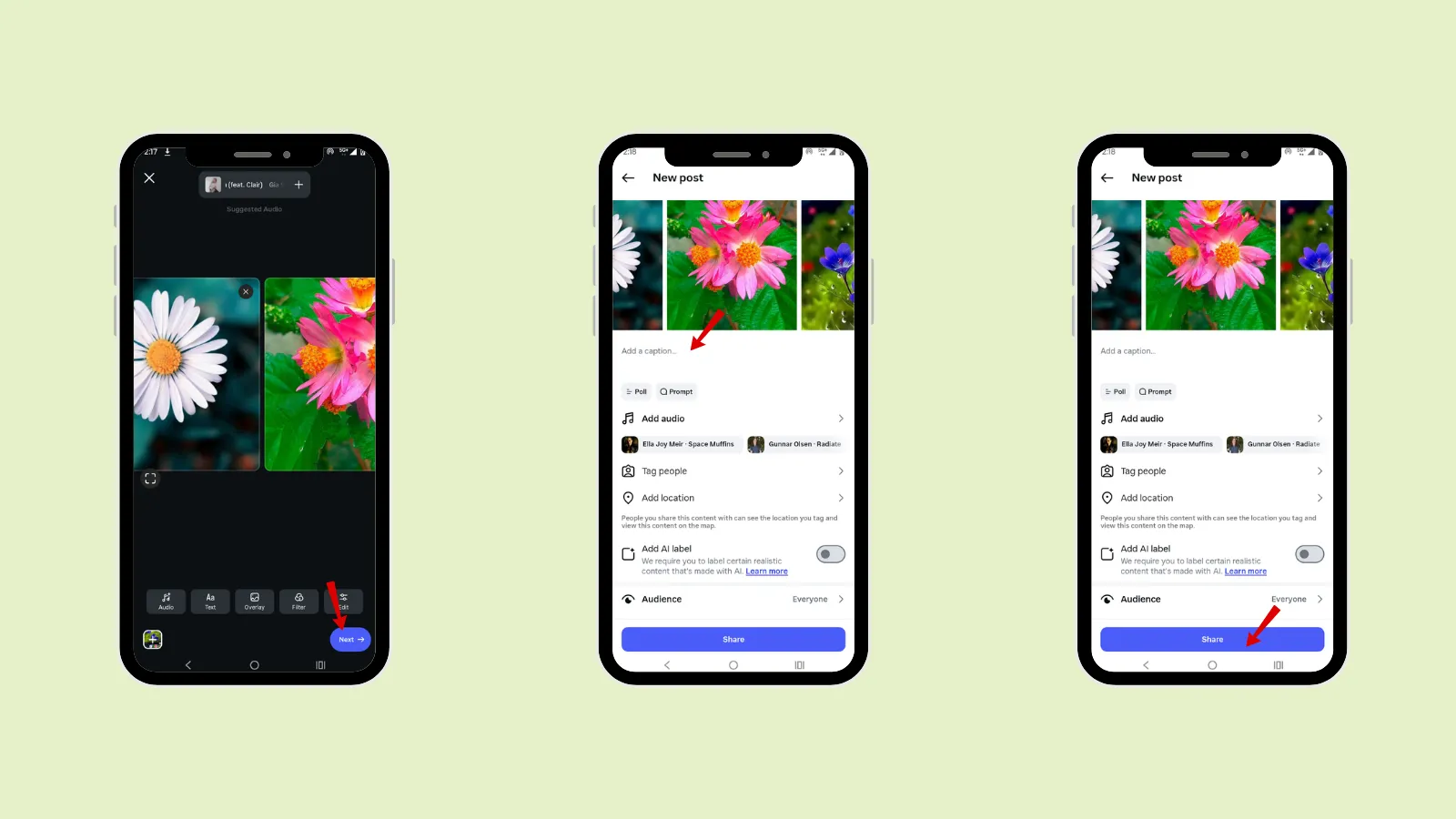
Step 6: Write your caption
Step 7: Add hashtags
Step 8: Tap people or brands with whom you are collaborating.
Step 9: Add a location.
Step 10: Share your post.
Free · Instant · No signupSee what ZuAI generates from your website — right now.
Paste your URL. Watch ZuAI write a month of brand-on captions in seconds. Preview before you create an account.
How to post an Instagram Story
Step 1: Swipe left on your home page on Instagram.
Step 2: Tap “Story”.
Step 3: Add the image you want to add
Step 4: Edit it
Step 5: Tap “Add to stories”.
Instagram different Content Types
Content Type | Details |
Feed Post | Feed post are the images or videos that are uploaded in a 1: 1. It is shown in your Instagram profile grid. |
Carousel | Carousel post is the post that is in the swipe able feature, it is also present in your Instagram grid. You can showcase before-and-after, storytelling, or a step-by step tutorial. |
Short-form, vertical videos will be shown in the Reels section of your Instagram profile. | |
Stories | Instagram Stories are in vertical format and are shown around your profile picture. They will disappear after 24 hours. |
Live videos | Live videos are the content format where a public user can go live in real time, broadcasting and interact with their audience. |
Broadcast channel | Broadcast channels are a one-to-many communication medium used to transmit information, audio, or video to a wider audience from a brand or influencer to its audience. |
Instagram notes | Instagram notes appear on the top of the direct message page. You can add notes for a specific person or close people. |
Speed · 10-minute setupOne coffee from URL to a full month of scheduled posts.
Drop your URL, brew your coffee, come back to 30 brand-on captions ready to publish.
How to post on Instagram using Indzu
Step 1: Open the Indzu account.
Step 2: Connect your Social channels
Step 3: Click “Compose”
Step 4: Select the Instagram social channel. (You can even select all the social channels in which you want to post the content.)
Step 5: Now create your post.
You can add your own media, add a caption emoji, or you can generate your content through ZuAi.
Add hashtags and even tag people just by entering their exact username.
Step 6: Click on “Post now”.
Blank tab. Six open browsers. No clue what to post.


 After · With Indzu
Paste one URL. Get 30 scheduled posts.
Different Types of Content to Post on Instagram using Indzu
You can post different types of content using indzu, such as
Post
Reel
Story
Step 1: Select the drop-down menu on the right side
Step 2: Choose which content type you want to upload.
Step 3: Create content accordingly
Step 4: Click “Post Now”.
Time killer · Pain
Spending 6 hours writing posts that get zero traction?
Paste your URL. ZuAI turns it into 30 brand-on captions in 10 minutes — no blank-page panic, no generic AI filler.
How to schedule an Instagram post using Indzu
Step 1: Open Indzu account.
Step 2: Connect your Social channels
Step 3: Click “Compose”
Step 4: Select the Instagram social channel. (You can even select all the social channels in which you want to post the content.)
Step 5: Now create your post.
You can add your own media, add a caption emoji, or you can generate your content through ZuAi.
Add hashtags and even tag people just by entering their exact username.
Step 6: Once you have created your post, click “Schedule”
Step 7: Enter the exact date and exact time.
Step 8: Click “Submit”.
Outcome · RecommendedGet 30 days of social content from your website — in 10 minutes.
Tips on how to upload to Instagram
It’s not just about clicking the “post” button; if you want to make the best use of the Instagram platform, you need to keep in mind some tips to boost your profile and content engagement.
- Audience needs
The first important tip you need to understand is your Audience needs. You need to focus on what your targeted audience is interested in. What type of content videos or posts will make them engage with your brand or business? Do their requirements align with what you offer?
- High quality Images
The 2nd important tip to capture your audience’s attention is to use high-quality images and videos. Your content needs to be clean, professional, and eye-catching.
In modern social media, Reels are driving focus and gaining more engagement than normal photos. So, create well–edited videos that will instantly make your content attract a larger audience.
- Caption
Caption is another way to hold your audience and communicate with them. Start with a hook that creates curiosity or is emotionally relatable. Make sure your caption tone is conversational and authentic, so your audience can feel relatable.
- Hashtags
Add hashtags to your post, but do not overload them. Hashtags help the Instagram algorithm understand your content and show them to the relevant audience who search on that particular topic. A mix of broad and specific hashtags in your post will work best for engagement.
- Best Time
Next, you should know the best time to post your Instagram post. The time when your target audience is active so they will engage with your post. Check Instagram Insights to understand your content’s overall engagement.
You can also check through Indzu social Analytics after uploading your post.
- Location
Tag the relevant location of your post; it has the chance to increase your content engagement. Once you add the location in your content, when your audience searches for that place, it will show your content.
- Collab
Collaboration is the best way to increase your engagement and make your content reach a wider audience. You can tag your friends in a post or actually send a collab invitation in Instagram; once they accept, your post will be shown in their profile.
Step 1: Create a post
Step 2: Add a tag (add the username you want to tag in the post) or send a collab invitation (Select the username to whom you want to add the invite).
Step 3: Tap “Post”.
- Interaction
Once you have uploaded your post, you will receive engagement (likes, comments, shares). You need to reply to those comments. Even after uploading the post, you can share your post in your Instagram story to let your followers know that you have uploaded a new post.
Proof · Verified
2k+ grew faster with one tool.
Conclusion
Know how to post on Instagram so you can create a well-organized Instagram profile for your Audience. Follow the steps to upload a post on Instagram. Upload high-quality images to attract more audiences.
Use Indzu to upload a post on different social media and even schedule your post and view analytics from one place.
Free · Instant · No signupSee what ZuAI generates from your website — right now.
Paste your URL. Watch ZuAI write a month of brand-on captions in seconds. Preview before you create an account.
FAQs
Q1. Does posting every day help you grow on Instagram?
Ans 1: Not always; posting daily should not be your target. You should focus on quality over quantity. You can post stories daily to be seen on your followers’ homepages, but do not spam too much unnecessary content.
Regarding the post or reel, maintain a gap between each upload. You can post 3-4 times a week.
Q2. Can I post on Instagram without showing my face?
Ans 2: Yes, you can post without showing your face. Nowadays, faceless content is having good engagement. The quality of your content matters, and it should be relatable to your audience. There are many different content examples you can create without showing your face :
- Product review
- Tutorials
- Graphics
- Educational content
These videos are the best faceless posts on Instagram.
Q3. How long should I wait between an Instagram post?
Ans 3: According to the research, you should wait 4 – 6 hours between each Instagram post. To gain maximum engagement in each post, you need to wait for the peak engagement time. Do not post one after another, as one will reach your audience’s feed and the other will not. So having a gap will help you to get better engagement.
Q4. Do longer Instagram captions perform better?
Ans 4: Your caption depends on your audience and the purpose of your post. Longer captions perform well if your post is a compelling story or provides useful information to your audience.
Q5. Should I use AI to create an Instagram caption?
Ans 5: Yes, you can generate ideas from AI to make your work much easier and faster. indzu will help you to generate captions according to your brand personality.