You uploaded content on YouTube, and your content was doing well, getting all the love, positivity, and warmth. But again, some people only visit your channel to demean you, write unnecessary comments, and prove their existence by demeaning you.
Did this happen to you? And sometimes the negativity of those commentators is so high that it ruins your day, takes away all the energy to create new content, and ruins your flow. Do you also want to know how to block people on YouTube?
But YouTube is not like other social media; you cannot block people this easily. YouTube wants more and more people to watch your videos, and that is why there is no direct feature to block people on YouTube. However, you can still take several steps to block a user.
Want to know how? Just be with us for five minutes, and your work will be easy.
 Time killer · Pain
Spending 6 hours writing posts that get zero traction?
Paste your URL. ZuAI turns it into 30 brand-on captions in 10 minutes — no blank-page panic, no generic AI filler.
How to block someone on YouTube desktop
Although you can’t block someone on YouTube via comments, you can hide their comments
- Their comments will not be visible to the public
- The creator will also not be able to view their comments
- So, the commentator will be wasting his/her time only.
How to hide someone on YouTube Desktop?
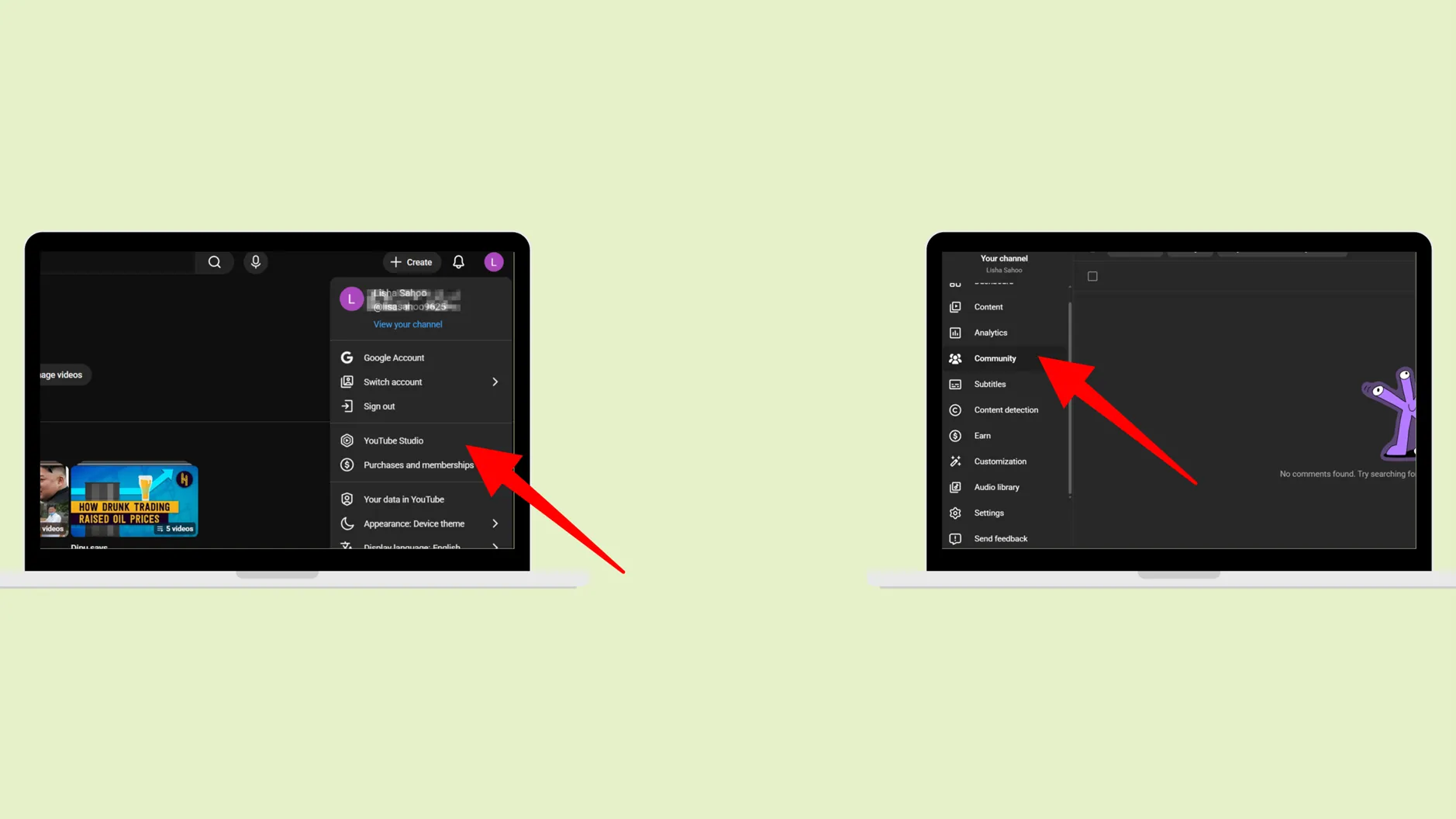
Step 1: Open your YouTube, go to your channel (Open YouTube Studio) Step 2: Then the dashboard would open, and click on “Community”
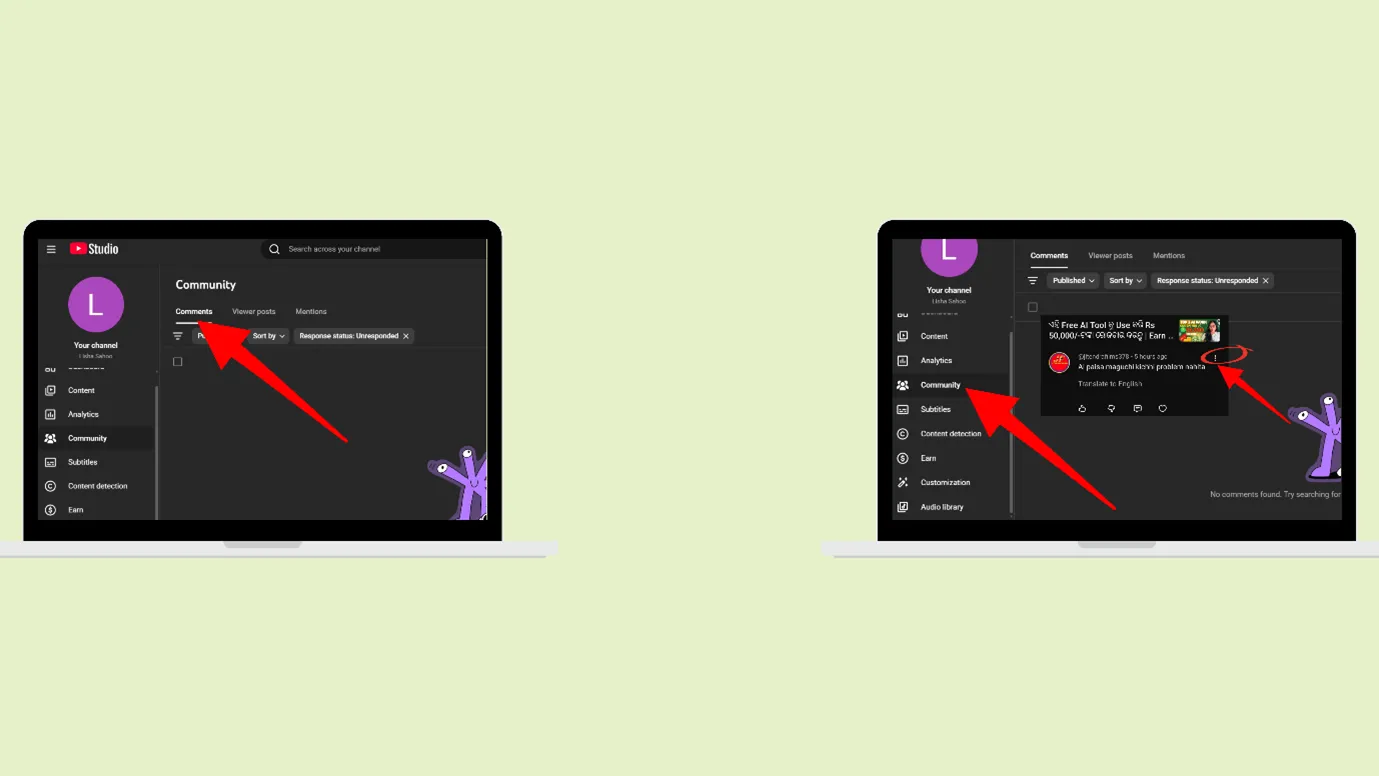
Step 3: Then go to the video’s comment that you want to hide
Step 4: Click on the 3 dots, then click on “Hide user from the channel”
Now the user can comment, but his/her comment won’t be visible to anybody.
Outcome · RecommendedGet 30 days of social content from your website — in 10 minutes.
How to report a user on YouTube?
Step 1: Open your YouTube, go to your channel (or open YouTube Studio app)
Step 2: Then the dashboard would open, and click on “Community”
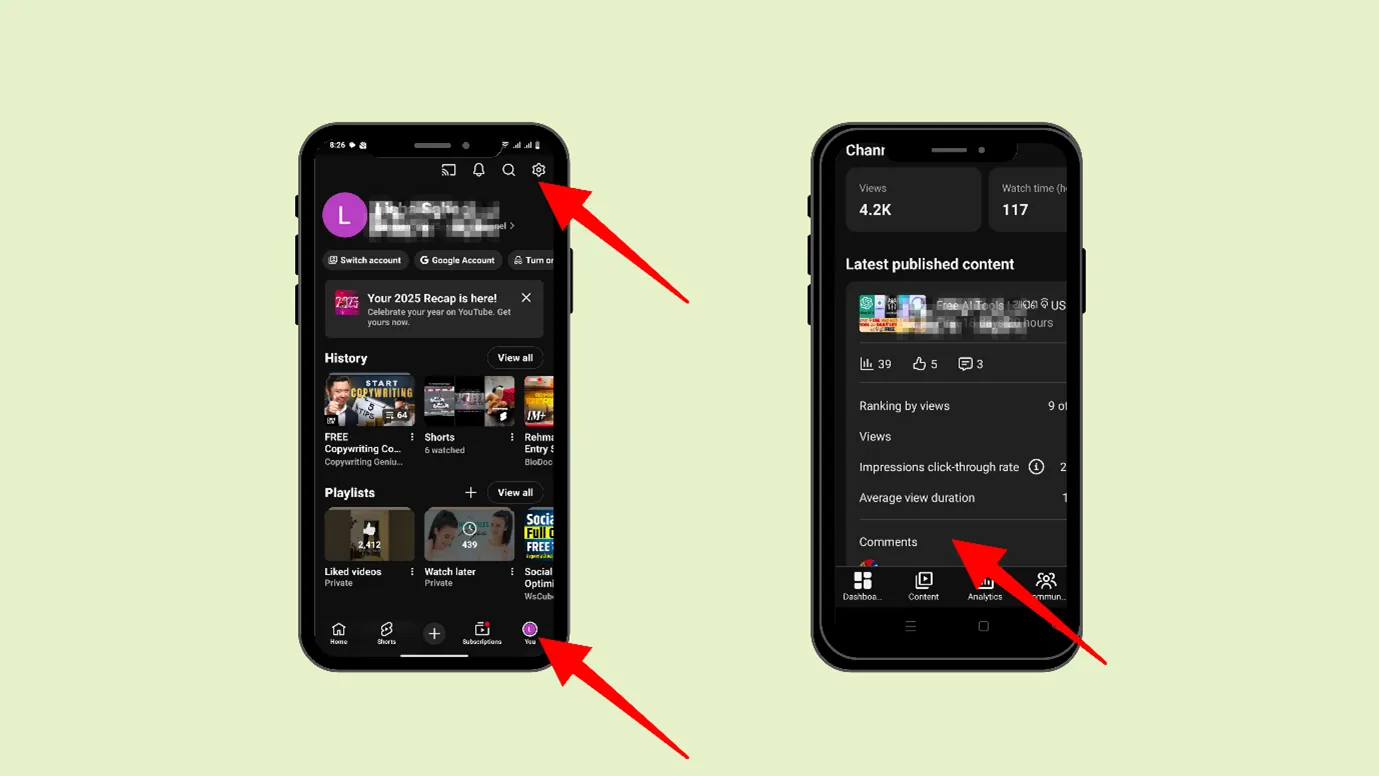
Step 3: Go to that particular comment and click on the commentator’s profile photo
Step 4: That person’s profile would open, and then you can click on “More.”
Step 5: Next, you can click on “Report User”
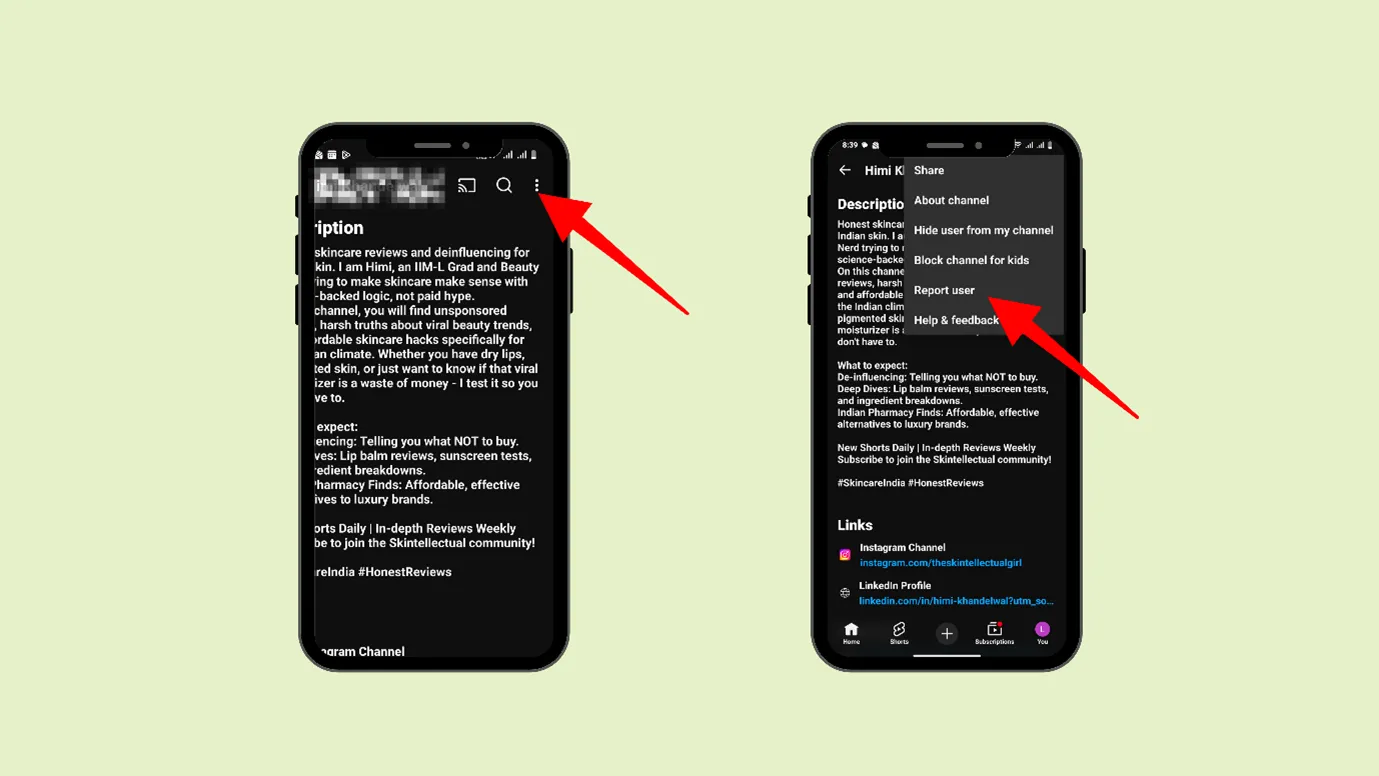
What happens when you report someone on YouTube?
- The commentator will not be notified.
- The commentator will not be able to create clips from your videos or live streams.
- There will be no visible changes or effects, but YouTube views their comments, videos, etc, and if there is any violation, YouTube can take action
- YouTube can give them a warning, delete their comments, or temporarily suspend them.
Proof · Verified
2k+ grew faster with one tool.
How to block someone on YouTube on Phone or How to block someone on YouTube comments?
If you want to keep someone away from your YouTube channel, you should download the YouTube Studio app.
Step 1: Open your YouTube Studio app and go to the comment section.
Step 2: Select the particular video, and go to the comments
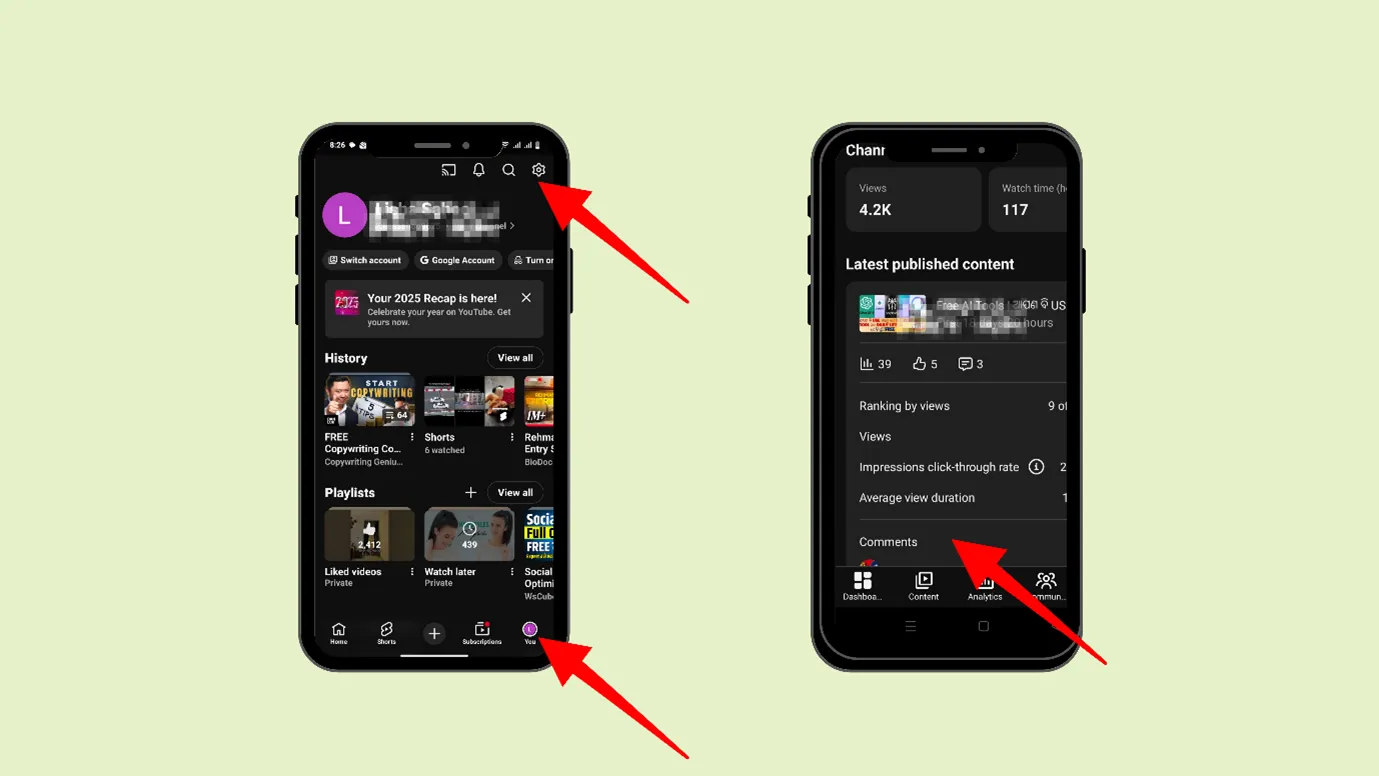
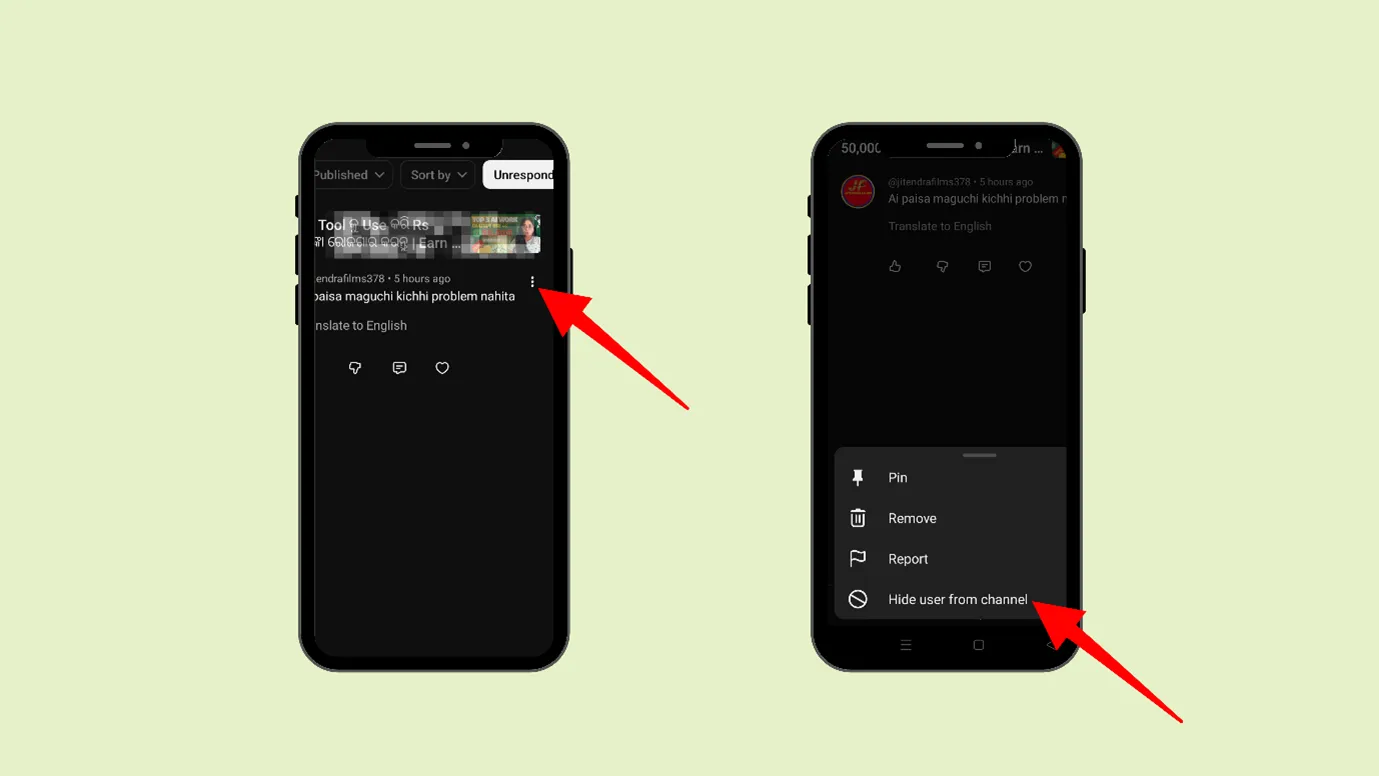
Step 3: Now, go to that comment and click on the three dots near the comment. You can then choose ‘Hide user from the channel.’
Free · Instant · No signupSee what ZuAI generates from your website — right now.
Paste your URL. Watch ZuAI write a month of brand-on captions in seconds. Preview before you create an account.
How to Block Someone in YouTube Live Chat?
When you are in YouTube’s Live Chat, you are connecting with others in real time. It is a wonderful feature of YouTube. But this wonderful opportunity can be turned into a nightmare by some people.
There are some commentators who can take advantage of your live presence and say random and unnecessary things, which will harm your YouTube community and make a bad impression.
It is important that they should be blocked.
Let us step by step
Step 1: If you are the creator, during the live session, you can tap the message of the viewer you want to block.
Step 2: Now you can tap on “ block “on the pop-up message.
You can also “Report“ the user.
Speed · 10-minute setupOne coffee from URL to a full month of scheduled posts.
Drop your URL, brew your coffee, come back to 30 brand-on captions ready to publish.
How to block someone on YouTube mention?
When someone tags a YouTube channel using the @ symbol, that is called a mention. When @symbol is used, you will get notified.
The mentioned comment looks important; it feels intentional, personal, and as if someone wants to get noticed by you and is interested in talking directly to you.
In the mentions, anyone can badmouth, say nasty things, target you, and demean you and your good work. So, it is important to block that person in the mention.
Step 1: Go to the YouTube app.
Step 2: On the right upper side, click on Notifications
Step 3: Next, tap on “Mention”
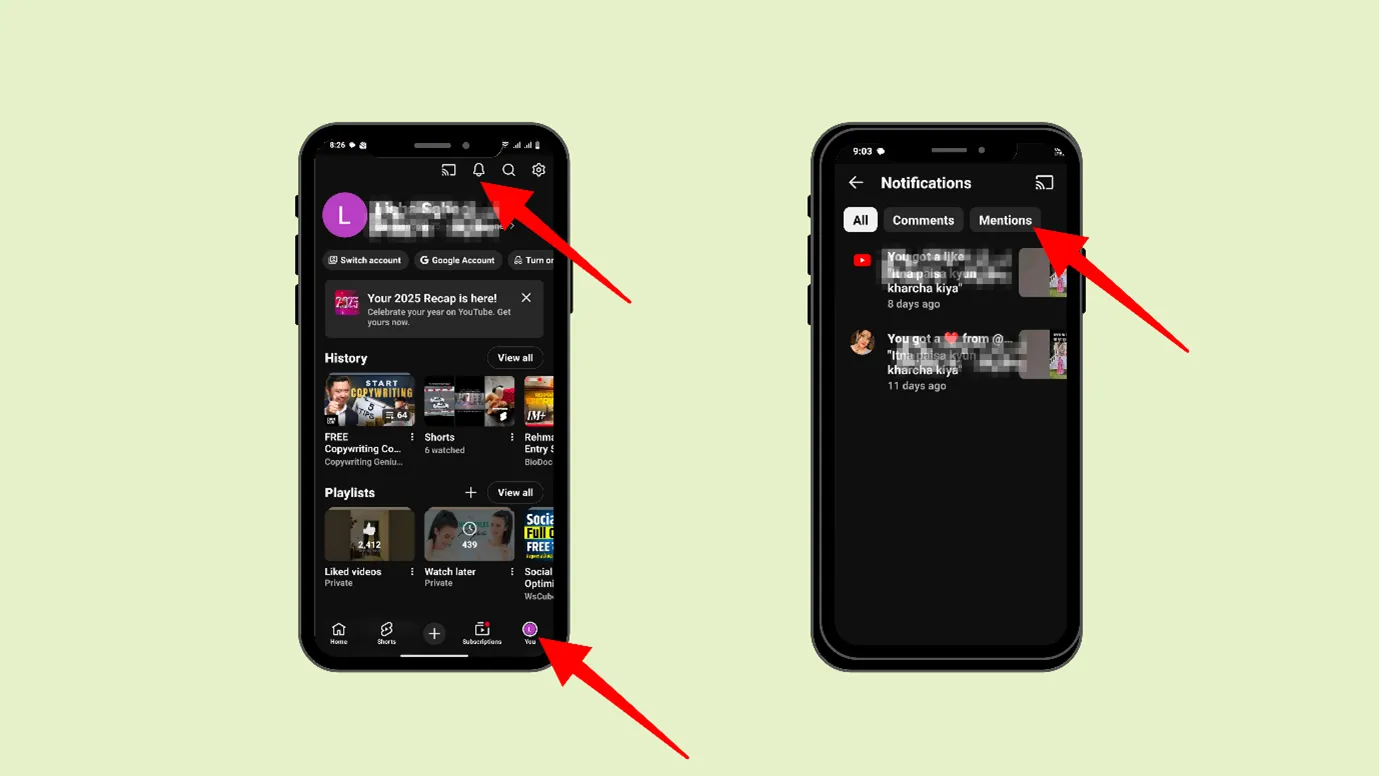
Step 4: Next, go to the mention of the person whom you want to block
Step 5: Now you can tap on More, ,
Step 6: Next, you can block the user.
Blank tab. Six open browsers. No clue what to post.


 After · With Indzu
Paste one URL. Get 30 scheduled posts.
How to unblock someone on YouTube? (on Phone)
You can easily unblock someone on YouTube.
Step 1: You can open your YouTube app
Step 2: Now, click your profile photo in the lower-right corner.
Step 3: Now, click on “Settings”
Step 4: Now, click on “Privacy”
Step 5: Now, you can click on “Blocked contacts”
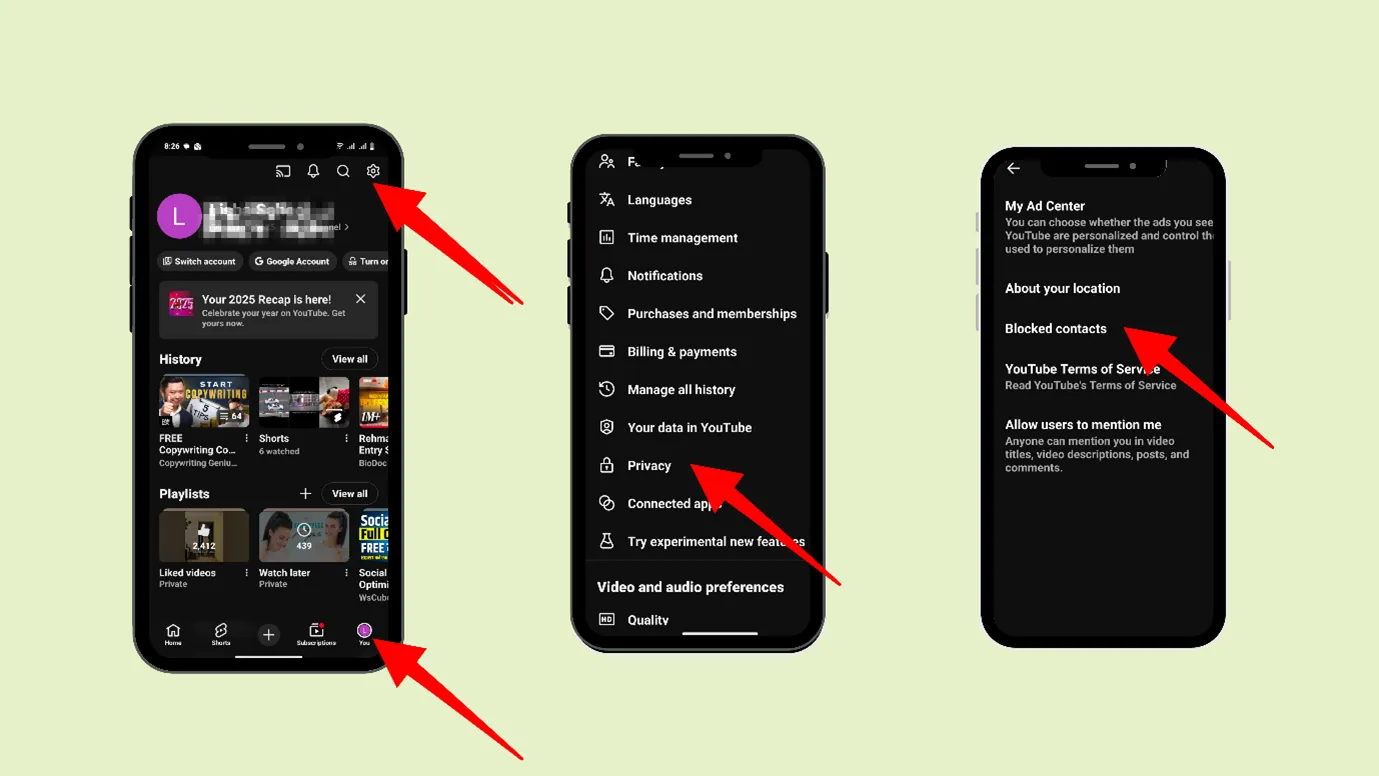
After that, you can choose the users and unblock them.
Time killer · Pain
Spending 6 hours writing posts that get zero traction?
Paste your URL. ZuAI turns it into 30 brand-on captions in 10 minutes — no blank-page panic, no generic AI filler.
How to unblock someone on YouTube? (on Desktop)
You can also unblock people on YouTube on a Desktop.
Step 1: Go to myaccount.google.com/blocklist.
Step 2: Tap next to the person you want to unblock.
Outcome · RecommendedGet 30 days of social content from your website — in 10 minutes.
How to Remove Someone From Your Hidden List on YouTube?
You can easily unhide a comment on YouTube
Step 1: Open YouTube Studio on your Desktop
Step 2: Go to that particular video, and go to “community moderation.”
Step 3: Next, you can go to” User Management”, and “Hidden users,” and their name would be displayed
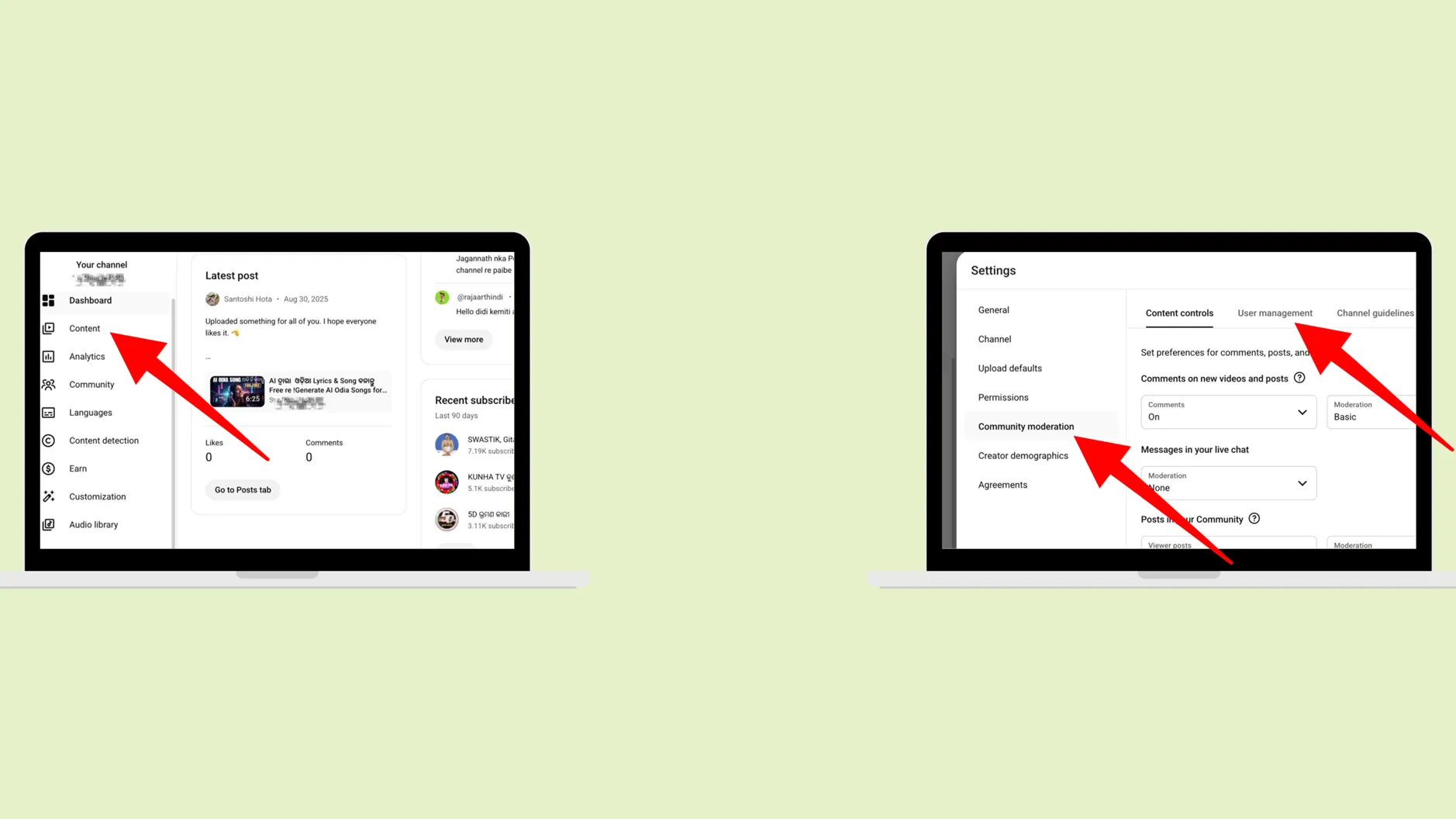
Step 4: Now you can remove their name
Proof · Verified
2k+ grew faster with one tool.
How to know if someone blocked you on YouTube?
YouTube does not notify you when someone blocks you. But there is an easy way to know whether someone has blocked you.
Step 1: Go to that particular YouTube channel and select any video or post and leave a comment.
Step 2: Now log out of your YouTube account, log in to another account, and visit that channel.
If you cannot see your posted comment, it has been hidden or blocked by the creator.
Free · Instant · No signupSee what ZuAI generates from your website — right now.
Paste your URL. Watch ZuAI write a month of brand-on captions in seconds. Preview before you create an account.
Why do you need to block/hide users from YouTube?
Avoid Negativity
It is said that “Your environment shapes you more than you think,” and when you see negative or mean comments around you, they will affect your mentality. This is why we should avoid unnecessary drama and malicious comments.
Avoid Spamming
Some random people comment on YouTube videos or posts that have nothing to do with the topic; instead, they’re just unnecessary links or spam, which can undermine the genuineness of your content.
It is important to block such users.
To avoid giving your audience a negative impression
People look at the comments before forming any perception about your content. Trollers know this fact, and they target you unreasonably. To maintain sanity and protect your channel from exuding a negative impression, you can block such people
Speed · 10-minute setupOne coffee from URL to a full month of scheduled posts.
Drop your URL, brew your coffee, come back to 30 brand-on captions ready to publish.
Key Takeaway
Do you know that YouTube reportedly removed over 853 million comments globally for guideline violations, among them 44 million for harassment or bullying?
So, using the YouTube comment section to bully someone is common. Therefore, proper steps should be taken to stop this negativity.
In this blog, we have outlined all the steps for how to block people on YouTube. You can utilise any of them to maintain your sanity and growth.
While blocking negativity is important, growing on YouTube is equally important. And just like other platforms, YouTube also requires consistency.
And creating good quality content every day is not possible, as we are humans. And all of us have tons of things to manage, which is why we have designed a content creation tool that creates videos tailored to your taste and style. You can feed the topic, subtopic, and representation style.
And if you are not happy, you can also edit the video in the editor section. The tool will automatically scan the brand, logo, and colour palette.
Now you do not have to worry about consistency or negativity. You can only focus on growth and making strategies.
Do you want to know more about YouTube? Keep Reading.
Blank tab. Six open browsers. No clue what to post.
After · With IndzuPaste one URL. Get 30 scheduled posts.
FAQ
Where is the block button on YouTube?
YouTube does not have a block button now; you can block users if they have mentioned you, or in a live chat. But in general, it does not have a block button.
The block button is now replaced with the “Hide user from channel” button.
How do I block a subscriber on YouTube 2025?
Yes, you can block a subscriber on YouTube if they mention you or comment during a live chat.
Otherwise, you can hide the subscriber from your channel. Now, even if the subscriber comments on your channel, no one can see his/her comment.
How to block a YouTube channel?
You can easily avoid a YouTube channel. Go to any video of that particular channel.
Step 1: On that video, click on the 3 dots
Step 2: You can either click on “Do not recommend this channel” or “Not Interested”
How to Block Videos and Channels on YouTube Kids?
You can easily block videos or channels on YouTube Kids.
Step 1: Go to that YouTube video on YouTube Kids
Step 2: If you want to block the video, click on the 3 dots
Step 3: Now, click on “Block this video.”
If you want to block the channel, go to that particular channel by clicking on that channel’s name
Step 4: Now, click on the 3 dots and click on “Block this channel.”