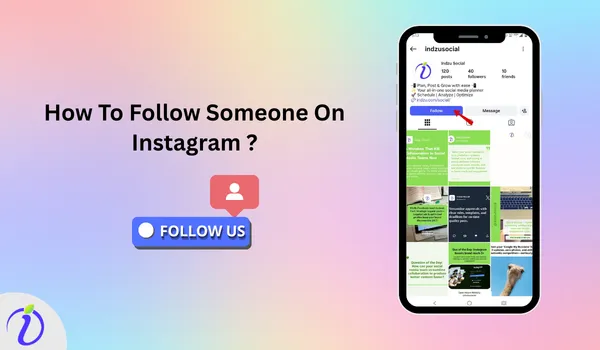
To get all the updates from your favorite creators or someone special, you need to know how to follow someone on Instagram. When you follow someone on Instagram you will never miss their new posts, stories, or reels from accounts that matters to you. By following the right people, you stay inspired and connected to what appears in your feed, turning Instagram into a space that truly works for you.
But sometimes you may get confused between public, private account and follow request if you are not sure how they work.
You do not need to worry; we have your back. Let’s get into the blog to know about the requirements for following someone on Instagram.
 Time killer · Pain
Spending 6 hours writing posts that get zero traction?
Paste your URL. ZuAI turns it into 30 brand-on captions in 10 minutes — no blank-page panic, no generic AI filler.
Why Knowing How to Follow Someone on Instagram is Important?
Instagram is a platform that helps you connect with people who share similar interests. Whether you are using Instagram for personal connection, creativity, or business, following enables you to stay connected to the content your friends or brands are posting.
- It helps to build a connection.
- Support Creators and businesses.
- Helps you stay informed and inspired by what other creators upload.
- It builds community.
Outcome · RecommendedGet 30 days of social content from your website — in 10 minutes.
What are the requirements you need before following someone?
You just cannot randomly follow someone; before you can follow someone on Instagram, there are a few basic requirements.
You must have an Instagram account.
Before following someone on Instagram, you need to have an Instagram account. It includes a valid email address or phone number and a username.
You must be logged in.
You need to log in to an account on the Instagram app or website to follow someone.
The account must exist.
You can only follow active Instagram accounts, and you need an active account. If you have an account that has been deleted, deactivated, or banned, then you cannot follow someone.
You must not be blocked.
If someone has blocked you, you cannot follow or find their account.
Proof · Verified
2k+ grew faster with one tool.
5 ways to follow someone on Instagram
Once you open your account, you can follow someone on Instagram in several ways. Whether you are new to Instagram or want to expand your network, knowing how to follow someone on Instagram is essential so you can enjoy and get the full benefit of the Instagram platform.
We have mentioned a few ways to add new friends and followers.
1. Syncing Contacts
Once you open an Instagram account, the easiest way to connect and follow people is by syncing your contacts, which helps you find friends quickly.
Step 1: Open an Instagram account in the app
Step 2: Tap the hamburger icon.
Step 3: Tap on “Accounts Centre”. Step 4: Tap on “Your information and permission”.
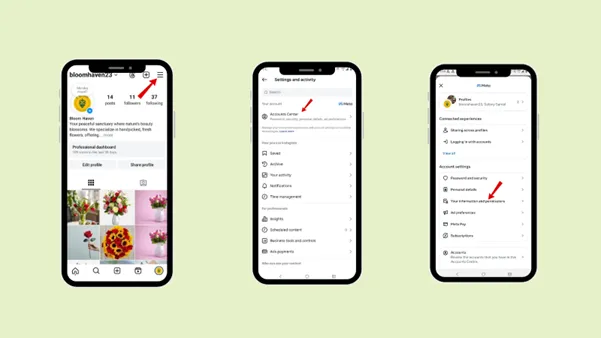
Step 5: “Upload Contacts”.
Step 6: Choose the Instagram profile you want to link with your contacts.
Step 7: Tap “Connect Contacts”.
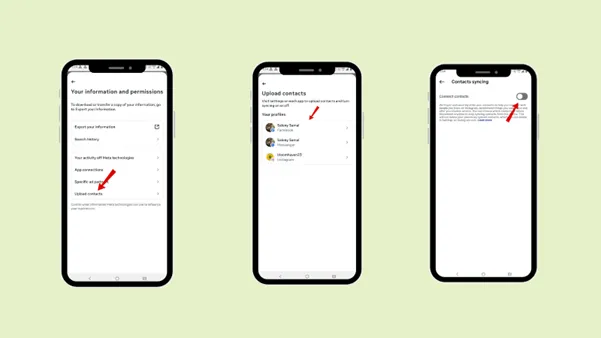
Syncing your contacts helps you connect with your friends and family. With it, you can also see who is on Instagram from your contacts, and you will be notified if someone opens a new account after you.
2. Suggestion and Recommendation
Based on your activity and the people you already follow, Instagram suggests and recommends more accounts. This recommendation appears on your home feed under “suggestions for you”. You can follow new people from suggestions if you like their content or want to make new friends.
This feature helps you discover influencers, brands, and people with new interests. You can review the accounts suggested by Instagram and follow one that matches your preferences.
3. Using the search feature
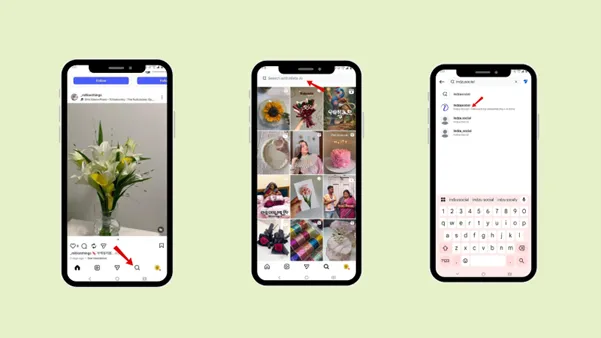
You can use the search bar to find any particular friend, brand, or influencer by their username.
Step 1: Tap the magnificent glass icon at the bottom
Step 2: Go to the search bar
Step 3: Type the username of your friend, influencer, or brand you want to find.
4. Directly from a profile
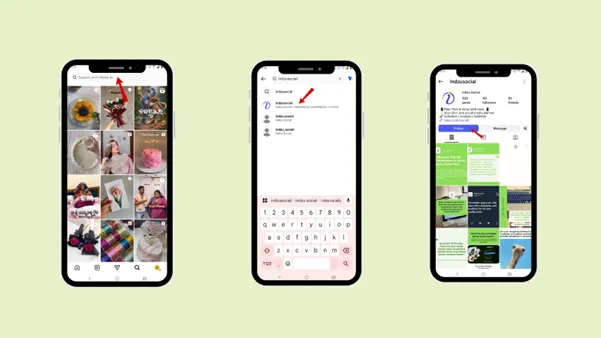
You can also follow someone directly from their profile. You will probably find someone’s profile in the comments, tags, stories, or shared posts. From there, you can follow them directly.
Step 1: Simply tap the username to open the profile.
Step 2: Tap the follow button.
5. From a friend’s following list You can also follow someone from your friend’s following list. For example, if you want to search for an old friend, you can search for them in your friends’ list. If they are following, you can follow them too if you want. 6. Using QR codes and hashtags You can follow someone on Instagram by scanning their profile QR code. Even if you want to promote your new Instagram account, you can share the profile QR code with your friends or family. If you are a brand, you can share your Instagram profile QR code with your customers so they can follow you.
Paste your URL. Watch ZuAI write a month of brand-on captions in seconds. Preview before you create an account. You can also follow someone on Instagram, whether you have and Android or iPhone Step 1: Open the Instagram app Step 2: Find the people you want to follow. Step 3: Go to their profile. Step 4: Tap the “follow” button. Step 5: Watch for the button to change
Drop your URL, brew your coffee, come back to 30 brand-on captions ready to publish. The desktop version of Instagram is slightly different from the Android version. Here are the steps below. Step 1: Go to Instagram.com Step 2: Search for the user Step 3: Go to their profile. Step 4: Tap the “follow” button. Step 5: Watch for the button to change
Paste your URL. ZuAI turns it into 30 brand-on captions in 10 minutes — no blank-page panic, no generic AI filler. There are a few signs that indicate you have successfully followed someone. You cannot follow someone without their consent. Instagram lets you choose whether to be notified when someone sends you a follow request. If you want to follow someone without them being notified under your actual name, you can change your username and profile picture. Or you can create a new account with a different name and limited profile information. Instagram is full of moments that disappear fast—Stories, and updates you don’t want to miss, especially when they’re from someone you care about. So, to stay updated on all the new content, you need to know how to follow someone on Instagram. First you need to know how to follow someone on Instagram. Following someone on Instagram is a simple action, but understanding how it works makes it much better and more enjoyable. Have a look at why the following matters on Instagram. Have an idea on 5 different ways to follow someone on Instagram? It will benefit you to make new followers and connections. Follow the steps to follow someone on Instagram on Android and desktop. Check the difference between a private and a public account for using the following feature. By knowing the correct steps and what happens after you follow an account, you can connect with your followers and make new friends more confidently, and enjoy using the Instagram app. After creating a new account and following new people, you can use Indzu. Social to create, manage, and schedule your social media posts.
Paste your URL. Watch ZuAI write a month of brand-on captions in seconds. Preview before you create an account. Q1. Can I follow someone without an account? Ans 1: No, you cannot follow someone without an account. You need to have an Instagram account to follow them. Q2. What happens if I unfollow and then follow again? Ans 2: If you unfollow and then follow again, the particular user will be notified. They will not be notified when you unfollow them. They will also receive a notification when you follow them again. Q3. How long does a follow request last? Ans 3: There’s no expiry date for a follow request. A follow-up request stays active until the person responds or you cancel it yourself. Q4. Is there a limit on how many people I can follow on Instagram? Ans 4: Yes, there is a limit on how many people you can follow on Instagram. The maximum limit is – 7500 accounts. You can follow up to 7500 Instagram users. Once you reach that limit, you need to unfollow before you can follow someone new. Q5. Can someone stop me from following them? Ans 5: Yes, they can stop you from following them.
Free · Instant · No signup
See what ZuAI generates from your website — right now.
How to follow someone on Instagram on Android
Speed · 10-minute setup
One coffee from URL to a full month of scheduled posts.
How to follow someone on Instagram on a desktop
Blank tab.
Six open browsers. No clue what to post.Open Canva, ChatGPT, Buffer, Calendar…Rewrite for every platformSchedule one by oneHope something lands
After · With Indzu
Paste one URL. Get 30 scheduled posts.
How to follow a private account vs public account?
Private Public When you tap Follow, a follow request is sent to the user. You follow the account instantly by tapping the Follow button. You cannot see posts, stories, or reels until your request is accepted. You can immediately see posts, stories, reels, and tagged photos. The button changes from Follow to Requested. The button changes from Follow to Following. The user receives a follow request notification. The user may receive a notification that you followed them. Approval is required before you can view any content. No approval is needed from the account owner.
Time killer · Pain
Spending
6 hours writing posts that get zero traction?
How do you know if you have followed someone successfully?
Outcome · Recommended
Get 30 days of social content from your website
— in 10 minutes.
How to follow someone on Instagram without them getting a notification?
Proof · Verified
Conclusion
Free · Instant · No signup
See what ZuAI generates from your website — right now.
FAQs