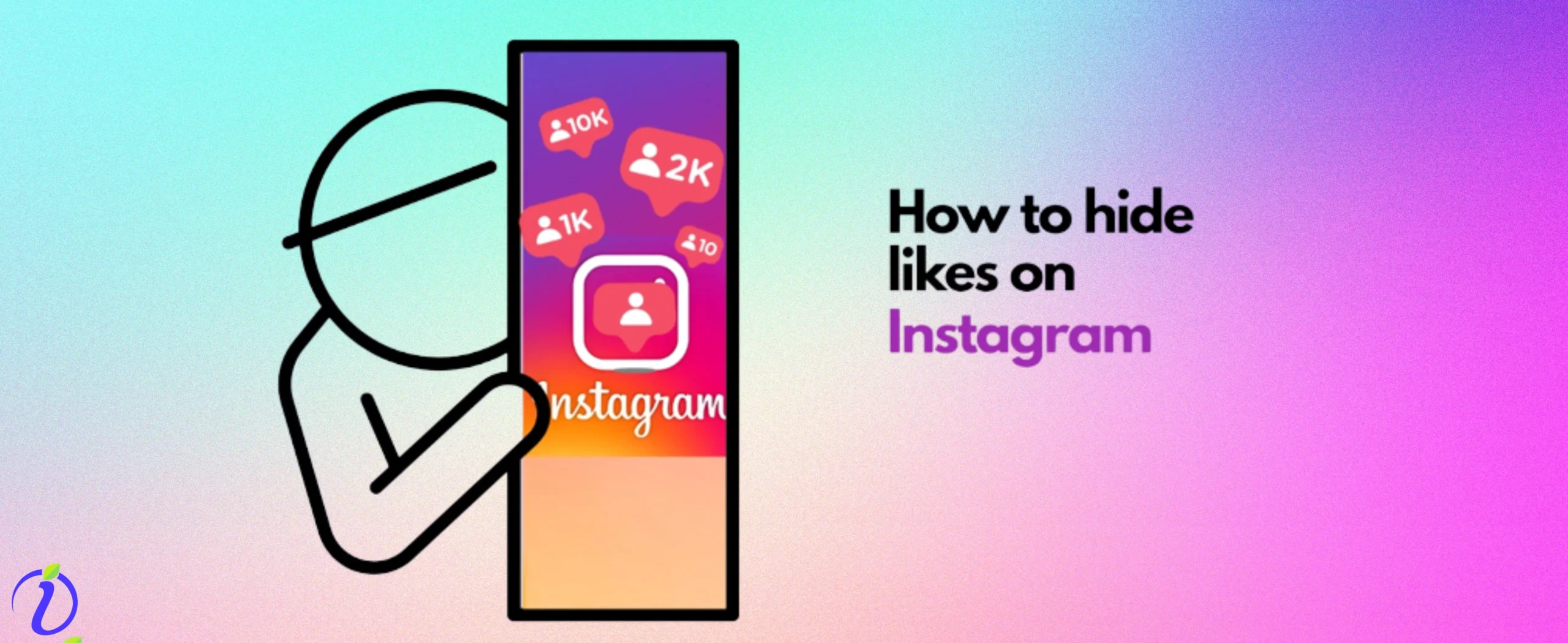
Social media platforms like Instagram provide you with a lot of options. You can be on Instagram and still be private, and do many settings like hide the number of followers, hide posts on Instagram, be selective about the audience.
Choose who can comment, or even hide the number of likes on Instagram.
We bet many of us do not know these tiny settings, like how to hide likes on Instagram. In this blog, we will talk about this little setting.
After all, it’s your account, and you can choose what people see and how they interact.
 Time killer · Pain
Spending 6 hours writing posts that get zero traction?
Paste your URL. ZuAI turns it into 30 brand-on captions in 10 minutes — no blank-page panic, no generic AI filler.
How to hide your likes on Instagram?
You can hide likes on your posts or reels, or any content on Instagram. You can do this while uploading content.
Here are the steps on how to do it.
1. While uploading a post, click on the + icon in the upper left-hand corner. Select “Post” or “Reel”.
2. Select the desired content from your gallery or shoot it from your camera.
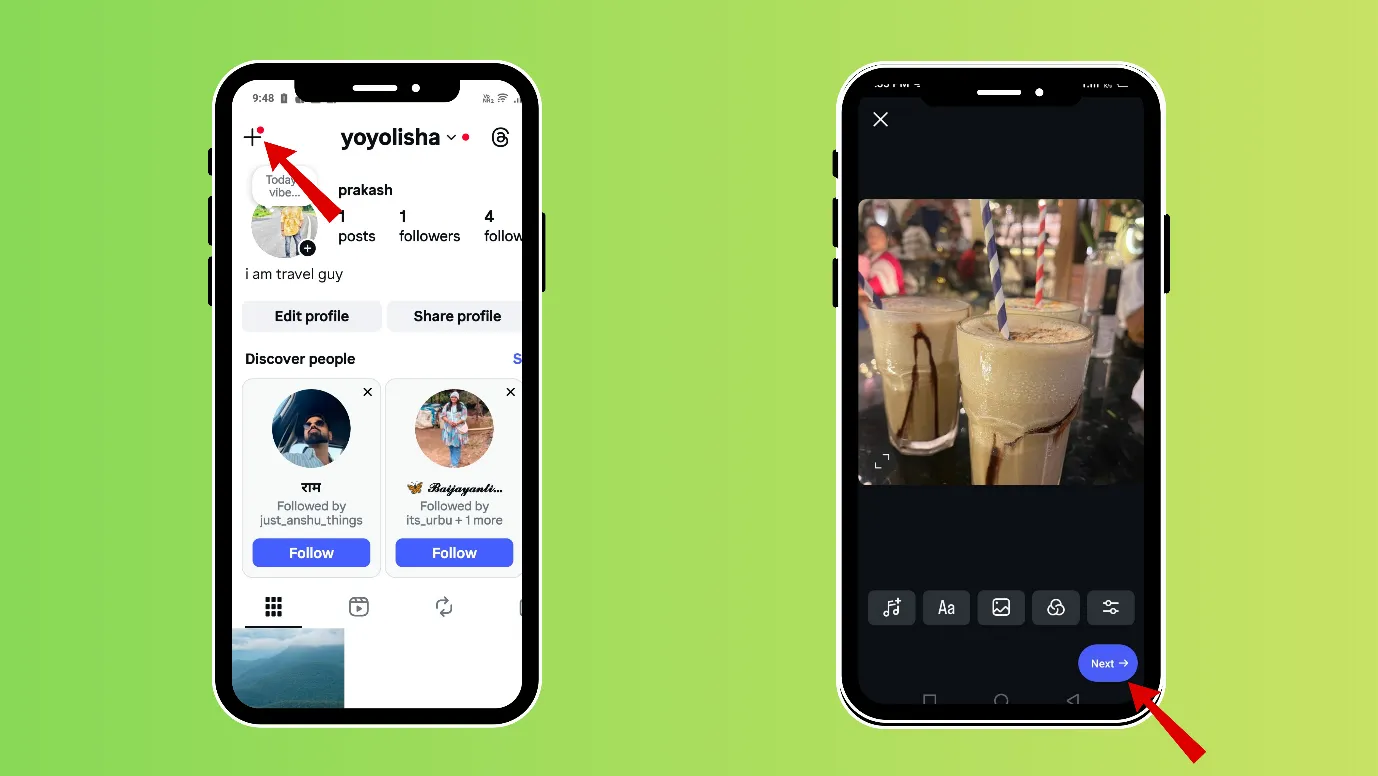
3. Click on “Next”, scroll down, and click on “More options”.
4. After scrolling a bit, you can find options like “Hide like count on this reel”. Select it.
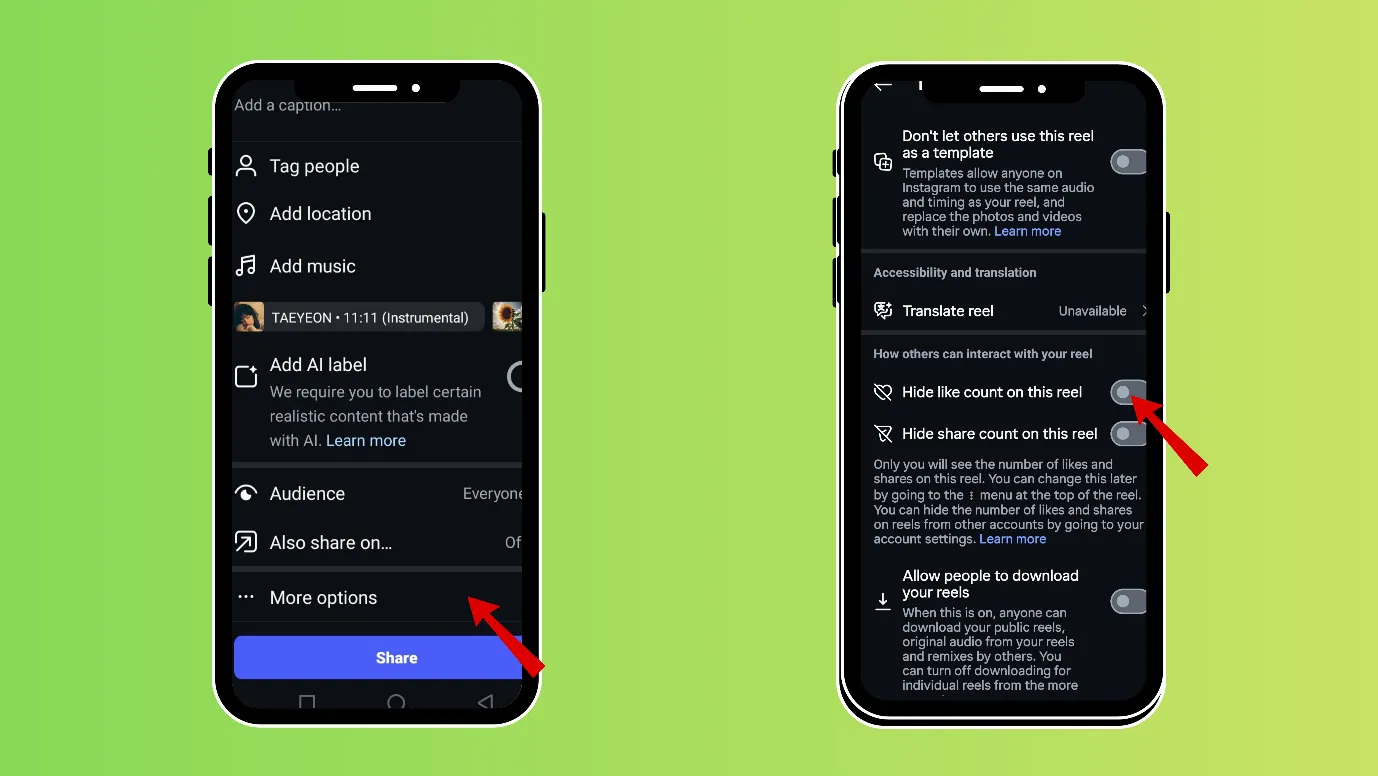
When uploading content, you can choose to hide the like count. But if you want to turn off likes on Instagram on any previous posts, you can do that, too.
Note: You are only hiding the like count. Others may not see the like count, but they can see who has liked it. It would be shown as “Liked by [Username] and others”. When clicked on, users can see who has liked the content.
Outcome · RecommendedGet 30 days of social content from your website — in 10 minutes.
How do you turn off your likes on Instagram for previously posted content?
You can easily hide likes and turn off commenting on previous posts or reels.
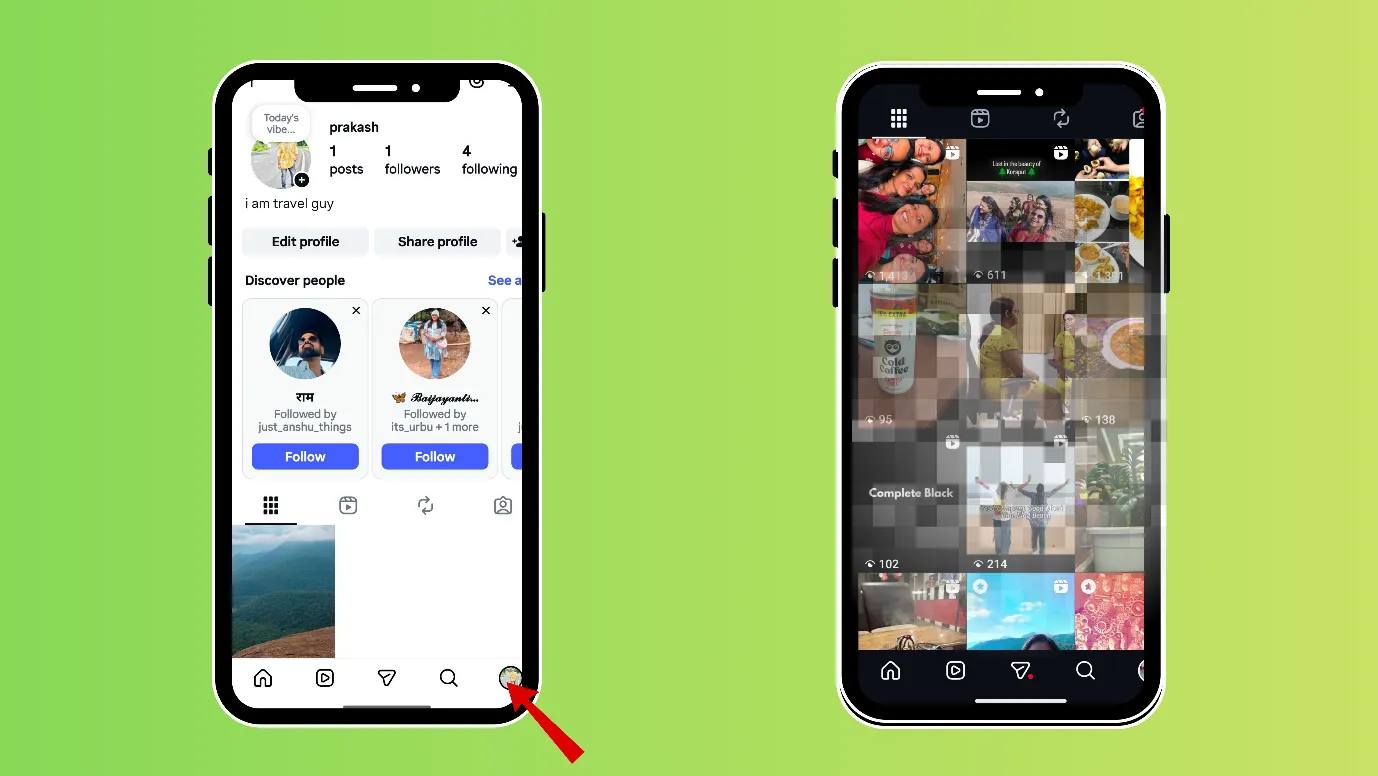
1. Open Instagram, then tap your profile picture in the bottom-right corner.
2. Now you can see your previously posted content.
3. Click on the 3 vertical dots and click on “Hide like count”.
4. You can also click “Turn off commenting”, if you want to turn off comments.
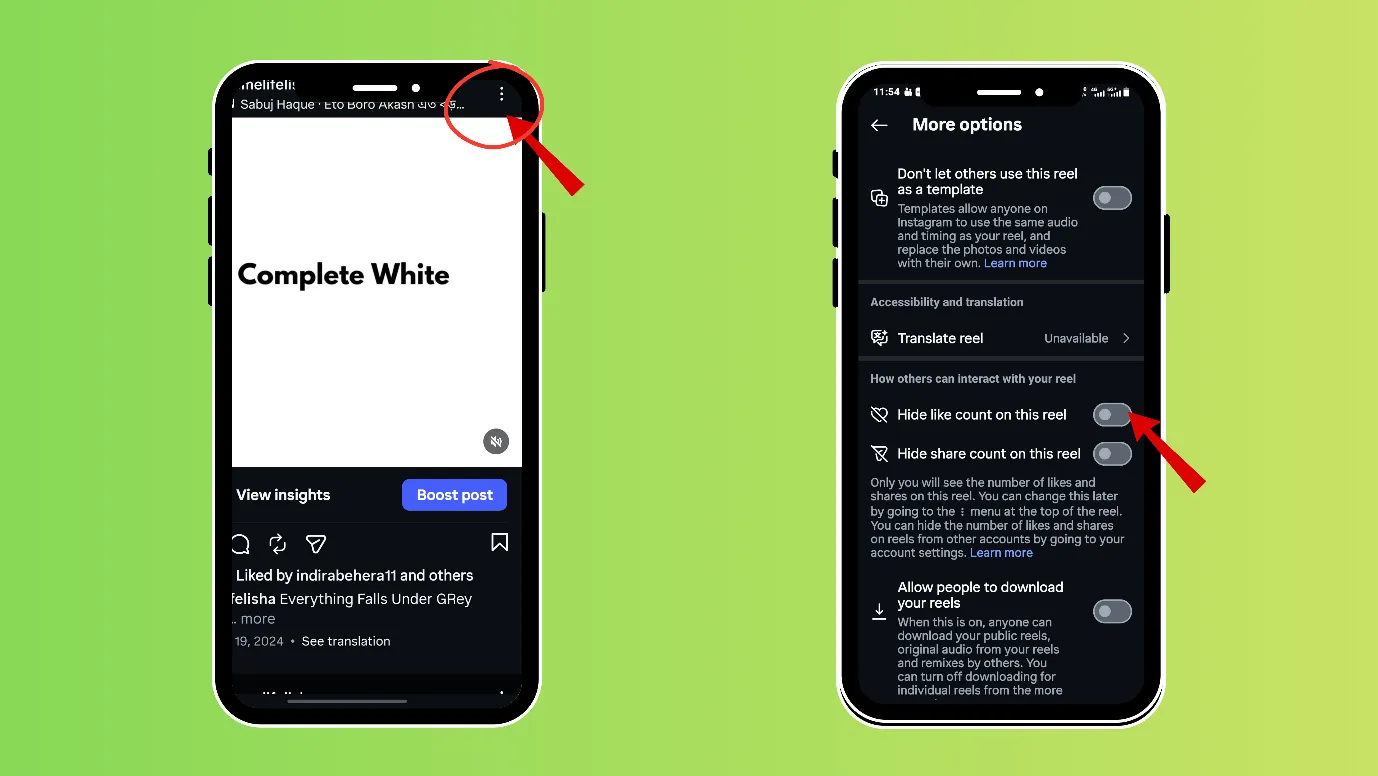
Note: You are only hiding the like count; others can still see who previously liked the content.
Proof · Verified
2k+ grew faster with one tool.
Can you hide what you liked on Instagram?
It is very frustrating when someone can see what we like on Instagram.
Watching any reel, liking it, or commenting on it is very minor and insignificant, and no one needs to know what you liked on Instagram. (Unless you are a big brand).
Instagram gives you the option to private likes on Instagram or in other words, hide likes on Instagram. Here are 2 ways to do it.
1. You can make your account private; only your followers will see what you like.
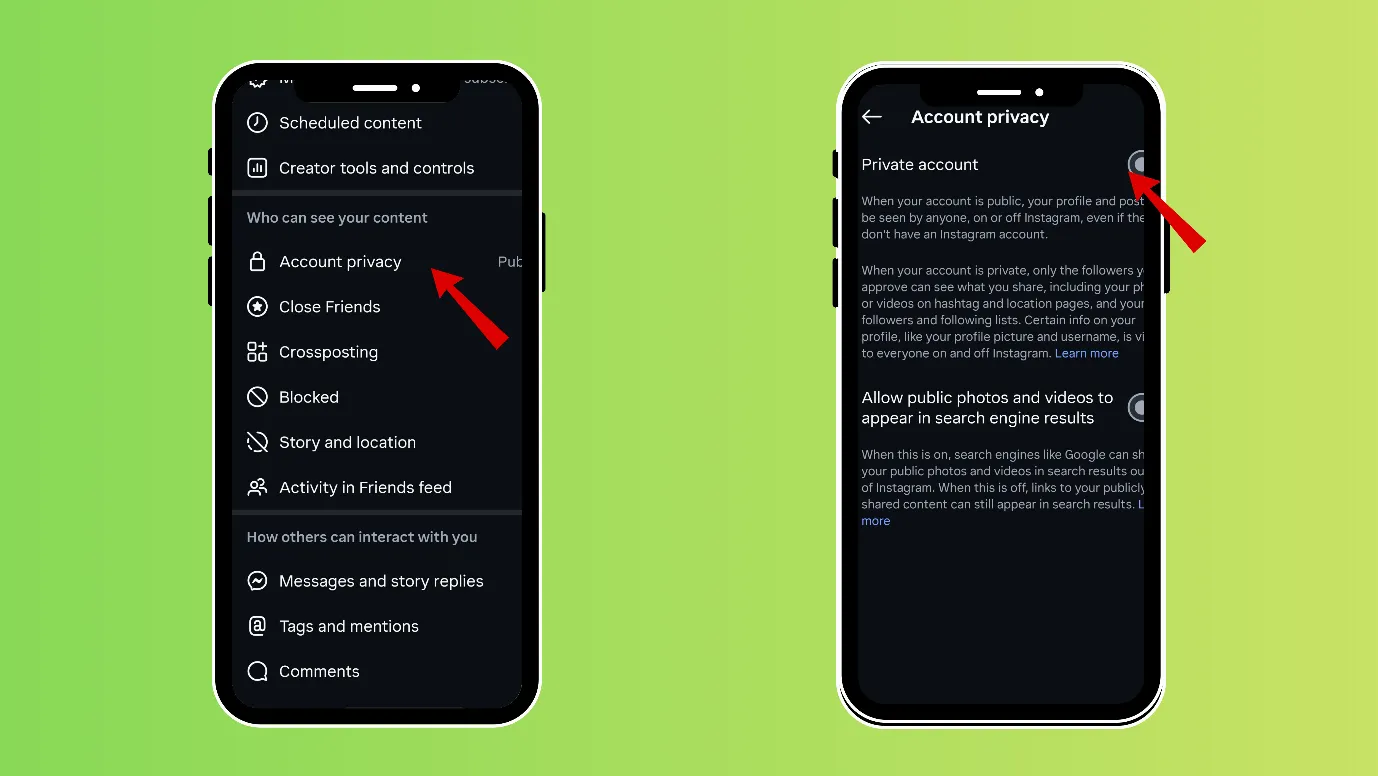
2. Or you set who can see your likes.
- Open Instagram, then tap your profile picture in the bottom-right corner.
- Click on the 3 vertical lines on the right-hand upper corner.
- Scroll down and tap on “Likes you’ve made”.
- Select your preferred setting for who can see what you like. “
“Allow everyone to see likes”, “Allow people you follow to see likes”, “Allow close friends to see likes”, “Don’t allow anyone to see likes.”
Note: The original creator can always know if you liked their reel or not.
Additionally, you can set the following to be more secure.
1. Open Instagram, then tap your profile picture inthe bottom-right corner.
2. Click on the 3 vertical lines on the right-hand upper corner.
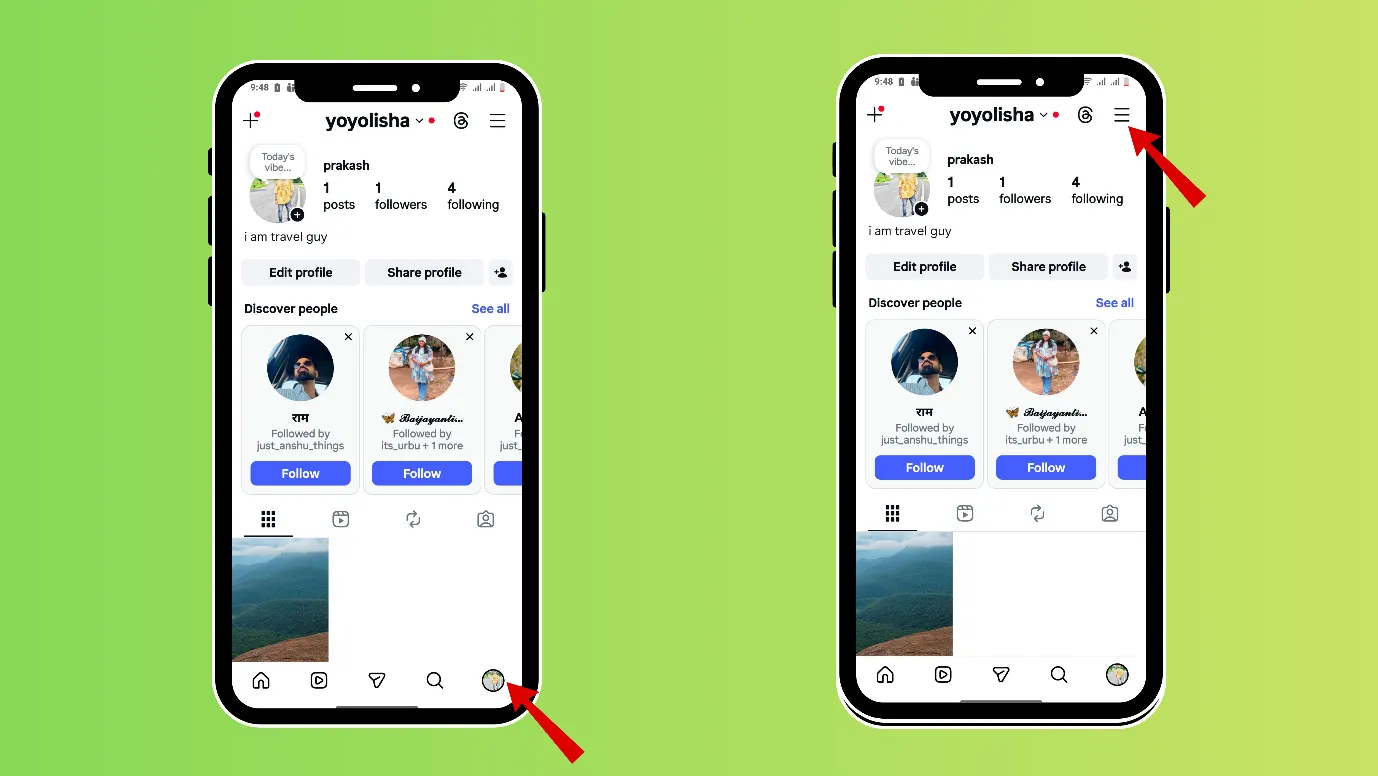
3. In “settings and activity,” click on “Activity on friends feed.”
4. Then click on “No one.”
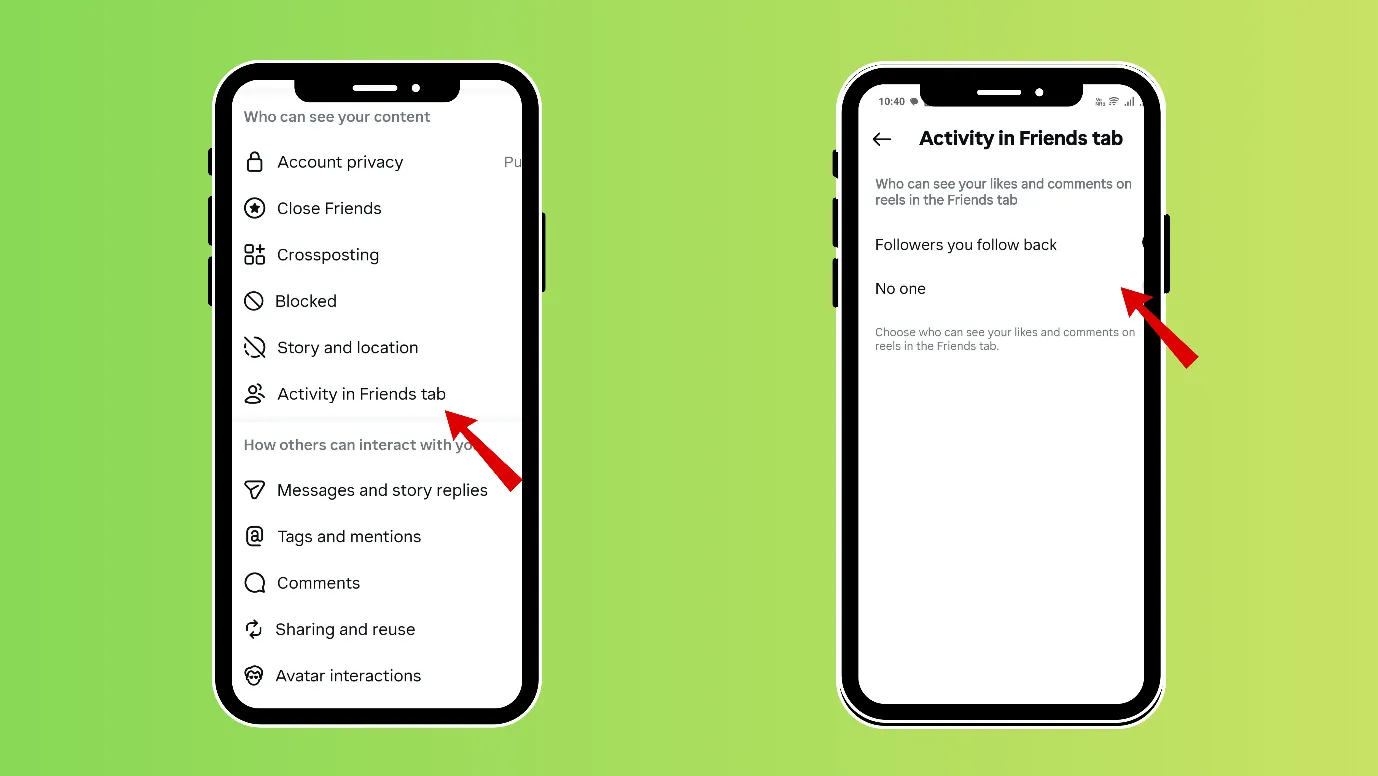
You might not see these options if your Instagram app is not updated.
Free · Instant · No signupSee what ZuAI generates from your website — right now.
Paste your URL. Watch ZuAI write a month of brand-on captions in seconds. Preview before you create an account.
How to hide your likes on reels on Instagram?
The process of hiding likes on reels on Instagram is the same as mentioned above.
Remember that there is no setting on Instagram where you can hide your likes on Instagram reels at once or in bulk.
You can either hide the Instagram like count or turn off comments before posting the reel. Alternatively, you can select a particular reel and hide the likes or comments after posting.
Speed · 10-minute setupOne coffee from URL to a full month of scheduled posts.
Drop your URL, brew your coffee, come back to 30 brand-on captions ready to publish.
Why do you need to hide likes on Instagram?
If you are searching for how to hide likes on Instagram, then you should know there are multiple reasons why people would want to hide their likes.
Not letting any bias affect your content
There is a syndrome that if many people are saying yes to a thing, then you also say yes. Most of the Instagram audience follow the crowd.
So, when you hide likes on a particular piece of content, then people judge the content independent of any bias.
Also, hiding likes prevents people from forming opinions based only on numbers.
Avoid getting judged based on the number of likes
Not everyone is your well-wisher on Instagram; people also visit your Instagram profile or view your content to judge you.
You can rest assured by hiding your Instagram likes on any content.
You can focus on making content and publishing it and not worry about judgment.
To get above the competition, have less social pressure
There are chances that you might get compared with your competitor on Instagram.
And the pressure of getting compared can kill creativity.
The origin of social media was to connect, express, and create. And if comparison is killing your creativity, then you can rise above it by turning off likes.
It is required for some content
Many times, you are trying to post some new type of content, for example if you are experimenting, or expressing something that is extremely important, but fear that people won’t understand or judge, then it becomes the necessity of the hour to hide the number of likes.
Blank tab. Six open browsers. No clue what to post.


 After · With Indzu
Paste one URL. Get 30 scheduled posts.
How to hide others’ likes and shares on Instagram?
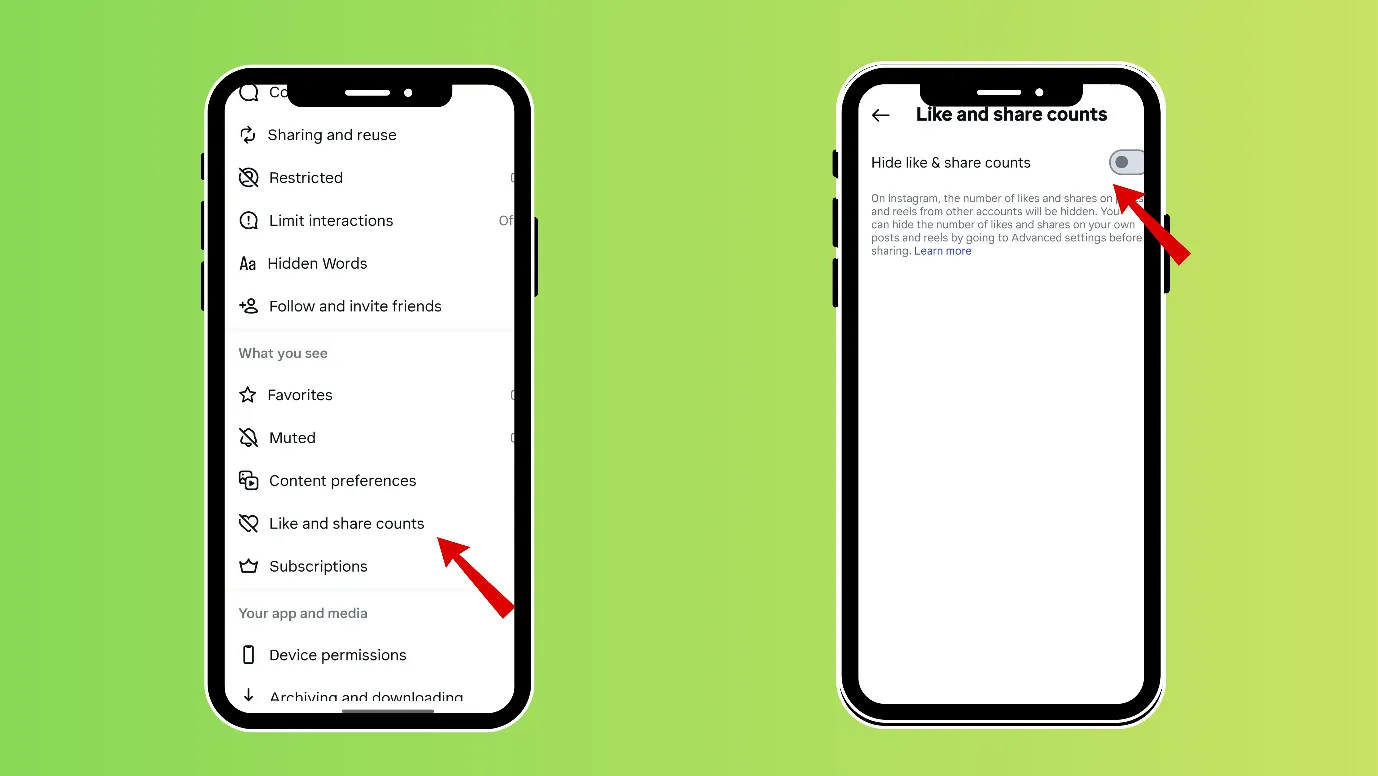
If you want to focus purely on content and not get affected by what others like or share, then you can try hiding others’ likes and shares.
1. Open Instagram, then tap your profile picture in the bottom-right corner.
2. Click on the 3 vertical lines on the right-hand upper corner.
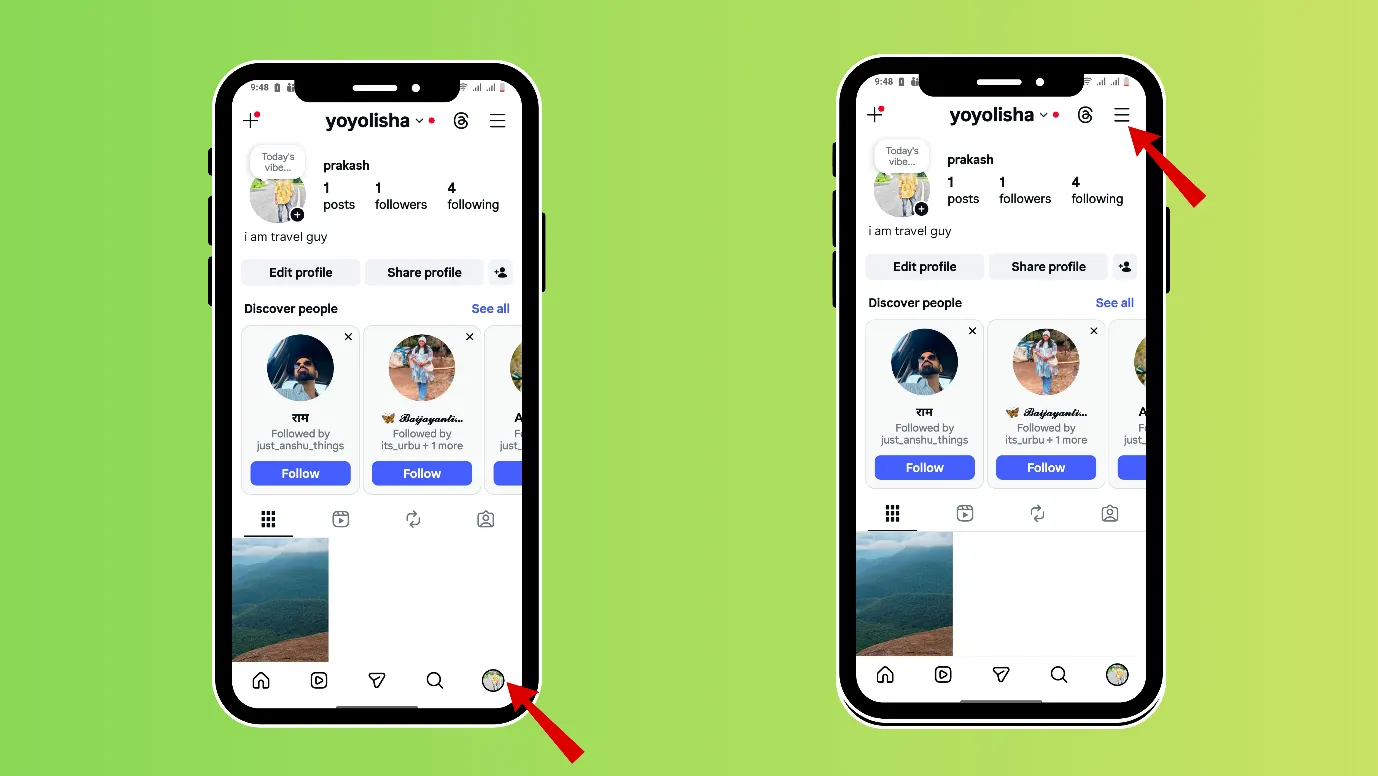
3. Next, scroll down, and under “what you see,” you will get the option” Like and share counts.”
4. You can turn on “Hide like and share counts.”
Time killer · Pain
Spending 6 hours writing posts that get zero traction?
Paste your URL. ZuAI turns it into 30 brand-on captions in 10 minutes — no blank-page panic, no generic AI filler.
Let’s make Instagram your safe space
You should control how Instagram shows your content to others and not the other way round. The good news is that Instagram gives you many settings to do that.
Apart from learning how to hide likes on Instagram, you can also learn about other settings. You just have to follow our blogs.
Along with creating content in seconds, you can also master Instagram + all other social media management with Indzu.
You can try it here.
Outcome · RecommendedGet 30 days of social content from your website — in 10 minutes.
FAQS
Q1.How to hide like count on Instagram/ hide Instagram like count?
Answer. There are two ways to hide the likes count on Instagram.
1. You can hide likes while uploading content on Instagram.
- While uploading a post, click on the + icon in the upper left-hand corner. Select “Post” or “Reel”.
- Select the desired content from your gallery or shoot it from your camera.
- Click on “Next”, scroll down, and click on “More options”.
- After scrolling a bit, you can find options like “Hide like count on this reel”. Select it. If you do not want comments on the post, you can “turn off commenting.”
2. You can hide likes after the content is uploaded.
- Open Instagram, then tap your profile picture in the bottom-right corner.
- Now you can see your previously posted content.
- Click on the 3 vertical dots, and click on “Hide like count”.
- You can also click on “Turn off commenting” if you want to turn off comments.
Q2. If you hide likes on Instagram can others see it?
Answer.
Others may not see the like count, but they can see who has liked it. It would be shown as “Liked by [Username] and others”. When clicked on, users can see who has liked the content.
Setting (after hiding like count) | What Others Can See |
Like count hidden | Others cannot see the exact number of likes on the post/reel |
Liked by section | People can still see “Liked by [Username] and others.” |
List of users who liked | Yes, if someone clicks on it, they can see who liked the content |
Q3. If I hide my likes and comments on Instagram, will it hurt my engagement?
Answer.
There are many accounts, on which likes and comments are hidden, but they are still getting good engagement.
If you are still doubtful about the engagement hurt, first hide your like count, and then after some days turn off commenting.
Q4. Can I restrict someone from seeing what I like on Instagram?
Answer.
There are 2 ways to do so,
1. You can make your account private; only your followers will see what you like.
2. Or, you set who can see your likes,
- Open Instagram, then tap your profile picture in the bottom-right corner.
- Click on the 3 vertical lines on the right-hand upper corner.
- Scroll down and tap on “Likes you’ve made”.
- Select your preferred setting for who can see what you like. “
“Allow everyone to see likes.”, Allow people you follow to see likes “ Allow close friends to see likes” Don’t allow anyone to see likes.”