You pinned a gorgeous photo, maybe a fall recipe or a cozy living room straight out of a Portland coffee shop in Pinterest. After few hours you have watched the saves roll in and now you’re wondering: who actually liked it? Good question.
Pinterest engagement can feel a bit mysterious compared to other platforms, and the “likes” feature has changed a lot over the years. In this blog, “How to see who liked your posts on Pinterest?” you will get the answer straight.
 Time killer · Pain
Spending 6 hours writing posts that get zero traction?
Paste your URL. ZuAI turns it into 30 brand-on captions in 10 minutes — no blank-page panic, no generic AI filler.
A Little Note About Pinterest “Likes”
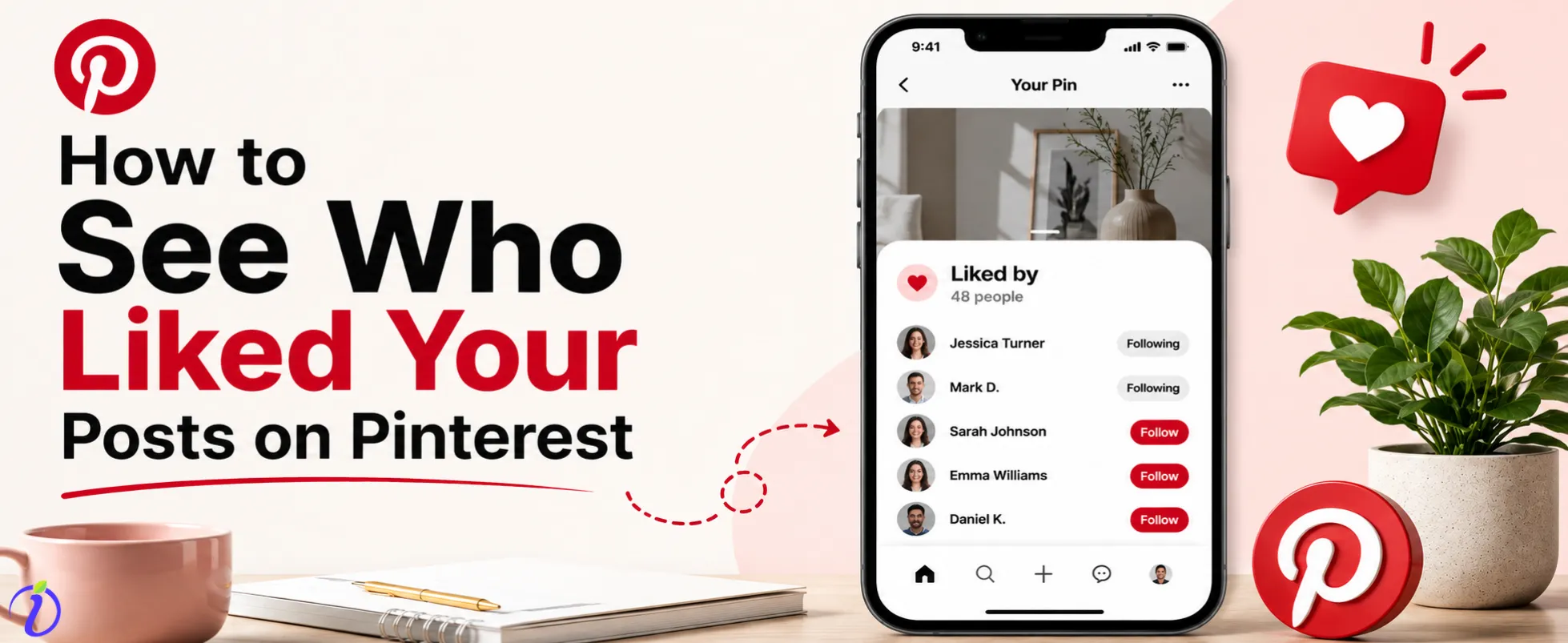
A quick note before we move further: Pinterest doesn’t have a classic “like” button anymore as it used to. In the old days you could heart a Pin and see a public list of likers. It is no longer available now. Today, engagement on Pinterest is achieved through saves (previously repins), reactions, comments, and clicks. So, when people talk about “likes” today, they usually mean these newer engagement signals. The positive news? These actions reveal so much more about your audience than a simple like ever could.
Outcome · RecommendedGet 30 days of social content from your website — in 10 minutes.
How to Check Your Pinterest Notifications
Your notifications are the quickest way to see when someone reacts to your content. Here’s how to find them.
Pinterest App
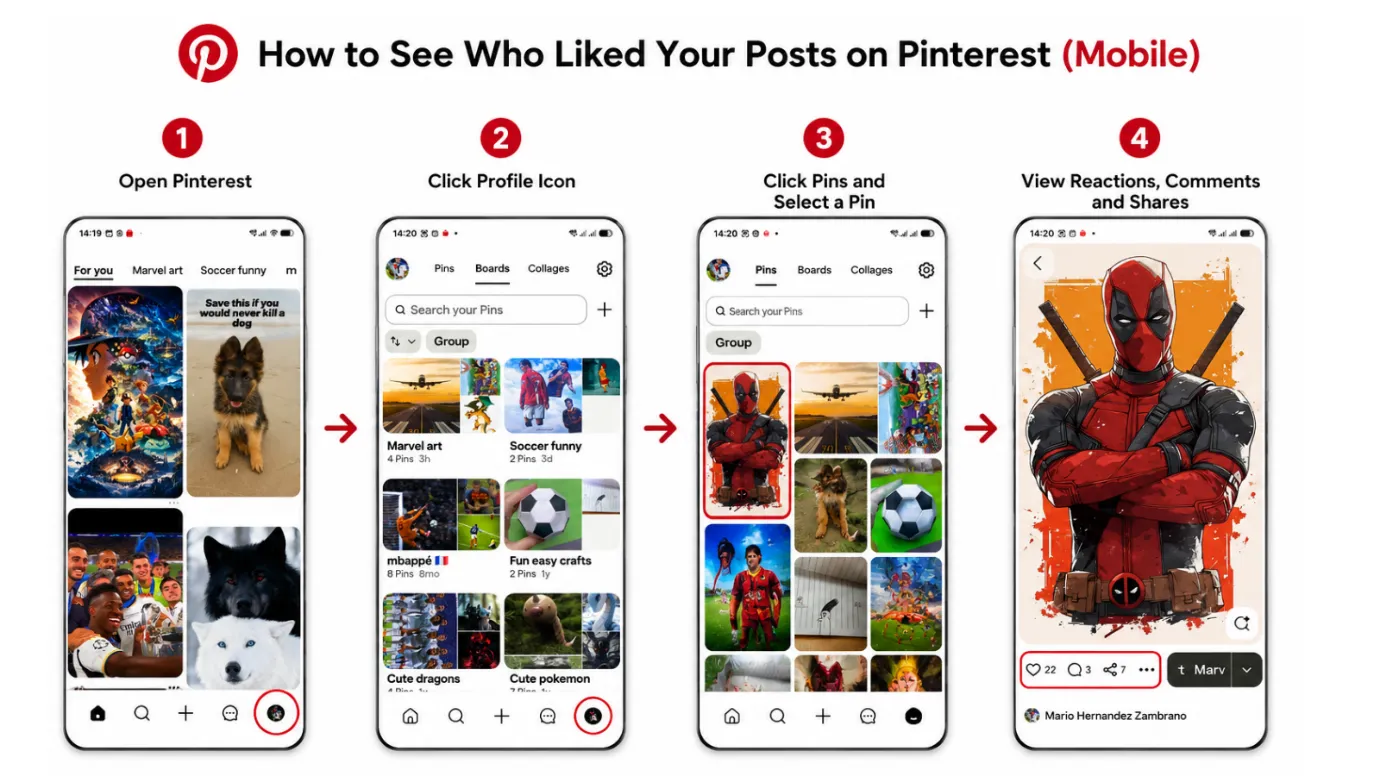
- Open the Pinterest app on your mobile.
- Locate the pin and click the heart emoji.
- You can find the number of likes received for the pin.
Desktop
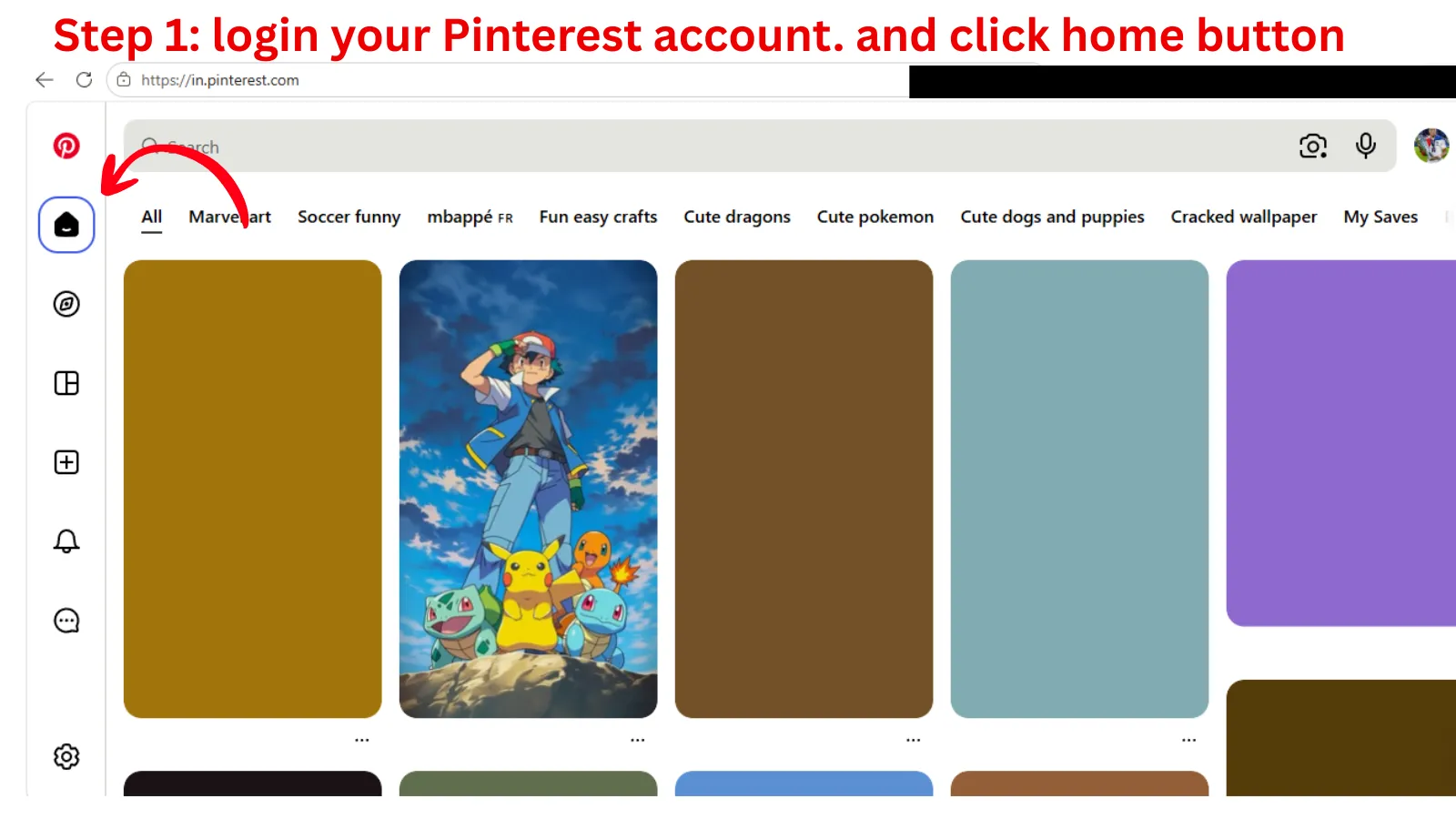
- Sign in to Pinterest in your browser.
- Click the Home button.
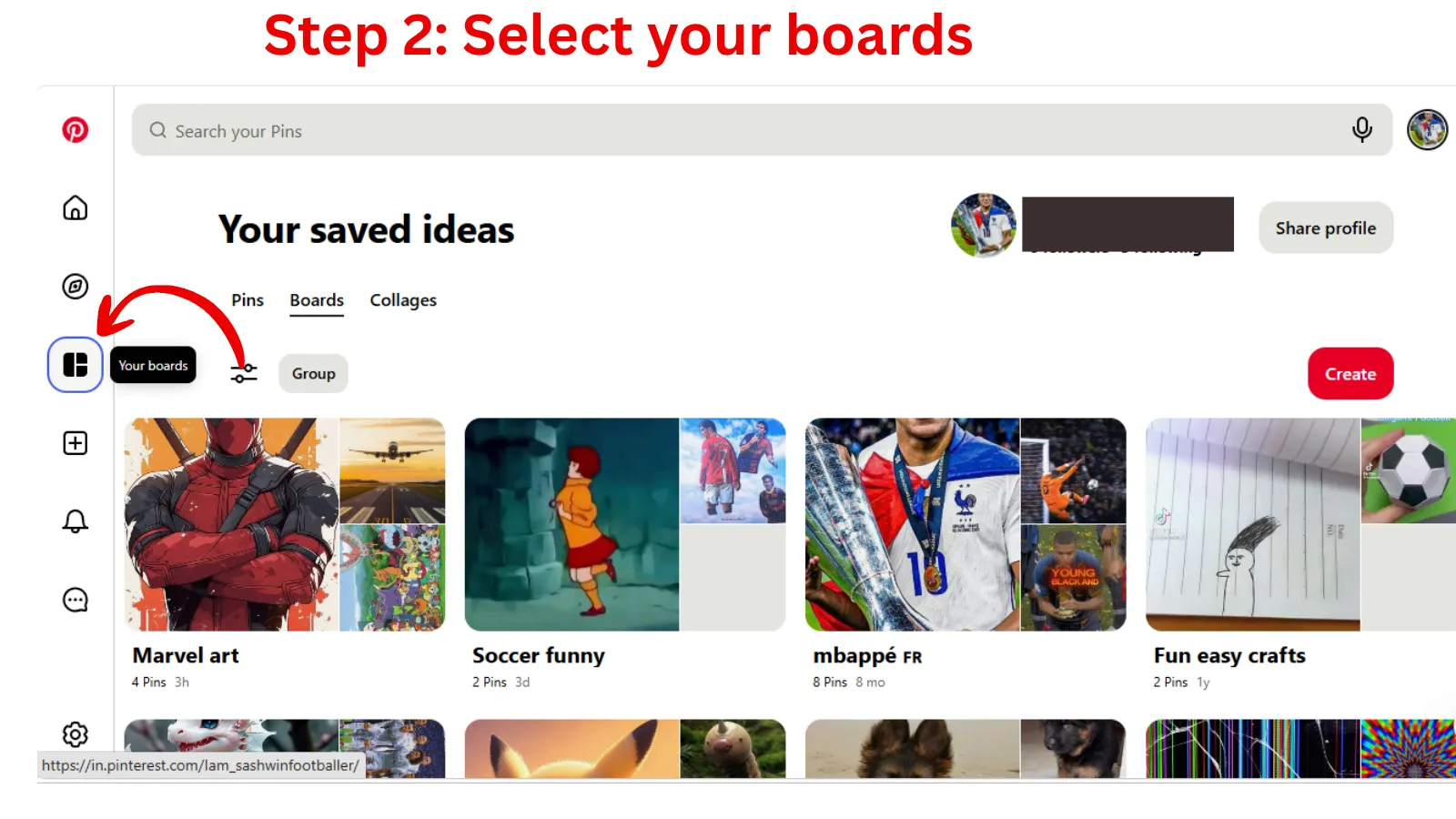
- Check your Boards.
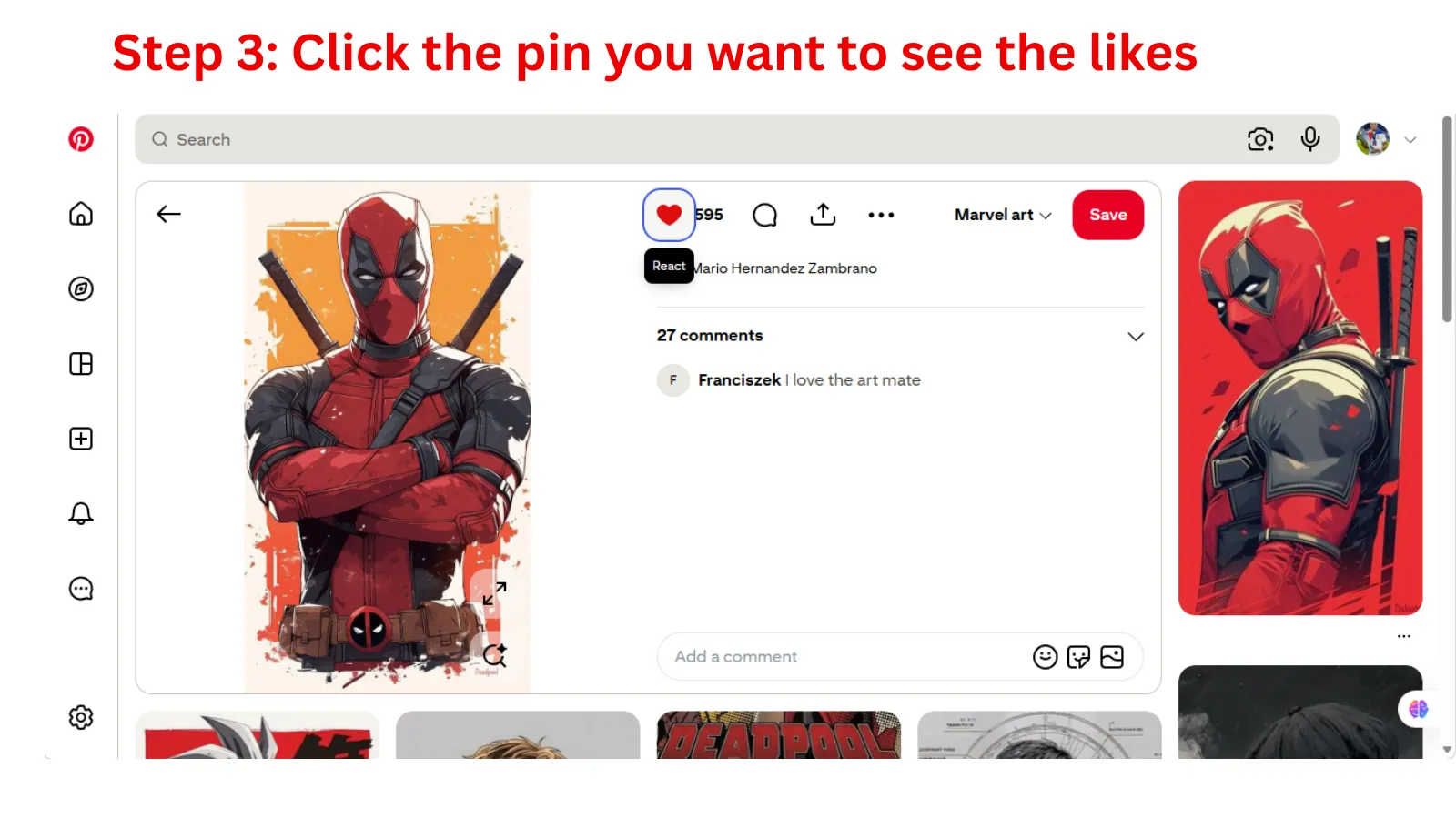
- Locate the pin and click.
- The pin is seen in a large format along with react, comment and share icons on the top right corner.
- Check the number near the heart symbol.
- That is the number of reacts (likes) for the pin.
How to Review Engagement for Individual Pins
Want to know more about a specific Pin? You can see reactions and comments right on the Pin itself.
How to See Responses
Users can react to Pins on Pinterest with a heart, a lightbulb or a clap. To see them,
- Go to your profile and click on the Pin you want to inspect.
- See the number of reactions next to the comments section.
In Pinterest, you can see how many people reacted and what reactions they picked, but Pinterest may not always show a full named list of everyone. This is one of the privacy options on the platform.
Viewing Comments
Comments are the easiest engagement to trace back to an individual. Scroll down to the comments on your Pin, and you will see usernames attached to each comment. Respond directly to initiate a dialogue and develop rapport with your audience. If you’re running a whole bunch of Pins at once, Indzu Social makes it easier to keep track of comments and replies so no conversation goes unnoticed.
Proof · Verified
2k+ grew faster with one tool.
How to Use Pinterest Analytics for the Bigger Picture
If you have a business account, Pinterest Analytics is your go-to tool. It won’t tell you who liked your posts, but it will show you the engagement stats that really matters for growth.
- Change to a business account (free).
- Click on Analytics in the top menu bar.
- Look at metrics like saves, pin-clicks, outbound clicks and impressions. Filter by date range, content type and device.
This allows you to see what Pins are performing best so you can create more content that your audience loves. It’s the strategic next step after chasing individual likes.
Combine Pinterest’s native data with Indzu Social to see your engagement trends across all your channels and plan your next set of Pins with confidence.
Mini takeaway:
Notifications tell you what is happening right now. Analytics gives you the trends in the large picture. Use Both.
Free · Instant · No signupSee what ZuAI generates from your website — right now.
Paste your URL. Watch ZuAI write a month of brand-on captions in seconds. Preview before you create an account.
Limitations of Pinterest Likes
It’s good to have realistic expectations about what Pinterest shows. Here’s what to keep in mind.
- No public liker list: Pinterest does not give you a tidy, complete list of people who engaged like other platforms do.
- Privacy first: Some people like to keep their activity private, so you may not always be able to see how they interact.
- Engagement is aggregated: Notifications often cluster similar actions together, making it harder to track exactly.
- Saves matter most: A save shows intent that someone wants to come back to your Pin or do something with it later. That’s worth more than a fleet of likes.
Knowing these boundaries will save you a lot of frustration and time. It will allow you to focus on the statistics that really matter.
Speed · 10-minute setupOne coffee from URL to a full month of scheduled posts.
Drop your URL, brew your coffee, come back to 30 brand-on captions ready to publish.
How to Get More Engagement on Your Pins
Now that you know where to look, here’s how to earn more of that engagement worth tracking.
- Post high-quality vertical images. Pinterest likes a 2:3 ratio picture more. Crisp visuals stop the scroll.
- Write keyword-rich descriptions. Searchable, clear text means it’s easy for the right people to find your Pins. When they’re searching for backyard BBQ ideas in Austin or apartment décor in Brooklyn, they are sure to get one Pin.
- Pin, always pin. A steady posting rhythm signals an active, reliable account. Tools like indzu allow you to queue Pre-set your pins, so you don’t miss a beat.
- Include engaging text overlays. A quick headline on your image tells them what they will get.
- Engage back. Engage with comments and reactions to get more engagement.
A steady stream of small improvements here will fill up your notifications faster than any one-time trick. You can even use indzu to create fresh Pinterest content. Generate everything a Pin requires from ideas to captions and full marketing posts. Thus, staying consistent is a breeze.
Blank tab. Six open browsers. No clue what to post.


 After · With Indzu
Paste one URL. Get 30 scheduled posts.
FAQs
Q1. Can I see a list of the people who liked my Pin?
Ans. Not quite. Pinterest has killed the old public “likes” list. You can view reaction totals and comments, but not necessarily a complete, named list of all who took part.
Q2. What is the new Pinterest “like” button?
Ans. It was replaced by saves, reactions and comments. Now, a save is the strongest sign of interest, because it means someone wants to save your Pin for later.
Q3. Why am I unable to see who has saved my Pin?
Ans. Pinterest is focused on user privacy. So, it groups saves and limits the amount of detail you can see. You can still see total saves in your Pin stats and Analytics.
Q4. Do I need a business account to track Pinterest engagement?
Ans. No, but you do get full Analytics with a business account. If you want to grow, that’s the way to go.
Q5. How do I know what Pins are best?
Ans. Open Pinterest Analytics, sort by saves or clicks, and look for patterns. The best performers tell you what more content to make. indzu can help you turn those insights into your next round of Pinterest content.
Time killer · Pain
Spending 6 hours writing posts that get zero traction?
Paste your URL. ZuAI turns it into 30 brand-on captions in 10 minutes — no blank-page panic, no generic AI filler.
Final Thoughts About how to see who liked your posts on Pinterest
Pinterest may not provide you with a nice list of likers, but it gives you something better: real signals of what your audience cares about. You’ll get a good idea of what your engagement looks like when you check your notifications, review reactions and comments on individual Pins, and use Analytics. What now? Check your notifications today, find your best-performing Pin, and create a similar one with indzu your one-stop shop for creating and managing Pinterest marketing content. That’s how you turn engagement insights into consistent Pinterest growth.