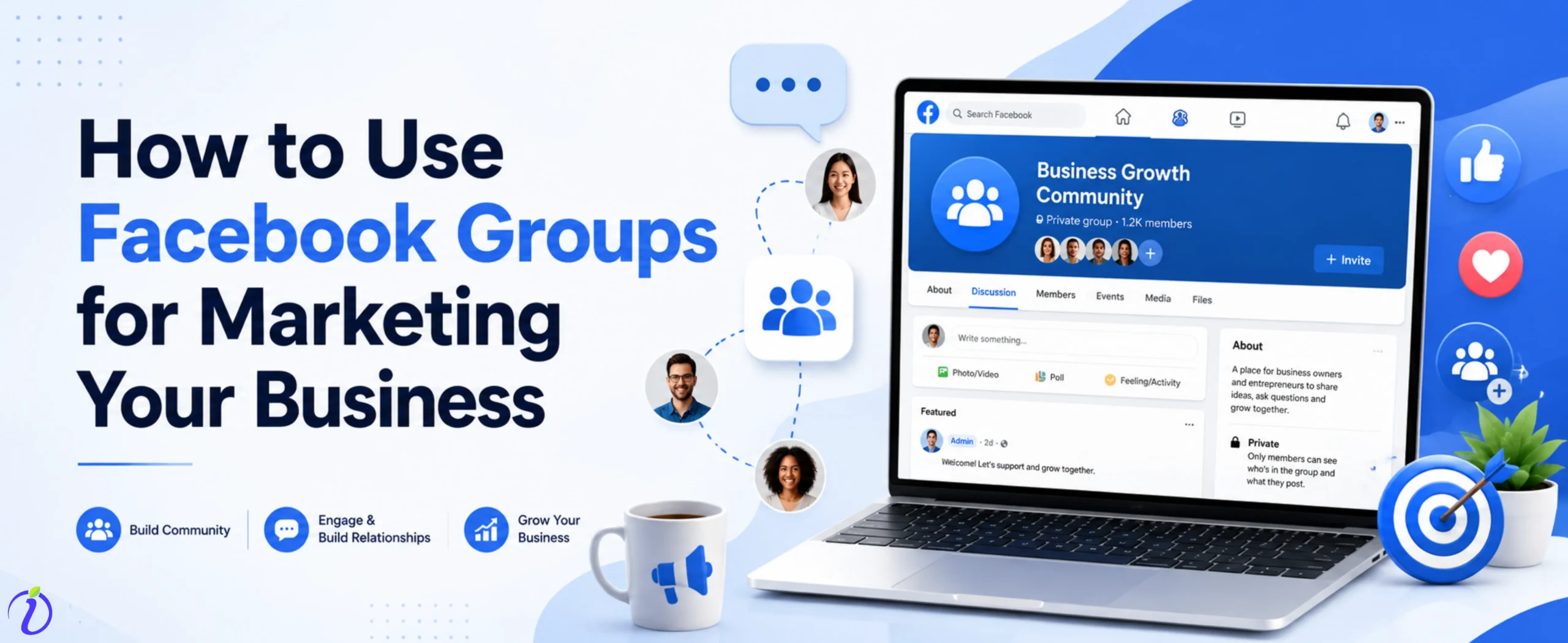
Want to promote your business with just one click? Know how to use Facebook groups for marketing your business. Facebook groups are the best way to build a loyal audience for your brand without spending a lot on Facebook ads.
Instead of chasing customers, imagine building a community where all the right audience for your brand is in one place. So, you upload your product details in one place and get a good engagement,
Let’s get into the blog to learn how to create a Facebook group and use Facebook groups for marketing your business.
 Time killer · Pain
Spending 6 hours writing posts that get zero traction?
Paste your URL. ZuAI turns it into 30 brand-on captions in 10 minutes — no blank-page panic, no generic AI filler.
What are Facebook groups?
A Facebook group is a dedicated online space on the Facebook platform for Facebook users where they can create a group to share similar interests, content, goals, discuss specific topics, or connect to communicate.
The purpose of the Facebook group is to create a space for Facebook users to organize, discuss, and engage with like-minded people.
A Facebook group can be of two types:
Public ( anyone can see members and posts).
Private ( only members can see members and posts).
Outcome · RecommendedGet 30 days of social content from your website — in 10 minutes.
How to create a Facebook Group for business?
Now that you know what a Facebook group is, let’s look at how you can create a Facebook group for business.
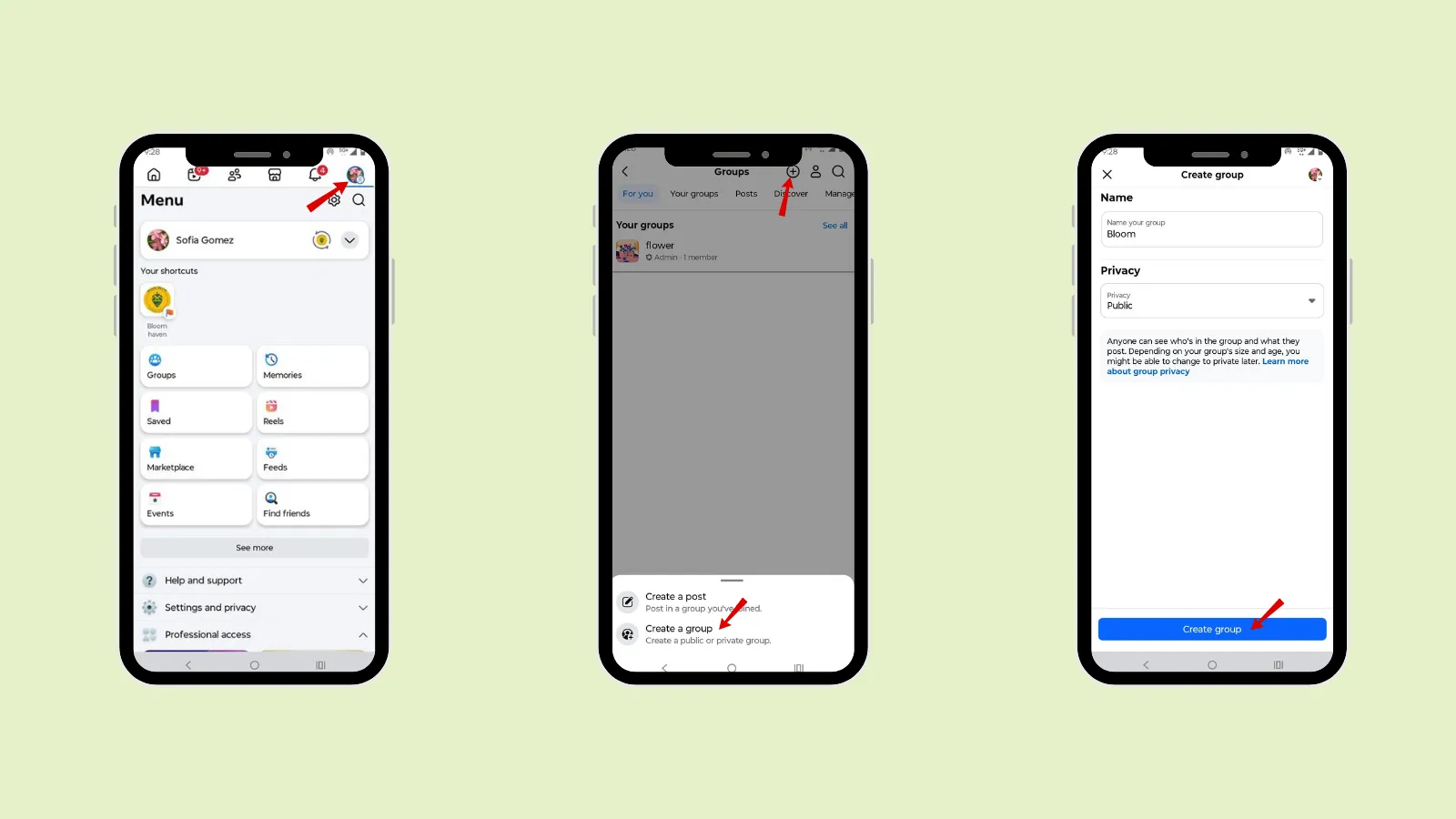
Step 1: Open the Facebook app.
Step 2: Go to the hamburger icon.
Step 3: Tap “Groups”.
Step 4: Tap “ plus”.
Step 5: Tap on “create a group”.
Step 6: Name the group and select privacy ( if you want your group to be public or private ).
Step 7: Tap “Create group “.
Step 8: Send an invite to the people you want to add to the group.
Proof · Verified
2k+ grew faster with one tool.
How to use Facebook groups for marketing your business?
You can use a Facebook group for normal discussions between friends or even for your business. Let’s discuss how you can use your Facebook group for your business.
1. Overview
First, open a Facebook group, add your existing customers, and let them share the group link with their friends or family. Who will benefit from your product or services?
2. Purpose
Start with a clear purpose that defines your goal. You should address
What is this group for?
What problem will it solve?
What value will members get?
Addressing the right goal will attract the right audience. To gauge your success, set clear metrics like engagement rates, member growth, and conversion rates, which will help you understand how well your Facebook group marketing is performing.
3. Community
Focus on building a community, not just a sales channel. Though you can use the Facebook group for marketing your business, do not make it a marketplace. Develop a community with like-minded people, encourage the members to share their experience, and even organize some games that will turn into conversions.
Example: You can host a contest, and the winner receives a 10% discount on your product or service.
4. Content
Share high-quality content in the group to keep your members engaged. Post content regularly to build trust and engagement with your audience.
Content you can post :
- Tips and how-to guide
- Education video related to your niche
- Industry Insight
- Personal stories and case study
- Let your customer share their experience.
5. Engagement
The key to growing your Facebook group for marketing and building strong relationships is to engage with your group members or audience. The more frequently members interact, the more active and valuable your group becomes.
To increase engagement, ask questions, create polls, and encourage opinion and discussion. You can host a live session to interact with your audience in real time.
Free · Instant · No signupSee what ZuAI generates from your website — right now.
Paste your URL. Watch ZuAI write a month of brand-on captions in seconds. Preview before you create an account.
How to promote business on Facebook?
In this digital era, social media like Facebook helps promote your business faster and at a lower cost. Yes, you will need to invest in Facebook ads to target the right and specific audience. But even without investing, you can create a free Facebook account to promote your business.
Let’s see how you can promote your business on Facebook.
1. Create a professional Facebook page.
Create a Facebook page for your business that has complete details about your business and how your audience can relate to it.
2. Post valuable content
Share content that your audience can relate to. The content that educates them about the product or service and how it will solve their problem.
3. Facebook group
Create a community using a Facebook group where you can add Facebook users who can relate to your niche or business.
In the Facebook group, you can engage with your members and ask questions. It is the place where you can build a relationship with your audience without being too salesy.
4. Facebook stories and reels
You can promote your business or brand through Facebook Stories or Reels. It increases your brand visibility, as reels can reach a wider audience.
5. Facebook ads
Facebook ads help reach the ideal audience based on demographics, interests, and behavior, while supporting an effective omnichannel marketing strategy.
Speed · 10-minute setupOne coffee from URL to a full month of scheduled posts.
Drop your URL, brew your coffee, come back to 30 brand-on captions ready to publish.
Facebook group vs Facebook page
| Facebook Group | Facebook Page | |
Purpose | The purpose of a Facebook group is to build a community and encourage discussion. | A Facebook page helps promote a business, brand, or public figure. |
Interaction style | Two-way communication | One-way communication |
Visibility | can be public or private, depending on the admin settings. | Always public and visible to everyone. |
Audience role | Members actively participate and contribute content. | People follow or like your page but have limited control. |
| Marketing approach | Best for engagement, trust-building and relationship marketing . | Best for ads, promotion and official updates. |
Blank tab. Six open browsers. No clue what to post.


 After · With Indzu
Paste one URL. Get 30 scheduled posts.
What mistakes should you avoid in Facebook group marketing?
Facebook is the best place to reach a wider audience from just one place. But while promoting your business in a Facebook group for marketing, you need to avoid common mistakes.
1. Being too Salesy
Focus on adding value first, rather than just promoting your product or service. Create content that makes your audience feel like they belong to your brand.
2. Lack of clear purpose
Without a clear purpose, your Facebook group will be inactive. First, you need to be clear about how you want to communicate with your audience, what post you need to upload, when to promote your product, and when to post educational or valuable content.
3. Not having CTA
Providing valuable content is great but always remember to have a clear CTA. A clear call to action will guide your audience to take action after engaging with your content.
Time killer · Pain
Spending 6 hours writing posts that get zero traction?
Paste your URL. ZuAI turns it into 30 brand-on captions in 10 minutes — no blank-page panic, no generic AI filler.
Conclusion
Facebook is not just about connecting with your friends; it can also be more useful for building a community for your business. Yes, you can use a Facebook group not just for marketing but also to build a community of members interested in your niche.
First, go through the steps to create a Facebook group, then use the tips on how to use a Facebook group for marketing your business. Avoid the mistakes to boost your engagement and conversion. To be consistent in posting, even on hectic days, use Indzu. social.
Outcome · RecommendedGet 30 days of social content from your website — in 10 minutes.
FAQs
Q1. How do I grow my Facebook Group quickly?
Ans 1: To grow your Facebook group quickly, target the right audience, those who are really related to your product or services. Make sure to optimize your Facebook group by using a proper group name, description, and cover image, and by including clear, relevant keywords related to your business or brand.
Promote your Facebook group on different social media platforms and groups. Post valuable and engaging content consistently in your group to excite the new members.
Q2. How often should I post in my Facebook group?
Ans 2: You can post 1-3 times a day to increase your content visibility.
Q3. How do I keep my Facebook group active?
Ans 3: To keep your Facebook group active, focus on engagement and interacting with your audience, rather than just posting. Respond to the audience’s comments or queries.
You can host live sessions, challenges, or theme discussion days.
Q4. Are Facebook groups good for small businesses?
Ans 4: Yes, Facebook groups are good for small businesses, as they help you build a loyal community, connect directly with your audience, and establish trust. A Facebook group will reduce your advertising cost on marketing and Champaign. You can create a post on Canva and post it in the group.
Q5. Can I use a Facebook group for customer support?
Ans 5: Yes, if you are a small business, you can use your Facebook group for customer support. You can directly interact with your customers, as groups are great for answering questions, solving problems, and creating a helpful community where members can support each other.
Q6. How long does it take to see results from a Facebook Group for marketing?
Ans 6: It takes time; a Facebook group helps you to connect with real people, so it takes time to see results. You need to be consistent, put effort into valuable content, and have genuine interaction to show results within a few months.