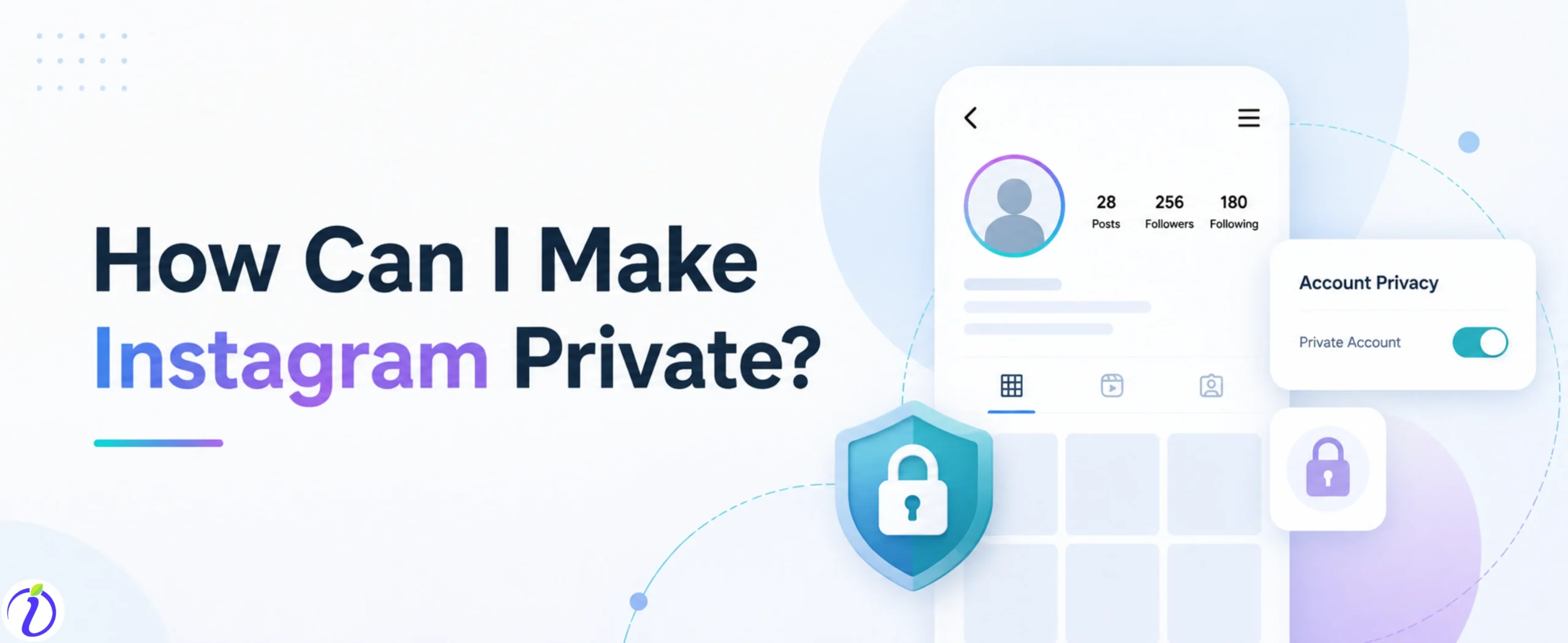
Are you wondering how can I make Instagram private? We got you. Do you want to post about your personal life but still want to keep things private from strangers or some specific Instagram users? You should create a private Instagram account.
Instagram has privacy settings where you can make an Instagram account private. It keeps your digital posting safe. Only people you personally know or whom you want to allow can view your post, stories, and browse your follower list once you accept their request.
Let’s get into the blog to know how can I make Instagram private and who should keep their account private.
 Time killer · Pain
Spending 6 hours writing posts that get zero traction?
Paste your URL. ZuAI turns it into 30 brand-on captions in 10 minutes — no blank-page panic, no generic AI filler.
What is an Instagram Private Account?
An Instagram private account is a feature on Instagram where you can make your account private so only people you approve can see your posts, stories, reels, and follower lists. It prevents strangers from viewing your personal lives.
Outcome · RecommendedGet 30 days of social content from your website — in 10 minutes.
How can I make Instagram private?
Here are the steps on how to make your Instagram account private by using a phone or desktop.
On phone
Step 1: Open the Instagram app
Step 2: Log in to the account you want to make private.
Step 3: Tap on the profile picture in the right corner of your home page.
Step 4: Tap on the hamburger icon.
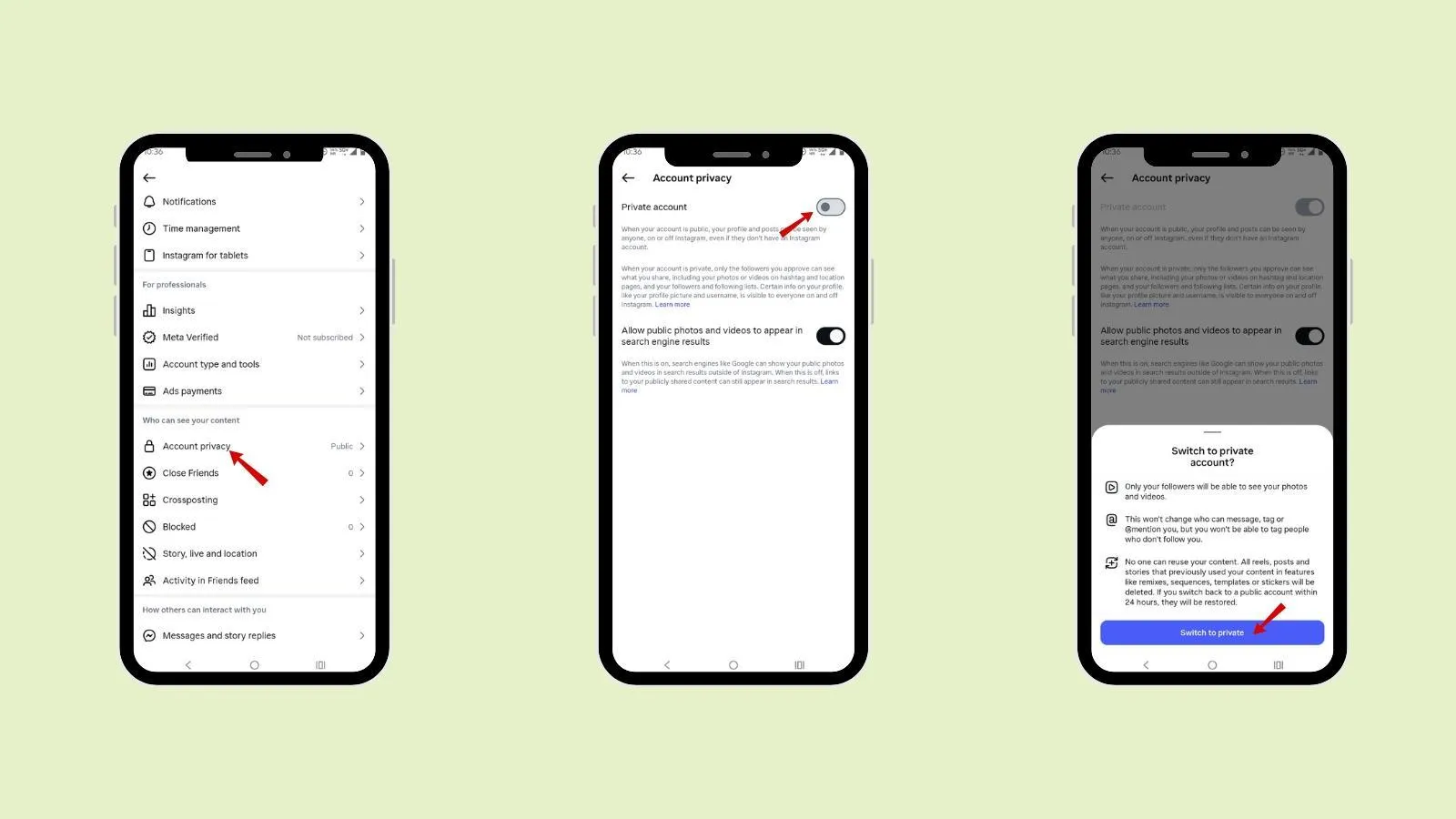
Step 5: Under “Who can see your content,” Tap on “Account Privacy”.
Step 6: Tap on “Private Account”.
Step 7: Tap on “Switch to private”.
On desktop
Step 1: Open the Internet Browser.
Step 2: Open Instagram.com
Step 3: Click on the account profile picture at the bottom of the screen.
Step 4: Click on the settings
Step 5: Click on “Account Privacy”.
Step 6: Click on “Switch to private”.
Proof · Verified
2k+ grew faster with one tool.
What happens after you make your Instagram private (Instagram privacy settings )
When you make your Instagram account private, certain changes occur. The changes that Instagram’s privacy settings bring are:
- New followers need to send you a follow request to view your content.
- Your posts and stories are hidden from non-followers.
- Your posts and reels will no longer appear in the public feed through hashtags.
- Even your followers cannot share your story or post to anyone if you have a private account.
Free · Instant · No signupSee what ZuAI generates from your website — right now.
Paste your URL. Watch ZuAI write a month of brand-on captions in seconds. Preview before you create an account.
Why do you need to make a private Instagram account?
If someone wants to enjoy Instagram but wants to keep their life private, they can use an Instagram private account.
Some common reasons include:
Protecting your personal photos and videos
Reducing unwanted attention from strangers
Preventing random users from viewing your Stories
Limiting spam accounts and fake followers
Creating a safer online experience for yourself and your family
Speed · 10-minute setupOne coffee from URL to a full month of scheduled posts.
Drop your URL, brew your coffee, come back to 30 brand-on captions ready to publish.
Who should not consider an Instagram private account?
Having a private account is not a good idea for every Instagram user.
If you are a
- Influencers and content creators
- Businesses and brands
- Public figures
- Artists, photographers, and musicians
- Anyone trying to gain followers and increase engagement
Then you should prefer a public account. A Private account limits the discoverability and can slow your growth and account reach.
Blank tab. Six open browsers. No clue what to post.


 After · With Indzu
Paste one URL. Get 30 scheduled posts.
Private vs public account
Private Account | Public Account |
Private account is the type of account where the profile is visible, but posts are hidden from non- followers. | A public account is an account where both the profile and posts are visible to non-followers. |
If you use hashtags in your posts, they do not appear in public hashtag feeds. | Using a hashtag in a post if you have a public account is essential, as it will increase the visibility of the post |
You can accept the following request of the people you know or those whom you want. You can accept the following request of the people you know or those whom you want. | Anyone can follow you instantly. |
In a private Instagram account, your posts, stories, and activity will be seen only by your followers. | In a public Instagram account, your posts, stories, and activity can be seen by anyone. |
Private accounts are not ideal for marketing and growth. | Public accounts are ideal for marketing and growth. |
Time killer · Pain
Spending 6 hours writing posts that get zero traction?
Paste your URL. ZuAI turns it into 30 brand-on captions in 10 minutes — no blank-page panic, no generic AI filler.
How to limit who can see your Instagram stories and posts?
Even if you have a public or private account, you can still control who sees your stories and posts.
Two Instagram features that you can use are:
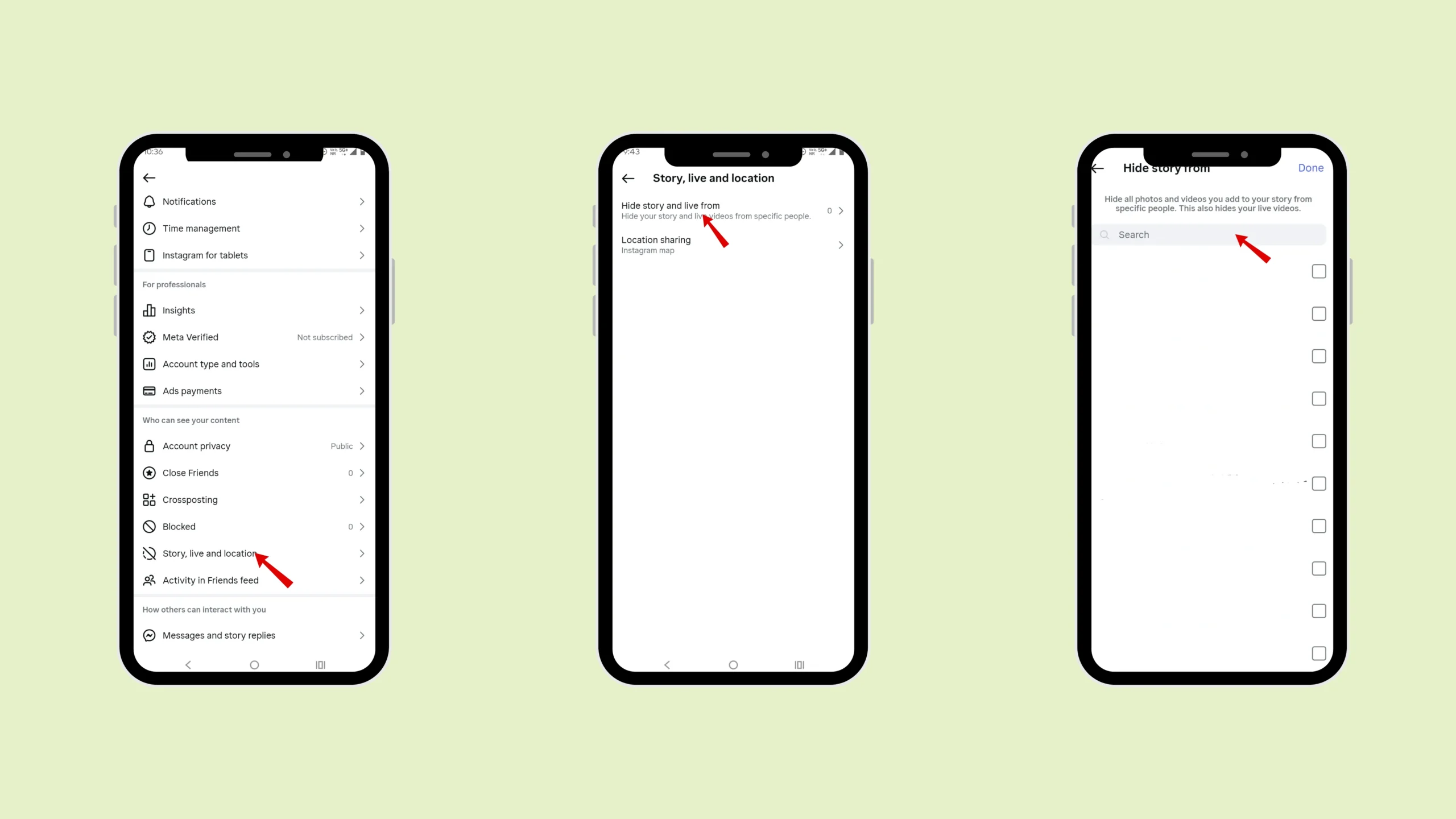
Hide Stories
The hide stories feature is used to hide specific people from your post or stories.
The steps are:
Step 1: Open Instagram
Step 2: Tap on the profile picture in the right corner of your home page.
Step 3: Tap on the hamburger icon.
Step 4: Under “Who can see your content”.
Step 5: Tap on “Story, live, and location”.
Step 6: Tap “Hide story from”.
Step 7: Search for the user and hide them.
Close Friends
To showcase your post and stories to only specific people, you can create your Close Friends list.
Step 1: Open Instagram .
Step 2: Tap on the profile picture in the right corner of your home page.
Step 3: Tap on the hamburger icon.
Step 4: Under “Who can see your content”.
Step 5: Tap “Close friends”
Step 6: Select your friend or followers you want to be in your close friends list.
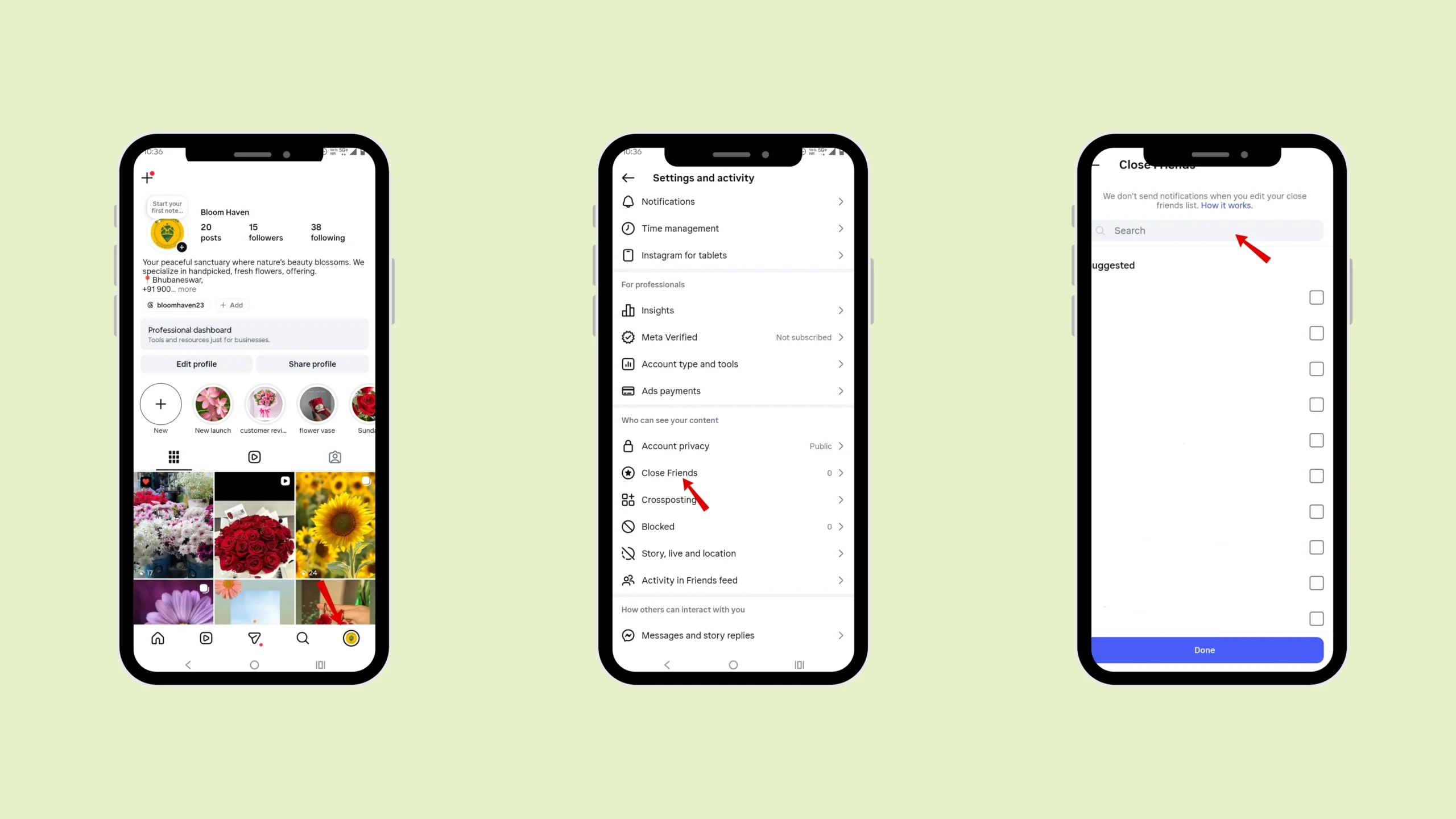
Create your post or story and then select “close friends” before posting.
Outcome · RecommendedGet 30 days of social content from your website — in 10 minutes.
Types of Instagram accounts
Instagram Personal Account | Instagram Creator Account | Instagram Business Account |
Personal account can be used by everyday users, friends and family. | Instagram Creator account can be used by Influencers, public figures, and content creators . | Instagram Business account can be used by businesses, brands, and organizations. |
It can be private | No, it must be public to gain more followers and engagement. | No, it must be public to gain more followers and engagement. |
It does not have a professional dashboard. | It has a professional dashboard. | It has a professional dashboard. |
The primary goal of a Personal account is personal sharing of content and communication | The primary goal of a Creator account is building an audience and personal brand. | The primary goal of a Business account is to promote product services, and brand awareness. |
Proof · Verified
2k+ grew faster with one tool.
Conclusion
Knowing how I can make Instagram private will give you the freedom to share safely. You can use Indzu to create posts and schedule them for your private or business account.
Follow the steps to make your Instagram private. But if you are an influencer, business account, or someone who wants to gain followers and increase engagement, you should avoid having a private Instagram account. If you want to share your content with a specific Instagram user, explore the hide and close friend feature in Instagram.
Free · Instant · No signupSee what ZuAI generates from your website — right now.
Paste your URL. Watch ZuAI write a month of brand-on captions in seconds. Preview before you create an account.
Faqs
Q1. Can people see my post if my Instagram account is private?
Ans 1: Only your followers can see your post when you have made your Instagram account private. The Instagram users who do not follow you cannot see what you post.
Q2. Will hashtags work on a private Instagram account?
Ans 2: No, hashtags are not useful in private accounts. As it will not help you attract the following, since your account is private, the Instagram algorithm cannot show your post to other users who do not follow you.
Q3. Can someone share my private Instagram posts?
Ans 3: If you have a private account, your followers cannot share your post unless they are tagged in it. While non- followers cannot even view your account’s post or any activity. If they share your post to any other user who does not follow you, it will show them “post unavailability”.
Q4. Is a private Instagram account safer than a public account?
Ans 4: Yes, private Instagram accounts are safer than public accounts. You can have control over who can see, engage, and share your post, stories, and profile in a private account.
Q5. Can I switch back to a public account later?
Ans 5: Yes, you can switch back to a public account.