
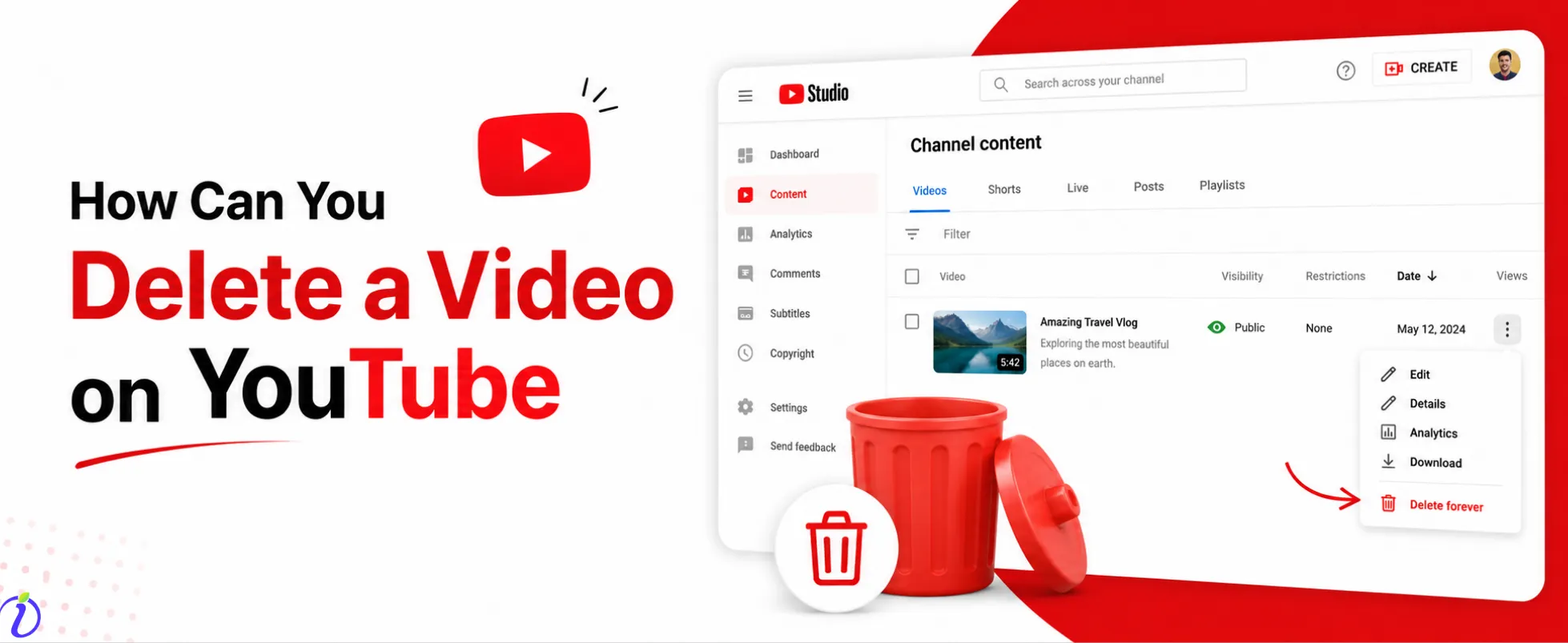
Have you uploaded the wrong video, and want to know how to delete a video on YouTube? You got you.
Millions of videos are uploaded daily, so after uploading, if you figure out any mistakes or want to add more content to your video, you can easily delete the video. But remember, once a video is deleted, it cannot be restored.
You need to understand how to properly remove a video, ensuring you maintain control over your video and protect your channel’s reputation.
Let’s get into the blog to know more about how you can delete a video on YouTube and the reasons why someone deletes a video.
 Time killer · Pain
Spending 6 hours writing posts that get zero traction?
Paste your URL. ZuAI turns it into 30 brand-on captions in 10 minutes — no blank-page panic, no generic AI filler.
What does deleting a YouTube video mean?
Deleting a video from YouTube means permanently removing it from your channel and even from the YouTube platform. Once you delete your video, you cannot recover it.
Once you delete the video, everything connected to the video will be deleted.
- Likes
- Comments
- Shares
- Even the collaborated or tagged accounts
- Views and watch time
- Performance analytics
Let’s get into a step-by-step process on how to delete a video on YouTube.
Outcome · RecommendedGet 30 days of social content from your website — in 10 minutes.
How to delete a video on YouTube Step – by – step
To delete a YouTube video, follow the step- by step ( On Desktop )
Step 1: Sign in to your YouTube account.
Step 2: Go to the YouTube studio.
Step 3: Navigate to the “Content” section.
Step 4: Select the video you want to delete.
Step 5: Click on the three dots menu.
Step 6: Choose “Delete”.
Step 7: Confirm by checking the box.
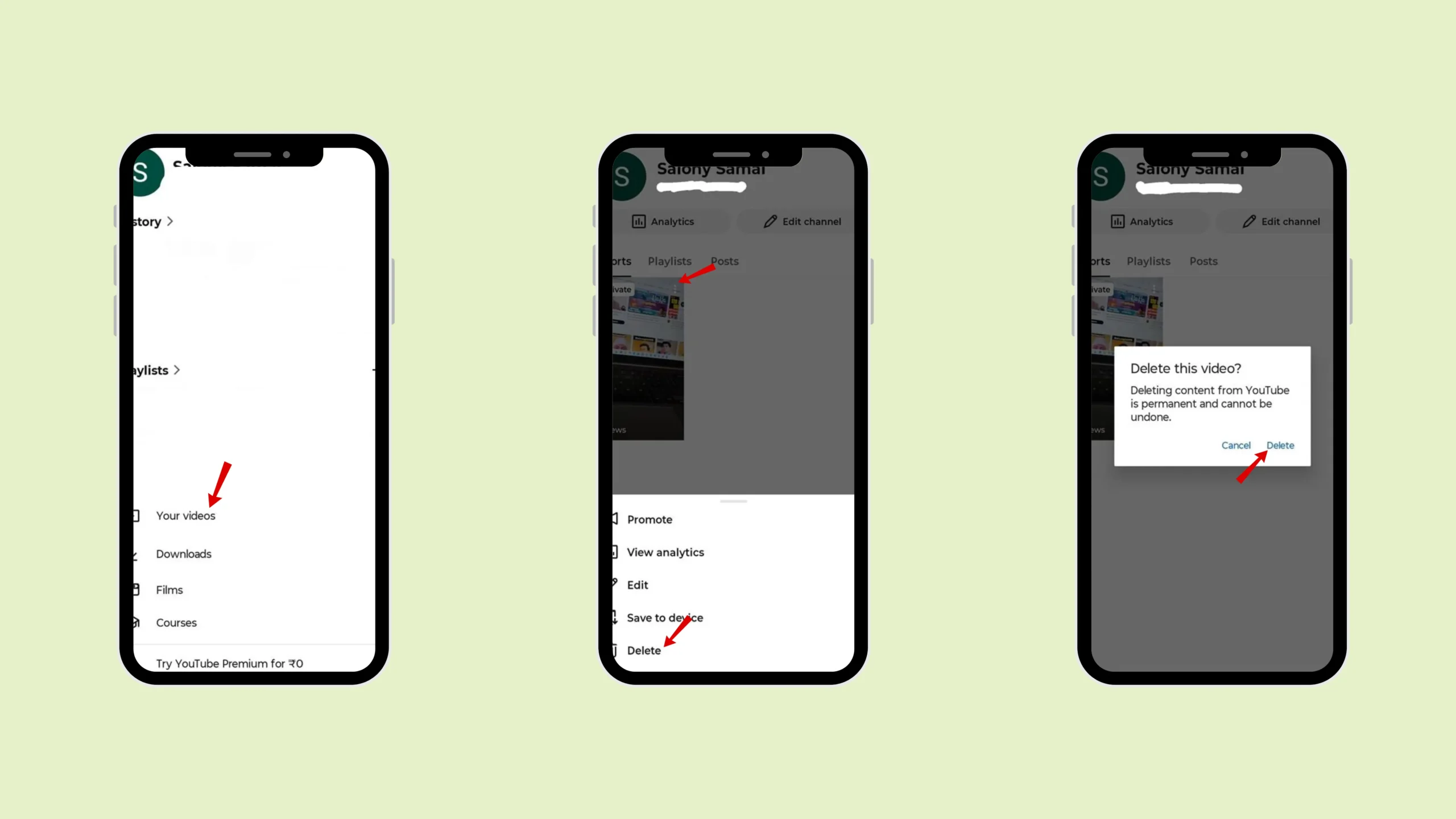
To delete a YouTube video, follow the step- by step ( On Mobile )
Step 1: Open your YouTube account.
Step 2: Go to the YouTube studio.
Step 3: Navigate to the “Content” section.
Step 4: Select the video you want to delete.
Step 5: Click on the three dots menu.
Step 6: Choose “Delete”.
Step 7: Confirm by checking the box.
Proof · Verified
2k+ grew faster with one tool.
Reason why you might want to delete your video.
There may be certain reasons why you might want to delete your video. Let’s check them out.
- Outdated Content
Suppose the video is no longer related to your niche. Then you may want to delete the video, as you want to keep a specific algorithm for your channel.
- Poor Quality
If some videos have poor quality, then you may want to delete the video. The more you grow as a Content creator on YouTube, the more your content quality improves.
Suppose your old videos have low video resolution. It contains poor audio quality and lacks proper editing or structure. Then you can delete your video if you want.
- Copyright issue
Copyright violation can be an important reason to delete the videos. Copyright issues can happen if you use music without proper licensing, or real clips from movies or shows. If you have used the images or content owned by others.
If your video gets a copyright strike,
- Duplicate uploads
Sometimes, if you have mistakenly uploaded the video more than once, you can delete one video.
If you upload one video more than once, then it will create confusion for your audience, split views and engagement, and even make your channel look unorganised.
- Errors and mistakes
If your video has any spelling errors or incorrect information, you want to make changes in editing. Then you can delete the video on YouTube.
- Others
There are other reasons you want to delete a video on YouTube. If you want to switch to a new niche, target a different audience. Or for some privacy reason, you want to delete a particular video.
Free · Instant · No signupSee what ZuAI generates from your website — right now.
Paste your URL. Watch ZuAI write a month of brand-on captions in seconds. Preview before you create an account.
Alternative option, Instead of deleting a video.
When you delete a video from YouTube, it is permanently deleted from the platform, so if you don’t want to delete the video and want some alternative ways to keep your video to yourself, so it will not be shown to the public.
1. Make the video private.
If you personally like a video or want to keep it. Then you can make the video private without deleting it.
Select the video to private means where only you can view it. It would not appear to the public.
2. Download
Another way to save the video without deleting it is to download it. You can download the video with editing and keep it, so you can use it later.
Speed · 10-minute setupOne coffee from URL to a full month of scheduled posts.
Drop your URL, brew your coffee, come back to 30 brand-on captions ready to publish.
Conclusion
Whenever your video has errors, outdated information or no longer fits your niche. Follow the steps on How to delete a video on YouTube. However, you need to remember that once you have deleted the video, you cannot restore it.
Keep your video private or download the video before deleting it. In your busy day, if you want to upload the video on time, use Indu. social.
Blank tab. Six open browsers. No clue what to post.


 After · With Indzu
Paste one URL. Get 30 scheduled posts.
FAQs.
Q1. Can I delete a YouTube video permanently?
Ans: Yes. Once you delete a video on YouTube, it will be permanently deleted. Once you delete it, you cannot recover it. So make sure that you really want to delete a YouTube video.
Q2. Can I recover a deleted YouTube video?
Ans: No, you cannot recover a deleted YouTube video. YouTube does not allow you to recover deleted videos. It’s best to download and back up the video before deleting it.
Q3. Will my subscribers be notified if I delete a video?
Ans 3: No, your subscribers will not receive any notification when you delete a video. When your subscriber tries to reach your account, and for that video, they will know that you have deleted the video.
Q4. Does deleting a video affect my channel analytics?
Ans 4: Yes, deleting a video will affect your channel analytics. Deleting a video will delete all its views, likes, comments, and shares.
Q5. Can I delete multiple videos at once?
Ans 5: No, you cannot delete multiple videos at once.