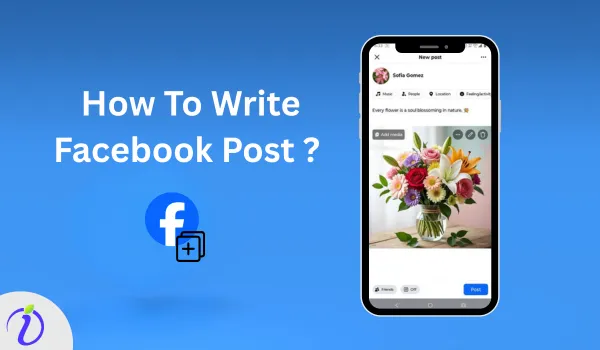
Struggling to gain engagement on your Facebook post? How to write Facebook post that truly captures attention and boosts engagement. With thousands of posts appearing in your user’s feeds, it is important to post unique post that gets Facebook users’ attention.
With the help of a SaaS product, you can make your content creation easier and more consistent. It helps create unique posts that align with the keywords and the audience’s interests.
Let’s dive into the blog to learn how to write Facebook posts and how SaaS content automation works.
 Time killer · Pain
Spending 6 hours writing posts that get zero traction?
Paste your URL. ZuAI turns it into 30 brand-on captions in 10 minutes — no blank-page panic, no generic AI filler.
How to write Facebook Post?
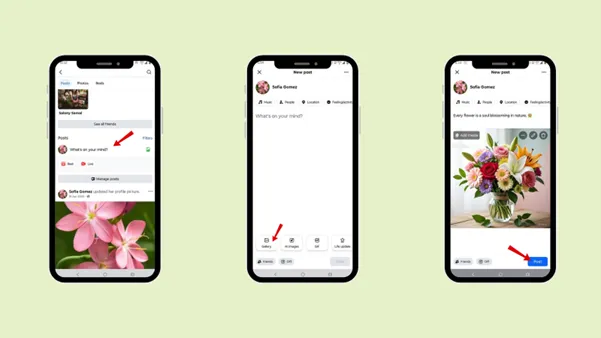
To write a Facebook post on Facebook
Step 1: Open Facebook.
Step 2: Go to the home page.
Or
Open your profile
Step 3: Tap on “What’s on your mind?
Step 4: Create your Facebook post, write the right caption, and use relevant hashtags.
Step 5: Tap “Post”.
Outcome · RecommendedGet 30 days of social content from your website — in 10 minutes.
Things you need to remember before writing a Facebook post
If you are a brand or content creator, you should not only post normally Facebook posts; your posts should showcase a few things.
1. Brand Awareness
The first purpose of your Facebook post is to help your audience recognize and remember your brand, thereby increasing brand awareness. You can build brand awareness by consistently sharing valuable information, using a unique brand tone, and using visuals that reflect your brand identity.
2. Lead generation
The next aim of creating a Facebook post is to generate leads. This means encouraging your audience who are interested to take the next steps, with them being the lead in taking action.
3. Sales conversion
The Facebook post can be used for sales conversion, a post that highlights products or services. Not all posts need to be promotional, but if you are a brand or content creator, you can use the Facebook post to connect with your audience and explain how your product or service can solve their problem.
By showcasing the value you offer, you can encourage your audience to make a purchase and become a consumer.
4. Community Building
You can also build a community with your followers or audience who like your content. A strong community builds trust and keeps people engaged with your brand over the long term.
To build a strong community, you need to engage with your audience by responding to the comments and asking questions.
How to write Facebook post using Indzu
Step 1: Open Indzu. social on your website.
Step 2: Select the account.
Step 3: In the Home page.
Step 4: Click Compose.
Step 5: Select the Facebook account you want to upload your content to.
Step 6: Click “Generate with ZuAi”.
Step 7: Describe your caption to ZuAi.
Step 8: Select your preferred language.
Step 9: Select the tone of your caption.
Step 10: Click “Generate”.
Step 11: If you want, you can “Rephrase”, “Shorten”, “Expand”, or “Retry’ your caption.
Step 12: If you are satisfied with the caption generated by ZuAI, click “Accept” to add it to your post.
Proof · Verified
2k+ grew faster with one tool.
How SaaS Content Automation Transforms Facebook Writing

What is SaaS Content Automation?
SaaS (Software as a Service) content automation helps businesses create, manage, and publish content across different social media platforms. Instead of manually creating each post and posting it, SaaS helps you create and post content seamlessly.
SaaS content automation helps save time, improve efficiency, and maintain consistency in publishing.
Free · Instant · No signupSee what ZuAI generates from your website — right now.
Paste your URL. Watch ZuAI write a month of brand-on captions in seconds. Preview before you create an account.
How SaaS Content Automation Helps Businesses Scale
SaaS content automation helps businesses boost their social media presence. Let’s go through a few things that SaaS makes Facebook content creation easier.
1. Bulk content creation
SaaS helps you create content in bulk with just one click. You can even edit the post created by ZUai. You can save the created content as a draft and use it later if required.
This feature helps social media managers or any user handling the social media post creation plan to create the content in advance and maintain the posting process. It is beneficial for a brand and business to manage campaigns or social media pages.
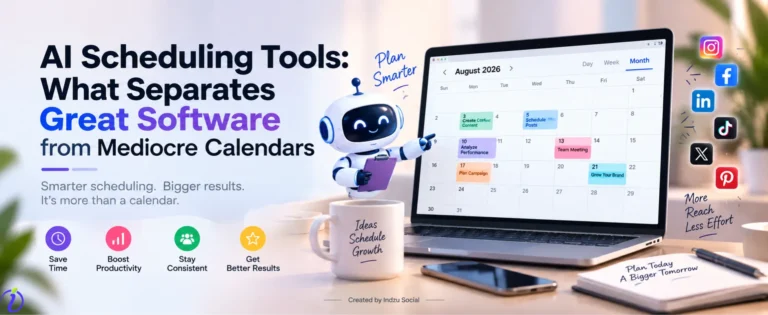
2. Scheduling posts
Another important feature of a SaaS product is scheduling posts for the exact time they need to be posted. This helps the content go live even when you are busy with other work.
Scheduling the post helps you to post the content at the best time when your Facebook audience is active.
3. Consistency
The main point in content creation is consistency. Being consistent in your posting helps you build a strong relationship with your audience. That is what SaaS takes care of; it helps you stay consistent with content posting, making the brand active and visible.
Speed · 10-minute setupOne coffee from URL to a full month of scheduled posts.
Drop your URL, brew your coffee, come back to 30 brand-on captions ready to publish.
Benefits of Using AI Tools while writing Facebook post
SaaS products use AI tools that offer several benefits when creating Facebook posts.
1. Idea generation
Rather than creating content manually, AI can generate content in minutes based on trends, keywords, and audience interests. It helps brands and businesses overcome writer’s block and produce fresh content. An AI checker can help identify potentially AI-generated phrasing.
2. Optimized hooks
The first line of the Facebook post is important, as it determines whether the audience will continue reading or ignore it. AI helps generate optimised hooks based on research and competitor analysis. A good hook can increase engagement.
3. Performance-based refinement
Saas helps you to analyse the performance of previous posts. By analysing the metrics, you can see which content works best and, in the future, create posts and videos accordingly.
Blank tab. Six open browsers. No clue what to post.


 After · With Indzu
Paste one URL. Get 30 scheduled posts.
Elements that support your Facebook post and boost engagement
A caption is important in a Facebook post, but certain elements make your post more engaging and interactive.
1. Visuals
The first thing the audience notices is the visuals. Before Someone reads your caption, they would first notice the images. The first impression your audience has of your post determines whether they will engage with it or ignore it.
It’s not just about simple visuals; use high-quality images that will make your profile look professional and trustworthy. A meme maker can also help you create engaging visuals that make your posts more attention-grabbing.
2. Captions that complement visuals
Make sure your caption is related to the visuals that you have posted in the post. If the caption is not related, it would make the audience feel disconnected from the topic.
For example:
If you have created an image “ 5 ways to increase engagement”.
In the caption, make sure you explain the 5 ways your audience can increase engagement with their content.
Your main aim should be:
Hook the attention of your audience in the first two lines.
Provide valuable context to your audience.
Should have a clear CTA ( call to action)
3. Videos
Like images, video is also an essential element in your Facebook post; it has greater potential to keep your audience on the platform longer. Video makes the post feel more personal and makes it easier to build trust through a face-to-face connection.
Type of video you can use while writing a Facebook Post.
- Behind the scene
- Client testimonials
- Mini tutorials
- Story-based content
- Quick tips
Whichever video type you use, do not forget to include a strong caption, as most users watch videos without sound.
Time killer · Pain
Spending 6 hours writing posts that get zero traction?
Paste your URL. ZuAI turns it into 30 brand-on captions in 10 minutes — no blank-page panic, no generic AI filler.
Common mistakes to avoid while writing a Facebook post
1. Writing a long paragraph
Avoid unnecessary long paragraphs in your Facebook post caption. Most users use social media on their phones, so long, dense blocks of text can make your post boring and cause users to avoid it.
Long paragraphs reduce your Facebook post’s readability, Lower engagement, and make your message unclear. If you are using AI to draft the caption, run it through an AI detector first to catch the generic, padded phrasing AI tools default to — which is exactly what scrollers swipe past.
2. Delay in posting
Avoid the mistake of delaying posts. Inconsistent posting weakens trust with your audience. When you delay posting, the audience might forget about your content. Try to build consistency in your posting to build trust, recognition, and algorithm visibility.
With the help of Indzu, a SaaS content automation tool, you can schedule your post for a week. Keeping you consistent and preventing last-minute stress.
3. No clear CTA
At the end of the brand, creators create a Facebook post to convert a normal audience into Facebook leads. For that reason, you need to mention a clear CTA.
A clear CTA guides your audience to take the next step, so it’s important to avoid confusion and be specific about the purpose.
For example :
Click the” link” for more details
Dm “guide” to get the details
Call the number
Save this for later
4. Ignoring comments
Facebook posts are created for your Facebook audience, so your work does not stop after just creating the post. Engagement is an important part where your normal audience is converted into a Facebook lead.
So, do not ignore the comments; they are a way to interact with your audience and turn them into customers. If you ignore the comments, then it will create a negative impact on your brand.
Outcome · RecommendedGet 30 days of social content from your website — in 10 minutes.
Conclusion
It’s important to know how to write a Facebook post; it’s not about posting for the sake of posting, but with a purpose for the brand, where you can solve your audience’s real-life problem with the product or service you offer. Go through the steps to write a Facebook post and post it.
But in this digital era, brands and businesses should understand SaaS content automation, which helps them create, schedule, and post content easily. Explore Indzu to create social media posts for your business and stay consistent with your content, even when you’re busy.
Proof · Verified
2k+ grew faster with one tool.
Faqs
Q1. How often should I post on Facebook for business growth?
Ans 1: For business growth, posting 3- 5 high-quality posts per week is ideal. Consistency matters in posting. With Indzu, your content creation becomes much easier. With ZuAi, you can create posts and schedule them at the exact time.
Q2. How do I convert Facebook leads without sounding too salesy?
Ans 2: Make sure your product or service feels valuable to your audience. Rather than a normal sales line, add something that inspires or solves their problem.
Example: Comment “guide,” and I’ll send it
Enroll in the free live session
Q3. How do I know if my Facebook posts are working?
Ans 3: You can view Facebook insights to know your post views, reach, and interaction. You can even track the growth of the Facebook post by:
Engagement rate ( likes, comments, and shares)
Click-through rate
Leads generated
Conversion rate
Q4. How long does it take to see results from Facebook content?
Ans 4: To get organic reach for your Facebook post, it takes 30–90 days of consistent posting. Create posts that resonate with your audience, and with consistent posting, you can gain organic reach.
Q5. Do hashtags still matter on Facebook?
Ans 5: Yes, hashtags still matter on Facebook. Use 2- 3 relevant hashtags related to your post.