You are not shadow banned, blocked, or quietly removed from visibility on Instagram. When the live button vanishes from your Instagram account, it usually means one of the sections needs an update, a fix, or a requirement that you have not met.
What exactly happened to your Instagram live option? Why is the Instagram Live Option Not Showing Your Account?
Indzu is going to pull the curtain back and show you exactly what causes the Instagram Live Option to Disappear and how to bring it back.
 Time killer · Pain
Spending 6 hours writing posts that get zero traction?
Paste your URL. ZuAI turns it into 30 brand-on captions in 10 minutes — no blank-page panic, no generic AI filler.
Start with the Basics: Simple and Quick Trouble shooting Steps
Once you can’t access your Instagram Live option, try to start smart with simple technical checks. In most cases, the IG live option disappears because of small and fixable issues.
Check your Internet Connection: This is the first and fundamental step.
Instagram live option requires a stable internet connection. If your Wi-Fi or mobile data is unstable. Instagram may hide the live option to prevent failed streams. More than one-third of the live video failures are caused by the unstable internet connections. If your internet speed is less than 3 Mbps, Instagram will stop your live streaming or remove the IG live button from your profile.
Do you have the latest version of Instagram App on your mobile?
Instagram shares new updates and new features regularly. If your app is outdated, then IG Live may not appear. So, check for any new feature updates in the App store. Instagram has confirmed that 32% of Instagram feature errors were due to outdated Instagram app versions.
Users on the latest Instagram versions are 2 X more likely to see new features early.
The Best Fix for All Glitches: Restart Your Device
Sometimes temporary memory can block your app from loading. Instagram recommends restarting your device. Restarting a device can fix up to 27% of app-related bugs instantly. Have you recently overused your phone? Phones left running continuously are more prone to performance issues. All you need is a quick restart.
Clear Your Instagram Cache and Corrupted Data
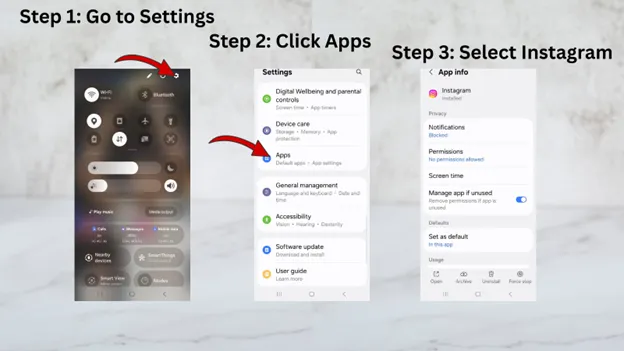
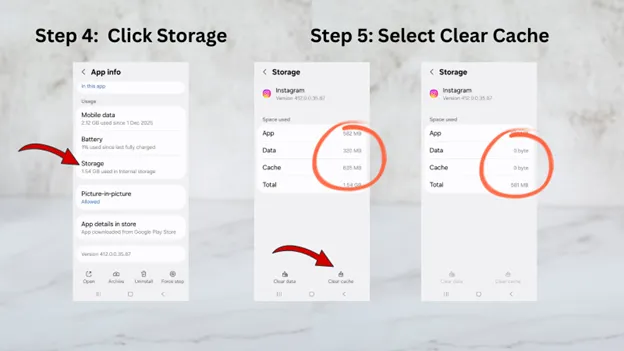
Around 21% of Instagram errors were caused due to corrupted cache files. By clearing the cache, you can improve the app performance by 18% on average. If you are using an Android mobile, go to settings -> Apps -> Instagram -> Storage -> Clear Cache.
Reinstall the Instagram App
After you have cleared your cache, data and restarted your App, are you still not in the game? Uninstall your Instagram app and install it again. It is the only way to fix your app if everything else fails. If there are bugs in your app, reinstalling your app will resolve 46% of your issues. Some cache clearance will not remove all your corrupted local data files; only reinstalling the app solves those issues too.
If the basics don’t fix your Instagram live option, the issue may be linked to your account.
Outcome · RecommendedGet 30 days of social content from your website — in 10 minutes.
Account Specific Reasons for Instagram Live Option Not Working
Some issues are directly linked to your Instagram account. Instagram Live option will not work for every user. You must meet some of their eligibility criteria.
Reason 1: You Haven’t Met Instagram’s Eligibility Requirements
Instagram live option is not a default feature, and it is not provided to every account immediately.
Your Instagram account will receive a live button only if
- Your account is older than 30 days.
- Your account should have a minimum of 1000 followers.
Instagram looks for authentic activity signs before unlocking IG live feature to your account.
Reason 2: Account Restrictions or Violation of Community Guidelines
Instagram accounts are restricted from going live, if there is a violation in Community Guidelines. Accounts with inappropriate content and copyright strikes get restrictions from live features. Guideline violations lead to 29% of feature restrictions. Also, if your account is flagged once, then you are more prone for 2 x future limitations.
Reason 3: Age Restrictions on Your Instagram Account
Instagram live is not available for all users. Users under 16 years of age are restricted from live features. Similarly, 19% of teen accounts don’t have a live option button.
Reason 4: Geographic or Regional Limitations on Features
Instagram test features vary between regions. 12% of Instagram new features roll out regionally. If your account is located in a region where Instagram live feature is still under testing, the live button may not appear. There is no manual fix for this issue.
Reason 5: Account Type or Recent Activity Changes
If you are switching between personal, business, or creator accounts, Instagram triggers temporary feature limitations. Instagram will take some time to re-evaluate your account status. Most live options return automatically within a few days.
Proof · Verified
2k+ grew faster with one tool.
“Is It Me or Is It Instagram?” – Platform wide issues
Sometimes most problems are not because of you, it may be because of Instagram itself.
Instagram Server Outages or Maintenance
Global servers are used for Instagram runs. When these systems go down or undergo maintenance, certain features get restricted automatically.
If the servers are not stable, then the live button will not load properly. These are mostly short-term glitches and get fixed in short duration without any action.
If the Instagram live option is not working, wait 30 – 60 minutes and then try again.
Phased Feature Rollouts by Instagram
Instagram does not release features to everyone at once. It uses phased rollouts, which means that some users get updates earlier and other later. It will affect new live layouts, live scheduling tools, and interactive live features.
Temporary Glitches
Instagram runs A/B tests on certain user groups. It may cause live to disappear for a few days and then reappear.
These glitches are usually not permanent, personal, or linked to violations.
Free · Instant · No signupSee what ZuAI generates from your website — right now.
Paste your URL. Watch ZuAI write a month of brand-on captions in seconds. Preview before you create an account.
What to Do When All Else Fails: Advanced Solutions and Reporting
- If you have tried everything and still miss the “live” button, contact Instagram Help Centre.
Go to
Settings -> Help -> Report a Problem -> Something Isn’t Working.
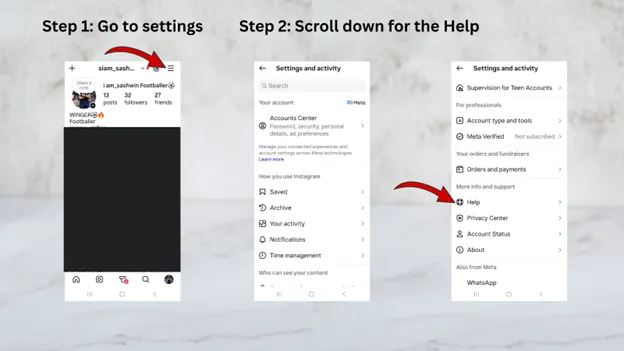
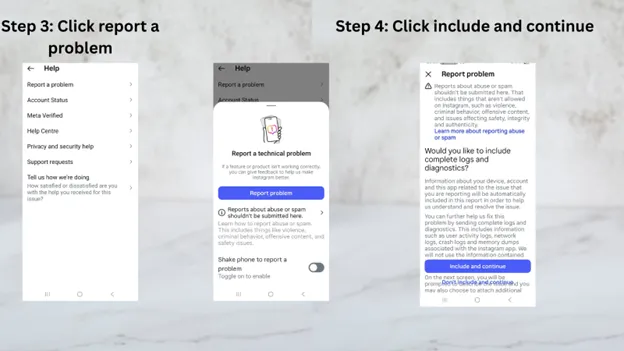
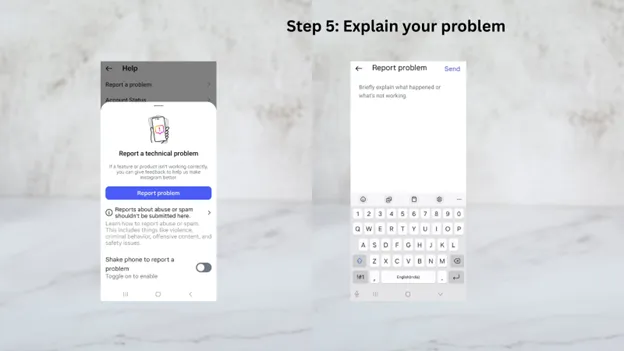
Now your issue is notified to the Instagram Help Centre, and they will help you resolve it.
- Check out official announcements from Instagram. Sometimes they announce updates or changes through their official blog, newsletters, and Twitter/X accounts. Meta acknowledges the issue and shares an update.
Speed · 10-minute setupOne coffee from URL to a full month of scheduled posts.
Drop your URL, brew your coffee, come back to 30 brand-on captions ready to publish.
How to Prevent Future Disappearance of Live Option on Instagram
Once your live feature is back,
- Adhere to strict Instagram Community Guidelines.
- Keep your app and device OS updated.
- Shares, comments, likes and replies on the posts.
- Monitor your account status regularly.
Blank tab. Six open browsers. No clue what to post.


 After · With Indzu
Paste one URL. Get 30 scheduled posts.
How to Go Live on Instagram Again
When Instagram live option disappears, it feels like a bigger issue. So, we have shared a guide to help you identify the problem. Most issues are almost always fixable.
At indzu, we help creators and businesses to amplify Instagram growth without smart ZU AI tool. indzu shares the content strategy and a month worth of posts in less than 20 minutes.
If your live button has disappeared, read this blog to get it back.
If your content feels inconsistent, use ZU AI to stay on track.