Everyone is on social media, and everyone wants to be safe. While we share so much on TikTok, it is very important to ask, “Does TikTok notify screenshots? “Is my data safe with TikTok? Just like Snapchat, will I get notified?
The answer is no; TikTok does not notify you if someone takes a screenshot of your content. It might sound unfair, but that is exactly why this blog will cover everything you need to know about screenshots and screen recording on TikTok.
We will also discuss what we can do to enhance our safety and privacy on TikTok.
 Time killer · Pain
Spending 6 hours writing posts that get zero traction?
Paste your URL. ZuAI turns it into 30 brand-on captions in 10 minutes — no blank-page panic, no generic AI filler.
Does TikTok tell you if you screenshot DMs, stories, or posts?
No, TikTok does not notify screenshots for DMs, stories, Live streams, comments, or anything.
When we say that the TikTok screenshot notification facility is not available, it may be frustrating for you. But remember that TikTok also does not notify for screen recordings.
Outcome · RecommendedGet 30 days of social content from your website — in 10 minutes.
What does TikTok track then?
Here is a table showing what is tracked by TikTok. TikTok will also provide notifications for these actions.
Activity | Will you get notification? |
Like | Yes |
Comment | Yes |
New follower | Yes |
Mention/tag | Yes |
Share | Sometimes/limited |
Duet/Stitch | Usually yes |
Live comments/gifts | Yes |
Here is a table showing the metrics, where TikTok does not give notifications, but you can go and check them.
Activity | Can you see it anywhere in TikTok? |
Video views | ✅ Yes, total view count |
Watch time | ✅ Yes, in Analytics |
Replays | ✅ Usually inside Analytics/retention data |
Saves/Favorites | ✅ Yes, usually as total saves/favorites in Analytics |
Profile views | ✅ Yes, only if Profile View History is enabled |
Proof · Verified
2k+ grew faster with one tool.
Why does TikTok not notify screenshots?
So, now you have understood that TikTok just does not care if anyone screenshots your content.
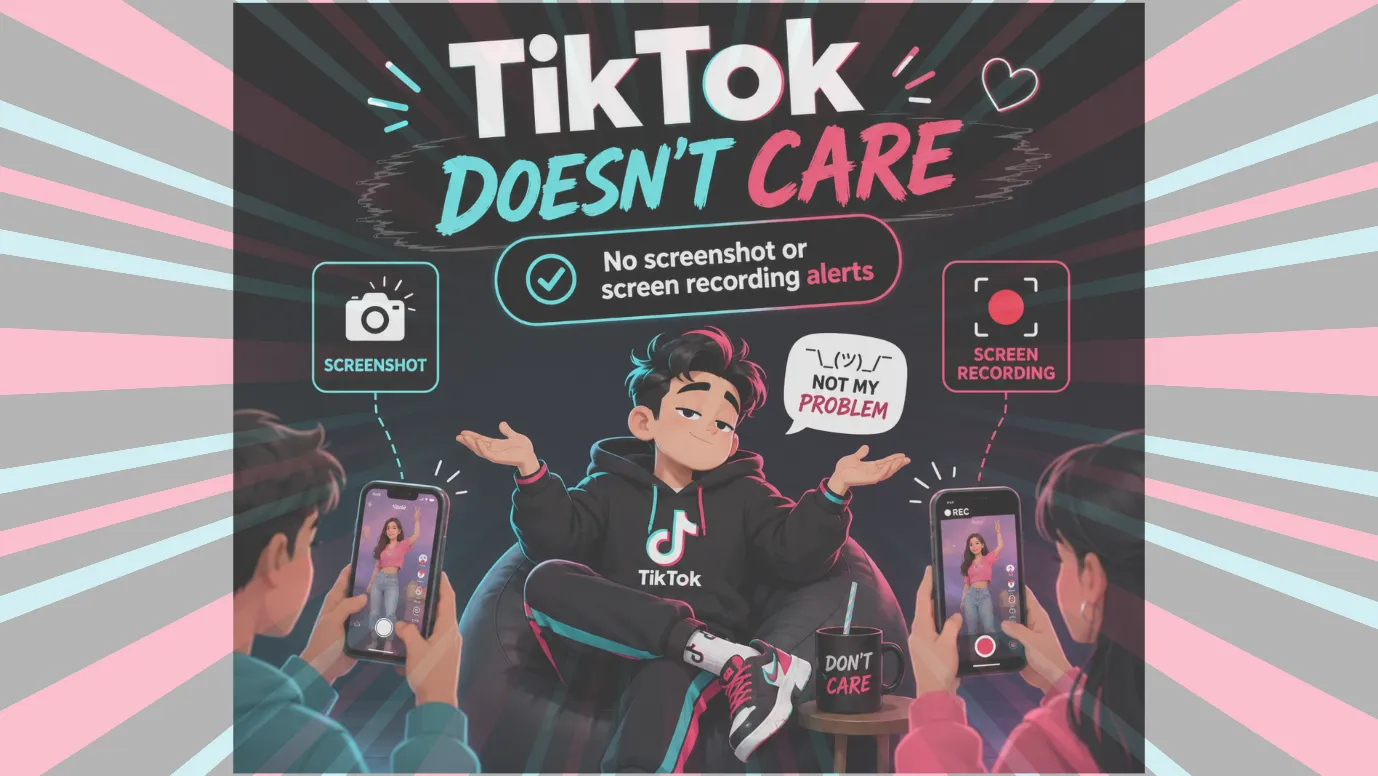
1. TikTok is very famous for short-form content and fast connections.
It believes in making everything more expressive, social, and accessible. That is why it is called a public content platform.
Giving screenshot notifications could make users feel restricted while browsing or interacting with content. This would make the platform less friendly for content sharing and discovery.
2. TikTok focuses on other metrics or signals like number of followers, views, likes, comments, saves, etc.
Therefore, screenshot data does not count as useful for TikTok.
3. Also, giving a screenshot notification could alert users, and they may engage less with other TikTok users.
This could hurt TikTok’s engagement rate, which is why TikTok does not pay much attention to screenshotting or screen recording.
Screenshotting something that is already publicly available does not make that a huge issue.
So, it does not make any noise when users screenshot something.
Why is the TikTok screenshot notification discussed?
There was a buzz due to Nothing Phone users’ screenshots. This happened in late 2024.
Users who had a Nothing Phone could get a local pop-up like “TikTok Detected”, which led to confusion that TikTok had started sending notifications for screenshots.
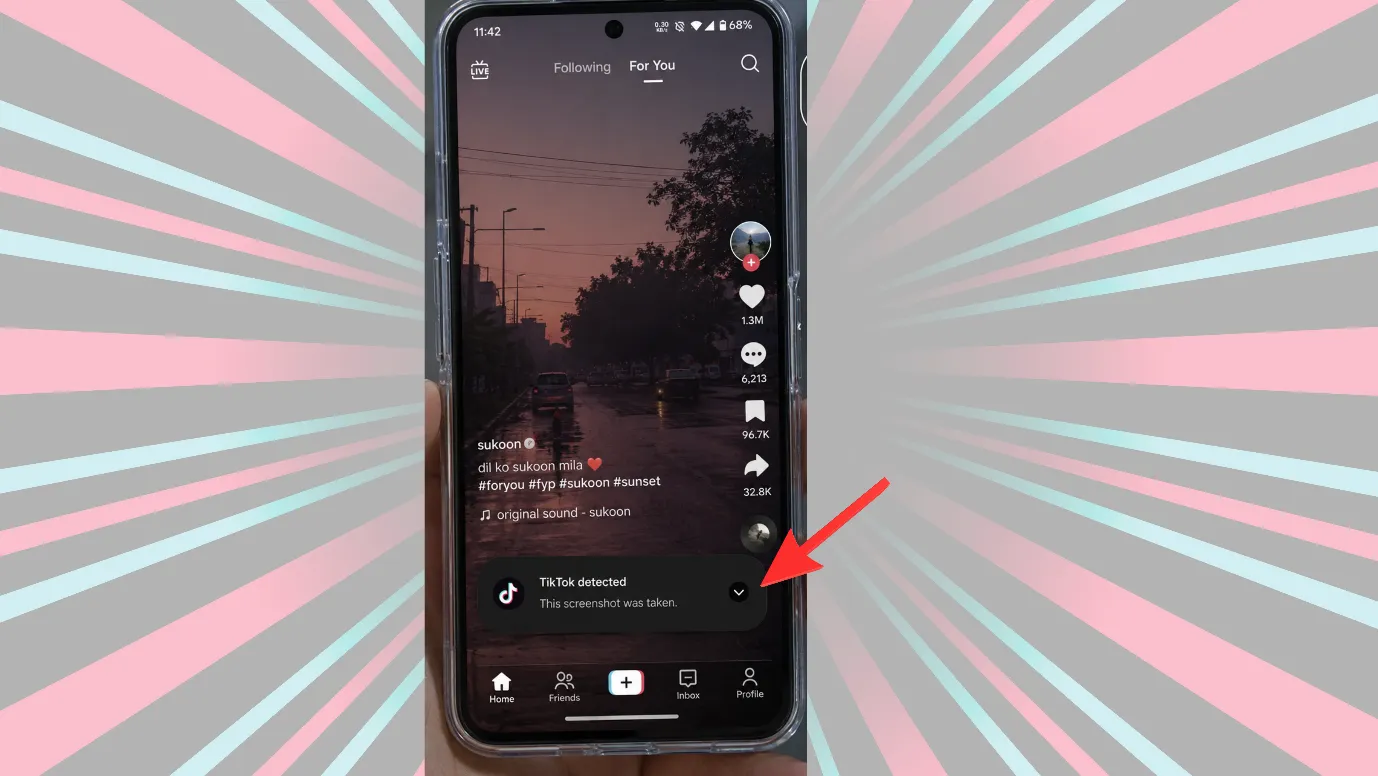
But this was a misconception; the notification came from Nothing OS features.
Although this buzz unmasked a very important question,” Does TikTok notify screenshots?”
Free · Instant · No signupSee what ZuAI generates from your website — right now.
Paste your URL. Watch ZuAI write a month of brand-on captions in seconds. Preview before you create an account.
Let us compare TikTok with other platforms.
Let us see a quick overview of which platforms allow screenshots and which platforms alert users otherwise
Platform | Screenshot Notification? | Where It Applies |
TikTok | ❌ No | Videos, DMs, Stories, Profiles, Lives |
Snapchat | ✅ Yes | Chats, Stories, Snaps, screen recordings |
| ⚠️ Partial | Vanish mode/disappearing photos only | |
| ❌ No | Posts, stories, messages | |
| ❌ No | Chats, Status | |
Telegram | ⚠️ Partial | Secret Chats only |
X | ❌ No | Posts, DMs, profiles |
Discord | ❌ No | Chats, servers |
| ❌ No | Pins, boards | |
| ❌ No | Profiles, posts, chats | |
| ❌ No | Posts, chats | |
BeReal | ✅ Yes | BeReal posts/screenshots |
As you can see, some platforms alert while taking screenshots, so some users wonder, Does TikTok notify screenshots or not.
But as users, we should understand that not all platforms have the same policy. Some platforms want to bring more public content, want users to connect, engage, and express more.
While some platforms want to keep things a bit private, their policies and features differ.
For example:
TikTok → public discovery platform → no screenshot alerts
Snapchat → private/temporary messaging → screenshot alerts make sense
Speed · 10-minute setupOne coffee from URL to a full month of scheduled posts.
Drop your URL, brew your coffee, come back to 30 brand-on captions ready to publish.
How can we protect our Privacy on TikTok?
Although TikTok can allow others to take screenshots or do screen recordings, there are so many things we can do in TikTok to keep things in control.
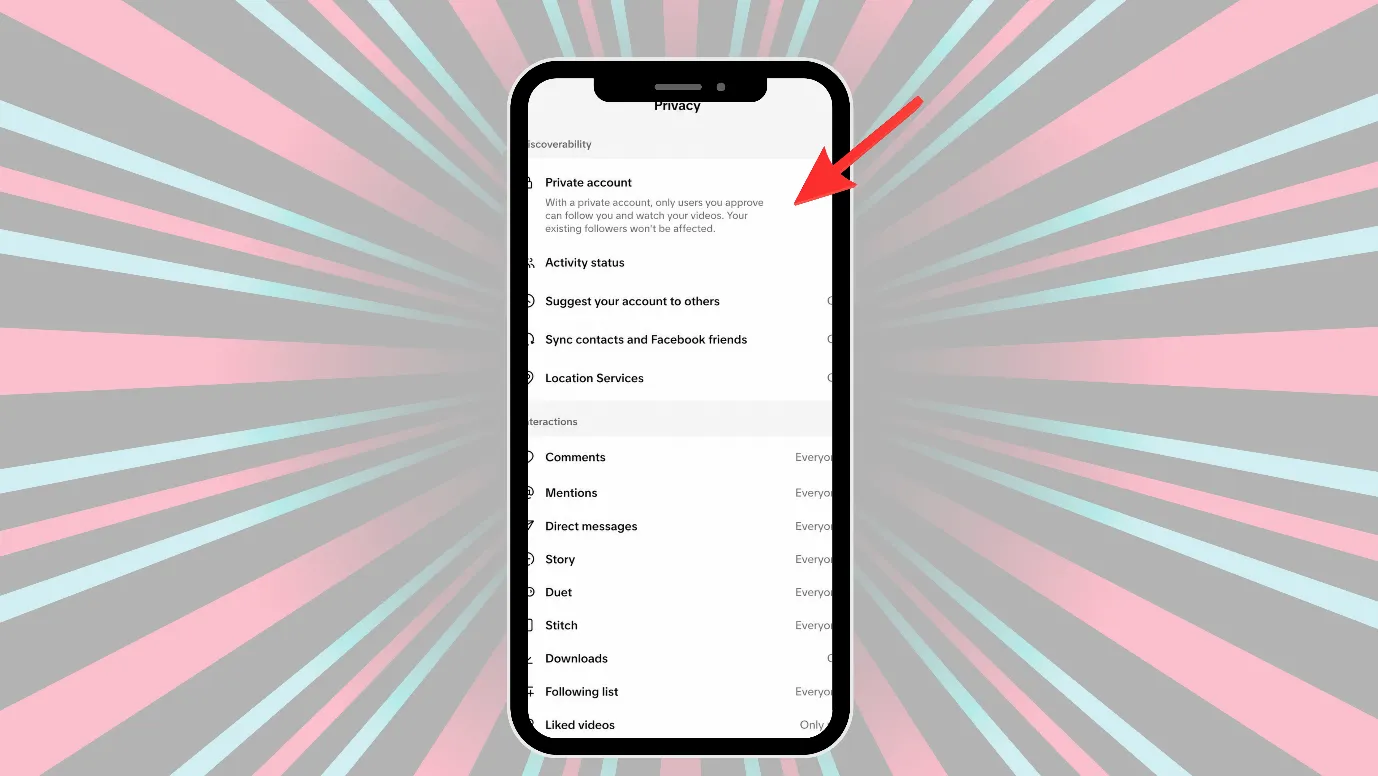
Make your TikTok account private
If you make your account private, then
- People won’t be able to Duet or Stitch with you.
- People cannot download your videos.
- Also, people won’t be able to add your posts to their Stories.
- You have to approve people before they follow you. Similarly, they need approval to watch your videos, LIVE, bios, and likes, or see your followers and following lists.
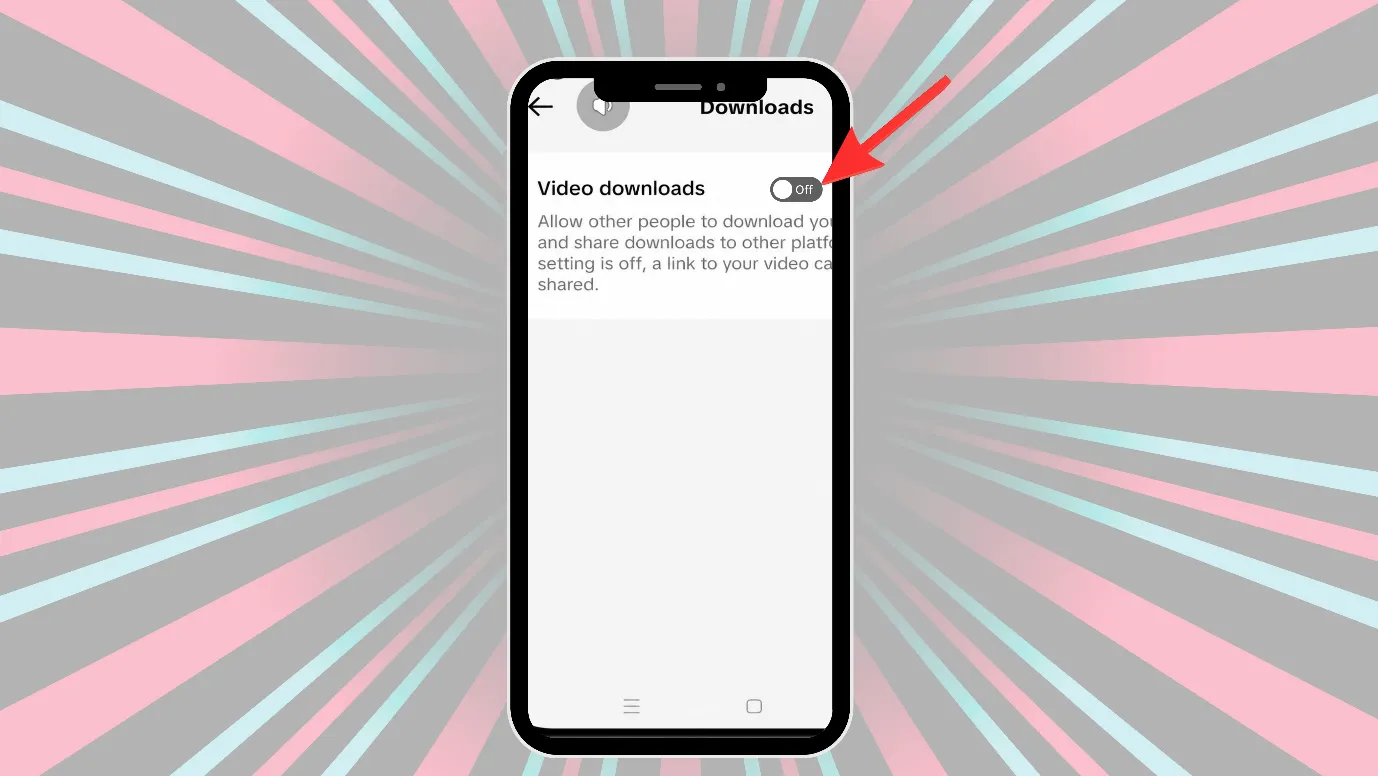
Turn off the video download setting.
If you do not want to turn your account private, you can at least turn off the video download option. On turning that setting off,
- People can’t download videos or photos you’ve already posted or your future content.
- People can’t convert your videos to live photos, GIFs, or directly share your videos or photos to some third-party platforms.
Although they can share your video link through a link or direct messages on third-party platforms.
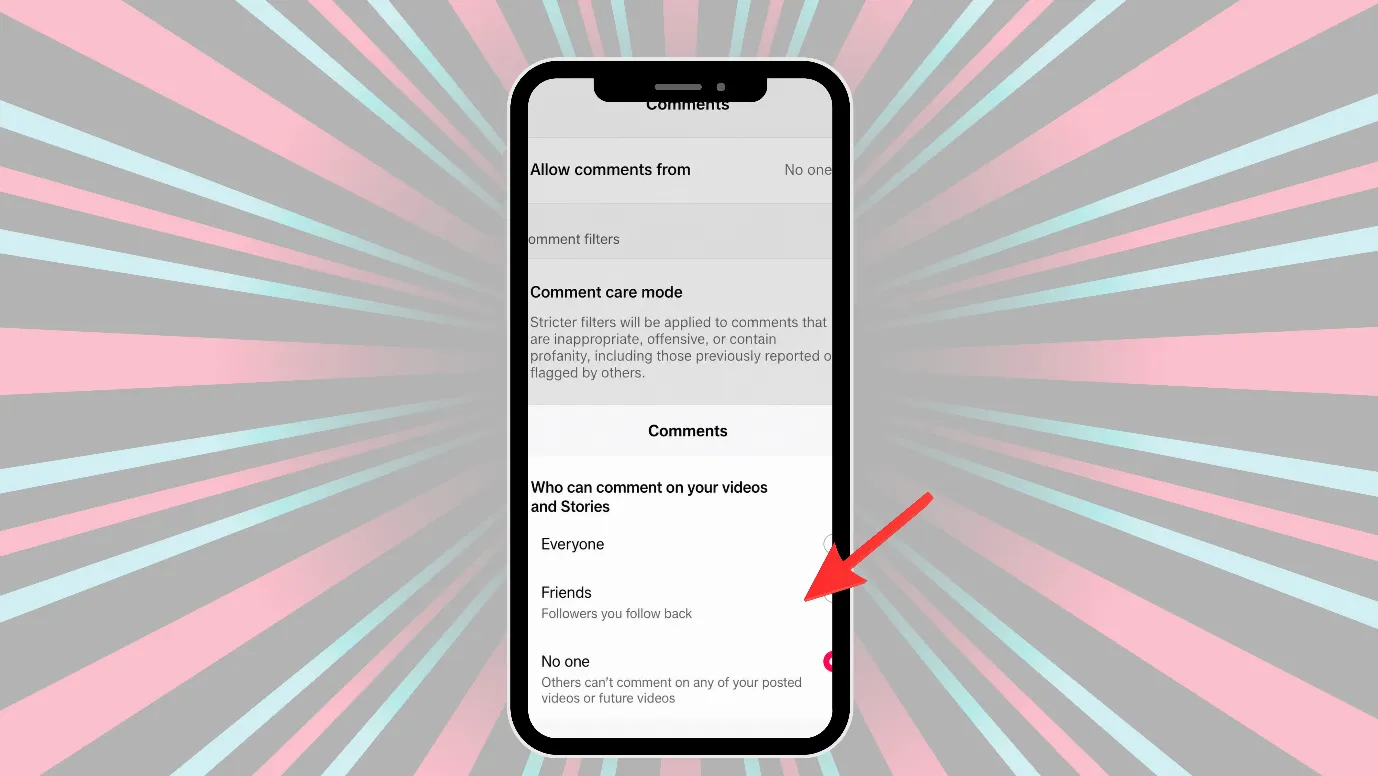
Choose only friends to comment on your posts
In TikTok, you choose who will be able to comment on your posts; you can choose everyone, followers, or friends.
This setting is very useful if you do not want anyone to comment random things below your posts and take screenshots.
Additionally, you can choose to turn off commenting on any of your posts.
Put a watermark on all your content or posts
Before posting any content, you can edit and put a watermark on the content. Even if someone screenshots or screen records your content, the watermark would still be visible.
Turn off the reuse of your content while posting content.
People on TikTok can do a duet or a stitch with your content. While posting any content, you can choose to turn off Allow reuse of content.
On turning off the reuse of your content, people will also be unable to use your content for stickers.
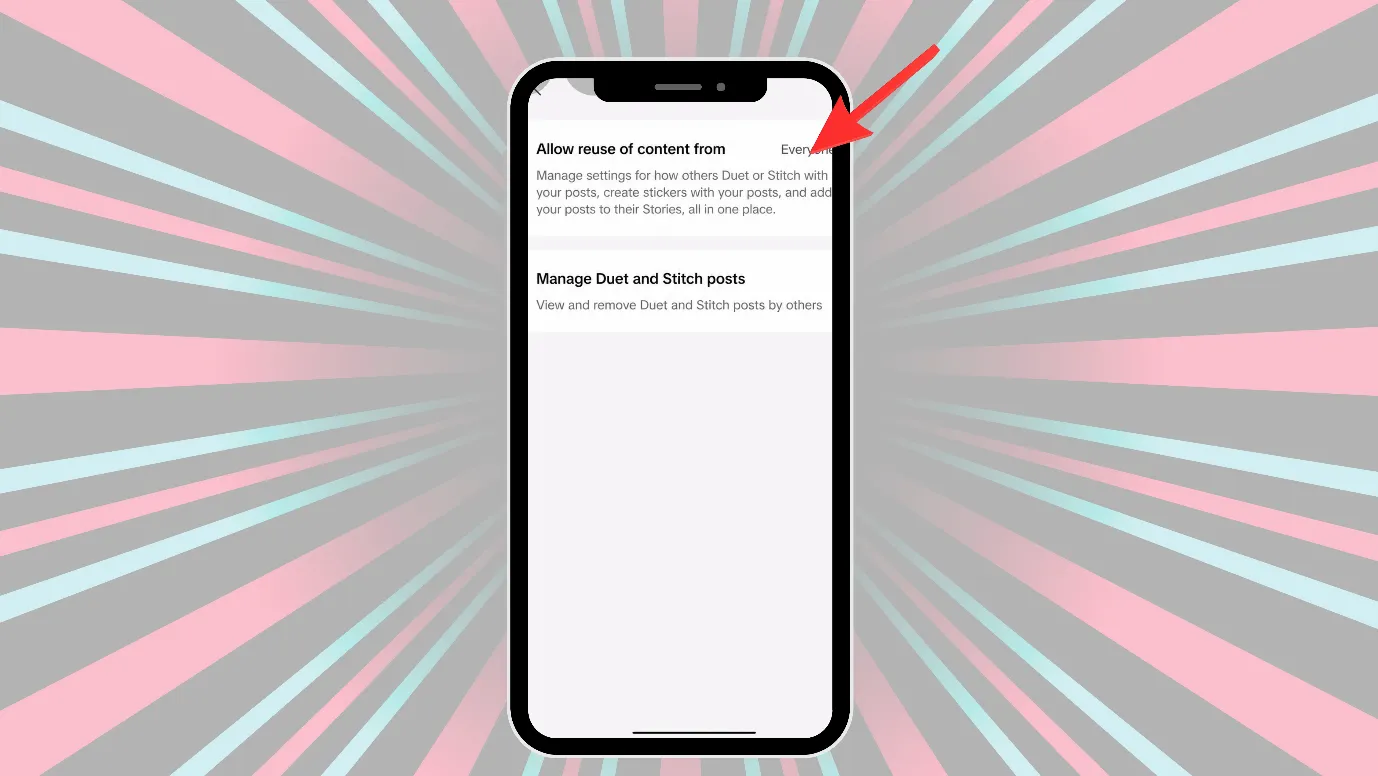
The table below summarizes what you do to make TikTok more private.
Security Step | What It Helps With |
Make the account private | Limits who can see your videos |
Disable video downloads | Prevents direct TikTok saving |
Restrict comments | Reduces spam/harassment |
Add watermark/branding | Protects against reposting |
Use followers-only visibility | Restricts audience |
Turn off the reuse of your content | Stops remixing of your content |
Avoid posting sensitive info | Prevents misuse if screenshotted |
Blank tab. Six open browsers. No clue what to post.


 After · With Indzu
Paste one URL. Get 30 scheduled posts.
Understood TikTok screen recording privacy or screenshot policy?
TikTok is designed to encourage sharing, remixing, and repurposing through features like Duets and Stitches.
So, the platform is generally less restrictive about content interaction than privacy-focused policies.
Prevention is better than cure, so if you do not want anyone to screenshot or screen record your content, do not post any sensitive content on TikTok.
And you can also take steps like making your TikTok account private, disabling video downloads, adding watermarks to the content, turning off reusage of content, etc.
TikTok is built for spreading your content and helping you grow followers.
Time killer · Pain
Spending 6 hours writing posts that get zero traction?
Paste your URL. ZuAI turns it into 30 brand-on captions in 10 minutes — no blank-page panic, no generic AI filler.
FAQs
Q1. Does TikTok send screenshot notifications?
No, TikTok does not send any screenshot or screen recording notifications. So, the original content creator will have no idea if their content is screenshotted or screen recorded.
Q2. Is TikTok going to notify screenshots in the future?
Social media platforms always listen to users’ demands. If many people comment or make reels on screenshot alert or notification, TikTok would listen to its audience.
Q3. Is it legal to screenshot TikTok?
Yes, there is nothing Illegal in taking screenshots in TikTok, but do not use the screenshots for public use.
- You should not just take a screenshot and repost it.
- Do not use screenshots in ads (without taking permission from the original content creator.
- You also should not use screenshots for public or commercial use.
Can someone see if you screenshot their TikTok?
No, the original content owner will not know if you screenshot or screen record their content.
Still, we advise you not to misuse anyone’s content as it can lead to copyright issues or policy violations.
Q4. Is there any TikTok screen recording privacy?
TikTok may have other kinds of privacy policies, but none for screen recording or screenshotting.
Privacy Type | TikTok Support |
Account privacy | yes |
Audience control | Yes (you can choose who can see, comment, or share your content) |
Download restriction | You can turn off your video downloads; no one can directly download your videos |
Screenshot privacy | No |
Screen recording privacy | No |
Q5. If I make my TikTok account private, will that prevent screenshots?
No, making a TikTok account private won’t prevent screenshots, but it can restrict everyone from viewing your profile and content.
If you make your account private, then
- People won’t be able to Duet or Stitch with you.
- People cannot download your videos.
- Also, people won’t be able to add your posts to their Stories.
- You have to approve people before they follow you. Watch your videos, LIVE videos, bios, and likes, or see your followers and following lists.