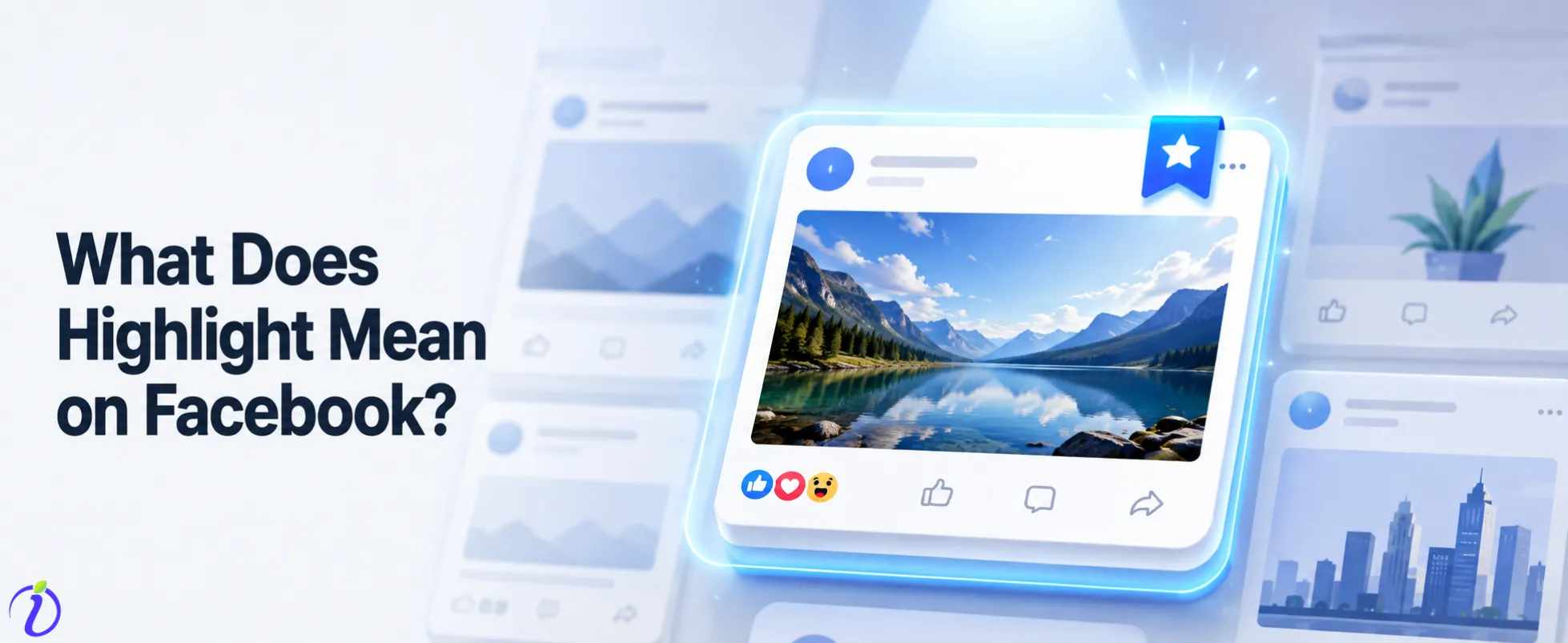
Facebook has grown from a simple social networking site to a powerful ecosystem for businesses and creators. As algorithms change and the attention span of users gets shorter, being able to control what your audience sees first is an advantage to compete. There is one particular feature that drags more interest: Facebook Highlight. The most common question around this is “What does Highlight mean on Facebook”.
Pinned posts, group-wide tags and curated visual stories are the highlights we are going to talk about in this blog.
We are talking about the “visibility architecture”. It enables you to build user journeys, increase engagement, and convert casual visitors into active community members.
 Time killer · Pain
Spending 6 hours writing posts that get zero traction?
Paste your URL. ZuAI turns it into 30 brand-on captions in 10 minutes — no blank-page panic, no generic AI filler.
What does Highlight mean on Facebook
Whether your question is
How do you highlight on Facebook? Or
How to add highlights in Facebook? Or
How to click highlight on Facebook? Or
What does highlight do on Facebook,
You have landed on the perfect blog that shares complete details about all these.
Pillars of Facebook’s Visibility Architecture
Highlighting on Facebook isn’t a one-time action, but a multi-faceted way of curating content. Knowing the difference between these features is critical to keeping yourself organized on social media.
Pinning Posts to the Top of Your Feed
Pinning is the easiest way to control the “above the fold” experience on your business page. When you pin a post, it will remain at the top of your feed as long as you require. This is your digital billboard for announcements, promotions or evergreen content that defines your brand.
How to use the @highlight command in Facebook Groups
The @highlight command is a very powerful but sensitive tool in Facebook Groups. This feature enables group admins and moderators to alert every member of a group simultaneously with a command. This way, your message reaches everyone and gets high visibility.
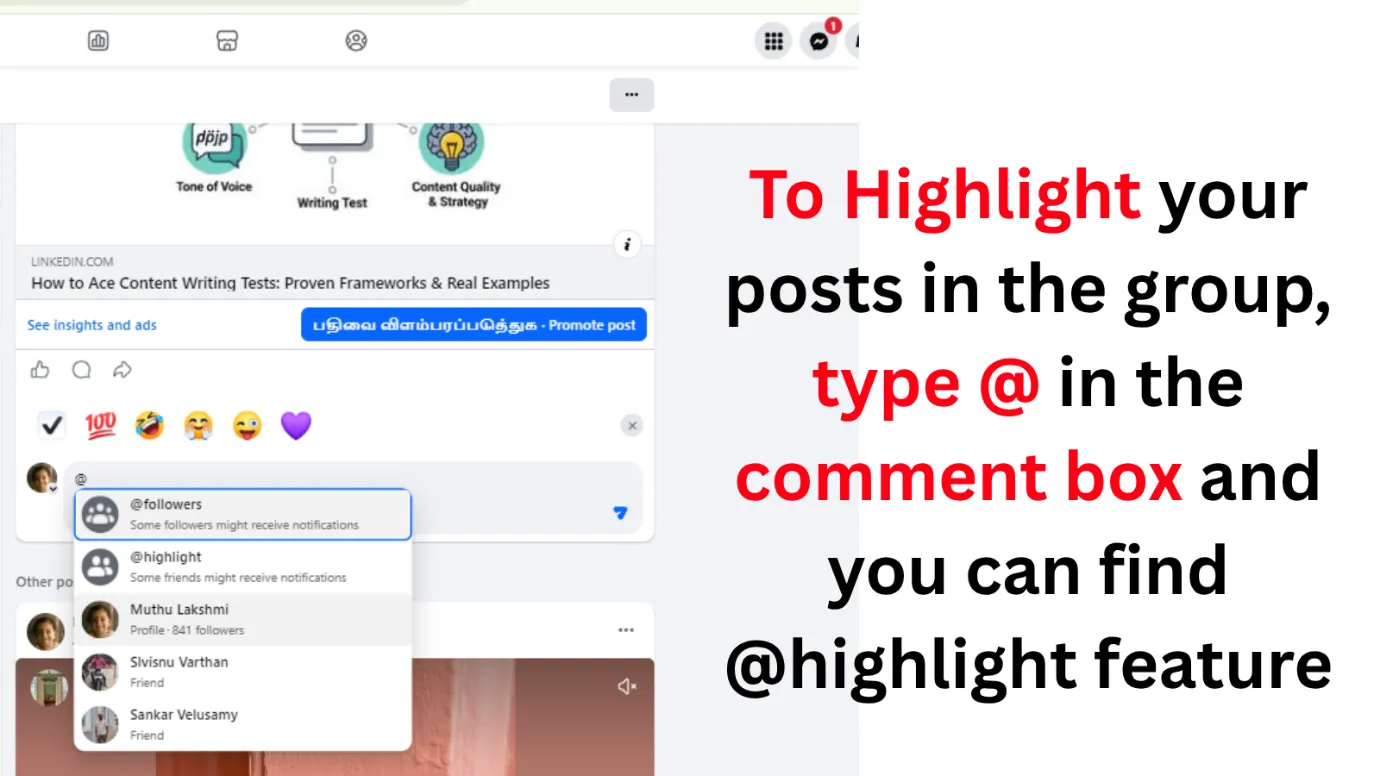
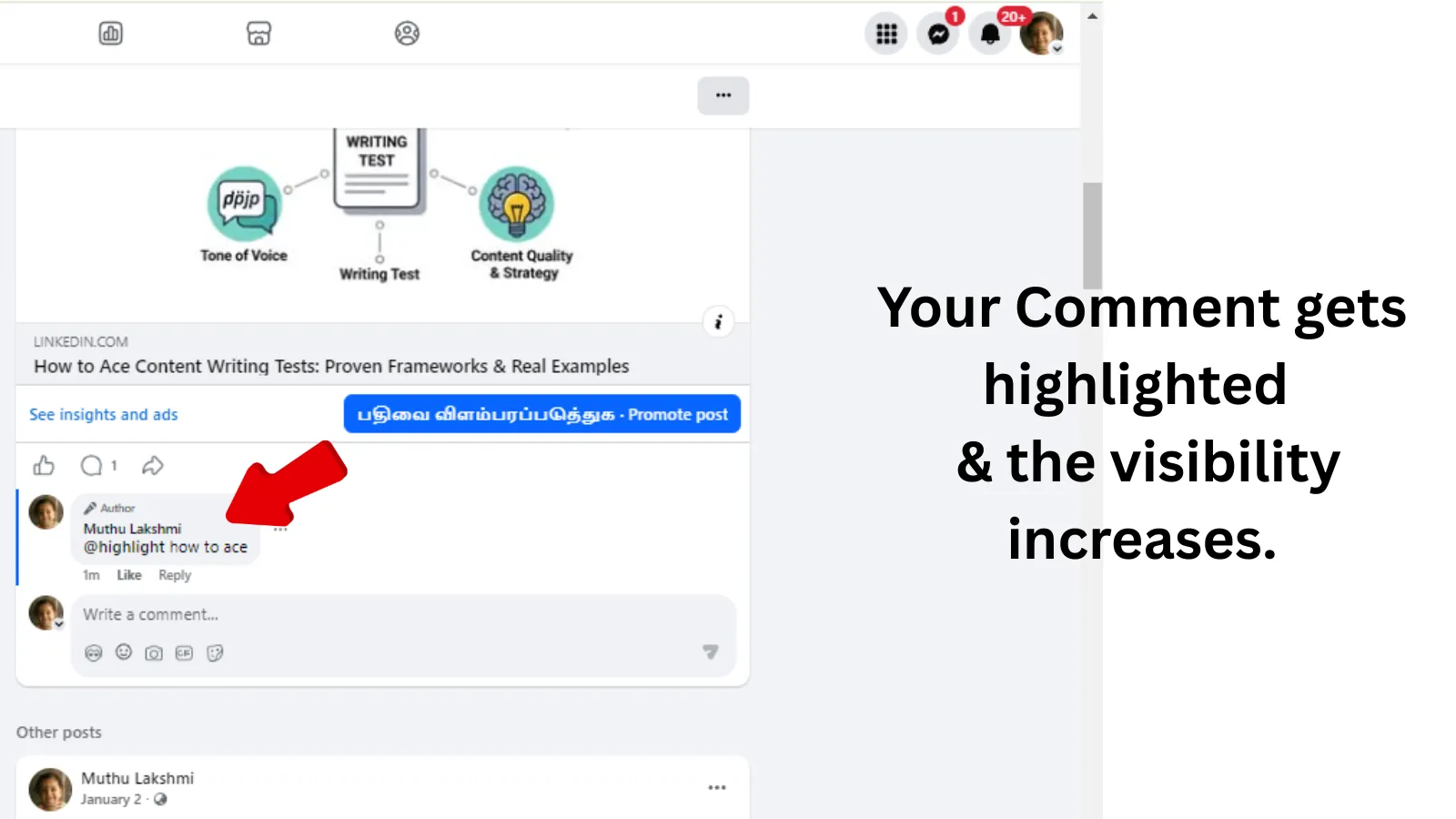
But, we strongly recommend you to use this only for emergency or rare occasions. Abusing this excellent feature may result in members muting your notification or leaving the group altogether.
How to Create Facebook Story Highlights for a Visual Portfolio
Story Highlights are the “best of” your temporary content, curated. Unlike normal Stories that vanish after 24 hours, Highlights stay on your profile forever. Organizing these creates a visual portfolio that will allow new visitors to quickly grasp your brand identity, services and past success stories.
Outcome · RecommendedGet 30 days of social content from your website — in 10 minutes.
How to Pin a Post to the Top of Your Business Page
Pinning a post is the fastest way to boost traffic to targeted marketing campaigns or important updates.
Desktop Interface – Step by Step
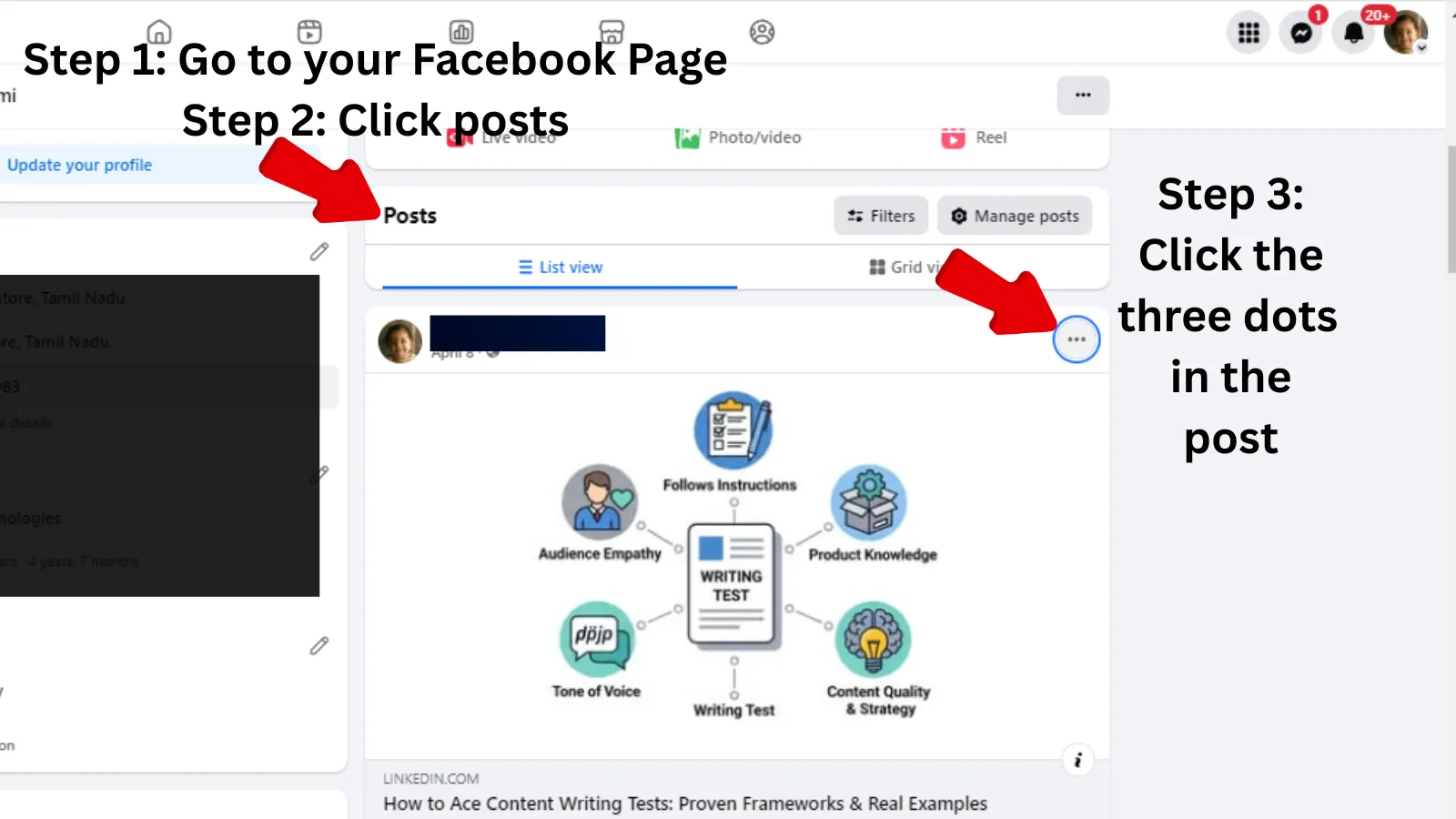
Pin a post to your business page from a desktop:
- Navigate to your business page’s timeline.
- Locate the specific post you want to pin.
- Click the three-dot menu icon (…) in the top-right of the post.
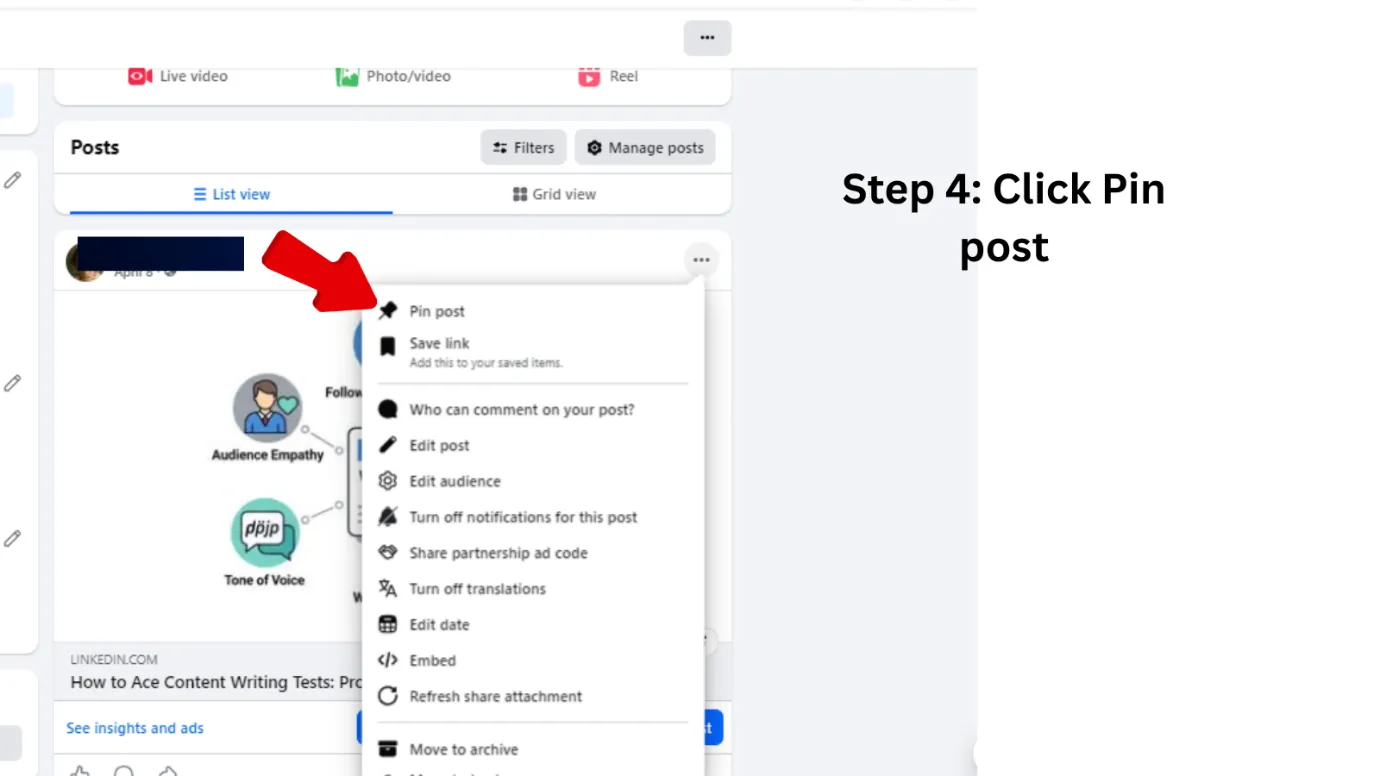
- Click the dropdown menu and select “Pin post”.
When pinned, pinned posts will show a pin icon to let you know it’s now at the top of your feed.
How to Add Highlights on Facebook in Mobile
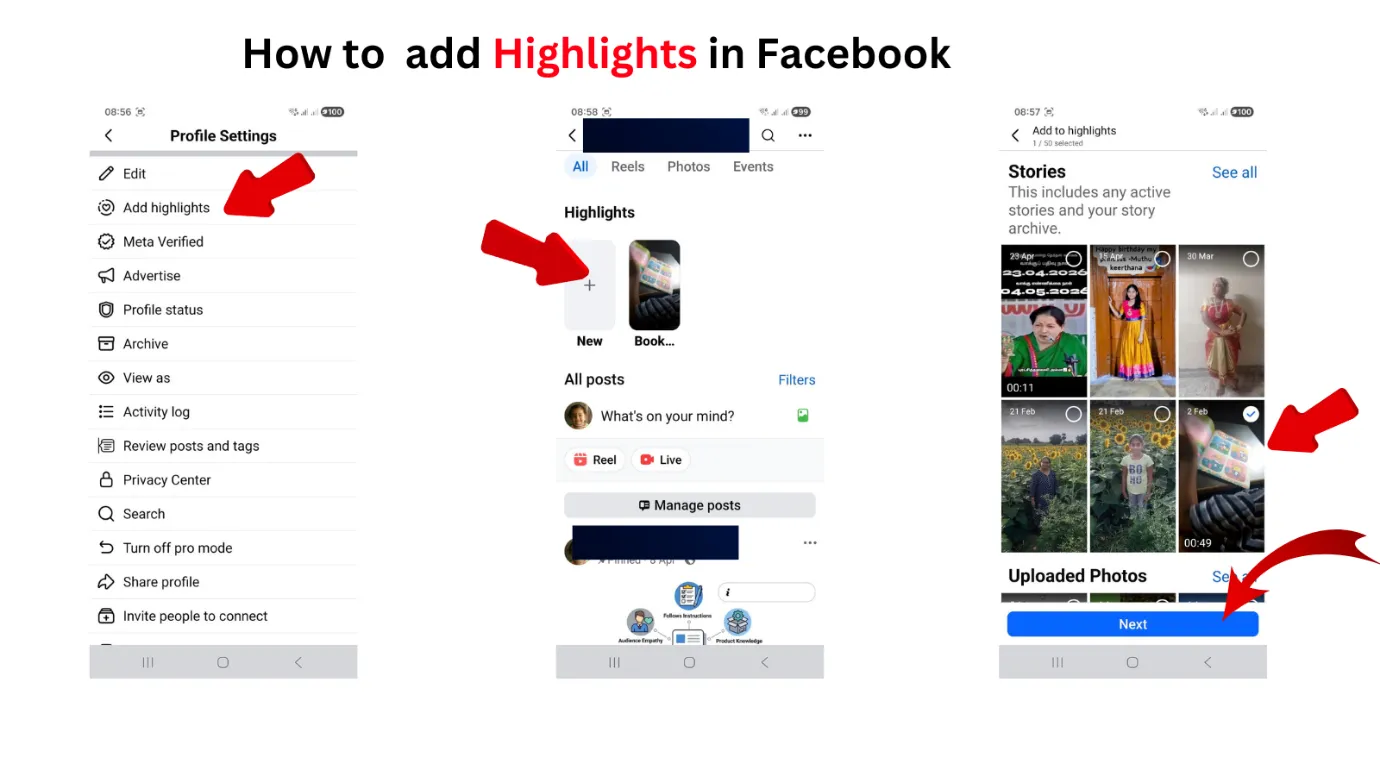
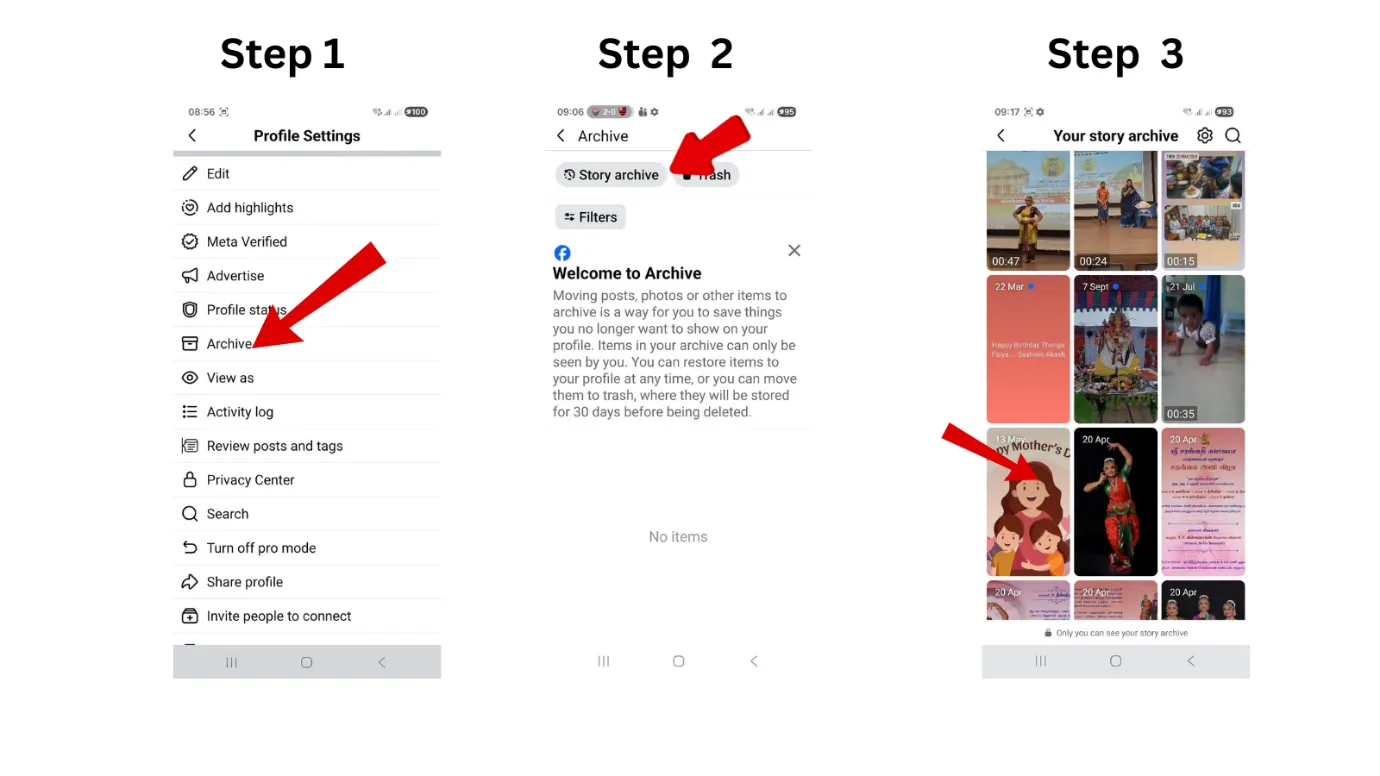
Bringing back posts from archive and posting them in Highlights will show your posts in the top. Here are the step by step instructions.
- Open Facebook app and click your profile picture.
- Click profile settings.
- Under Profile settings look for “Add highlights.”
- You are taken to Highlights section.
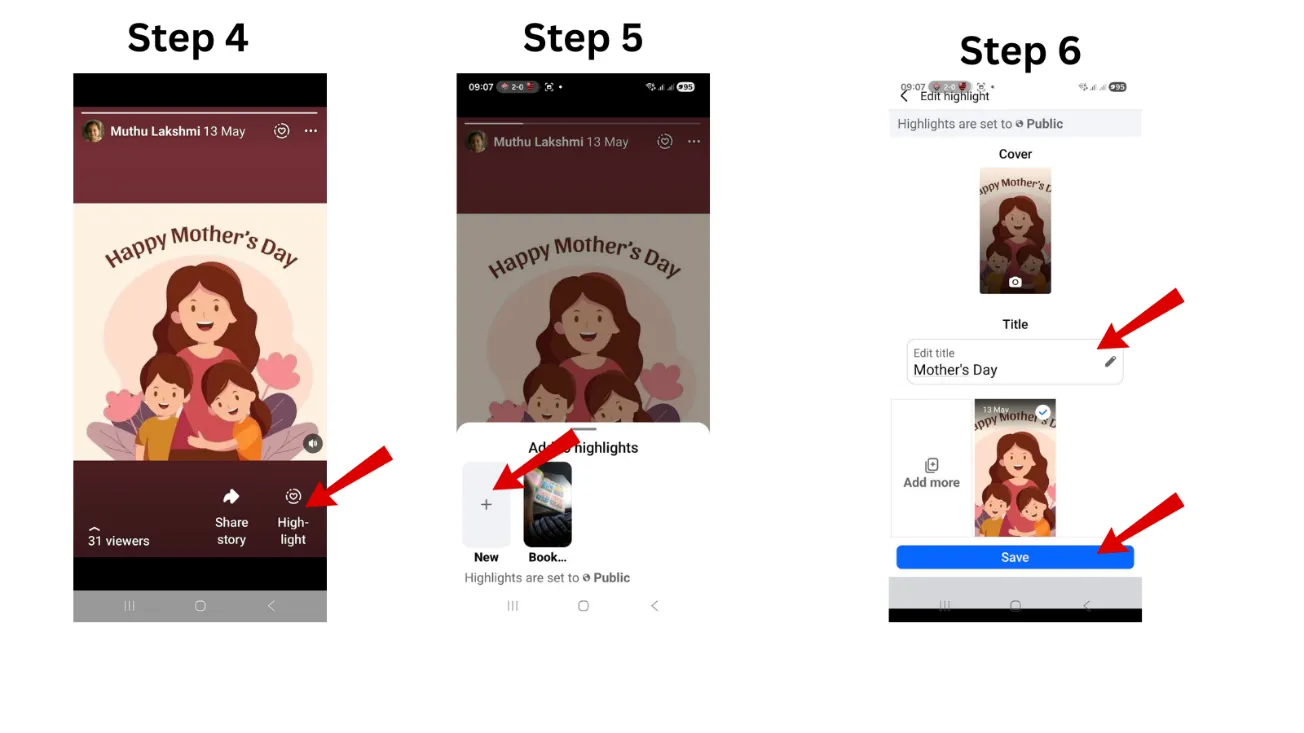
- Click the “+” symbol under Highlights. You are taken to the stories and photos section.
- Choose the story or photos that you want to add to highlights and click “Next.”
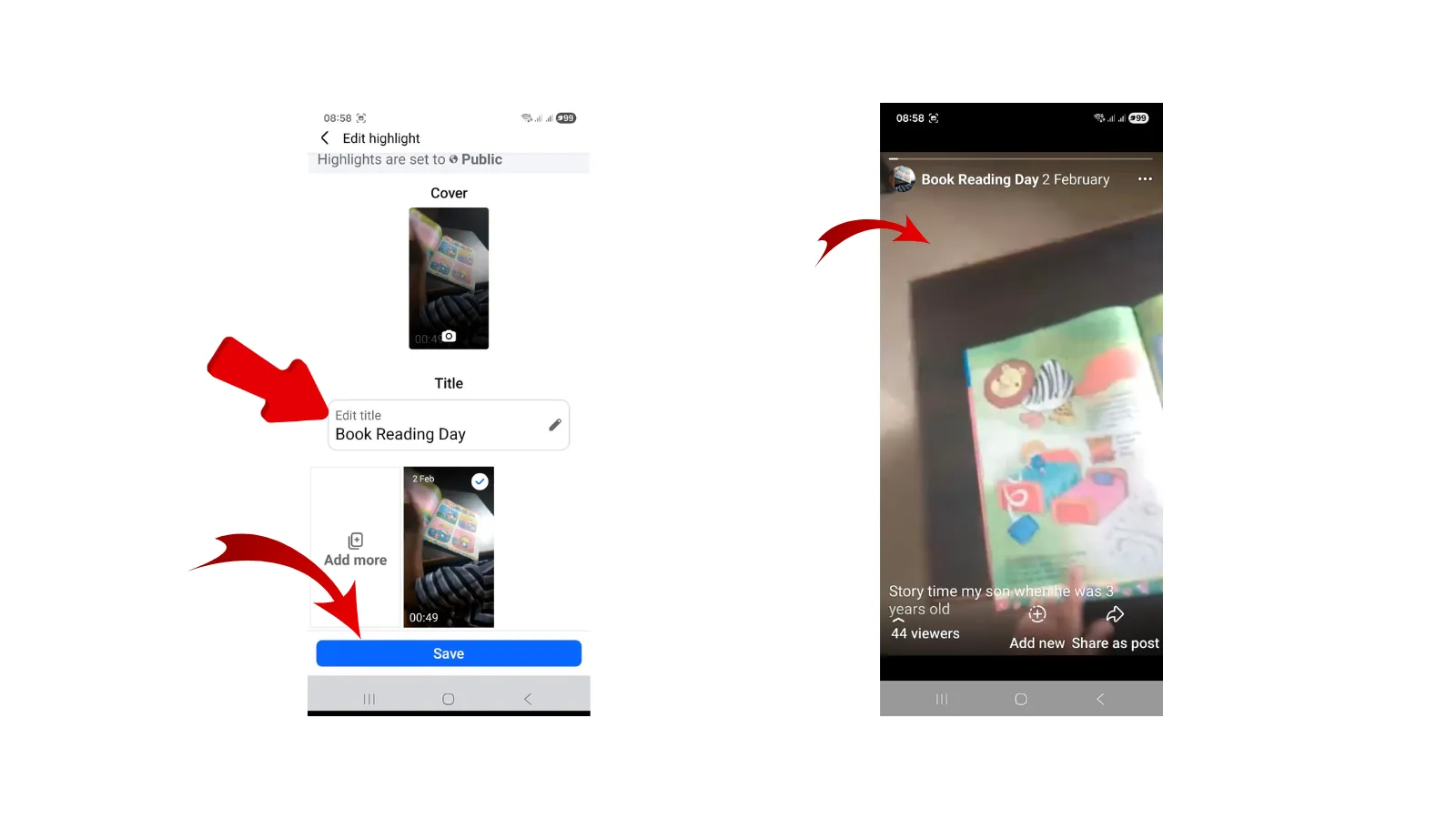
- Choose a Title name and click “Save.”
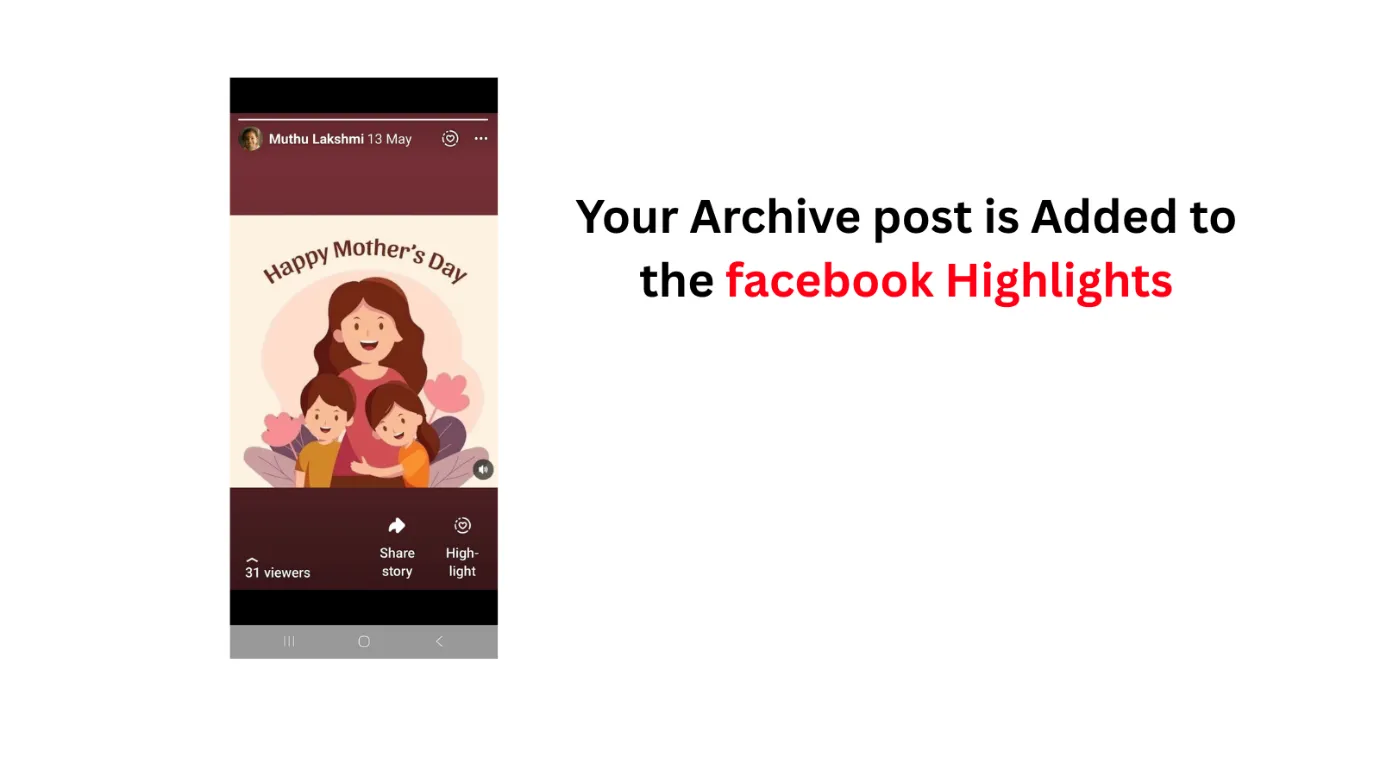
- Your archive post is moved to the Highlights section. It will stay in Highlights until you remove that. You can also add as many highlights as required.
Similar to Instagram Highlights, Facebook Highlights remain in your feed forever.
 Select the Right Content When to Pin vs. When to Update
 Select the Right Content When to Pin vs. When to Update
Pick content that is aligned to a high-level business objective. Great examples are high-performing customer testimonials, registrations for upcoming events or seasonal sales. Skip low engagement posts or daily posts that quickly become irrelevant.
Proof · Verified
2k+ grew faster with one tool.
How Group Moderators Can Make Use of the @highlight Feature
The @highlight tag is a two-edged sword. It works really well for critical updates. However, if abused there is a high social cost.
Use the @highlight Tag to Increase Page Visibility
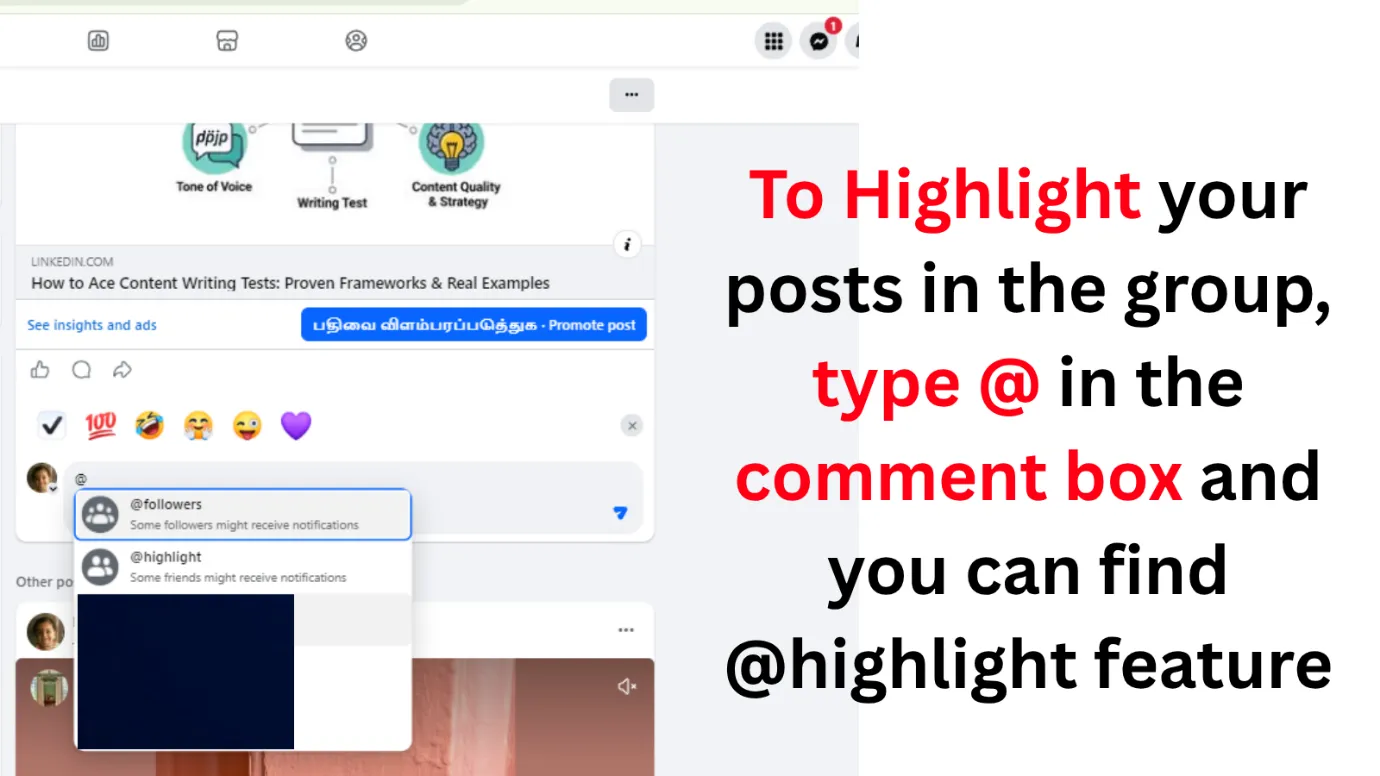
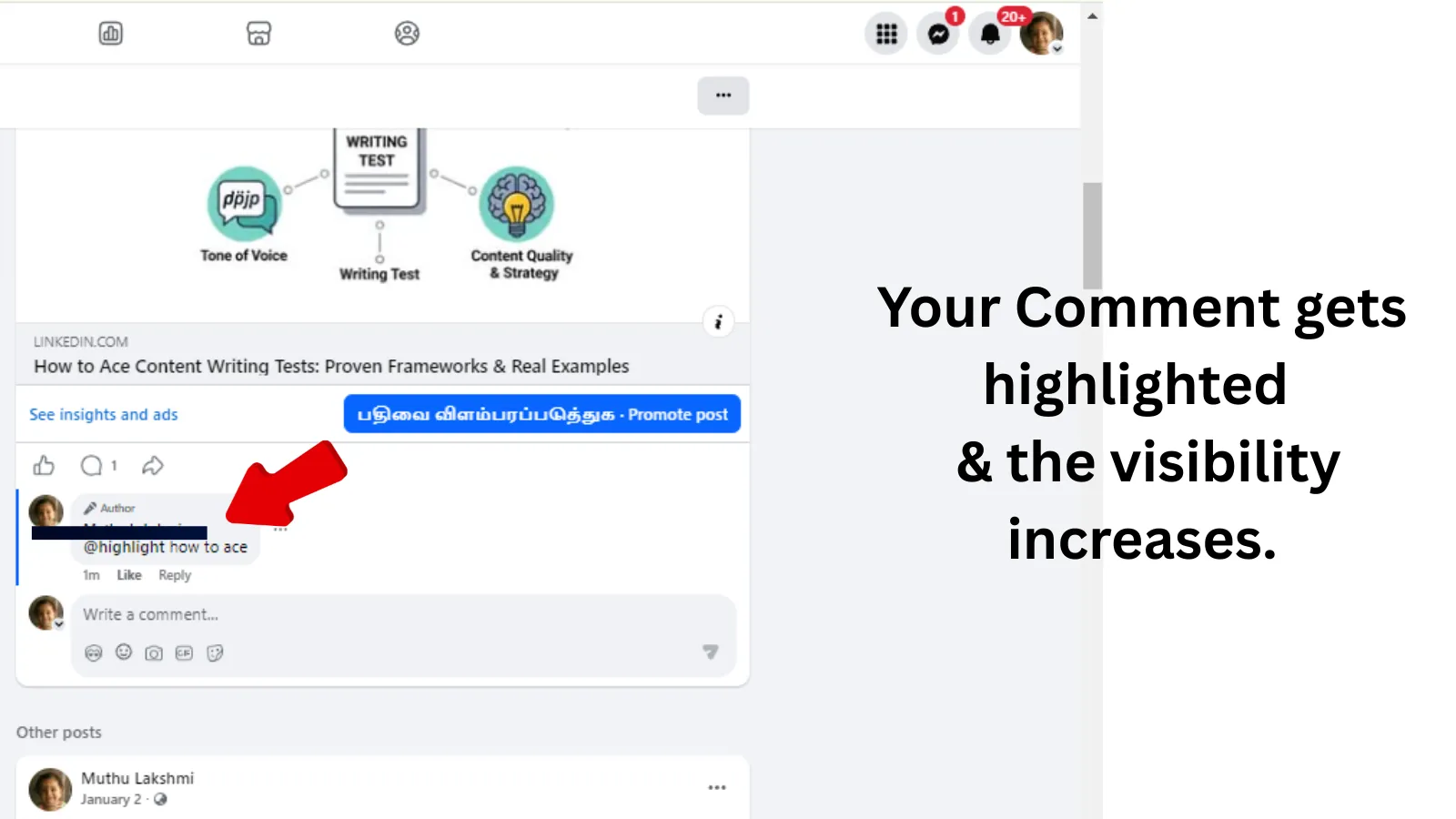
Just type “@highlight” in your group comment or post body. Facebook will send a notification to all group members. This makes sure that even those who aren’t actively checking the app will see your message.
Rules and Limits of Administrative Privileges
This feature is for administrators and moderators only. It’s only available for Facebook Groups, not personal profiles or business pages. Always check your settings to make sure you are able to receive these notifications, as some groups may disable administrative tagging privileges.
How to Drive User Engagement Without Bombarding Your Audience
Save this for something big, like a new product launch or something like a community emergency that just can’t wait. Use it no more than once a day so you don’t lose the trust of your members and keep interaction rates high.
Free · Instant · No signupSee what ZuAI generates from your website — right now.
Paste your URL. Watch ZuAI write a month of brand-on captions in seconds. Preview before you create an account.
From Stories to Permanent Facebook Highlights
Your Story archive is full of evergreen content. Making them permanent highlights results in a pro, cohesive look.
How to Access Your Story Archive
Want to see your old stories? Head to your profile and tap the three-dot icon, or “More,” and choose “Story Archive.” Here you can see all the stories you’ve posted so you can create the best moments to add to your highlights.
 Choosing a Good Image and Title for Your Post
 Choosing a Good Image and Title for Your Post
The visual identity of your highlights is equally important as the content. Select a custom cover image that reflects your brand colors and professional profile picture. Provide each highlight with a descriptive and clear title to make the user experience intuitive and easy to navigate.
Organization Spotlight: Creating a Consistent Social Media Presence
Organize your stories into logical categories. Such as “Customer Testimonials”, “Behind the Scenes”, “FAQs”, or “Team Spotlights”. This categorization helps users to go through your brand history without having to scroll through your whole timeline.
Speed · 10-minute setupOne coffee from URL to a full month of scheduled posts.
Drop your URL, brew your coffee, come back to 30 brand-on captions ready to publish.
Strategic Content Management: The Marketing Advantages of Highlighting
Highlighting is an essential part of Facebook Marketing because it gives you the power to curate the user’s first impression.
Displaying Customer Testimonials as Social Proof
Pinned posts with positive customer reviews give instant credibility. It helps to reduce the sales cycle and build trust because a new user coming to your page will see your best feedback right away.
Marketing for Product Launches and Time Critical Events
Highlighting ensures that your most important messages are never lost. If it is a time sensitive event, pin the link to registration and keep updating it periodically to build momentum as the event date approaches.
Highlights as Content Curator for New Visitors
New visitors often don’t scroll far back in your history. You can pin a “Start Here” post or an introductory video so you can curate their path and make sure they see the most important information first.
Blank tab. Six open browsers. No clue what to post.


 After · With Indzu
Paste one URL. Get 30 scheduled posts.
High-Profile Post Management and Comment Moderation
High visibility means high traffic, and with that comes the possibility of unwanted comments or spam.
Handling the Increased Feedback and User Engagement
Content that is highlighted will get more reactions and responses. Spend some time in the comments during the first 24 hours of a pinned post to help build the community and increase algorithmic reach.
Filtered Responses with Automation
On pages with a lot of volume, manual moderation doesn’t scale. Automated tools can help you manage interactions by automatically filtering out spam and identifying high-value comments. This keeps your response time low, while keeping the community a safe place to be.
Protecting Your Page from Spam, Malicious Links and Malformed Data
Automated Moderation tools are a firewall, protecting your pinned posts from malicious links and harmful bots. That’s especially the case if you’re running high-visibility marketing campaigns, because one bad link can really do a lot of damage to your brand’s reputation.
Determine administrative bulk actions for selected comments
You may see questions repeated on popular posts. Use bulk actions to archive or hide irrelevant interactions to help keep the conversation on point with your core message.
Time killer · Pain
Spending 6 hours writing posts that get zero traction?
Paste your URL. ZuAI turns it into 30 brand-on captions in 10 minutes — no blank-page panic, no generic AI filler.
Best practices to sustain a positive user experience
The quality of a curated page hinges on its relevance and functionality.
Interaction Tracking: How to Respond to Volume Feedback
Don’t let your highlights become static graveyards of old information. Check your pinned posts interactions regularly. Answer questions, pin helpful comments at the top of the comment thread and engage with your community to build long-term loyalty.
Content Quality Check: Do Your Highlights Match Your Profile Picture and Brand Voice?
Your profile picture, pinned posts and highlights should feel like one cohesive unit. If your profile picture is bright and cheery, make sure your highlight covers and post graphics are too. Consistency = identification.
Frequency Balance: How Often Do You Use Global Tags?
Balance is the secret to longevity. The downside of using global tags too often is that it causes “notification fatigue” where users begin to ignore your updates. Major feature updates or critical community news that is of value to the group as a whole should use these tags.
Outcome · RecommendedGet 30 days of social content from your website — in 10 minutes.
Summary
Mastering Facebook highlights are not just about knowing where to click. It’s about complete control of your brand’s Visibility Architecture. Pin strategically, curate your Story archive and use smart moderation tools to build a sophisticated, high-performing presence that drives real business results.
If you want to succeed you have to commit to a regular auditing and refresh cycle. A static profile signals that your brand is not active. Today, pin your best piece of content, curate your highlights to reflect your current offerings, and track your engagement metrics to see what’s working. Don’t just use these tools to broadcast, use them to build a community that feels guided, valued and protected. Every highlight you create is an invitation to your audience – ensure the journey they take is clear, consistent and undeniably professional. By implementing these practices, you’ll transform your Facebook page from a static feed to a dynamic marketing engine that fuels your long-term growth goals.