Have you been judged by your family members or friends for being online on Instagram? It happens a lot of times, we get judged by others, and cannot explain to them the necessity.
That is why so many social media platforms like Instagram have privacy options like turning off active status. Today, we will learn how to turn off active status on Instagram.
But along with turning off active status, there are also some other limitations, which we also discuss in this blog. We will also discuss some other smart ways to always appear offline on Instagram. Let’s cover all of them.
 Time killer · Pain
Spending 6 hours writing posts that get zero traction?
Paste your URL. ZuAI turns it into 30 brand-on captions in 10 minutes — no blank-page panic, no generic AI filler.
Let us turn off active status on Instagram
If others don’t need to know or track your own online Instagram time, then it’s better to turn it off.
Here are the steps on how to turn off active status on Instagram.
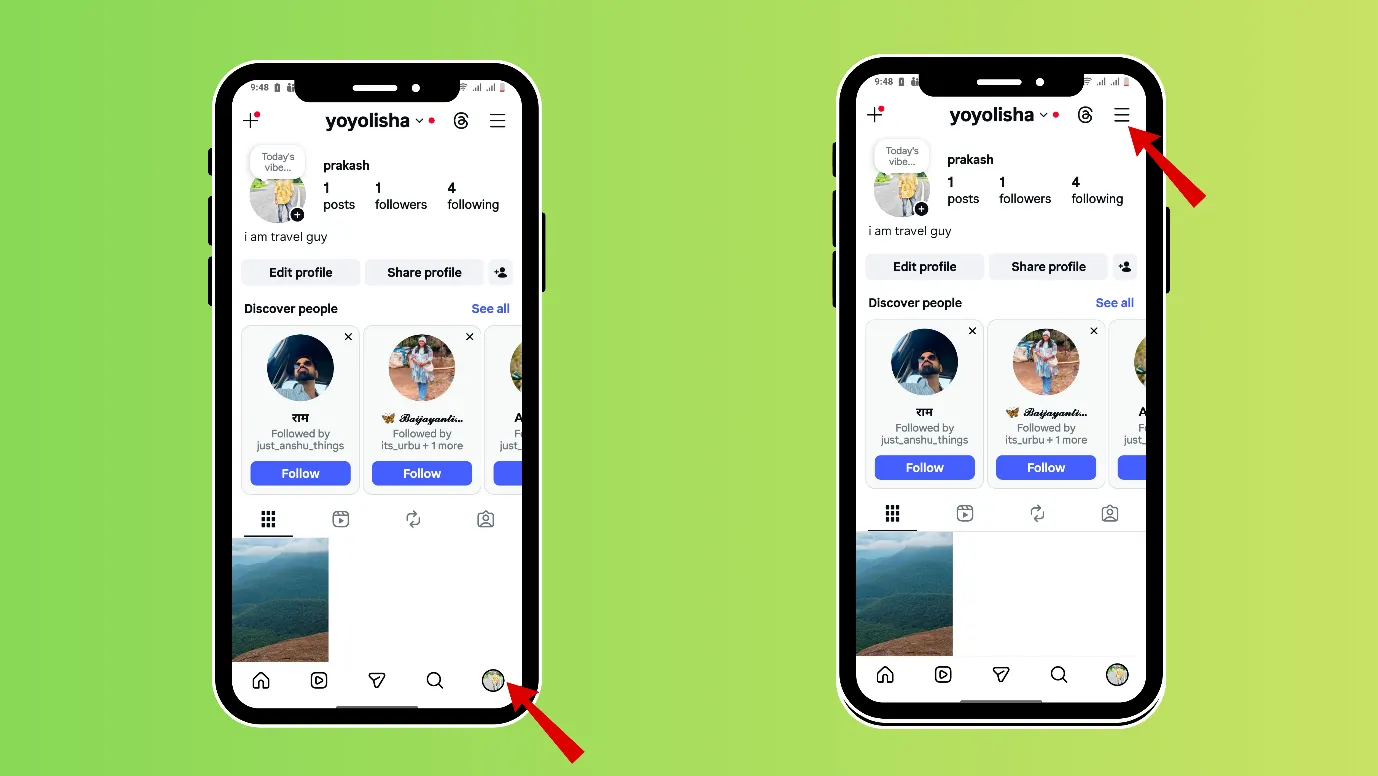
1. Open your Instagram and click on your profile picture at the bottom right.
2. Now, click on the three vertical bars in the rightmost upper corner (hamburger icon)
3. Scroll down and reach “How others can interact with you” and tap on “Messages and Story replies.”
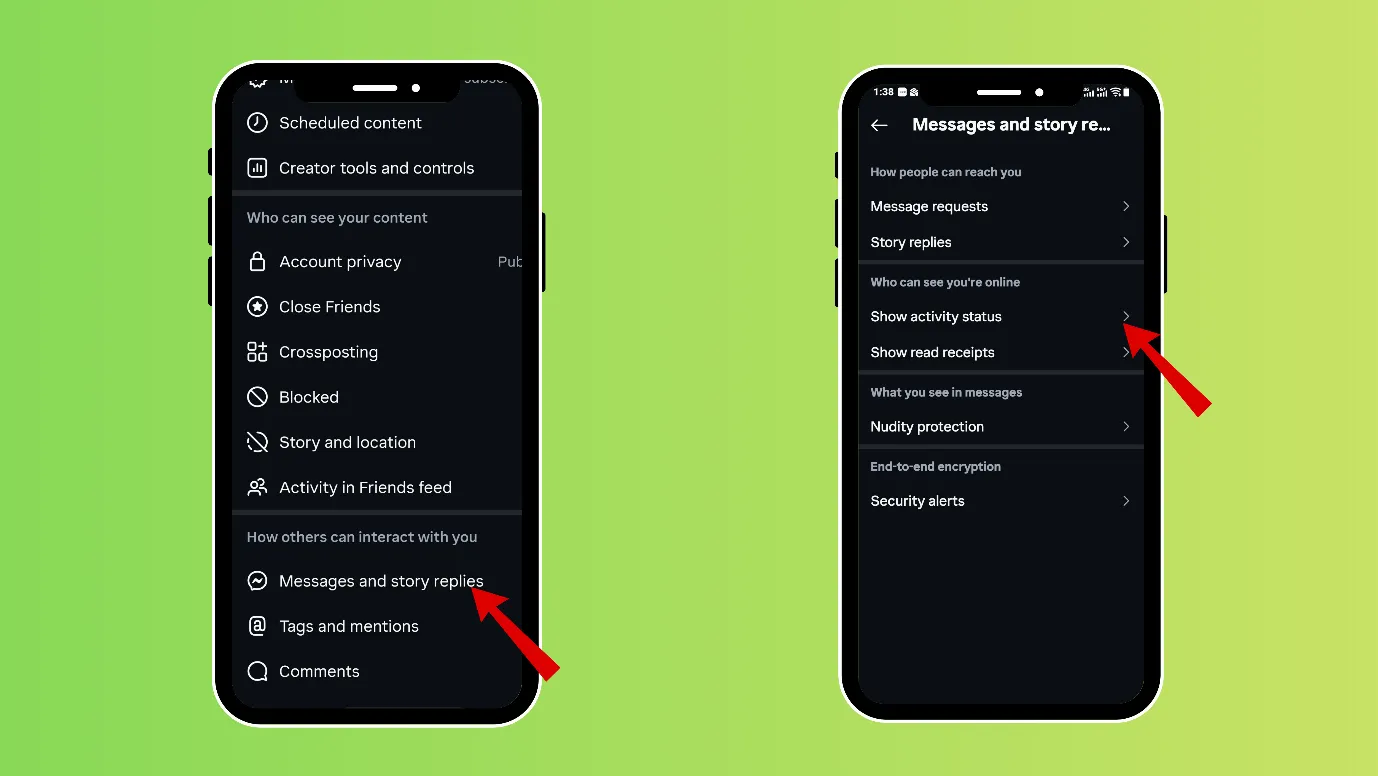
4. Next, tap on “who can see you are online”, and choose “show activity status and turn it off.
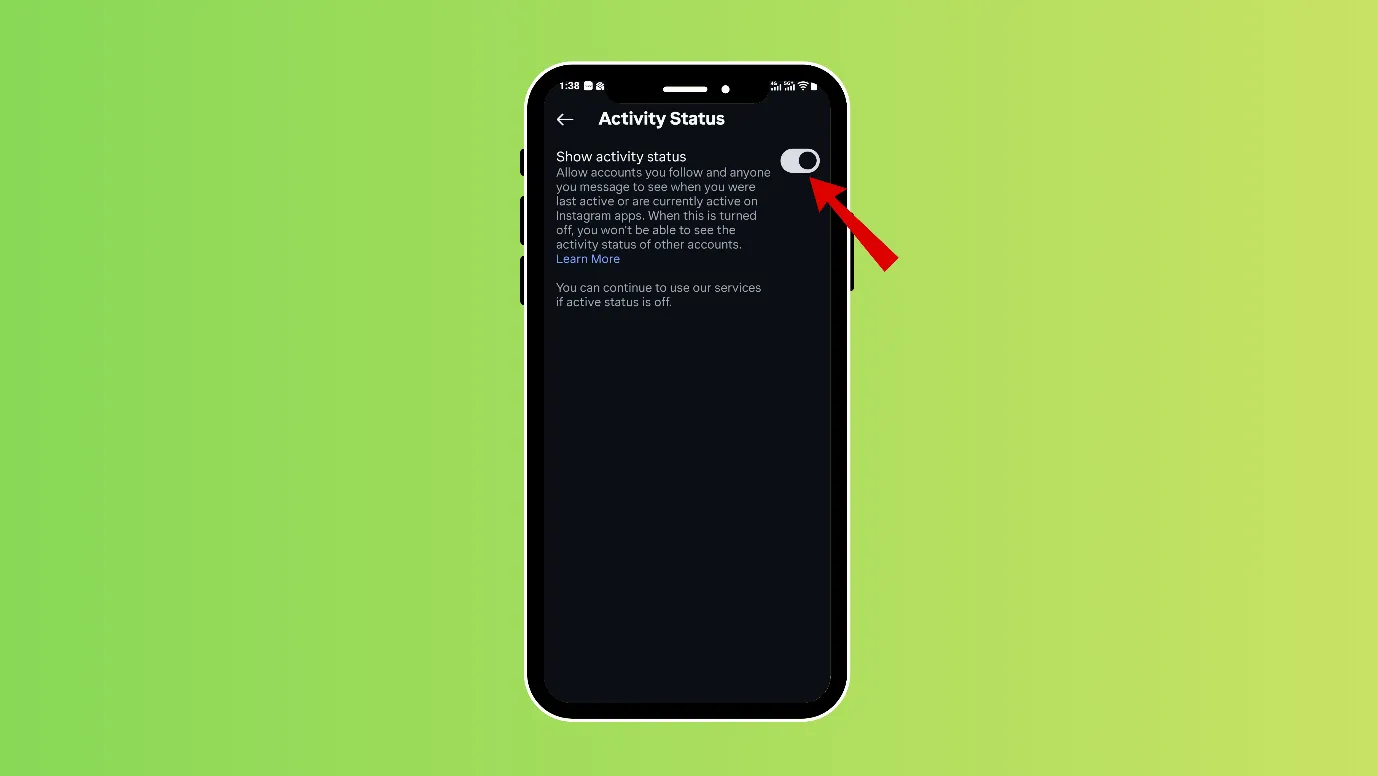
You can also go one step ahead and turn off read receipts.
Outcome · RecommendedGet 30 days of social content from your website — in 10 minutes.
Things to remember when you turn off active status.
While you can see that many people turn off their activity status, there are many who do not turn it off.
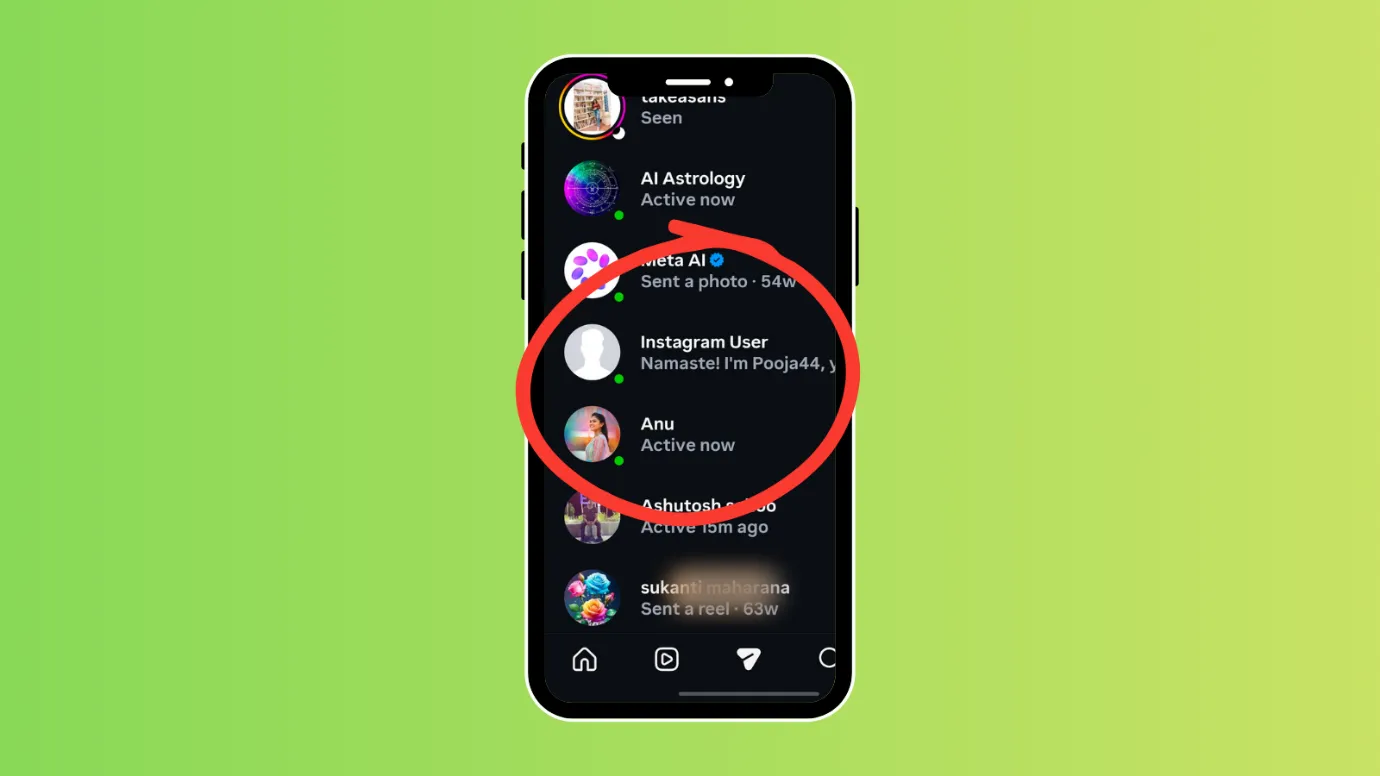
When your Activity Status is turned on on Instagram
- A green dot next to your profile picture when you are online, or
- A “last active” time showing when you were last using Instagram.
When your Activity status is turned off on Instagram.
- Other people will not be able to see when you are online or last active.
- You also will not be able to see their online status or last active time.
Instagram makes it fair. If you hide your online status, you can’t see others’ online status either. Fair enough, right?
But if you want to know others’ online status, even keeping your online status private, then you can quickly turn your activity status on just for 5 minutes, observe others, and turn the activity status off.
Remember that it does not take more than 1 minute to make your green dot disappear, i.e., turn off your active status.
Proof · Verified
2k+ grew faster with one tool.
Let us ensure that you are always offline on Instagram.
If you want to stay more reserved on Instagram, then you can do some other game-changing settings too.
Turn off read receipts
If someone messages you, and you read their messages, then the status shows as “seen”.
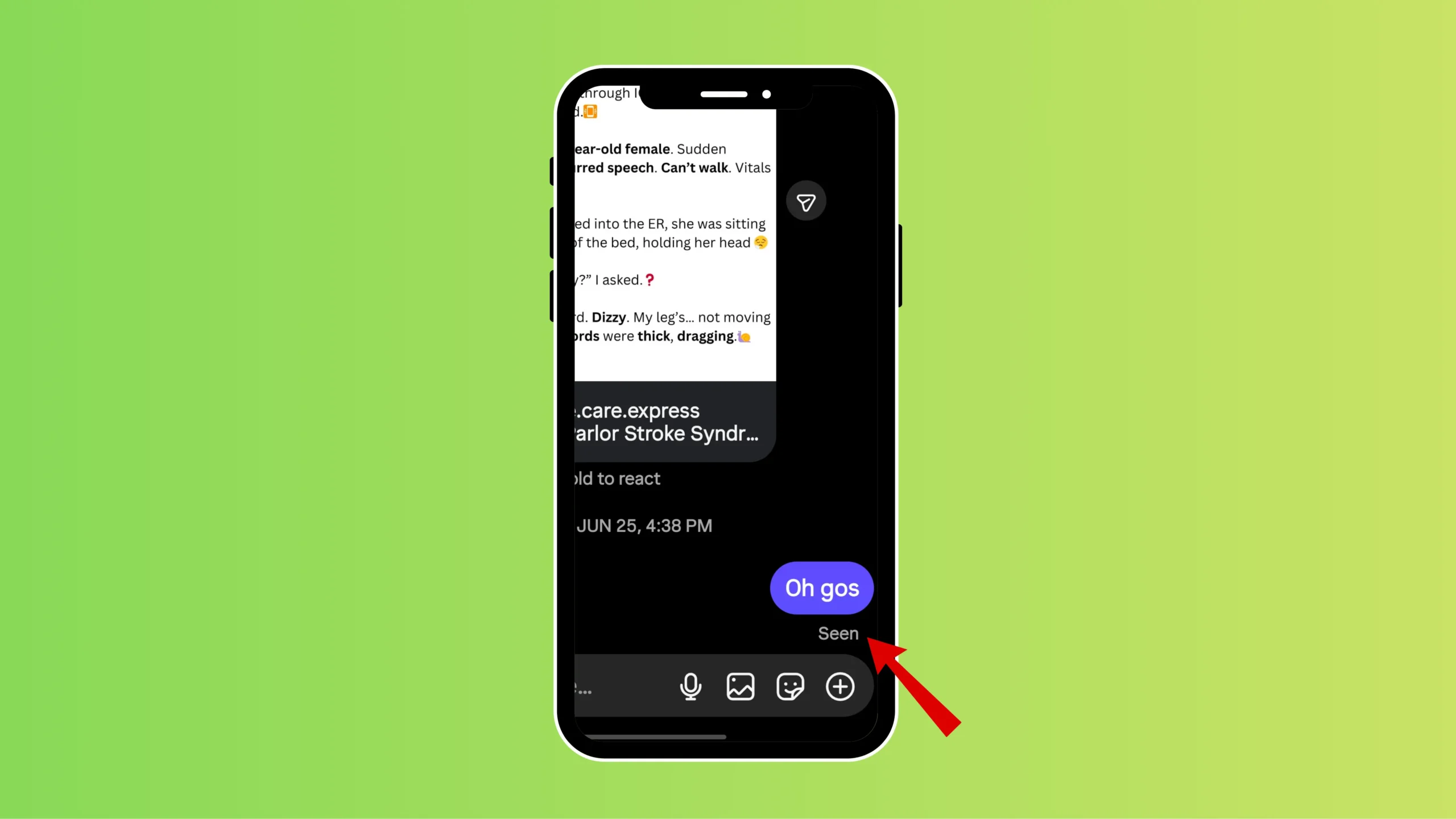
An awkward situation can occur if you have seen someone’s messages on Instagram and not replied; the other person might feel ignored.
In order to avoid this, you can turn off the read receipt status. Now no one will know whether you saw their messages or not.
1. Open your Instagram and click on your profile picture at the bottom right.
2. Now, click on the three vertical bars in the rightmost upper corner (hamburger icon)
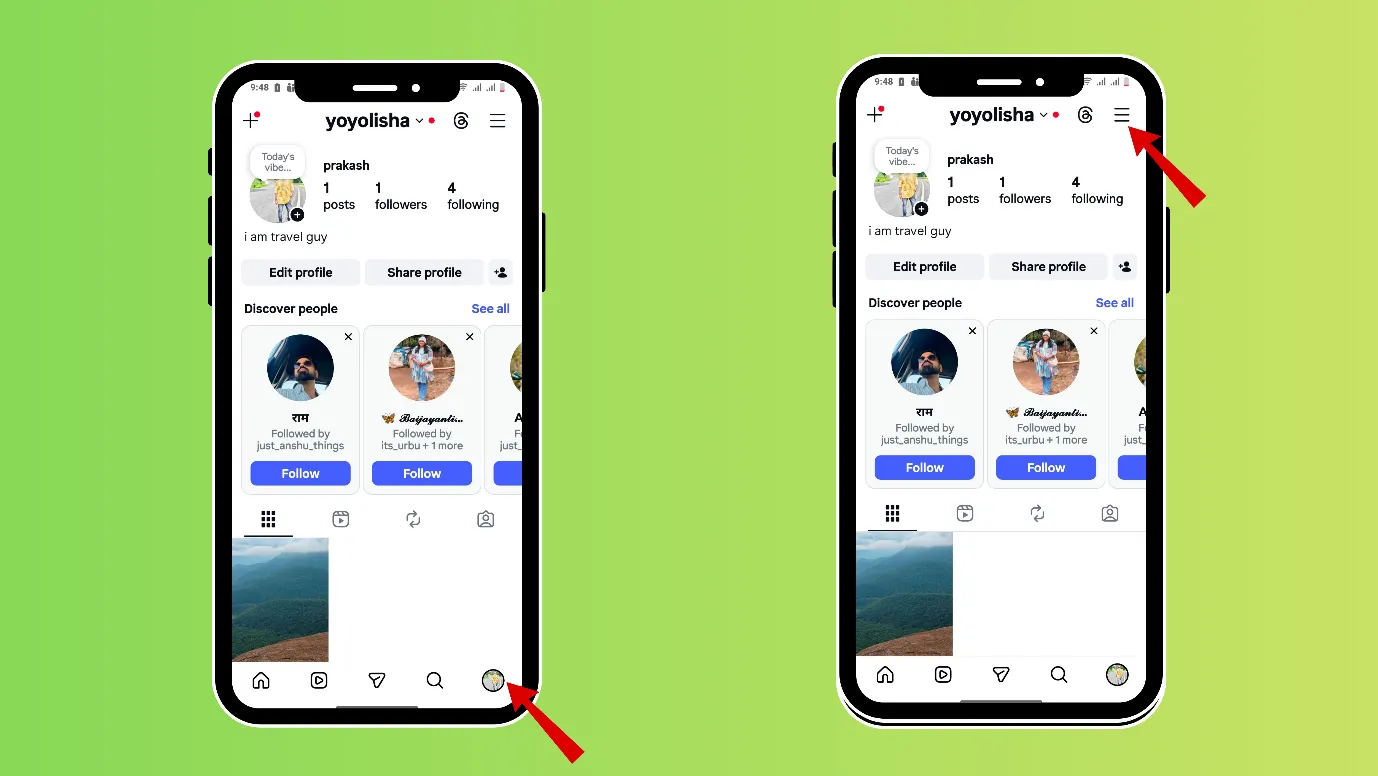
3. Scroll down and reach “How others can interact with you” and tap on “Messages and Story replies.”
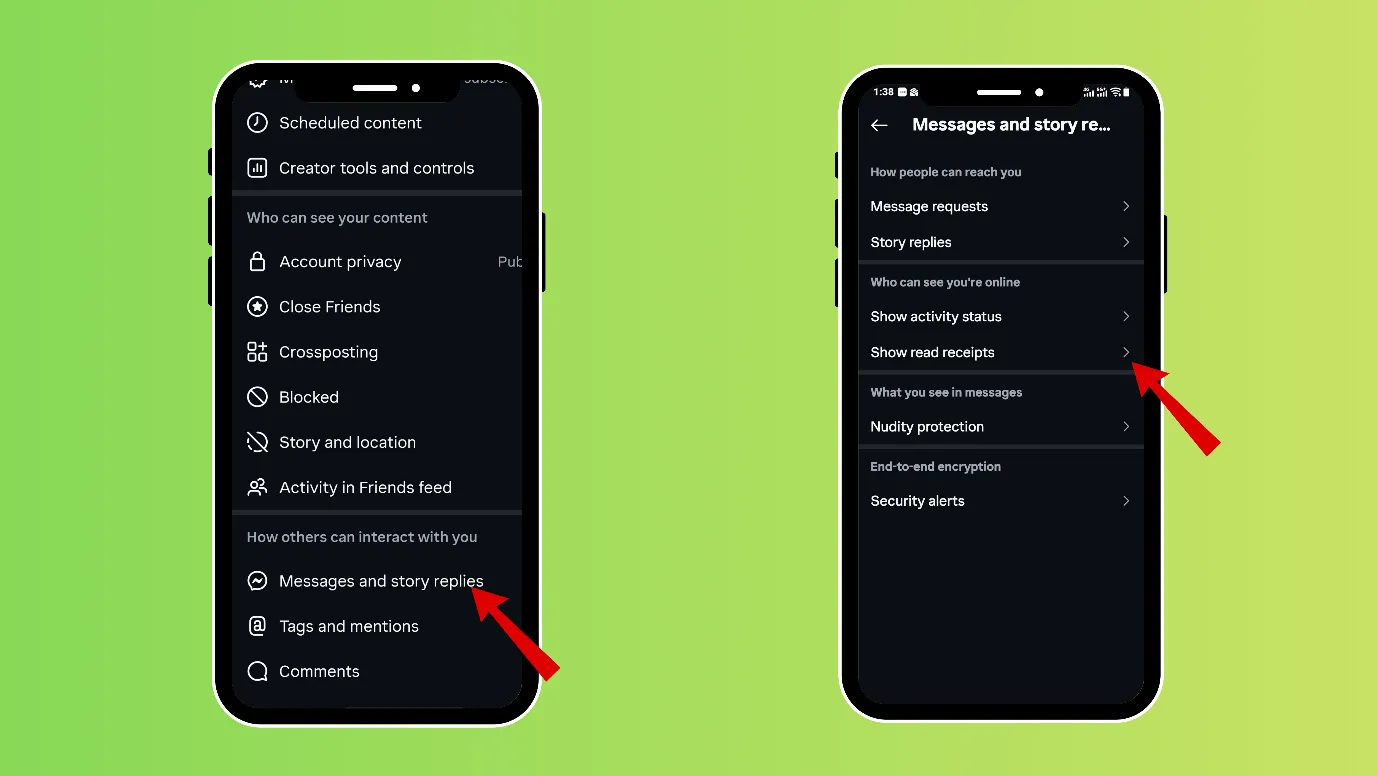
4. Next, tap on “show read receipts,” and you can turn it off.
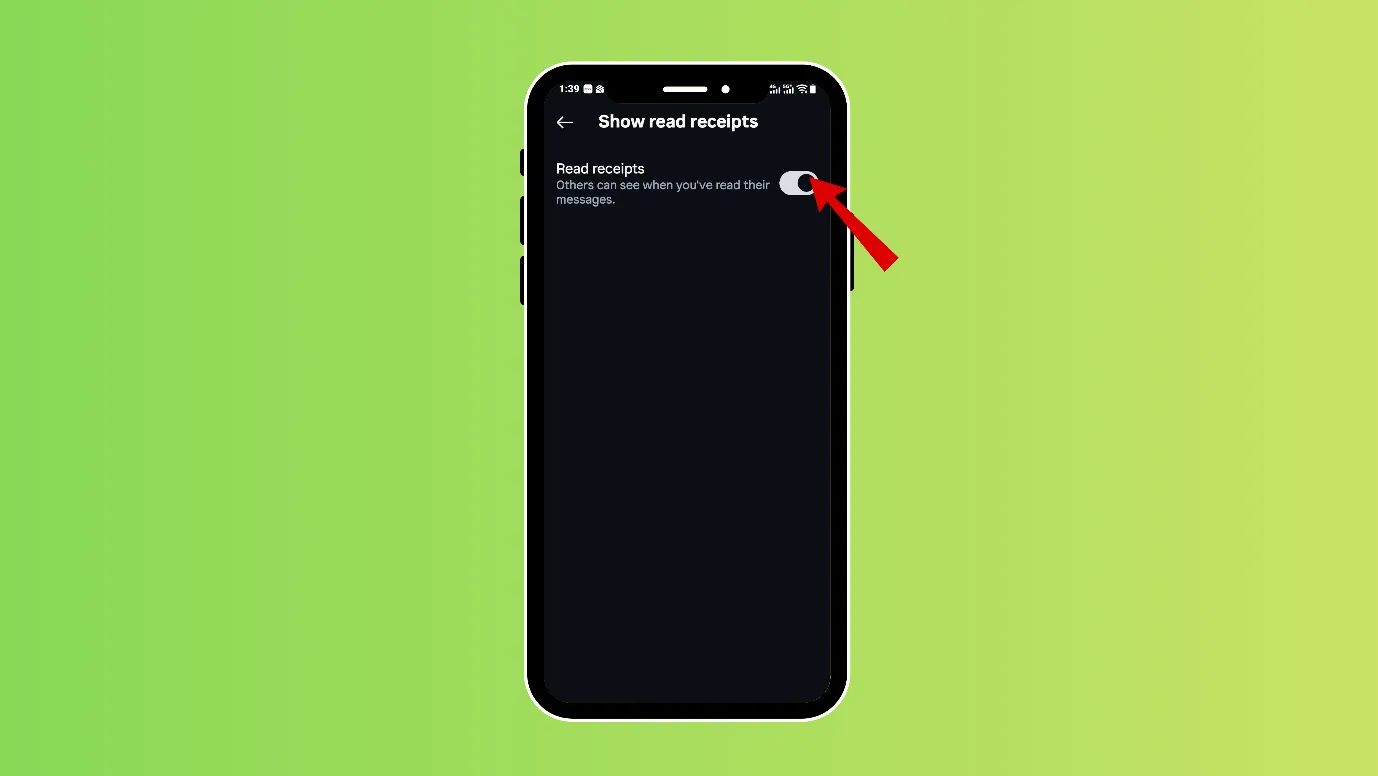
Note- You can turn off read receipts for an individual user, too.
Remember, you cannot turn off read receipts from your pc; you should use your phone.
Share posts or stories with close friends only
If you do not want a particular person or group to know that you are active on Instagram, then you can choose your close friends on Instagram and post or put stories only for them.
Here are the steps to make a close friend list
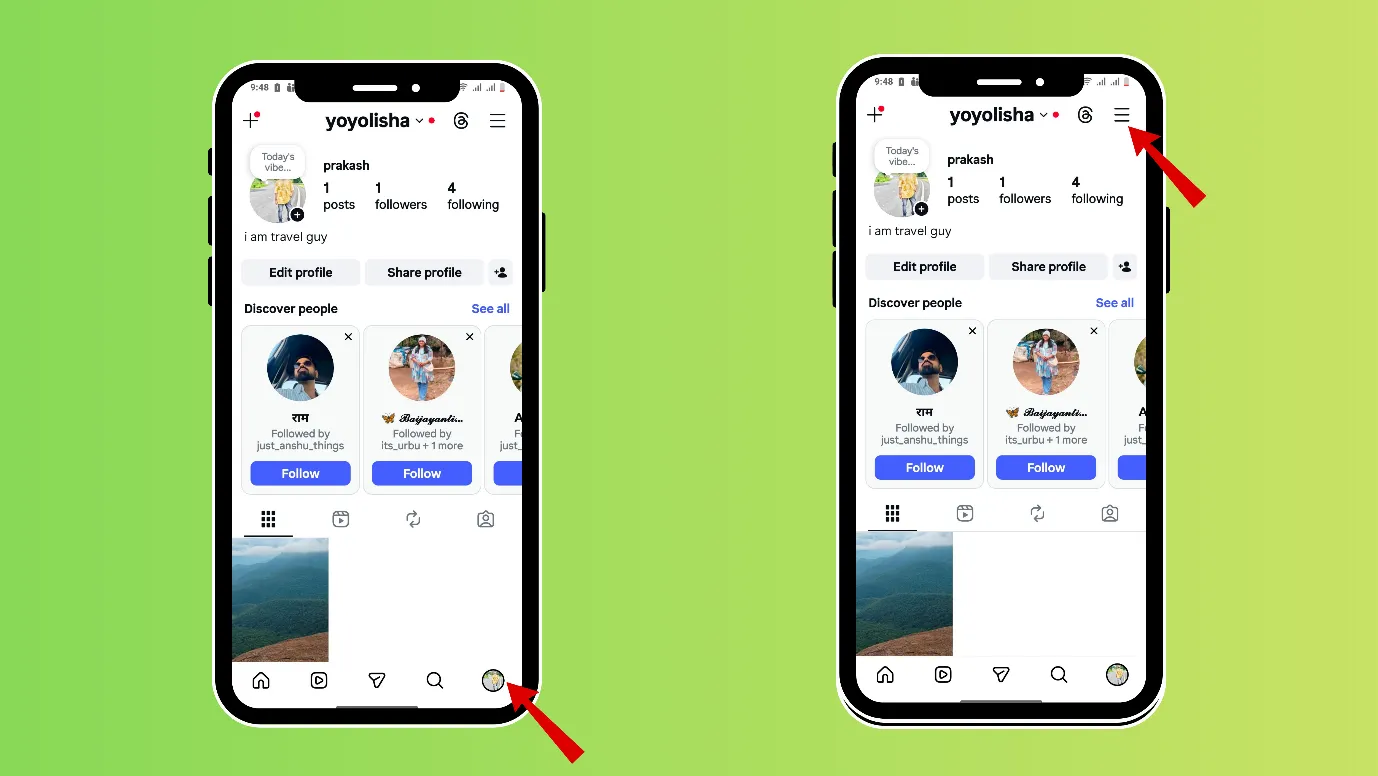
1. Open your Instagram and click on your profile picture at the bottom right.
2. Now, click on the three vertical bars in the rightmost upper corner (hamburger icon)
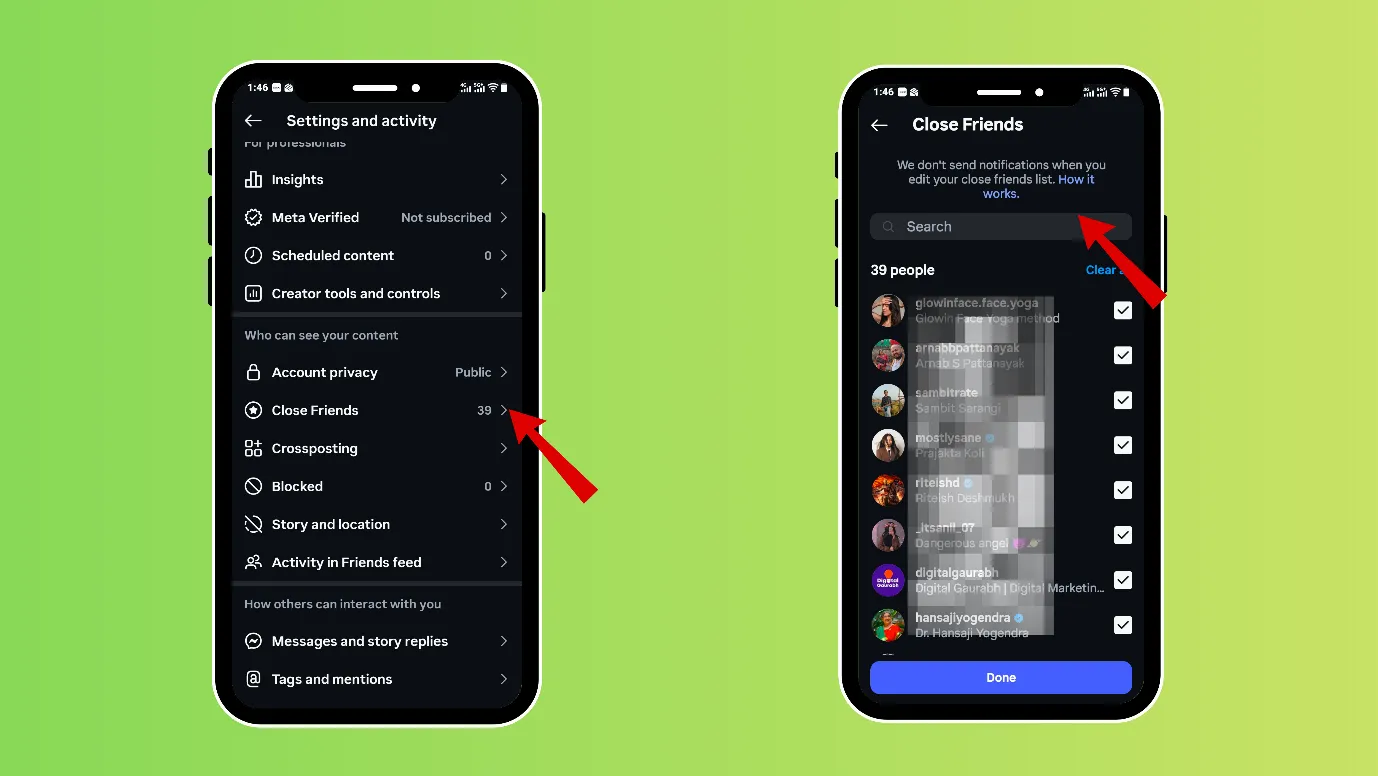
3. Scroll down and reach “ who can see your content” and tap on “close friends”. Here you can search for usernames and make a list.
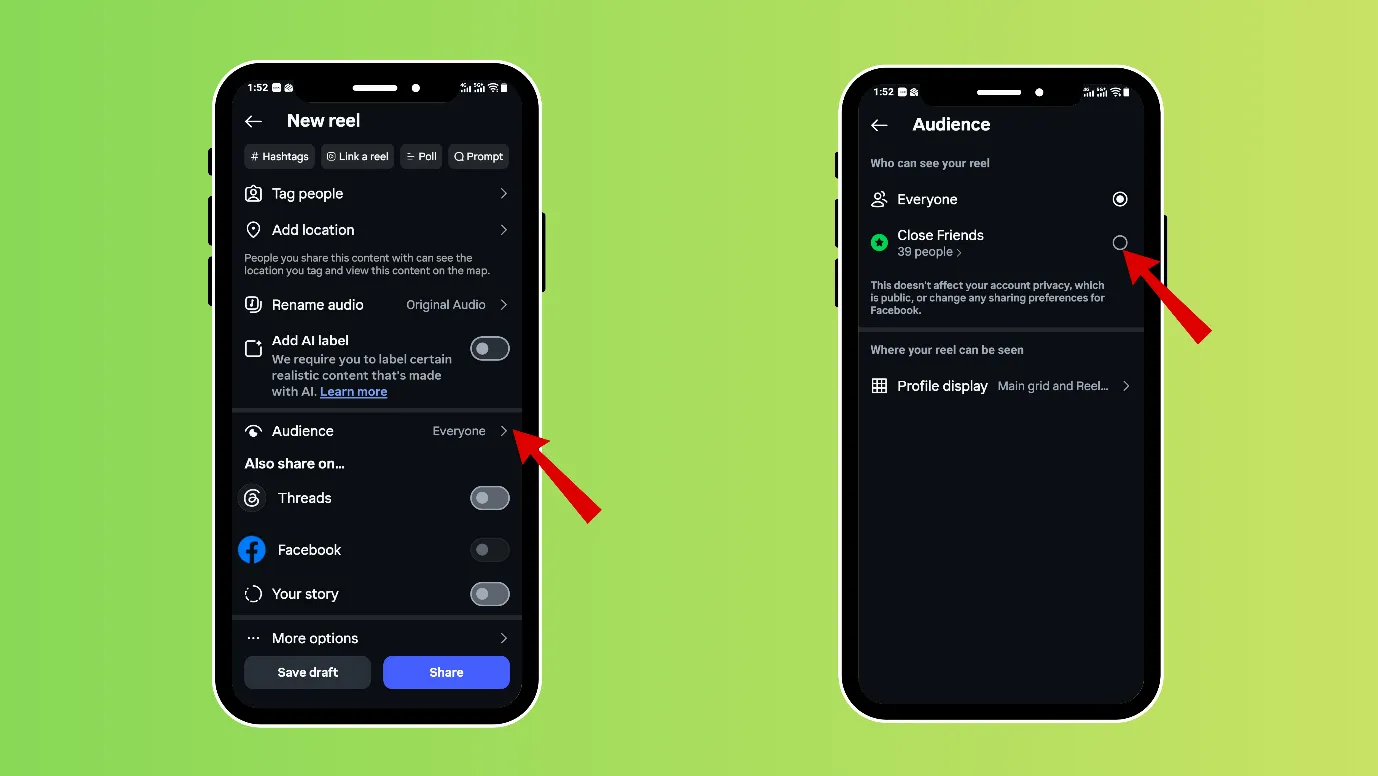
While posting anything, you can post it for close friends.
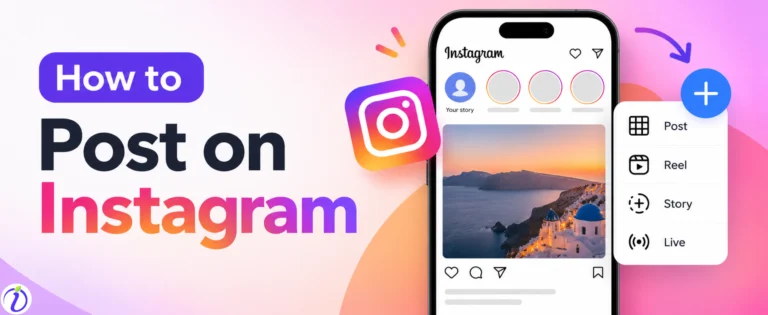
- While uploading a post, click on the + icon in the upper left-hand corner. Select “Post” or “Reel”.
- Select the desired content from your gallery or shoot it from your camera.
- Choose next and select the “audience,” and then tap on “close friends.”
Hide your likes on Instagram.
Do you know that your followers can see what reels or posts you like on Instagram? If you want to show that you were offline on Instagram the whole time, you can hide your likes on Instagram.
- Open Instagram, then tap your profile picture in the bottom-right corner.
- Click on the 3 vertical lines on the right-hand upper corner.
- Scroll down and tap on “Likes you’ve made”.
- Select your preferred setting for who can see what you like. “
“Allow everyone to see likes.”, Allow people you follow to see likes “ Allow close friends to see likes” Don’t allow anyone to see likes.”
Free · Instant · No signupSee what ZuAI generates from your website — right now.
Paste your URL. Watch ZuAI write a month of brand-on captions in seconds. Preview before you create an account.
Why do we need to turn off active status on Instagram?
Although Instagram is a public platform, but that does not mean that anyone should know everything about you.
Here are some reasons to turn off your active status on Instagram.
Your schedule should be private to yourself.
If you are a public figure or have a large following on Instagram, it is possible that someone in your follower list is constantly observing you and studying your Instagram online time.
You should turn off your active status to avoid any complications and stay private about your schedule.
Avoid unwanted conversations
Some people text you randomly when they see you are active. And in many cases, they expect a reply instantly.
You can avoid any such awkward moment by being private about your online time on Instagram.
There is no pressure on you to open or close Instagram.
When there is no one watching your green dot, there is no pressure on you to close Instagram quickly. You can relax and enjoy your time on Instagram.
This step is also useful for remote workers or freelancers, who are bombarded with work-related questions while they open Instagram.
Speed · 10-minute setupOne coffee from URL to a full month of scheduled posts.
Drop your URL, brew your coffee, come back to 30 brand-on captions ready to publish.
If we sum up
Instagram provides several privacy settings that help users stay public while maintaining a level of privacy. Just like how to turn off active status on Instagram, we have blogs on thousand of such settings, which can make your Instagram life smooth.
Did you know that you can be a public account and still turn off your likes and comments on Instagram? Check it here.
You can also try our Instagram post generator for free.
Blank tab. Six open browsers. No clue what to post.


 After · With Indzu
Paste one URL. Get 30 scheduled posts.
FAQ
Q1. What is Instagram ghost mode?
Ans. Instagram ghost mode refers to a mode in which you can
- Read someone’s message, and the other person won’t know.
- Your active status is never visible.
- No one can see your visibility on Instagram.
Officially, there is no such mode on Instagram. But Instagram users casually refer to being too private on Instagram as being in ghost mode on Instagram.
Q2. What does the green dot mean on Instagram?
Ans. Green dot signifies being active on Instagram. If a green dot appears near anyone’s profile, that means they are active on Instagram.
Q3. How do I remove active status?
Ans. You can easily turn off active status on Instagram.
- Open your Instagram and click on your profile picture at the bottom right.
- Now, click on the three vertical bars in the rightmost upper corner (hamburger icon)
- Scroll down and reach “How others can interact with you” and tap on “Messages and Story replies.”
- Next, tap on “who can see you are online”, and choose “show activity status and turn it off.
Q4. How do I appear offline on Instagram?
Ans. You cannot appear offline, but you can stop appearing online on Instagram. You can do this by turning off active status on Instagram.
- Open your Instagram and click on your profile picture at the bottom right.
- Now, click on the three vertical bars in the rightmost upper corner (hamburger icon)
- Scroll down and reach “How others can interact with you” and tap on “Messages and Story replies.”
- Next, tap on “who can see you are online”, and choose “show activity status and turn it off.
Q5. How do I turn off my green dot on Instagram?
Ans. You can turn off activity status on Instagram, and within seconds, your green dot will disappear.